Introduction
Most Azure FinOps implementations don't fail because the tools are hard to configure. They fail because the organizational scaffolding was never built.
According to Flexera's 2025 research, 84% of organizations cite managing cloud spend as their top cloud challenge—yet the majority already have access to Azure Cost Management. The tools exist. What's missing is the cross-functional coordination.
A real FinOps implementation requires finance, engineering, and operations to share ownership of cloud costs. Without that alignment, the symptoms are predictable:
- Cost overruns with no clear owner
- Over-provisioned infrastructure draining budgets silently
- Dashboards full of data nobody acts on
This guide covers the complete implementation of the Azure FinOps Framework—from organizational prerequisites through the Inform-Optimize-Operate lifecycle—following the FinOps Foundation's standards and Microsoft's own guidance.
Key Takeaways
- Azure FinOps is a cross-functional discipline—finance, engineering, and operations each need defined roles before implementation begins
- The FinOps lifecycle runs in three iterative phases: Inform (visibility), Optimize (waste reduction), Operate (governance and sustained improvement)
- Azure Cost Management, Azure Advisor, and Azure Policy are the core native tools—each with real coverage gaps, especially around storage
- Missing resource tags, undetected over-provisioned infrastructure, and treating FinOps as a one-time project are the top failure points
- Success is measurable: track cost reduction percentage, forecast accuracy, utilization rates, and time-to-detect anomalies
What You Need Before Implementing Azure FinOps
Skipping prerequisites is the most common reason implementations stall within the first 90 days. Teams deploy tools, generate reports, and then discover they have no one assigned to act on the data.
Cross-Functional Team Structure
Before any tool configuration begins, define your team. The FinOps Foundation identifies key personas across every FinOps practice:
- FinOps practitioner — bridges engineering, finance, and business decisions
- Finance representative — owns budget thresholds and cost allocation reporting
- Engineering lead — responsible for right-sizing decisions and architecture choices
- Operations manager — governs ongoing compliance and resource lifecycle
- Executive sponsor — resolves cross-team conflicts and keeps FinOps funded
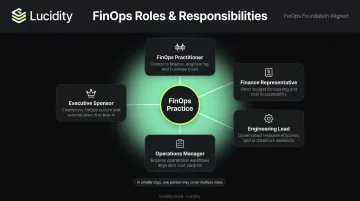
In smaller organizations, one person may cover multiple roles. What matters is that all perspectives are represented.
Also document the decision layer: who approves optimization actions, who sets budget thresholds, and who is accountable when a cost anomaly appears in a specific service or business unit.
Azure Environment Readiness
Get permissions right before you build anything else:
- Cost Management Reader — minimum for visibility; allows viewing cost analysis, forecasts, and budgets
- Cost Management Contributor — minimum for managing budgets and exports
- Contributor/Owner — required where teams need to act on Advisor recommendations
Establish a resource hierarchy using management groups, subscriptions, and resource groups that reflects your actual organizational structure: by department, product line, or cost center. That hierarchy sets the ceiling on how granular your cost allocation can get.
Note for EA customers: Enterprise Agreement billing scopes (Billing Account, Department, Enrollment Account) unlock additional APIs and billing data. Management groups are not currently supported in Cost Management for MCA subscriptions.
Resource Tagging Strategy
With your hierarchy in place, tagging is the next layer to lock down — and it needs to happen before go-live. Without consistent tags, cost data can't be attributed to teams or projects, and accountability breaks down entirely.
Microsoft's Cloud Adoption Framework tagging guidance recommends tags across five categories: functional, classification, accounting, purpose, and ownership. At minimum, define these tags before going live:
| Tag | Purpose |
|---|---|
environment |
Prod, dev, test, staging |
cost-center |
Finance reporting unit |
owner |
Team or individual accountable |
project |
Workload or initiative name |
business-unit |
Department or division |
Use Azure Policy with the modify effect to enforce tag inheritance — new resources get required tags automatically, and remediation tasks retroactively tag existing non-compliant resources.
How to Implement the Azure FinOps Framework: Step by Step
The FinOps Foundation's lifecycle runs in three phases: Inform → Optimize → Operate. This is iterative, not sequential. Teams cycle through it continuously, with each pass building on the last.
Phase 1: Inform — Establish Cost Visibility and Accountability
Azure Cost Management (ACM) is your central source of consumption data. Configure it to give every stakeholder visibility into their portion of spend:
- Set up cost analysis views filtered by resource group, subscription, and tag — ACM's smart views (Resources, Services, Subscriptions) surface top cost contributors immediately
- Enable forecasting — ACM uses a time-series regression model to project spend up to 12 months ahead; use this to catch trajectory problems early
- Configure budgets and alerts for each cost entity (department, project, cost center) — budgets can reset monthly, quarterly, or annually and support both actual and forecasted cost thresholds
- Establish a cost baseline — document spend by resource type, service, and business unit now, so future optimization has a reference point
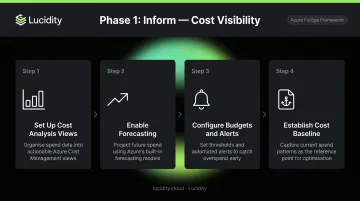
Budget notifications can reach up to five email recipients, Azure App notifications, or Azure Action Groups for automated responses like webhooks or Azure Functions.
On anomaly detection: ACM runs it 36 hours after day-end, using 60 days of historical data. Make sure it's enabled — catching a spend spike a day late is far better than discovering it at month-end.
Phase 2: Optimize — Reduce Waste and Right-Size Resources
With visibility established, the focus shifts to action. Work through these optimization levers in order of typical impact:
Compute optimization:
- Right-size over-provisioned VMs using Azure Advisor recommendations (flags VMs at ≤5% CPU utilization over 7 days)
- Eliminate orphaned and idle resources
- Schedule auto-shutdown for non-production environments
- Evaluate commitment-based discounts: Reserved Instances save 36–72% over pay-as-you-go for predictable workloads; Azure Savings Plans deliver 11–65% savings for flexible workloads
- Use Spot VMs for fault-tolerant workloads — discounts up to 90% vs. on-demand for batch processing and dev/test environments
Storage optimization — the frequently missed category:
Compute gets the most attention, but storage waste is where costs quietly compound. When a VM is deleted, its attached disks are not deleted by default, so billing continues.
Azure Advisor identifies some unattached disks and snapshot optimization opportunities, but its cost recommendations are primarily compute-focused.
The four idle disk categories that generate the most recoverable waste are:
- Unattached — disks with no VM association
- Reserved — allocated but inactive volumes
- Unmounted — attached to a VM but not mounted to the OS
- Zero-I/O — attached and mounted but receiving no read/write activity
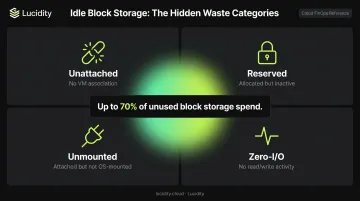
These four categories can represent up to 70% of unused block storage spend, and they don't surface in native Azure dashboards. Lucidity's Lumen identifies all four types across Azure environments, exposing waste that standard Advisor recommendations miss. Lucidity's AutoScaler then continuously expands and shrinks volumes in real time — no downtime, no code changes — improving average disk utilization from roughly 30% to 75%.
Phase 3: Operate — Sustain, Govern, and Continuously Improve
Governance with Azure Policy:
Azure Policy enforces cost-related rules at scale, preventing cost drift as new workloads are provisioned:
- Required tagging on all new resources
- Allowed locations to restrict deployments to cost-optimized regions
- Disallowed resource types to prevent expensive SKUs from being provisioned without approval
Assign policies at the root management group scope so enforcement inherits down to all subscriptions automatically.
Review cadence:
| Frequency | Activity |
|---|---|
| Weekly | Anomaly review and Advisor recommendation triage |
| Monthly | Cost allocation reporting by business unit |
| Quarterly | Maturity assessment using FinOps Foundation's Crawl-Walk-Run model |
Use Microsoft's FinOps Review assessment tool (35 questions based on the FinOps Foundation framework) to identify capability gaps and prioritize next actions.
Azure Native Tools for FinOps Implementation
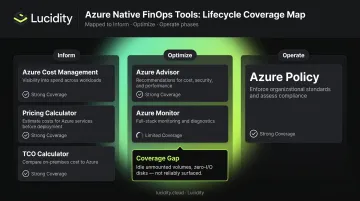
| Tool | Primary Use | Phase |
|---|---|---|
| Azure Cost Management | Cost visibility, budgets, forecasting, anomaly detection | Inform |
| Azure Advisor | Compute right-sizing, reserved capacity recommendations, some storage | Optimize |
| Azure Policy | Tag enforcement, resource type restrictions, regional limits | Operate |
| Azure Monitor | Performance-cost correlation via utilization metrics | Optimize |
| Azure Pricing Calculator | Pre-deployment cost estimation | Inform |
| Azure TCO Calculator | Migration cost comparison | Inform |
ACM integrates with Power BI via a native connector for business analyst reporting (direct support for MCA and EA customers). For organizations building internal financial systems, the REST API (POST .../providers/Microsoft.CostManagement/query) exposes consumption data programmatically.
These integrations cover reporting and cost visibility well. Where native tooling falls short is storage optimization depth: Azure Advisor's coverage is limited to unattached disks and snapshot tier optimization. Idle unmounted volumes, zero-I/O disks, and over-provisioned block storage tiers fall outside what Advisor reliably surfaces. Organizations relying solely on native tools will miss a meaningful portion of recoverable storage waste — gaps that third-party platforms like Lucidity's Lumen are specifically built to close.
Common Azure FinOps Implementation Challenges and How to Fix Them
Challenge 1: Cost Data Is Ungranular and Unactionable
Problem: Teams can see total Azure spend but can't attribute costs to specific teams, applications, or projects.
Root cause: Missing or inconsistent resource tags, no billing scope hierarchy, resource groups that don't align with org structure.
Fix:
- Retroactively apply tags using Azure Policy remediation tasks (handles up to 50,000 non-compliant resources per task)
- Restructure subscriptions to align with cost centers
- Enforce tag inheritance on all new resources going forward
The FinOps Foundation's maturity model sets a useful benchmark: Crawl-stage organizations should allocate at least 70% of costs to known owners. Run-stage organizations exceed 90%.
Challenge 2: Nobody Acts on Optimization Recommendations
Problem: Azure Advisor surfaces recommendations that go unreviewed for weeks—generating no savings despite visible waste.
Root cause: No ownership assigned to optimization actions, no review SLA, no integration with engineering workflows.
Fix:
- Assign recommendation ownership by resource group or team
- Set a weekly or bi-weekly review cadence
- Use Advisor's Quick Fix for high-confidence recommendations to act on them without manual ticket triage
- Where possible, automate remediation using Azure Automation or Logic Apps
Challenge 3: FinOps Is Treated as a Finance-Only Initiative
Problem: Engineering teams aren't engaged, so over-provisioning habits continue and cost-conscious architecture stays an afterthought.
Root cause: FinOps launched by finance without engineering buy-in; no shared metric both teams care about.
Fix:
- Introduce unit economics as a shared KPI both engineering and finance track — cost per deployment, cost per API call, or cost per active user
- Make cost impact a standing agenda item in architecture reviews
- Add spend visibility to sprint retrospectives so engineers see the downstream effect of provisioning decisions
These three challenges share a common thread: cost accountability breaks down when ownership, tooling, and cross-team alignment aren't built in from the start. Fixing them systematically is what separates FinOps programs that plateau from those that reach Run-stage maturity.
Pro Tips for a Successful Azure FinOps Implementation
Use the Crawl-Walk-Run model to set realistic milestones. The FinOps Foundation's maturity model defines three stages deliberately—Crawl organizations start with basic reporting and 70% cost allocation; Walk organizations add automation and achieve forecast variance under 10%; Run organizations have FinOps embedded across all teams with 90%+ cost allocation. Don't target Run-stage maturity in month one. Focus the first 90 days on visibility and tag coverage.
Embed FinOps into DevOps pipelines. Cost should be evaluated at the point of resource creation, not after the monthly bill arrives. Tools like Infracost integrate directly into CI/CD workflows and surface the cost impact of infrastructure-as-code changes before they're deployed. Pair this approach with cost-conscious IaC templates that enforce guardrails on VM SKUs and region selection from the start.
Automate wherever possible—especially for storage. Manual cost reviews don't scale as environments grow. Native Azure automation handles budget alerts and Policy enforcement well, but coverage gaps remain for certain resource categories. For Azure block storage specifically, platforms like Lucidity continuously right-size volumes without engineering intervention or downtime—a gap that native tools leave largely unaddressed.
Document every governance decision with stakeholder sign-off. Every budget threshold, tagging policy, and optimization action should be recorded and approved in writing. FinOps practices need to survive team turnover and organizational restructuring—informal agreements don't.
Applied consistently, these four practices move FinOps from a reporting exercise into an operational discipline embedded in how your team builds and runs infrastructure.
Frequently Asked Questions
What is the Azure FinOps Framework and who is it for?
The Azure FinOps Framework adapts the FinOps Foundation's open-source framework for Microsoft Cloud environments. It's intended for any organization using Azure that wants to align cloud spending with business value—relevant to finance, engineering, and operations teams equally.
How long does it take to implement FinOps on Azure?
A basic implementation covering visibility, tagging, and budgets can be established in 30–90 days. A mature practice with automation, governance, and continuous optimization typically develops over 6–12 months of iterative cycles through the Inform-Optimize-Operate lifecycle.
What is the difference between Azure Cost Management and the FinOps Framework?
Azure Cost Management is a native Azure tool for tracking and analyzing spend. The FinOps Framework is a broader operating model covering people, processes, and principles. ACM is one tool used within a FinOps practice—not a substitute for the organizational and governance work the framework requires.
What are the three phases of the FinOps lifecycle in Azure?
The three phases are Inform (establish cost visibility), Optimize (reduce waste and right-size resources), and Operate (sustain governance and improve continuously). Teams cycle through them repeatedly—there's no finish line.
What are the most common reasons Azure FinOps implementations fail?
Lack of cross-functional ownership, missing resource tags, treating FinOps as a one-time project, and over-reliance on native tooling that has coverage gaps—particularly for storage resource types that Azure Advisor doesn't fully surface.
How do I measure the success of an Azure FinOps implementation?
Five metrics to track:
- Total cost reduction percentage
- Budget forecast accuracy
- Resource utilization rates
- Time-to-detect cost anomalies
- Percentage of costs allocated to specific business units or projects