
Azure cloud storage costs rarely come from one obvious line item. They build up across different storage choices: Blob Storage for unstructured data, Azure Files for shared access, and Managed Disks for VM workloads. Each service has a different pricing behavior, so the real challenge is not just choosing the right storage type, but keeping it aligned with access patterns, workload growth, and performance needs.
This guide breaks down the main Azure cloud storage types, how each one shows up in the bill, the initiatives that reduce waste, and why manual or native-only optimization becomes difficult at scale.
Key Takeaways
- Azure cloud storage is not one product or one cost model. It includes storage options for object data, file shares, VM disks, queues, big data, and table-style workloads, and each one affects the bill differently.
- Blob Storage cost usually depends on access behavior. Frequently accessed data belongs in hotter tiers, while older or rarely used data can often move to Cool, Cold, or Archive tiers when retrieval needs allow.
- Azure Managed Disks need a different optimization mindset. They support VM-based workloads, so teams often overprovision capacity to protect performance, growth, and uptime.
- The most useful cost-saving initiatives are specific to the storage type. Blob data needs tiering and lifecycle policies, file shares need access and capacity reviews, and Managed Disks need utilization-based right-sizing and idle disk cleanup.
- Lucidity fits the block storage side of the problem. It helps teams find over-provisioned or idle cloud block storage and use automation to reduce waste without turning every disk decision into a manual engineering project.
What is Azure Cloud Storage?
Azure Cloud Storage is Microsoft’s managed storage portfolio for storing object data, file shares, VM disks, queues, big data workloads, and table-style structured data. For engineering teams, the useful question is not just which service to use, but how that service will be accessed, scaled, governed, and charged over time.
That matters because each storage pattern has a different optimization path. Blob data can often move between access tiers. File shares need capacity, redundancy, and access-pattern reviews. VM disks need closer attention to provisioned capacity versus actual utilization.
The storage account is the control point for many Azure Storage services
Most Azure Storage services begin with a storage account, which stores data objects such as blobs, files, queues, and tables under a unique namespace. It also centralizes decisions around access, networking, redundancy, security, and management boundaries.
But storage accounts do not make all Azure storage behave the same way. Blob Storage, Azure Files, Queue Storage, and Table Storage may sit under the storage account model, while Azure Managed Disks follow a different operational pattern because they are attached to VM workloads. A useful Azure storage strategy separates storage organization from storage optimization.
Azure storage types and how each one shows up in the bill
The fastest way to misunderstand Azure storage cost is to treat every service like “space used in the cloud.” Some services are shaped by stored capacity, while others depend on access frequency, transaction volume, redundancy, provisioned performance, or disk size.
| Azure storage type | What it stores | Common use cases | How it usually shows up in the bill |
|---|---|---|---|
| Blob Storage | Unstructured object data | Logs, backups, media files, analytics data, app content | Capacity, access tier, retrieval, transactions, redundancy |
| Azure Files | Managed file shares | Lift-and-shift file servers, shared folders, app file shares | Share size, access pattern, transactions, redundancy, performance tier |
| Azure Managed Disks | Block storage for VMs | OS disks, databases, enterprise apps, VM-based workloads | Provisioned disk size, disk type, provisioned IOPS/throughput where applicable |
| Queue Storage | Messages | Async workflows, decoupled services, background processing | Message operations and transaction volume |
| Table Storage | NoSQL key-value data | Metadata, logs, simple structured data | Stored data volume and transactions |
| Elastic SAN | Shared block storage | IO-intensive workloads that need centralized block storage | Provisioned capacity and performance pool |
| Container storage / persistent volumes | Storage for containerized workloads | Stateful AKS applications and persistent app data | Persistent volume size, disk type, workload configuration |
The practical takeaway is simple: Azure storage optimization starts by matching the initiative to the storage type. Blob data needs tiering and lifecycle rules. File shares need access and capacity reviews. Managed Disks need utilization checks, idle disk detection, and right-sizing discipline. Applying the same cost-control playbook to all three is how teams end up with a clean spreadsheet but an unchanged bill.
Azure Blob Storage tiers explained
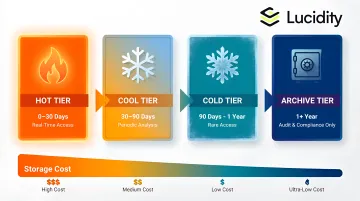
Blob Storage cost depends on how often data is accessed, how quickly it must be retrieved, and how long it needs to be retained. Azure uses four Blob access tiers to help match storage cost to usage patterns.
| Tier | Best for | Cost tradeoff |
|---|---|---|
| Hot | Frequently accessed data | Higher storage cost, lower access cost |
| Cool | Infrequently accessed data | Lower storage cost, higher access cost |
| Cold | Rarely accessed data that still needs online access | Lower storage cost, higher retrieval cost |
| Archive | Long-term retention | Lowest storage cost, delayed retrieval |
The mistake is choosing a tier only by looking at per-GB storage price. A cheaper tier can become expensive if data is retrieved often, restored urgently, or moved before the minimum retention period.
A better approach is to map storage to the data lifecycle. Recent logs, exports, or application files may need Hot storage while teams actively use them. Older data can often move to Cool or Cold. Data kept mainly for compliance or long-term retention may belong in Archive.
This is where lifecycle management helps. It can automatically move blobs between tiers or delete them based on rules, making Blob optimization more policy-driven than manual. For a deeper tier-specific view, Lucidity has a guide on Azure storage tiers.
Azure Managed Disks explained
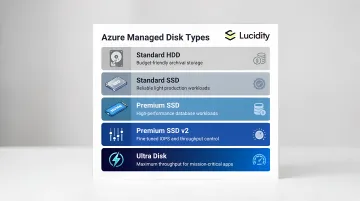
Azure Managed Disks are block-level storage volumes attached to Azure Virtual Machines. They are used for operating systems, databases, enterprise applications, analytics jobs, and other workloads that need persistent storage connected to compute.
Unlike Blob Storage, Managed Disk cost is tied closely to what the team provisions: disk type, disk size, and performance requirements.
| Disk type | Best fit | Cost and operations note |
|---|---|---|
| Standard HDD | Dev/test and low-IO workloads | Lowest-cost option, but not ideal for performance-sensitive workloads |
| Standard SSD | Light production and general workloads | Balanced option for moderate performance needs |
| Premium SSD | Production apps and databases | Higher performance, but expensive if overused |
| Premium SSD v2 | Workloads needing flexible tuning | Capacity, IOPS, and throughput can be configured more granularly |
| Ultra Disk | High-throughput, latency-sensitive workloads | Built for demanding IO workloads and needs careful cost control |
The cost issue usually starts when disks are sized for peak usage, future growth, or safety, and then never revisited. That is understandable because these disks support live workloads. If the application is stable, teams often avoid touching storage unless there is an urgent reason.
For cloud teams, the useful question is: are we paying for the disk capacity and performance the workload actually needs, or the capacity and performance we guessed it might need months ago?
At small scale, that question can be answered manually. Across hundreds or thousands of disks, it requires utilization history, workload ownership, performance context, and confidence that changes will not create downtime or application risk.
How Azure storage pricing works
Azure storage pricing changes by service, region, redundancy model, access tier, operations, and performance configuration. A pricing calculator can estimate what a setup costs, but it cannot tell you whether that setup is efficient.
| Pricing driver | Where it matters | What to watch |
|---|---|---|
| Stored capacity | Blob Storage, Azure Files, Table Storage | How much data is retained and for how long |
| Access tier | Blob Storage | Whether data belongs in Hot, Cool, Cold, or Archive |
| Transactions | Blob, Files, Queue, Table | Read, write, list, and operation volume |
| Retrieval | Cool, Cold, Archive tiers | How often older data is restored or accessed |
| Redundancy | Storage accounts | Whether replication matches the workload’s recovery needs |
| Provisioned disk size | Managed Disks | Paying for allocated disk capacity |
| Provisioned performance | Premium SSD v2, Ultra Disk | IOPS and throughput settings |
Microsoft’s Blob Storage pricing is shaped by factors such as tier, operations, retrieval, and redundancy. Managed Disk pricing follows a different model because teams pay for the disk type, provisioned capacity, and, for some disk types, configured performance.
That is where waste becomes harder to spot. If a disk is larger than the workload needs, the bill reflects the provisioned disk, not just the used portion inside the VM. So Azure storage cost optimization is not only a pricing exercise. It is an operational exercise: compare the billing model with real usage, access patterns, ownership, and workload risk.
Practical initiatives to reduce Azure storage costs
Once teams understand how each Azure storage type behaves, optimization becomes easier to prioritize. The goal is not to cut storage blindly. It is to match cost controls to the way each service is actually used.
| Cost area | What to check | Practical initiative |
|---|---|---|
| Blob Storage | Old data still in Hot tier | Move infrequently accessed data to Cool, Cold, or Archive |
| Blob lifecycle | Manual movement of old data | Use lifecycle management policies |
| Azure Files | Share size, redundancy, access pattern | Right-size shares and review performance tier |
| Managed Disks | Provisioned capacity vs actual utilization | Right-size disks based on workload behavior |
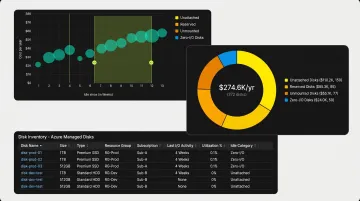
| Idle disks | Unattached, unmounted, reserved, or zero-I/O disks | Investigate, delete, or optimize |
| Performance tiers | Over-allocated IOPS or throughput | Match disk performance to real workload demand |
| Redundancy | Replication level vs recovery requirement | Align redundancy with business criticality |
- For Blob Storage, start with tiering. Older logs, backups, exports, and media files can often move to lower-cost tiers when retrieval needs allow it.
- For Azure Files, review whether the share size, redundancy, and performance tier still match the workload. Shared file systems often grow quietly because multiple teams or applications depend on them.
- For Managed Disks, compare provisioned capacity with actual utilization, growth rate, and performance needs. This is where Azure storage cost optimization becomes more operational, because disk changes need workload context.
- Idle disks should also be reviewed separately. Unattached, unmounted, reserved, or zero-I/O disks can keep adding cost even when they no longer support an active workload.
The broader principle is simple: optimize storage by category, not by spreadsheet. Blob data needs lifecycle rules. File shares need access and capacity governance. Managed Disks need utilization visibility and safe right-sizing.
Why Azure storage optimization is difficult with native and manual approaches
Azure gives teams useful metrics, pricing tools, and configuration options. The harder part is turning that visibility into safe action.
A dashboard may show capacity, transactions, or disk metrics, but it does not always answer the questions teams need before making a change: Who owns this resource? Is the workload still active? Is usage temporarily low, or has the disk been oversized for months? What happens if we resize it? That is why storage optimization often gets stuck between FinOps visibility and engineering execution.
For Blob Storage, the path is usually clearer. If access patterns are predictable, teams can use lifecycle management policies to move older data into lower-cost tiers. There is still governance work involved, but the optimization logic can be rule-based. Managed Disks are harder because they support live VM workloads. A disk that looks oversized from a cost view may still belong to a production database, legacy application, or workload with irregular growth. Without enough context, teams often leave it untouched. Manual cleanup also has a short shelf life. A quarterly audit can remove unused resources today, but it will not stop new disks from being over-provisioned next month.
The practical lesson: native tools can show a lot, but optimization still depends on interpretation, ownership, and safe execution. That gap is where storage waste keeps returning, especially in block storage environments where teams would rather overpay than risk downtime.
Where Lucidity fits in Azure storage optimization
Lucidity is not a replacement for Azure, and not a tool for every cloud cost category, but a platform for cloud block storage optimization across AWS, Azure, and Google Cloud.
For Azure environments, the biggest fit is Managed Disks. Teams may know some disks are oversized or idle, but acting on that information still requires utilization history, ownership context, and confidence that changes will not affect workloads.
Lucidity helps make that process more systematic. A Lucidity Assessment can surface where block storage is over-provisioned, idle, or underutilized. Lucidity Lumen helps identify waste patterns, including unattached, reserved, unmounted, and zero-I/O disks. Lucidity AutoScaler supports ongoing right-sizing by expanding and shrinking cloud block storage based on workload needs.
The clean way to think about it: Azure gives teams the storage services. Lucidity helps teams keep the block storage layer from becoming oversized, idle, or manually managed forever.
Find the block storage waste hiding in your Azure bill.
Run a free Lucidity Assessment to see which disks are over-provisioned, idle, or ready to optimize.
FAQs about Azure Cloud Storage
What is Azure cloud storage?
Azure cloud storage is Microsoft’s managed storage portfolio for storing object data, file shares, VM disks, queues, tables, and related workload data in Azure. It gives teams different storage services for different application, analytics, backup, and infrastructure needs.
What are the main types of Azure Storage?
The main Azure storage options include Blob Storage, Azure Files, Queue Storage, Table Storage, Managed Disks, Elastic SAN, and container-related storage for AKS workloads. Each service has a different use case and pricing behavior.
What is the difference between Azure Blob Storage and Azure Disk Storage?
Azure Blob Storage is object storage for unstructured data such as logs, backups, images, and analytics files. Azure Disk Storage provides block storage attached to Azure VMs, which makes it more suitable for operating systems, databases, and VM-based applications.
How do Azure Blob Storage tiers work?
Azure Blob Storage tiers let teams match cost to access frequency. Hot is for frequently accessed data, Cool and Cold are for less frequently accessed data, and Archive is for long-term retention where delayed retrieval is acceptable.
Why do Azure Managed Disks become over-provisioned?
Managed Disks are often sized for peak demand, future growth, or performance safety. Once attached to production workloads, teams may avoid resizing them unless they have enough utilization history and confidence that the change will not affect uptime or performance.
How can teams reduce Azure storage costs?
Teams can reduce Azure storage costs by moving Blob data to the right access tier, using lifecycle policies, reviewing redundancy, cleaning up obsolete resources, identifying idle disks, and right-sizing Managed Disks based on actual utilization.
Conclusion
Azure cloud storage is not just a set of services. It is a set of cost and operations decisions that keep changing as workloads grow.
Blob Storage can often be optimized through access tiers and lifecycle policies. Azure Files needs regular review around capacity, access patterns, redundancy, and performance needs. Managed Disks need a different level of attention because teams pay for provisioned block storage, even when actual utilization is much lower.
That is where Azure storage optimization becomes harder than basic cost review. Native tools can show metrics, but teams still need to understand ownership, workload behavior, performance risk, and whether a resource can be safely changed.
The best approach is to optimize by storage type: tier Blob data, govern file shares, clean up idle resources, and continuously right-size Managed Disks based on real usage.
Find the block storage waste hiding in your Azure bill. Run a free Lucidity Assessment to see which disks are over-provisioned, idle, or ready to optimize.