Azure cloud cost optimization usually fails when teams treat the bill like a finance problem after the damage is done. By then, the real decisions have already been made: a VM was sized for peak demand, a dev environment was left running, a disk was provisioned with extra headroom, or a commitment was purchased before the workload was rightsized.
The challenge is not that Azure is expensive by default. It is that Azure costs grow through reasonable engineering choices that stop being reviewed. This guide breaks down where Azure cloud costs usually come from, which optimization principles actually reduce waste, and why sustainable savings depend on visibility, ownership, and automation, not one-time cleanup.
Key Takeaways
- Azure cloud cost optimization starts with cost origin, not cost cutting. Teams need to understand whether spend is coming from compute, storage, networking, commitments, licensing, governance gaps, or architecture choices.
- Rightsizing should come before commitments. Azure Reservations and Azure Savings Plans can reduce costs, but they work best after teams understand the workload baseline.
- Compute waste is often visible, but storage waste is easier to miss. Oversized VMs, idle non-production resources, and overprovisioned Managed Disks can all inflate spend in different ways.
- Native tools help, but they do not remove operational judgment. Azure Cost Management, budgets, Advisor, Monitor, and Policy can surface signals, but teams still need ownership, context, and safe execution.
- Lucidity fits the block storage side of Azure cost optimization. Lucidity helps teams identify idle, overprovisioned, and underutilized cloud block storage, while AutoScaler, Lumen, and Assessment support continuous block storage visibility and optimization.
Where Azure cloud costs usually come from
Azure cost optimization gets easier when teams stop looking at the bill as one large number and start reading it as a map of engineering decisions.
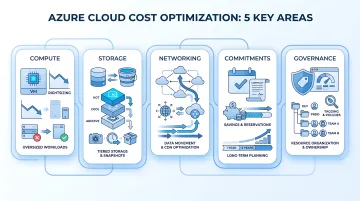
Most Azure spend usually comes from a few familiar areas: compute, storage, networking, commitments, and governance gaps. Each one needs a different cost-control motion.
| Cost area | What usually drives spend | What to check first |
|---|---|---|
| Compute | VM size, uptime, AKS nodes, App Service plans | Are workloads oversized, always-on, or running at peak capacity by default? |
| Storage | Blob tiers, file shares, Managed Disks, snapshots, redundancy | Is storage matched to access patterns, usage, and workload risk? |
| Networking | Egress, cross-region transfer, gateways, CDN decisions | Is data moving more than it needs to? |
| Commitments | Reservations, Savings Plans, license benefits | Was the baseline rightsized before committing? |
| Governance | Untagged resources, abandoned environments, loose provisioning | Can spend be traced to an owner, workload, and business purpose? |
Compute is usually the most visible starting point. Oversized VMs, idle dev environments, and static capacity for variable workloads can make the bill climb quickly. Azure gives teams native options such as Azure Advisor, autoscale, and scheduled shutdowns, but the real work is deciding which recommendations are safe for the workload.
Storage is less obvious because the waste is often hidden inside capacity choices. Blob data may sit in the wrong tier. Azure Files may keep growing without ownership reviews. Azure Managed Disks may remain provisioned above actual usage because they support live VM workloads and teams do not want to risk resizing them casually.
Networking costs often appear late in the review cycle. Cross-region traffic, outbound data transfer, and inefficient content delivery patterns can quietly add cost, especially when applications move data across services, regions, or external users at scale.
Commitments can help, but only after the environment is understood. Azure Reservations, Azure Savings Plans, and Azure Hybrid Benefit can reduce spend, but they should not be used to discount an oversized baseline.
The practical takeaway: start by classifying spend by source before choosing the saving tactic. Compute may need rightsizing. Blob Storage may need lifecycle policies. Managed Disks may need utilization review. Commitments may need better timing. Governance may need tags, budgets, and policy controls. The best savings plan is rarely one big move; it is a sequence of smaller decisions applied to the right cost category.
Why Azure cloud waste builds up even in mature teams
Azure waste is rarely caused by careless teams. More often, it comes from safe engineering decisions that become expensive because no one revisits them.
Teams provision for risk, not average usage
No engineer wants to be the reason a production workload runs out of capacity. So VMs are sized with headroom, disks are provisioned for future growth, and performance tiers are chosen conservatively.
That logic makes sense during deployment. The problem starts when the workload stabilizes and the original assumptions stay untouched. A VM sized for launch traffic may keep running at a fraction of its capacity. A disk provisioned for growth may remain mostly empty. The bill keeps reflecting the original safety buffer, not the current workload.
Ownership gets blurry as environments grow
Cost optimization also breaks down when teams cannot clearly answer who owns a resource. This happens quickly in Azure environments with multiple subscriptions, resource groups, dev/test setups, migrations, and abandoned projects.
A useful cost review should ask:
- Who owns this resource?
- Which workload or customer does it support?
- Is it production, staging, dev, or temporary?
- When was it last used?
- What breaks if we change or remove it?
Without those answers, teams usually leave the resource alone. That is how stale environments, unattached disks, oversized services, and unused capacity survive multiple budget cycles.
Reviews happen after the bill, not before provisioning
The most expensive pattern is treating optimization as a finance review instead of an engineering workflow. By the time the bill arrives, the VM size, disk capacity, region, redundancy model, and uptime pattern have already been chosen.
Better optimization starts earlier: during provisioning, tagging, sizing, policy setup, and architecture review. A cost review can find waste later, but it cannot fully compensate for weak controls at the point of creation.
That is why sustainable Azure cost optimization depends on two habits: make every resource accountable when it is created, and keep checking whether the original assumptions still match reality.
Find the storage waste that survives every cost review. Run a free Lucidity Assessment to identify overprovisioned, idle, and underutilized block storage across your cloud environment.
Principle 1: Rightsize before you commit
The wrong sequence can turn a cost-saving plan into a locked-in waste problem.
Azure Reservations and Azure Savings Plans can reduce Azure spend for predictable workloads. But they work best after teams understand what the workload actually needs. If a VM is oversized, a commitment only discounts the oversized baseline.
Start with actual workload behavior
Before buying commitments, review whether the resource still matches current usage. For compute, that means looking at CPU, memory, uptime, and application performance patterns. For storage, it means checking provisioned capacity, used capacity, growth rate, and performance needs.
The question is not:
Can we get a discount on this resource?
The better question is:
Should this resource still exist in this size, tier, region, and uptime pattern?
That one shift prevents teams from optimizing the invoice while leaving the underlying waste untouched.
Then apply the right commitment model
Once the baseline is clean, commitments become more useful.
- Use Reservations for predictable, steady-state workloads where the instance family, region, and usage pattern are stable.
- Use Savings Plans when compute usage is predictable but teams need more flexibility across eligible compute services.
- Use Azure Hybrid Benefit when eligible Windows Server or SQL Server licenses can be applied to reduce licensing cost.
The principle is simple: rightsize first, commit second. Otherwise, the organization may save a percentage on a resource it should have resized, stopped, or removed.
Principle 2: Treat compute optimization as an operating habit
Compute is usually the easiest Azure cost to notice, but it is also one of the easiest to let drift. A VM that was correctly sized during launch can become oversized after traffic changes. A dev environment that was needed yesterday can keep running all week. A scale set built for peak demand can keep capacity online during quiet periods.
Shut down non-production resources when they are not needed
Dev, test, staging, and sandbox environments should rarely behave like production. If teams know these workloads are only needed during working hours, scheduled shutdown is one of the simplest savings controls.
Azure supports auto-shutdown for virtual machines, which can help reduce cost by shutting down VMs during off-hours. The important step is not only enabling shutdown. It is defining which environments are safe to stop, who can override the schedule, and how exceptions are reviewed.
Use autoscaling instead of static peak capacity
For variable workloads, static peak capacity is expensive because teams pay for readiness even when demand is low. Autoscale for Virtual Machine Scale Sets can scale instances based on metrics or schedules, helping teams align capacity with demand.
The practical rule: use performance-based scaling when demand is unpredictable, and schedule-based scaling when demand follows a known pattern, such as business hours, batch windows, or seasonal traffic.
Use Spot VMs only where interruption is acceptable
Azure Spot VMs can reduce compute cost by using spare Azure capacity, but they are not a fit for every workload. They make sense for interruptible jobs: batch processing, simulations, rendering, CI workloads, and some dev/test environments.
They should not be used where eviction would break customer-facing reliability. The saving is only useful when the workload can tolerate the tradeoff.

Principle 3: Optimize storage by type, not as one line item
Storage optimization fails when teams treat all storage waste the same. Blob data, file shares, and Managed Disks create cost in different ways, so they need different controls.
Move Blob data according to access patterns
For Azure Blob Storage, the first lever is usually tiering. Active data may belong in Hot, while older logs, backups, exports, and media files can often move to Cool, Cold, or Archive when retrieval needs allow it.
The practical move is to use lifecycle management policies, so data moves based on rules instead of manual cleanup.
Review Azure Files for capacity and access
Azure Files should be reviewed differently. The question is not only how much data is stored, but whether the share size, redundancy, access pattern, and performance tier still match the workload.
This matters because file shares often grow quietly. Multiple teams, apps, or legacy workflows may depend on them, so cleanup requires ownership context before anything is reduced or removed.
Right-size Managed Disks based on utilization
Azure Managed Disks are the most operationally sensitive storage category because they support VM workloads. Teams pay for provisioned disk capacity and performance, even when actual usage is much lower.
Before resizing, teams need to check:
- used capacity versus provisioned capacity
- growth pattern over time
- workload owner
- IOPS and throughput requirements
- production risk if the disk changes
Start with idle disks before touching live workloads
The safest storage wins often come from disks that are no longer actively supporting workloads. Unattached, unmounted, reserved, or zero-I/O disks should be investigated before teams move into more sensitive production right-sizing.
This is where storage optimization becomes more than a pricing exercise. Blob data needs lifecycle rules. Azure Files needs governance. Managed Disks need utilization visibility and safe execution.
See where Azure disk waste is hiding. Run a free Lucidity Assessment to find overprovisioned, idle, and underutilized block storage before it keeps compounding.
Principle 4: Build governance into provisioning
Azure cost optimization becomes easier when teams prevent expensive defaults before resources are created. Once a workload is live, every change needs more context, approval, and risk review.
Use tagging for ownership and attribution
Tags are the first control because they answer the question every cost review depends on: who owns this spend?
At minimum, tag resources by:
- workload or application
- environment
- owner or team
- cost center
- business criticality
Without this, teams can see that spend exists, but not who should approve a change. Azure tags help organize resources and support cost attribution across subscriptions and resource groups.
Use Azure Policy to prevent expensive defaults
Governance should not rely only on people remembering the rules. Azure Policy can enforce or audit standards before bad habits become recurring cost.
Useful cost-focused policies include:
- requiring tags before deployment
- restricting expensive VM SKUs
- limiting approved regions
- enforcing naming conventions
- controlling allowed storage redundancy options
- setting rules for dev/test environments
This turns cost discipline from a cleanup task into a provisioning rule.
Use budgets and anomaly alerts for early detection
Budgets and alerts do not optimize Azure by themselves, but they shorten the time between a cost issue and someone noticing it. Azure Cost Management budgets can alert teams when spend crosses defined thresholds.
The practical rule is simple: use governance to stop obvious waste at creation, then use alerts to catch the cases that still slip through. Cost optimization works better when teams are not discovering every problem at the end of the month.
Principle 5: Change the architecture when the cost model is wrong
Some Azure costs cannot be fixed with rightsizing alone. If the workload is built around always-on capacity, heavy data movement, or static peak provisioning, the architecture itself may be creating the waste.
Use serverless for sporadic or event-driven workloads
For workloads that run occasionally, always-on infrastructure can be the wrong cost model. Azure Functions and Azure Logic Apps can be useful when work is event-driven, intermittent, or automation-heavy.
The point is not to move everything to serverless. It is to ask whether the workload needs reserved capacity all the time, or whether it should pay closer to actual execution.
Co-locate resources to reduce transfer costs
Data movement can quietly inflate the bill when services are spread across regions or when applications transfer large volumes out of Azure. Before optimizing individual resources, review where the workload runs, where the data lives, and how often it moves.
A small architecture change can sometimes do more than a pricing discount: keep dependent services in the same region where possible, avoid unnecessary cross-region traffic, and review whether external data transfer is part of the application's normal path.
Use CDN for static, high-traffic content
If an application serves static content to distributed users, pushing every request back to origin infrastructure can increase cost and load. Azure CDN can help cache static assets closer to users and reduce repeated origin requests.
This is the broader principle: optimization is not only about making existing resources cheaper. Sometimes the bigger saving comes from changing the pattern that creates the cost in the first place.

Why native and manual Azure cost optimization falls short
Azure gives teams strong cost signals. Azure Cost Management can show where spend is going. Azure Advisor can surface recommendations. Azure Monitor, budgets, and Policy can help teams track usage and enforce standards.
The gap is not visibility. The gap is execution.
Recommendations still need workload context
A recommendation may show that a VM is underused, a disk is oversized, or a reservation opportunity exists. But someone still has to decide whether acting on that recommendation is safe.
Before making a change, teams need answers like:
- Is this resource tied to a production workload?
- Is low usage temporary or consistent?
- Who owns the application?
- Will resizing affect performance or availability?
- Is the resource needed for rollback, backup, or compliance?
Without that context, recommendations sit in dashboards while the waste continues.
One-time audits go stale quickly
A cleanup project can reduce cost once, but Azure environments do not stay still. New resources are deployed, test environments are created, disks are attached, workloads shift, and ownership changes.
That is why quarterly reviews often produce temporary savings. They remove yesterday's waste, but they do not stop tomorrow's overprovisioning.
Block storage is especially hard to operationalize
Compute optimization is usually easier to act on because teams can often scale, schedule, or resize around visible usage patterns. Block storage is more sensitive.
A Managed Disk may look overprovisioned, but changing it requires confidence in the workload, growth pattern, and operational risk. That is why block storage waste often survives even when teams already have cost dashboards in place.
The practical takeaway: native tools are necessary, but they are not the full operating model. Sustainable Azure cost optimization needs visibility, ownership, policy, and automation working together.
Where Lucidity fits in Azure cloud cost optimization
Lucidity fits into one specific part of Azure cloud cost optimization: cloud block storage waste. It should not be positioned as a replacement for Azure Cost Management, Azure Advisor, or a broader FinOps platform. Its role is narrower and more operational: helping teams find and reduce overprovisioned, idle, and underutilized block storage across AWS, Azure, and Google Cloud.
That matters because storage waste is often harder to act on than it is to identify. A team may know that some disks are oversized, but resizing production-attached storage still requires utilization history, ownership context, and confidence that the workload will not be disrupted.
Visibility first: find the waste before changing anything
A Lucidity Assessment helps teams understand where cloud block storage is overprovisioned or underutilized. Lucidity Lumen adds visibility into idle disk patterns such as unattached, reserved, unmounted, and zero-I/O disks.
That is useful because the first action should not always be resizing production storage. In many environments, the lower-risk starting point is simply finding idle or unused disk capacity that no longer supports an active workload.
Automation next: right-size block storage continuously
Lucidity AutoScaler helps teams move beyond one-time cleanup by expanding and shrinking cloud block storage based on workload needs. This is where Lucidity connects directly to the bigger cost optimization principle: savings should not depend on someone remembering to run another audit next quarter.
The clean way to frame it is this: Azure provides the infrastructure and native cost signals. Lucidity helps teams operationalize block storage optimization, where overprovisioned capacity, idle disks, and manual resizing friction keep waste in the bill longer than they should.
Find the block storage waste hiding in your Azure bill. Run a free Lucidity Assessment to see which disks are overprovisioned, idle, or ready to optimize.
Azure cloud cost optimization checklist
Use this checklist before cutting, resizing, or committing to any Azure resource:
- Map spend by source: separate compute, storage, networking, commitments, licensing, and governance-related waste.
- Review ownership: make sure every major resource has an owner, workload, environment, and business purpose.
- Rightsize before committing: clean up oversized VMs and storage before buying Reservations or Savings Plans.
- Schedule non-production workloads: shut down dev, test, staging, and sandbox resources when they are not needed.
- Use autoscaling where demand changes: avoid paying for peak capacity when workloads are variable.
- Move Blob data by lifecycle: shift older or rarely accessed data to lower-cost tiers when retrieval needs allow it.
- Review Azure Files usage: check share size, redundancy, access pattern, and performance tier.
- Find idle disks: investigate unattached, unmounted, reserved, and zero-I/O disks before touching production workloads.
- Right-size Managed Disks carefully: compare provisioned capacity with actual utilization, growth, and performance needs.
- Enforce governance at creation: use tags, budgets, alerts, and policy so waste is caught before it compounds.
The best Azure cost optimization programs do not rely on one large cleanup. They create a repeatable operating rhythm: identify waste, assign ownership, act safely, and keep checking as workloads change.
FAQs about Azure cloud cost optimization
How do you reduce Azure cloud costs?
Start by finding where spend originates. Then rightsize oversized resources, shut down idle non-production workloads, move storage to the right tier, clean up unused resources, and apply commitments only after the workload baseline is clear.
What causes Azure cloud waste?
Common causes include oversized VMs, always-on dev/test environments, over-provisioned Managed Disks, unused resources, poor tagging, unnecessary data transfer, and commitments purchased before rightsizing.
Which Azure tools help with cost optimization?
Azure Cost Management helps teams analyze spend, budgets, and cost trends. Azure Advisor provides recommendations for cost, performance, reliability, security, and operational excellence.
How do you optimize Azure storage costs?
Start by separating storage types. Blob Storage can be optimized with access tiers and lifecycle policies. Azure Files needs capacity and access review. Managed Disks need utilization checks, idle disk detection, and careful right-sizing.
Conclusion
Azure cloud cost optimization works best when teams stop treating the bill as one problem.
Compute needs rightsizing, shutdown schedules, and autoscaling. Storage needs tiering, ownership reviews, idle resource cleanup, and careful block storage right-sizing. Commitments only work when the baseline is already clean. Governance makes those decisions repeatable instead of reactive.
The real principle is simple: reduce waste at the point where it starts. That means provisioning with ownership, reviewing workload behavior continuously, and using automation where manual cleanup cannot keep pace.
Start with the storage waste you can't see. Use a free Lucidity Assessment to uncover idle, over-provisioned, and underutilized block storage across your cloud environment.