Introduction
According to the FinOps Foundation's 2025 State of FinOps report, workload optimization and waste reduction was the top priority for 50% of practitioner respondents — and that number has only grown since. Meanwhile, Flexera's 2026 State of the Cloud Report found that estimated wasted cloud spend on IaaS and PaaS climbed to 29% after five years of decline.
Azure Spot VMs seem like an obvious fix. Up to 90% off pay-as-you-go rates is a compelling headline. But the gap between advertised discount and realized savings is wide — and entirely avoidable with the right approach.
That gap has a predictable cause. Teams that treat Spot VMs as a set-and-forget discount run into eviction-driven restarts, orphaned managed disks still billing after VMs are deallocated, and workloads that simply aren't suited for interruption. The discount is real; the risk is just as real — and knowing where costs actually originate is the difference between reliable savings and a surprise bill.
Key Takeaways
- Azure Spot VMs offer up to 90% off pay-as-you-go rates by using Azure's spare capacity, but come with eviction risk and no uptime SLA.
- Hidden costs accumulate through managed disks that keep billing after deallocation, repeated job restarts, and stranded resources.
- The biggest cost drivers are poor VM size selection, single-region dependence, and no eviction handling — not the Spot model itself.
- Effective cost reduction spans pre-deployment decisions, active runtime management, and architecture that treats eviction as normal.
- Pairing Spot VMs with right-sized managed disks removes one of the most common sources of wasted spend.
How Azure Spot VM Costs Typically Build Up
Spot VM cost accumulation is not linear. Teams start with apparent savings. Then costs compound — through repeated job restarts, orphaned storage charges, and resources that keep billing after VMs go dark.
The Default Eviction Policy Creates a Hidden Billing Problem
Microsoft documents that Azure's default Spot VM eviction policy is Deallocate — not Delete. When a Spot VM is evicted under this policy, the VM moves to stopped-deallocated state. Compute billing stops. But managed disks attached to that VM keep accruing storage charges regardless.
This matters because:
- Disk charges are invisible in most cost dashboards unless you're explicitly looking for them
- Deallocated VMs still count against quota, limiting future Spot provisioning
- A fleet of 50+ evicted VMs generates persistent storage charges that compound with every eviction cycle
Why Scale Exposes What Small Deployments Hide
A team running five Spot VMs may not notice orphaned disk charges. Run fifty, and the pattern becomes clear. At five hundred VMs, those charges become a recurring budget line that finance teams start asking about.
The costs that stay invisible early — stranded disks, failed checkpoints, restart overhead — become consistent budget leakage as deployments grow. By the time the pattern is obvious, the damage is already months deep.
Key Cost Drivers for Azure Spot VMs
Spot Prices Are More Volatile Than Most Teams Expect
Cast AI's analysis found that Azure Spot VM prices increased by 108% from 2022 to 2023. Within Azure's D-family instance types alone, the spread between the lowest and highest price increases reached 980% — with specific SKUs like Standard_Dpds showing increases exceeding 1,000%.
The spot price you lock into at deployment is not a fixed rate. It reflects current Azure capacity conditions. Teams that configure Spot VMs once and never revisit pricing are exposed to costly pricing gaps over time.
Configuration Decisions Made at Deployment Drive Long-Term Cost
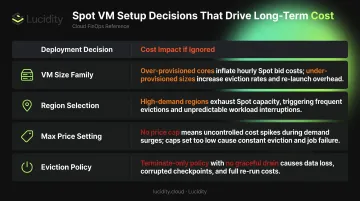
Four choices at setup time determine whether Spot VMs deliver real savings or generate offsetting costs:
| Decision | Impact if Ignored |
|---|---|
| VM size family | High eviction rates, frequent restart costs |
| Region selection | Higher hourly prices than nearby alternatives |
| Max price setting | Either caps savings unnecessarily or triggers frequent evictions |
| Eviction policy | Deallocate default creates persistent disk charges |
Workload Fit Determines Whether the Discount Survives
A 70% compute discount disappears quickly when the workload running on that VM cannot tolerate interruption. These workload types consistently erase Spot's nominal savings:
- Stateful workloads — failed state means recovery work that costs more than the discount saved
- Long-running jobs without checkpointing — a mid-run eviction restarts the entire job
- Tightly coupled services — one evicted node can cascade failure across dependent components
Before committing to Spot, confirm the workload can either resume cleanly from interruption or complete within a predictable window.
Cost-Reduction Strategies for Azure Spot VMs
Effective Spot VM cost reduction requires attention across three dimensions: decisions made before deployment, management practices applied while VMs run, and the architectural context in which Spot VMs operate. No single lever is sufficient alone.
Strategies That Reduce Costs by Changing Decisions
Choose VM Sizes Based on Eviction Rate History, Not Familiarity
Not all VM sizes have equal spot market supply. The Azure portal shows historical eviction rates by size and region — expressed in ranges like 0–5%, 5–10%, 10–15%, and above — directly in the VM creation flow under View pricing history or See all sizes.
Teams that default to familiar VM sizes without checking availability history expose themselves to frequent evictions and the compute cost of restarting interrupted work. Compare eviction rates across size options before provisioning, and revisit that comparison periodically.
Compare Regional Spot Prices Before Committing to a Region
Regional spot prices vary significantly and fluctuate independently. Teams that default to their primary region without comparing alternatives often pay more than necessary.
The Azure portal's pricing history view lets you compare spot prices and eviction rates across nearby regions. For interruption-tolerant workloads — batch jobs, ML training, dev/test — selecting a lower-demand region can reduce hourly compute costs without changing anything else about the workload.
Set the Max Price Parameter Based on Restart Cost, Not Convenience
Microsoft's documentation defines two approaches:
- Max price = -1: The VM is never evicted on price grounds; you pay the lower of current Spot price or standard pay-as-you-go. Maximizes uptime.
- Specific price ceiling: The VM is evicted when Spot price exceeds your ceiling. Limits spend, but increases eviction frequency.
The right choice depends on restart cost. Workloads where failed jobs are expensive to restart should lean toward -1. Truly disposable, easily-restartable jobs can accept tighter ceilings. The wrong default in either direction generates more cost than it avoids.
Choose the Eviction Policy Deliberately — Deallocate Is Not Always the Right Default
Azure's default Deallocate policy preserves the VM and its disks post-eviction — but disk storage charges continue billing continuously after the VM stops. The Delete policy eliminates all charges but requires rebuilding the VM from scratch on restart.
The practical guidance:
- Use Delete for stateless, ephemeral workloads: CI/CD agents, batch runners, disposable compute nodes
- Use Deallocate only when VM state genuinely needs preservation and you have a plan to manage disk costs
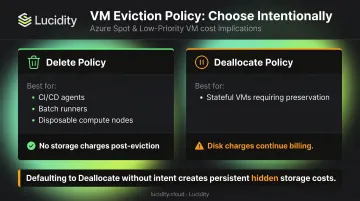
Defaulting to Deallocate without intent creates persistent, invisible storage costs across every evicted VM in your fleet.
Strategies That Reduce Costs Through Better Management
Handle Evictions Gracefully to Avoid Wasting Compute Spend
Azure provides approximately 30 seconds of advance notice before a Spot VM eviction via the Instance Metadata Service Scheduled Events endpoint. Applications that poll this endpoint can trigger graceful shutdown procedures — saving state to external storage, draining connections, flushing caches — before the VM terminates.
Unhandled evictions turn compute spend into wasted spend. Any work not checkpointed before shutdown must be repeated at additional cost. That 30-second window is tight; shutdown logic needs to be pre-built and fast.
Use Checkpointing to Limit How Much Work an Eviction Can Destroy
For batch processing, ML model training, or long-running simulations, periodic checkpointing to durable storage (Azure Blob, separate managed disks) ensures that an eviction loses at most one checkpoint interval of work.
Without checkpointing, an eviction at hour 11 of a 12-hour training job represents almost the full compute cost with no output — effectively a 100% waste event. Checkpoint intervals should be sized to match the cost tolerance of the workload.
Monitor Spot Prices Actively and Rebalance When Prices Drift
Spot prices are not static. Published analysis has documented 980%+ price spread within Azure's D-family — a concrete illustration of the exposure that comes from passively accepting spot prices over time.
Periodic audits of spot price history — available in the Azure portal — combined with willingness to shift VM size or region when prices rise, are a underused management lever. Teams that set and forget their Spot configuration are implicitly accepting that drift.
Clean Up Orphaned Managed Disks Left by Evicted VMs
One of the most persistent hidden costs in Spot VM environments is managed disk storage attached to deallocated VMs. These disks bill continuously, regardless of whether the VM is running. At enterprise scale, orphaned disks across a fleet of evicted Spot VMs accumulate meaningful recurring charges.
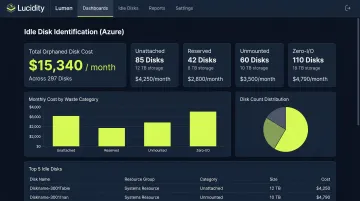
Tools like Lucidity help enterprises surface and eliminate idle disks across their Azure environment. Lucidity's Lumen product identifies four categories of idle disks — unattached, reserved, unmounted, and zero-I/O — that don't appear in native Azure dashboards or standard Advisor recommendations:
- Unattached: Disks no longer associated with any VM
- Reserved: Allocated but consistently idle
- Unmounted: Attached to a VM but not mounted by the OS
- Zero-I/O: Mounted but generating no read/write activity
Together, these four types can account for up to 70% of unused block storage spend. Lucidity's free Assessment tool scans your environment and surfaces orphaned disk waste in under five minutes, with no agents or infrastructure changes required.
Strategies That Reduce Costs Through Architectural Design
Use VM Scale Sets with Spot Restore to Automate Eviction Recovery
Running Spot VMs as part of a VM Scale Set (VMSS) with the Spot restore feature enabled allows Azure to automatically attempt to replace evicted instances when capacity becomes available — removing the manual cost of monitoring and redeploying evicted VMs.
Pairing the Delete eviction policy with VMSS auto-replacement is more cost-efficient than manual Deallocate workflows for stateless workloads. It eliminates both disk storage charges and the engineering time cost of recovery.
Design Workloads for Interruption Tolerance Before Deploying on Spot
Spot VM savings are only fully realized when workloads are designed to tolerate eviction. Stateless application design, distributed job frameworks, and microservices patterns increase resilience to interruption. Workloads that are architecturally stateful or tightly coupled cannot benefit from Spot pricing without incurring high recovery costs.
The architectural context determines whether Spot VMs are genuinely cheap or deceptively expensive. This is a prerequisite, not an optimization.
Combine Spot VMs with Reserved Instances for Hybrid Coverage
Using Spot VMs for 100% of compute capacity maximizes eviction exposure. A hybrid approach reduces that risk:
- Reserved Instances: Cover predictable baseline workloads at up to 72% discount with 1- or 3-year terms and guaranteed availability
- Spot VMs: Handle burst capacity, batch jobs, and non-critical workloads
This combination provides full-spectrum cost optimization. Spot handles variable demand cheaply; Reserved Instances guarantee the floor. The two strategies are complementary — neither replaces the other.
Use AKS Spot Node Pools for Containerized Workloads
For containerized workloads, AKS Spot node pools abstract eviction handling at the orchestration layer. When a Spot node is evicted, the cluster autoscaler scales up replacement capacity if nodes are still needed — without requiring application-level eviction logic.
This reduces both the engineering cost of building eviction resilience and the operational cost of managing evicted VMs manually, while still capturing Spot discounts for non-critical pods. Enable the cluster autoscaler — without it, an evicted Spot node pool scales to zero and requires manual recovery.
Conclusion
Azure Spot VMs are among the most powerful cost-reduction levers on the Azure platform. But the gap between their advertised discount and actual realized savings depends entirely on where costs originate — in VM size selection, eviction policy defaults, unmanaged disk storage, workload architecture, or price drift across regions and instance families.
Sustained savings require ongoing discipline. Teams that monitor price history, audit orphaned resources, and revisit their Spot strategy as workloads evolve will keep those gains. Teams that don't will watch them erode through hidden charges and idle resource sprawl.
The most reliable mindset change is treating eviction as a design constraint from the start — not an edge case to handle after deployment.
Frequently Asked Questions
What discount can I realistically expect from Azure Spot VMs?
Azure Spot VMs offer up to 90% off pay-as-you-go rates, but actual discounts vary by VM size, region, and current Azure capacity conditions. Spot prices fluctuate — sometimes significantly — so realized savings depend on active monitoring and the flexibility to shift VM size or region when prices rise.
What happens to my data when an Azure Spot VM is evicted?
It depends on your eviction policy. Deallocate preserves managed disks but continues charging for storage; Delete removes both the VM and its disks entirely. Application state not saved to external storage before eviction is lost under either policy.
Can I run production workloads on Azure Spot VMs?
Spot VMs carry no SLA and can be evicted with as little as 30 seconds' notice, making them unsuitable for stateful or single-instance production workloads. Production use is possible for fault-tolerant, stateless workloads with proper eviction handling, but requires deliberate architectural design.
How do Azure Spot VMs compare to Reserved Instances for cost savings?
Spot VMs offer higher potential discounts (up to 90%) with no upfront commitment but come with eviction risk. Reserved Instances offer up to 72% discounts with guaranteed availability in exchange for a 1- or 3-year term. The two are complementary; most cost-efficient architectures use both.
How much notice does Azure give before evicting a Spot VM?
Azure provides approximately 30 seconds of advance notice via the Instance Metadata Service Scheduled Events endpoint. Applications can poll this endpoint to trigger graceful shutdown procedures. That window is tight, so shutdown logic must be pre-built and execute quickly.
Which workloads are best suited for Azure Spot VMs?
Spot VMs work best for batch processing, dev/test environments, large compute jobs, and any stateless workload with flexible execution time. If a workload can be interrupted, restarted, or redistributed without significant consequence, it's a strong candidate.