Introduction
According to Flexera's 2025 State of the Cloud report, 84% of organizations struggle to manage cloud spend, with budgets already exceeding limits by 17%. Meanwhile, HashiCorp found that 91% of respondents report waste in their cloud spend — waste that compounds across hundreds of services unnoticed.
Azure's billing model makes this worse. Pay-as-you-go pricing across 200+ products, elastic resources that scale up easily but rarely scale down, and cross-team ownership gaps make costs genuinely hard to predict.
The culprits are rarely dramatic. They look like:
- A VM spun up for a one-time load test and never terminated
- A managed disk orphaned after a workload migration
- A dev environment running at 2 AM on a Tuesday
Left unchecked, these small charges compound into serious budget overruns.
This guide covers everything FinOps, DevOps, and ITOps teams need: what Azure cost management actually is, why costs spiral, the four core pillars of control, actionable optimization strategies, and how to choose the right tools.
Key Takeaways
- Azure Cost Management is a free native tool, but it only scratches the surface of what enterprise cost control requires
- Over-provisioning and idle resources — including orphaned managed disks — are the most common and overlooked cost drivers
- Azure Reservations save up to 72% and Savings Plans up to 65% versus pay-as-you-go — but only for stable, predictable workloads
- Tagging enforcement via Azure Policy is non-negotiable — without it, cost allocation is guesswork
- Lucidity identifies idle disks — unattached, unmounted, zero-I/O — that Azure Advisor misses entirely
What Is Azure Cost Management?
Three terms get used interchangeably, but they're distinct:
| Term | What It Means |
|---|---|
| Cost Management | Ongoing governance — monitoring, allocating, and controlling Azure spend continuously |
| Cost Optimization | Active waste reduction — identifying and eliminating unnecessary spend |
| Cost Analysis | Investigative breakdown — understanding why costs are what they are |
Microsoft Cost Management is the free native product inside the Azure portal. It handles monitoring, reporting, budgeting, and alerting — available to all Azure customers at no additional charge. It integrates with Azure Advisor and can export data to Power BI for richer dashboards.
One key limitation: Microsoft Cost Management is built primarily for Azure-only environments. For enterprises with more complex needs, native tooling often falls short:
- Business-unit-level cost allocation requires near-perfect tagging discipline
- Multi-cloud visibility beyond a basic AWS connector isn't a core strength
- Hybrid cloud footprints typically need third-party tooling to get full coverage
Why Azure Costs Spiral Out of Control
The Billing Complexity Problem
Azure bills by the second across hundreds of services, each with different pricing models — pay-as-you-go, reserved capacity, spot pricing, and block pricing. A single application might touch compute, storage, networking, and database services with entirely different cost structures. That complexity alone explains why 84% of organizations report budget overruns.
The Over-Provisioning Trap
Teams provision storage and compute for peak demand — then leave it there. The peak passes, the workload stabilizes, but the resources stay at full size. Nobody goes back to downsize.
This is especially damaging with Azure Managed Disks. Once a VM is deleted or detached, its managed disk continues accruing charges at full rate until someone manually deletes or optimizes it.
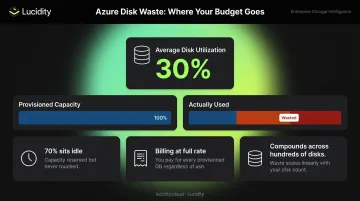
Lucidity's analysis of 100+ petabytes of enterprise storage puts average disk utilization at just 30%. That's the majority of provisioned capacity sitting idle — and billing at full rate.
The Visibility Gap
Azure's native cost allocation relies on resource tags — and tagging is manual, inconsistent, and error-prone. The FinOps Foundation's Allocation framework notes that cost accountability breaks down when tagging is incomplete, making it impossible to attribute charges to specific teams, applications, or projects.
In practice, this creates three compounding problems:
- Untagged resources can't be attributed to any team or budget owner
- Shared service costs get absorbed into general overhead instead of allocated properly
- Finance teams flag overruns only after billing closes — too late to course-correct
The Four Pillars of Azure Cost Management
Pillar 1: Visibility and Cost Analysis
Real control starts with understanding where money is going. Azure Cost Analysis in the portal lets teams slice spend by resource, region, subscription, tag, or time period — daily, monthly, or custom ranges.
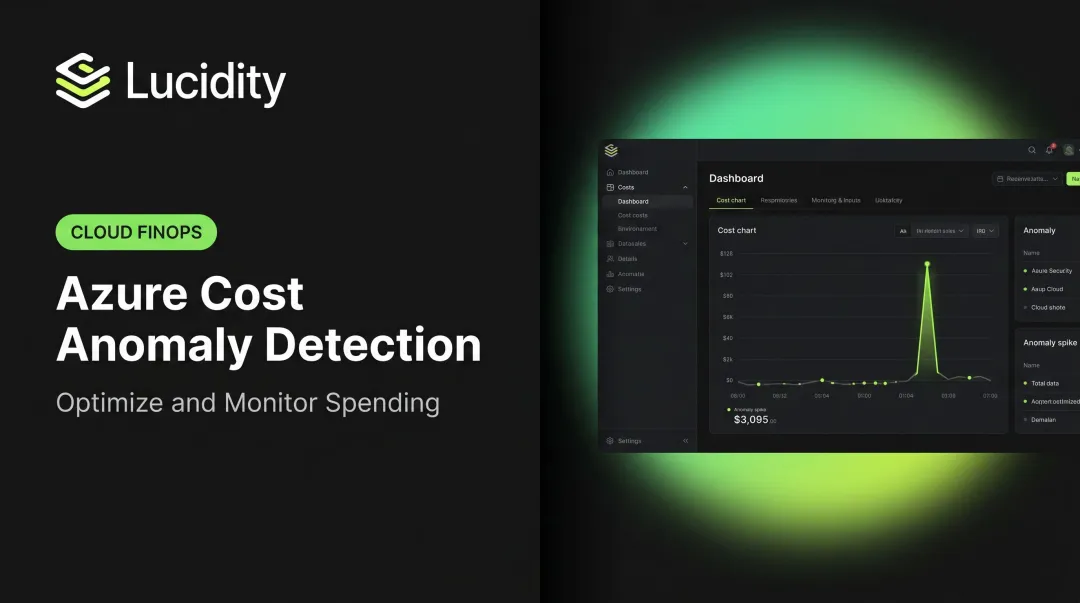
Cost anomaly detection runs daily scans for unexpected spend spikes or drops. When a runaway auto-scaling event triples your compute spend overnight, anomaly alerts catch it before the end of the billing cycle — not after.
Pillar 2: Budgets and Alerts
Azure Budgets let teams set spending thresholds by cost or usage, configure alert recipients, and trigger automated actions (like shutting down VMs) when thresholds are breached.
Key practices:
- Tie budgets to specific business units or projects, not just subscriptions
- Schedule alert emails to reach people who don't log into the portal daily
- Revisit budgets quarterly — they become stale as workloads evolve
- Pair budget alerts with automated action groups for immediate response
Pillar 3: Cost Allocation and Tagging
Azure's native allocation relies on resource tags, management groups, subscriptions, and resource groups. Tag inheritance in Cost Management can apply subscription-level tags down to resources without modifying the resources themselves — useful for coverage without manual effort.
Tagging works well when enforced from day one. In practice, it rarely is. Common failures include:
- Tags applied at creation but never updated as ownership changes
- Shared resources (load balancers, shared databases) that don't clearly belong to one team
- Untagged legacy resources deployed before any tagging standard existed
The fix: define your tagging taxonomy before deploying resources, then enforce it with Azure Policy to block resource creation without required tags.
Pillar 4: Optimization Recommendations
With visibility, budgets, and allocation in place, the next layer is acting on what the data shows. Azure Advisor analyzes usage patterns and surfaces daily recommendations for rightsizing underutilized VMs, purchasing Reserved Instances, removing unused network resources, and optimizing database instances.
Advisor is a solid starting point, but it has limitations. It covers common compute and basic storage recommendations — but it won't surface the full range of idle disk types (unattached, reserved, unmounted, zero-I/O) that build up silently across larger Azure environments. Catching those requires dedicated storage observability tools that look beyond what Advisor tracks.
Top Azure Cost Optimization Strategies
Rightsize Compute Resources
Many VMs run far below their provisioned CPU and memory capacity. Azure Advisor's rightsizing recommendations flag underutilized VMs and suggest smaller SKUs or burstable instance types.
Practical approach:
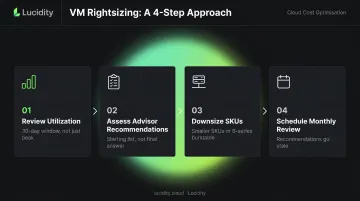
- Review VM utilization metrics over a 30-day window — not just peak usage
- Use Advisor's recommendations as a starting list, not a final answer
- Move consistently under-utilized workloads to smaller SKUs or B-series burstable instances
- Set a recurring monthly review — rightsizing recommendations go stale as workloads change
Leverage Reserved Instances and Savings Plans
Two commitment-based discount options exist, and they're not the same:
| Option | Savings vs. PAYG | Flexibility |
|---|---|---|
| Azure Reservations | Up to 72% | Specific resource type, 1 or 3 years |
| Azure Savings Plans | Up to 65% | Flexible across instance types, spend commitment |
Reservations deliver deeper discounts for stable, predictable workloads. Savings Plans suit environments where instance types or regions shift. Both require genuine usage commitment — buying capacity you won't use cancels out the discount.
Eliminate Idle and Unattached Resources
Idle managed disks are the most common source of silent waste on enterprise Azure bills. Deleted VMs routinely leave behind fully billable disks that go unnoticed for months.
Azure Advisor can flag some unattached disks, but it misses broader categories of idle storage. Lucidity's Lumen product identifies four specific types that native tooling overlooks:
- Unattached disks — no VM attached, but billing continues at full rate
- Reserved disks — provisioned capacity sitting idle with no active workload
- Unmounted disks — connected to a VM but invisible to the OS, doing nothing
- Zero-I/O disks — mounted and attached, but recording zero reads or writes
Together, these four categories can represent up to 70% of unused block storage spend. Lucidity's analysis across 600+ enterprise assessments shows average disk utilization sitting at just 30% — meaning most enterprises are paying for storage that does no useful work.
Lucidity's free, agentless Assessment completes in under five minutes. It shows which disks are wasted, which are at risk of causing downtime, and the exact dollar amount cleanup would recover — no commitment required.
Apply Azure Hybrid Benefit and Spot Instances
| Option | How It Works | Best For |
|---|---|---|
| Azure Hybrid Benefit | Apply existing Windows Server / SQL Server licenses (with active Software Assurance) to Azure VMs | Enterprises with large on-premises license estates |
| Azure Spot Instances | Up to 90% discount vs. pay-as-you-go for interruptible workloads | Dev/test, batch processing, data pipelines |
Implement Auto-Scaling and Auto-Shutdown
- Azure VM Scale Sets with auto-scaling rules match compute capacity to real-time demand, preventing sustained over-provisioning during quiet periods
- Auto-shutdown schedules for dev/test environments eliminate the cost of resources running overnight and on weekends with no active users
- Azure Automanage can enforce these policies at scale without manual configuration per VM
Essential Azure Cost Management Tools
Native Azure Tools
All four core native tools are free for Azure users:
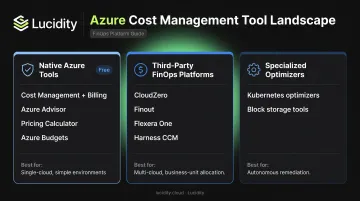
- Azure Cost Management + Billing — monitoring, reporting, budgeting, and alerting
- Azure Advisor — personalized recommendations for rightsizing, reservations, and unused resources
- Azure Pricing Calculator — pre-deployment cost estimation across configurations
- Azure Budgets — threshold-based alerts and automated remediation actions
These tools are sufficient for straightforward, single-cloud environments with good tagging hygiene. For anything more complex, they start showing limits quickly.
Third-Party FinOps Platforms
Native tools lack granular cost allocation by business unit, application, or customer — unless tagging is nearly perfect. They also provide limited multi-cloud support.
Third-party platforms (CloudZero, Finout, Flexera One, Harness CCM) fill these gaps with richer allocation logic, anomaly detection, and showback/chargeback capabilities. The trade-off is cost and implementation time.
Specialized Optimization Tools
A category of purpose-built tools goes beyond visibility into autonomous remediation:
- Kubernetes cost optimizers (CAST AI, Kubecost) for AKS workload rightsizing
- Block storage optimizers (Lucidity) for Azure Managed Disk right-sizing, tier optimization, and idle disk cleanup
The distinction matters: these tools operate at the resource layer, delivering actual cost reductions rather than just surfacing recommendations for humans to act on. Lucidity's AutoScaler illustrates this well: it autonomously expands and shrinks Azure Managed Disks in real time with zero downtime, requiring no code changes or infrastructure modifications.
How to Choose the Right Tool
| Situation | Recommended Approach |
|---|---|
| Pure Azure, modest complexity | Start with native tools |
| Multi-cloud or business-unit allocation | Add a third-party FinOps platform |
| Kubernetes (AKS) workloads | Evaluate a Kubernetes cost optimizer |
| Storage waste or unattached disk issues | Use a specialized block storage optimizer |
Key selection criteria: automation depth (recommendations vs. autonomous action), integration requirements, SOC 2 compliance for enterprise security, and whether the tool surfaces problems or solves them.
Azure Cost Management Best Practices
Establish FinOps Culture and Ownership
Cost management fails when it belongs only to finance. The FinOps Foundation's framework — built around an Inform, Optimize, Operate lifecycle — calls for collaboration between engineering, finance, and business teams, with cost ownership distributed to the people generating the spend. Regular cost reviews and showback reports surface visibility to teams who wouldn't otherwise see the bill.
Tag Rigorously and Enforce via Policy
Define a tagging taxonomy before resources are deployed: team, environment, application, cost center. Enforce required tags at resource creation using Azure Policy, and use tag inheritance in Cost Management to extend coverage without manual work. Without this foundation, cost attribution is impossible.
Review Commitment-Based Discounts Monthly
Reserved Instances and Savings Plans only deliver value if utilization stays high. Audit RI utilization in Azure Cost Management monthly, exchange or return underutilized reservations within the allowed window, and adjust commitments as workloads shift. A quick monthly check catches discounts tied to workloads that have since been migrated or decommissioned — before they quietly drain budget.
Frequently Asked Questions
What is Azure Cost Management and is it free?
Azure Cost Management is a native Microsoft tool inside the Azure portal for monitoring, analyzing, and controlling Azure spend. It's free for all Azure customers, covering budgeting, reporting, and alerts.
What is the difference between Azure Cost Management and Azure Advisor?
Azure Cost Management focuses on tracking and reporting spend: budgets, alerts, and cost analysis. Azure Advisor goes further by analyzing usage patterns and surfacing specific recommendations — rightsize this VM, buy a reservation for that workload, remove these unused resources.
Why is my Azure bill higher than expected?
The most common culprits: over-provisioned resources never downsized after peak periods, idle VMs or unattached managed disks still accruing charges, auto-scaling that expanded capacity but never contracted it, and untagged shared resources that obscure true cost visibility.
How do I set budget alerts in Azure?
Go to Cost Management + Billing in the Azure portal and select Budgets. Define a scope (subscription or resource group), set a time period and spend threshold, then configure alert recipients and any automated action groups.
What is the best way to reduce Azure storage costs?
Delete unattached managed disks, move infrequently accessed data to cooler storage tiers, and right-size over-provisioned volumes. For continuous coverage, an autonomous storage optimization tool like Lucidity monitors and resizes disks automatically, catching idle storage that Azure Advisor won't flag.
How does Azure Hybrid Benefit work?
Azure Hybrid Benefit lets organizations apply existing on-premises Windows Server and SQL Server licenses with active Software Assurance to Azure VMs, reducing the licensing portion of VM costs. Microsoft notes Windows Server savings averaging 36% versus the leading cloud provider, with potential savings up to 80% when combined with Reserved VM Instances.