Both tools deliver real savings. Azure Reserved VM Instances cut costs by up to 72% compared to pay-as-you-go, while Azure Savings Plans for Compute offer up to 65% off across eligible services. But those discounts only work if the right tool is matched to the right workload — and if teams right-size before committing.
This article breaks down exactly how each instrument works, when to use each one, and why combining both is usually the smartest play.
Key Takeaways
- Reservations offer the deepest discounts (up to 72%) but require committing to a specific VM type, region, and term
- Savings Plans trade a slightly lower discount (up to 65%) for flexibility across VM types, regions, and eligible compute services
- When both apply, Azure applies Reservations first, then Savings Plans cover remaining eligible usage
- Neither tool covers storage, networking, or licensing costs — a significant gap on most Azure bills
- The optimal strategy for most enterprises: Reservations for the stable baseline, Savings Plans for variable compute
Azure Reservations vs. Savings Plans: Quick Comparison
| Factor | Azure Reservations | Azure Savings Plans |
|---|---|---|
| Commitment type | Resource-specific (VM type, region) | Spend-based ($/hour) |
| Maximum discount | Up to 72% | Up to 65% |
| Scope | Specific region and VM family | Any Azure region, any eligible compute |
| Eligible services | VMs, SQL, Cosmos DB, Databricks, Disk Storage, App Service, Backup Storage | VMs, Dedicated Hosts, App Service (Premium v3/Isolated v2), Functions Premium, Container Instances, Container Apps |
| Payment options | Upfront or monthly (no added cost) | Upfront or monthly (same total cost) |
| Cancellation | Refunds allowed; $50,000 USD cap per rolling 12-month window | Cannot be cancelled, exchanged, or refunded |
| Best fit | Stable, predictable workloads | Dynamic, multi-region, or evolving architectures |
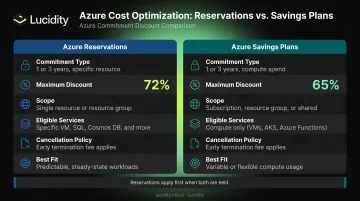
There's one asymmetry that catches teams off guard: Reservations give you an exit (with refund caps), while Savings Plans do not. Once purchased, the commitment is locked — the hourly amount, term length, and billing frequency cannot be changed. Get your usage forecasts wrong, and you're absorbing the cost regardless.
That lock-in also means the two tools aren't interchangeable. Microsoft maintains Reservations and Savings Plans as distinct discount mechanisms — and when the same usage qualifies for both, Reservations apply first.
What Are Azure Reservations?
Azure Reservations — sometimes called Reserved Instances or RIs — are commitments to use a specific Azure resource at a defined capacity for a 1- or 3-year term. In exchange, you receive discounts of up to 72% compared to pay-as-you-go rates for Linux VMs. Windows Server customers who layer in Azure Hybrid Benefit can reach up to 80% savings by combining both programs.
How the Billing Works
Here's how billing works once you commit:
- Usage up to your reserved hourly capacity bills at the discounted rate
- Usage above the commitment bills at standard pay-as-you-go rates
- Unused hourly capacity is forfeited — it doesn't roll over
The discount applies automatically to matching resources after purchase, with no operational changes required.
Instance Size Flexibility
One feature that partially offsets region and VM family lock-in: instance size flexibility. When enabled (it's the default for shared-scope reservations), the discount applies across VM sizes within the same instance size flexibility group — not just the exact SKU you purchased. This matters when you need to resize VMs within a family without voiding the reservation.
You can also optimize for capacity priority instead, which reserves physical capacity in a specific region. Useful for compliance-sensitive workloads, but sacrifices the sizing flexibility.
What Reservations Cover
Beyond VMs, Reservations extend to a broad set of Azure services:
- Azure SQL Database and SQL Managed Instance
- Azure Cosmos DB (provisioned throughput)
- Azure Databricks (prepurchase commit units)
- Azure Disk Storage (Premium SSD SKUs)
- Azure Backup Storage
- Azure App Service (Premium v3 and Isolated v2)
Best for:
- Always-on production databases and stable VM fleets
- Enterprise applications with no planned architectural changes over 1–3 years
- Organizations with predictable, multi-service Azure footprints
Watch out for:
- Workloads that migrate, resize outside the flexibility group, or get decommissioned — unused reserved capacity is forfeited
- Storage, networking, and licensing costs, which remain at pay-as-you-go rates regardless of your reservation
What Is an Azure Savings Plan for Compute?
An Azure Savings Plan for Compute is a spend-based commitment — you agree to spend a fixed dollar amount per hour on eligible compute resources over a 1- or 3-year term. In return, you get discounts of up to 65% versus pay-as-you-go rates.
The key distinction from Reservations: there's no SKU or region lock-in. The discount follows your usage automatically, applying to whichever eligible compute resources generate the most savings each hour.
Eligible Services
Savings Plans apply across:
- Virtual Machines
- Azure Dedicated Hosts
- App Service (Premium v3 and Isolated v2 plans)
- Functions Premium Plan
- Container Instances
- Azure Container Apps
All Azure regions are covered, and the plan is OS-agnostic for infrastructure costs. Software costs are not included.
How Discounts Get Applied
Each hour, Azure applies your Savings Plan discount to the usage that yields the highest percentage savings first. When you hold multiple Savings Plans, the priority order works as follows:
- 3-year plans apply before 1-year plans
- More restrictively scoped plans apply before broader ones
- Any unused hourly commitment expires with no rollover
The Non-Cancellation Risk
Unlike Reservations, a Savings Plan cannot be cancelled, exchanged, or modified after purchase. The hourly commitment, term, and billing frequency are all locked in.
Over-commitment is a real hazard: committing $5/hour when your actual eligible usage averages $3/hour means forfeiting $2 every single hour for 1–3 years.
Best for: Organizations modernizing from IaaS to PaaS, teams scaling across regions, workloads that shift VM families or services frequently, and early-stage cloud environments where future architecture is uncertain.
Which Should You Choose?
The honest answer: most enterprises shouldn't choose one over the other — they should use both deliberately. But the decision starts with workload analysis.
As Microsoft's own guidance states, right-size first. Discounts reduce rates, not waste. Buying a cheaper reservation for an oversized VM doesn't fix the underlying inefficiency.
Choose Azure Reservations When...
- Workloads run 24/7 in a single region with no anticipated VM family or regional changes
- You can confidently forecast compute needs for the full 1–3 year term
- Maximum discount depth matters more than flexibility
- You're running stable databases (SQL Managed Instance, Cosmos DB) or long-running VM fleets
Choose Azure Savings Plans When...
- Workloads span multiple regions or shift VM families
- Your organization is moving to containers, App Service, or other PaaS services
- You want discount coverage that doesn't require manually matching usage to reservations
- Architecture is still evolving and locking into a specific SKU would create stranded capacity
The Best Strategy: Layer Both
A practical four-step approach combines both instruments effectively:
- Right-size first — eliminate waste before committing to any discount; discounts lower rates, not waste
- Apply Reservations to the stable baseline — any workload running predictably 24/7 in a fixed region deserves the deepest discount available
- Layer a Savings Plan over variable compute — cover the workloads that shift services, regions, or VM families without needing to manage individual reservation configurations
- Leave genuine burst capacity on pay-as-you-go — unpredictable spikes don't justify commitment risk
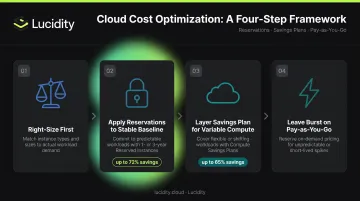
When both instruments apply to the same usage, Azure handles the math automatically: Reservations apply first, then Savings Plans cover the remaining eligible usage.
That said, commitment size still matters. Flexera's 2026 State of the Cloud Report estimates that 29% of cloud IaaS and PaaS spend is wasted. Committing to that waste at a discounted rate still costs money. A smaller, accurate commitment with pay-as-you-go overflow is nearly always safer than over-committing — especially given that Savings Plans cannot be cancelled.
Optimizing Azure Costs Beyond Reservations and Savings Plans
Here's what both instruments don't cover: storage, networking, and licensing. These costs remain at full pay-as-you-go rates regardless of what Reservations or Savings Plans you've purchased.
For many Azure environments, storage alone represents a substantial and growing share of the bill — yet FinOps reviews focused primarily on compute frequently miss it.
The Storage Gap
Azure Savings Plans for Compute explicitly exclude storage charges. The same is true for Reserved VM Instances. While Azure does offer separate disk storage reservations (Premium SSD SKUs), these cover only specific storage tiers and don't address the broader problem of over-provisioned or idle managed disks.
The underlying problem is how far utilization actually drifts. Across 600+ enterprise assessments analyzing 100+ PB of data, the average organization runs at just 30% disk utilization — well before any optimization has occurred.
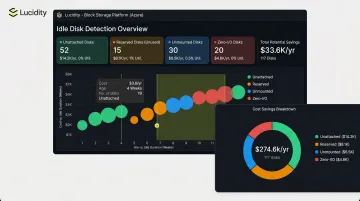
Lucidity addresses this directly. Its autonomous block storage platform identifies four types of idle disks — unattached, reserved, unmounted, and zero-I/O — that don't surface in native Azure dashboards or standard Advisor recommendations. Lucidity's AutoScaler brings average utilization to 75%, with storage cost reductions of up to 70% and zero downtime.
Additional Cost Levers
Storage optimization aside, commit-based discounts aren't the only lever available. Three other mechanisms that meaningfully reduce Azure costs:
- Azure Hybrid Benefit — use existing Windows Server or SQL Server licenses with active Software Assurance for Azure VMs and SQL services; combined with Reserved VM Instances, Windows Server customers can reach up to 80% savings versus standard pay-as-you-go
- Dev/Test pricing — available to Visual Studio Standard subscribers, bills Windows VMs at Linux rates; a typical dev/test environment using SQL Database and App Service can save up to 57%
- Azure Advisor reviews — Advisor analyzes historical hourly usage to surface reservation purchase recommendations and flag underutilized existing commitments before capacity is forfeited
Conclusion
Azure Reservations and Savings Plans solve different problems. Reservations deliver the deepest discounts for stable, predictable workloads where you can confidently commit to a specific VM type and region. Savings Plans trade some discount depth for flexibility across services, regions, and compute types, making them the better fit for dynamic or shifting architectures.
For most enterprises, neither instrument alone is the right answer. The most effective approach is deliberate layering:
- Reservations for the predictable baseline
- Savings Plans for the variable compute layer
- Pay-as-you-go for genuine spikes
Always right-size before committing to either.
That said, compute discounts alone leave storage, networking, and licensing costs completely untouched. Addressing those categories separately is what separates a partial FinOps win from a complete one — and storage in particular tends to hide significant waste that even disciplined FinOps teams overlook. Tools like Lucidity are built specifically to surface and eliminate that idle and over-provisioned block storage spend across Azure and other clouds.
Frequently Asked Questions
What is the difference between an Azure Savings Plan and Reserved Instances?
Azure Reservations commit to a specific VM type and region for 1–3 years (up to 72% discount). Savings Plans commit to a fixed hourly spend across any eligible compute service and region (up to 65% discount). Reservations offer deeper savings for stable workloads; Savings Plans offer flexibility for dynamic ones.
What is an Azure Savings Plan?
An Azure Savings Plan for Compute is a spend-based commitment ($/hour for 1 or 3 years) that automatically applies discounts of up to 65% across eligible compute services — including VMs, App Service, and Functions Premium Plan. Unlike Reservations, it isn't tied to a specific region or VM type.
When would you consider Reserved Instances or Savings Plans instead of on-demand?
When compute workloads run consistently rather than in pure spikes, committing to either instrument generates meaningful savings over on-demand rates. The FinOps Foundation recommends targeting commitments that reach breakeven within 9 months, using SKU-specific pricing math to size them accurately.
Can you use Azure Reservations and Savings Plans at the same time?
Yes — many organizations layer both. When the same usage qualifies for both, Azure applies Reservations first (deeper discount), then Savings Plans cover the remaining eligible compute usage. Any overage above both commitments bills at pay-as-you-go rates.
Are Azure Savings Plans replacing Azure Reserved Instances?
No. Microsoft continues to support both as distinct discount instruments with separate documentation and purchase flows. Reservations target predictable, SKU-specific workloads; Savings Plans cover dynamic compute usage across services and regions.
What happens to unused Azure Reservation or Savings Plan hours?
Both operate on a use-it-or-lose-it basis — unused hours expire and do not roll over. Reservation hours may transfer to another eligible resource in the same size flexibility group, but Savings Plan hours have no equivalent recovery mechanism. Accurate sizing before purchase is critical for both.