Introduction
Pay-as-you-go pricing is the most expensive way to run predictable workloads on Azure. For enterprises running stable infrastructure at scale, that cost gap compounds fast. Azure Reservations exist to close it.
Azure Reservations can cut costs by up to 72% compared to pay-as-you-go rates. But that number assumes you're reserving the right resources, in the right quantities, at the right time. Many enterprises lock in commitments before optimizing their environment, turning a discount program into a multi-year bill for infrastructure they don't fully use.
This guide covers how Azure Reservations work, the two main types, and the practical steps to maximize their value. That includes what to clean up before you commit and how to avoid the most common optimization mistakes.
Key Takeaways
- Azure Reservations are 1- or 3-year pre-purchase commitments that can save up to 72% versus pay-as-you-go pricing
- Two core types: Reserved Instances (VMs) and Reserved Capacity (databases, storage, analytics)
- Unused reservation hours are forfeited — they don't roll forward
- Rightsize and remove idle resources (especially disk volumes) before purchasing — or you'll lock in waste
- Use Azure Advisor and Cost Management recommendations to guide your purchase decisions, not replace your own analysis
What Are Azure Reservations and How Do They Work?
Azure Reservations are 1- or 3-year commitments to specific Azure resources — VMs, databases, disk storage, analytics services — in exchange for discounted pricing versus standard pay-as-you-go rates. They're built for the always-on, stable portion of your cloud environment.
The Automatic Discount Mechanic
Once purchased, reservations don't require any workload changes. Azure continuously checks running usage for matching attributes — resource type, size, and region — and applies the reserved rate automatically when a match is found. No redeployment, no configuration changes.
The billing scope controls where that discount applies. You can scope a reservation to a resource group, a single subscription, or a shared scope that covers multiple subscriptions under the same billing account. That scope decision also shapes your exposure to the mechanic below.
The Use-It-or-Lose-It Rule
Reservations are measured hourly. If no matching resource is running in a given hour, that reserved quantity is forfeited for that period. Unused hours do not carry forward. Usage beyond your reservation is charged at pay-as-you-go rates.
This mechanic makes over-commitment a direct source of waste — not just an optimization miss.
Reservations vs. Azure Savings Plans
These two discount models solve different problems:
| Feature | Azure Reservations | Azure Savings Plans |
|---|---|---|
| Commitment type | Specific resource (size, region, service) | Fixed hourly compute spend |
| Maximum savings | Higher (up to 72%+) | Slightly lower |
| Flexibility | Low — tied to configuration | High — applies across VM types and regions |
| Best for | Stable, confirmed workloads | Predictable spend, shifting infrastructure |
When both are active, reservations apply first because they carry higher discounts. Savings Plans then cover remaining eligible usage.
How Azure Generates Purchase Recommendations
Azure's recommendation engine evaluates hourly usage over the past 7, 30, and 60 days, simulates costs with and without reservations at various quantities, and surfaces the purchase quantity with the highest net savings. These recommendations appear in Azure Advisor, the portal's reservation purchase workflow, and via the Cost Management and Consumption APIs.
Azure Reservation Types: Reserved Instances vs. Reserved Capacity
Reserved Instances (Virtual Machines)
Reserved VM Instances commit to a specific VM size and region for 1 or 3 years, delivering savings of up to 72% compared to pay-as-you-go pricing. The discount applies to compute costs only — software licenses, networking, and storage are billed separately.
For Enterprise Agreement customers with Software Assurance, combining Reserved Instances with Azure Hybrid Benefit can increase savings further. Exact percentages vary by VM SKU and region, so check Microsoft's Azure Hybrid Benefit pricing pages for current SKU-level figures before committing.
Before purchasing, confirm these eligibility constraints that affect how much you'll actually save:
- Promotional and preview VM series are excluded
- 1-year and 3-year terms carry different discount tiers — check the Linux VM pricing page for current SKU-level figures
- Instance size flexibility (covered below) significantly affects how useful a Reserved Instance remains over time
Reserved Capacity (Databases, Storage, and Analytics)
Reserved Capacity covers non-VM services across a wide range of Azure offerings. Savings vary considerably by service — Microsoft's pricing page shows up to 80% savings on eight-vCore SQL Database Business Critical instances in certain regions.
For all other services, check current rates at Azure's reservation pricing page before purchasing.
Key services eligible for Reserved Capacity:
| Service | What's Covered | What's Excluded |
|---|---|---|
| Azure SQL Database / SQL Managed Instance | vCore compute charges | Software licensing, I/O, networking |
| Azure Disk Storage (Premium SSD P30+) | Per-disk reserved capacity charge | Transactions, snapshots, bandwidth |
| Azure Cosmos DB | Provisioned throughput (RU/s) | Storage, bandwidth, backups |
Other eligible services include Azure Synapse Analytics, Azure Databricks, Azure Cache for Redis, and managed database services (MySQL, PostgreSQL, MariaDB). Microsoft periodically updates the eligible service list — confirm current coverage before purchasing.
Best Practices to Optimize Azure Reservations
Rightsize and Clean Up Resources Before Committing
Purchasing reservations against unoptimized infrastructure locks in today's inefficiencies for 1–3 years. The correct sequence is to rightsize VMs, eliminate idle workloads, and remove unused disk volumes before selecting reservation quantities.
This matters most for Azure Disk Storage Reservations (Premium SSDs P30+). Unattached, zero-I/O, and unmounted volumes silently inflate baseline usage — and if you reserve against that inflated footprint, you're paying for capacity you'll never use.
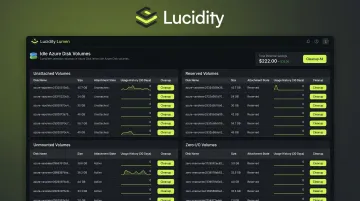
Lucidity's Lumen product identifies four specific categories of idle Azure disk volumes — unattached, reserved, unmounted, and zero-I/O — that native Azure dashboards and Advisor often miss. These idle disks can represent up to 70% of unused block storage spend.
Lumen surfaces full context (disk age, attachment state, usage history) for each idle volume and enables one-click cleanup directly from the dashboard, giving FinOps and ITOps teams a clean, accurate storage baseline before they commit.
Lucidity's free Assessment tool can scan your Azure environment in under 5 minutes and surface exactly what's wasted and what's driving spend — useful input for any reservation planning exercise.
Commit to Your Stable Baseline — Not Peak Demand
Anchor reservations to the lowest, most stable portion of your usage — not seasonal spikes, launch events, or anticipated but unconfirmed workload additions.
Practical guidance:
- Start with 1-year terms to reduce lock-in risk
- Add 3-year commitments only after usage patterns have proven stable across multiple review cycles
- Reserve for baseline; use pay-as-you-go for peaks — this is the core principle of any FinOps-sound reservation strategy
Use Azure Advisor and Cost Management Recommendations
Azure Advisor generates reservation recommendations based on 30 days of usage at single-subscription scope. The portal's reservation purchase workflow shows recommended quantity and projected savings. Enterprise customers can also access reservation utilization and RI coverage reporting through the Cost Management Power BI app.
Treat these recommendations as input, not instruction. They assume historical usage patterns continue unchanged — which is rarely the full picture. Before acting, factor in:
- Planned workload migrations or retirements
- Infrastructure changes in the next 12 months
- Any rightsizing work not yet reflected in the usage history
Enable Instance Size Flexibility for VM Reservations
Instance size flexibility allows a Reserved VM Instance discount to apply across multiple VM sizes within the same instance-size flexibility group and region — for example, across Standard_D series sizes — rather than locking to a single SKU.
Enabling this option improves reservation utilization rates when teams resize VMs within the same family. This reduces wasted reservation hours without changing your purchasing strategy.
That said, flexibility does not extend across regions or outside the documented instance-size flexibility groups.
Combine Reservations with Azure Savings Plans Strategically
A well-structured discount strategy layers these tools:
- Reservations — for workloads where resource configuration (service, region, size) is confirmed stable for 1–3 years; captures maximum per-unit savings
- Savings Plans — for compute workloads where overall spend is predictable but VM families, sizes, or regions may shift; offers less savings but absorbs infrastructure changes
- Pay-as-you-go — for variable, spiky, or short-term demand
When both a reservation and savings plan can apply to the same usage, the reservation applies first. Don't duplicate coverage — use Savings Plans to catch what reservations miss.
Establish an Ongoing Review Cadence
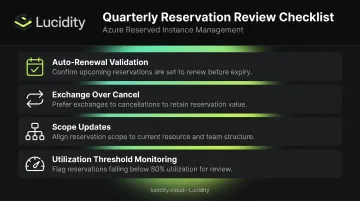
Unreviewed reservations drift out of alignment with actual usage faster than most teams expect. Schedule a quarterly review using Azure Cost Management's reservation utilization reports to catch commitments running below target before they become sunk cost.
Key practices for active reservation management:
- Auto-renewal: Only enable with active validation that the reserved configuration still matches current usage
- Drifting commitments: Exchange rather than cancel whenever possible — it preserves committed value
- Scope changes: Update reservation scope when team ownership or cost allocation shifts
- Utilization threshold: Flag any reservation running consistently below 80% utilization for review
Managing Your Reservations: Scope, Exchange, and Cancellation
Controlling Scope
Reservations are scoped at purchase to a resource group, subscription, or shared (billing account) level. Shared scope maximizes the chance that eligible usage across multiple subscriptions receives the discount.
Scope can be changed after purchase. Reservations can also be split to assign portions to different scopes — useful when team ownership or chargeback structures shift.
Scope options include:
- Resource group: Discount applies to resources within a single resource group
- Subscription: Discount applies across all eligible resources in one subscription
- Shared (billing account): Discount applies across all eligible subscriptions in the billing account
Exchanging Reservations
When a reservation no longer matches actual usage — due to rightsizing, workload migration, or infrastructure changes — Azure allows exchange for a new reservation of equal or greater value. The replacement reservation's total lifetime commitment must meet or exceed the remaining commitment of the original.
Exchange is the preferred adjustment over cancellation — it preserves committed discount value rather than incurring termination costs. Exchange policies for compute reservations (VMs, Azure Dedicated Host, App Service) have been extended, though Microsoft has signaled this flexibility may change. Verify current eligibility rules in Microsoft's documentation before planning an exchange.
Canceling Reservations
Cancellation should only happen when exchange isn't viable. Microsoft currently does not charge an early termination fee, though documentation indicates a 12% fee may be charged in the future. Canceled commitments are capped at $50,000 USD in a rolling 12-month window per billing scope.
Before canceling, model the financial decision carefully: compare the projected cost of continuing an underutilized commitment through its remaining term against the refund amount after any applicable fees. Exchanges almost always produce better outcomes than outright cancellations.
Frequently Asked Questions
How do Azure Reservations work?
Once purchased, Azure Reservations automatically apply discounted pricing to matching resources within the defined billing scope — no workload changes required. Unused reservation hours are forfeited, not rolled forward. That makes accurate sizing critical before you commit.
How can Azure Reserved Instances help achieve cost predictability?
Reserved Instances replace variable pay-as-you-go compute charges with a fixed rate for the reservation term (1 or 3 years). This makes monthly Azure compute costs easier to forecast, budget around, and report to finance stakeholders.
Do Azure Reservations guarantee capacity?
No. Standard Azure Reservations provide a pricing discount only — they do not guarantee capacity by default. If guaranteed capacity is required (especially in high-demand regions), a separate Azure On-demand Capacity Reservation must be purchased and configured alongside the pricing reservation.
What is the difference between Azure Reservations and Azure Savings Plans?
Reservations commit to specific resource configurations (VM size, region, service) for higher per-unit discounts on stable workloads. Savings Plans commit to a fixed hourly compute spend that applies flexibly across VM types, regions, and eligible compute services, offering lower savings but greater flexibility when infrastructure changes.
Can Azure Reservations be exchanged or canceled?
Yes. Reservations can be exchanged for a new reservation of equal or greater value or canceled with a prorated refund. Verify current Microsoft terms before acting, as exchange eligibility rules and cancellation fee policies have evolved and may change.
Which Azure services are eligible for reservations?
Main eligible categories include: virtual machines, Azure SQL Database and SQL Managed Instance, Azure Cosmos DB, Azure Synapse Analytics, Azure Databricks, Azure Disk Storage (Premium SSDs P30+), Azure Cache for Redis, managed database services (MySQL, PostgreSQL, MariaDB), and Azure App Service. Microsoft periodically updates the eligible service list.