Introduction
Azure Reservations can cut cloud bills by up to 72% compared to pay-as-you-go pricing — but purchasing them is only half the work. Keeping them aligned with your actual workloads is the other half.
Without active management, reservations drift. Workloads get rightsized, teams restructure, subscriptions move. The reservation that once covered a stable production VM ends up mostly idle: discounts go uncollected while pay-as-you-go charges accumulate elsewhere.
According to Flexera's research, an estimated 29% of enterprise cloud spend is wasted — and unmanaged commitments are a significant contributor.
This guide walks through what Azure Reservations actually are, how to catch misalignment before it compounds, management best practices with a structured review cadence, and how to automate the reservation lifecycle using Azure's REST APIs.
Key Takeaways
- Azure Reservations are 1- or 3-year commitments delivering up to 72% savings — unused reserved hours are forfeited, making active management non-negotiable.
- Choose between two commitment models: Reservations (resource-specific, highest savings) or Savings Plans (spend-based, more flexible).
- Watch for low utilization rates, scope mismatches after team reorganizations, and auto-renewals set to renew at full price without review.
- Azure REST APIs enable programmatic purchasing, utilization monitoring, scope updates, and split/merge operations at scale.
- Rightsize workloads before committing, buy incrementally against proven baselines, and schedule regular utilization reviews.
What Are Azure Reservations and Why Does Active Management Matter?
Azure Reservations are pre-purchase commitments to a specific resource configuration — VM size, region, service tier — for a one- or three-year term. In exchange, Microsoft applies a discounted rate automatically to any matching usage. No workload changes required.
The catch is the use-it-or-lose-it mechanic. Reservation discounts are measured hourly. If a reserved VM runs at 60% of its reserved capacity for a given hour, you still pay for 100% of the reservation — the unused 40% of that hour simply disappears. Unused capacity doesn't carry over to the next hour or the next day.
Picture a VM reserved for 8 cores that runs at 4–5 cores for an entire week. On paper, the reservation is "active." In practice, you're capturing maybe half the savings it should deliver while paying the full committed price.
What Makes Reservations Hard to Manage Over Time
The problem isn't usually the initial purchase — it's infrastructure drift. Reservations are tied to specific attributes: resource type, size, region, and scope. Any of these shifting can silently break the match:
- A VM gets rightsized from D4s_v3 to D2s_v3
- A workload migrates from East US to West Europe
- A team reorganization moves resources to a different subscription outside the reservation's scope
None of these changes automatically update the reservation. The billing keeps running — but the discount stops applying.
Scope: The Most Overlooked Management Lever
Reservation scope determines where the discount lands. Microsoft supports four scope options:
- Single resource group — most restrictive
- Single subscription — standard for isolated teams
- Shared — applies across all eligible subscriptions in a billing context (billing account or enrollment)
- Management group — broadest coverage
Organizations that purchase reservations scoped to a single subscription and then reorganize their subscription structure frequently end up with reservations that technically still apply — just not to anything that's actually running. When a scope review is skipped, you can have 100% utilization reported on paper while the actual workload running the bill is covered by on-demand pricing instead.
Types of Azure Commitment Models
Azure offers two primary commitment structures. Choosing between them — or finding the right blend — is the first real decision in any reservation strategy.
Reserved VM Instances
Azure Reserved VM Instances commit to a specific VM size in a specific region for 1 or 3 years, delivering up to 72% savings on compute costs compared to pay-as-you-go. The discount covers compute only — software licenses, networking, and storage are billed separately.
A few VM series are ineligible for reservation discounts: A-series, G-series, and any VM in preview or using promotional meters.
Instance size flexibility should be enabled for most workloads. When turned on, the reservation discount extends to other VM sizes within the same instance family group (not just the exact size you committed to). This reduces waste when workloads shift to a similar but not identical configuration.
Reserved Capacity for Services
Reserved Capacity extends the same commitment model to non-VM services:
- SQL Database — covers vCore usage
- Cosmos DB — covers provisioned throughput (not storage or networking)
- Azure Synapse Analytics — covers cDWU usage
- Azure Databricks — covers DBU usage
- Azure Cache for Redis — covers compute costs
- App Service — covers instance hours
- Azure Disk Storage — Premium SSDs P30 through P80
Disk reservations warrant extra scrutiny. According to Lucidity's data across 600+ enterprise assessments covering over 100 petabytes of storage, the average enterprise runs at roughly 30% disk utilization — meaning approximately 70% of provisioned capacity is idle before any optimization occurs.
Committing to reserved capacity on top of already over-provisioned storage compounds the problem. Tools like Lucidity, which continuously right-sizes Azure managed disk volumes based on actual I/O, help ensure accurate reservation sizing. Lumen, Lucidity's observability product, specifically identifies reserved disks that are idle alongside unattached, unmounted, and zero-I/O disks — surfacing waste that native Azure dashboards often miss.
Azure Savings Plans
Azure Savings Plans work differently: instead of committing to a specific resource configuration, you commit to a fixed hourly spend ($/hour) on eligible compute services. Discounts reach up to 65% and apply flexibly across VM sizes, families, regions, and eligible services including Azure Virtual Machines, App Service, Container Instances, Azure Functions premium plan, and others.
The trade-off is clear: slightly lower ceiling savings in exchange for much more flexibility when infrastructure configurations change.
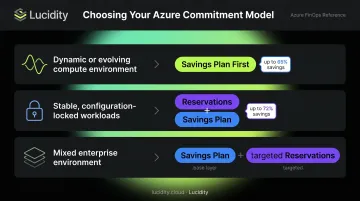
Practical decision framework:
| Scenario | Recommended Model |
|---|---|
| Dynamic or evolving compute environment | Savings Plan first |
| Stable, configuration-locked workloads | Reservations on top of Savings Plan |
| Mixed environment (typical enterprise) | Savings Plan as base layer + targeted Reservations |
Warning Signs Your Azure Reservations Need Attention
Utilization Dropping Below Acceptable Thresholds
Azure Cost Management and the Reservations Summaries API both surface utilization metrics. A reservation running consistently below 80–85% utilization warrants investigation — though the right threshold depends on resource type and your cost tolerance.
Azure Advisor surfaces underutilization signals and recommends corrective actions: scope changes, enabling instance size flexibility, or exchanges. You can also configure utilization alerts in Azure Cost Management to catch drift before it accumulates.
Scope or Workload Mismatch
Scope mismatch is often invisible until someone looks for it. Symptoms include:
- The reservation shows as active, but matching usage is unusually low
- Expected discount savings aren't appearing on target subscriptions
- Reservation utilization fell sharply after a team reorganization or subscription transfer
This pattern is common after subscription reassignments, when workloads migrate to different resource groups, or when a team splits and one half takes their workloads to a new subscription that's outside the reservation's original scope.
Approaching Renewals Without a Usage Review
Microsoft enables auto-renewal by default when a reservation is purchased. Before the next renewal cycle catches you off guard, understand how it works:
- Renewal purchases a new reservation when the existing one expires — it doesn't extend the original
- You can disable auto-renewal up to 48 hours before expiry
- Renewal notification emails go out 30 days before expiration
Auto-renewal isn't the issue — leaving it unchecked is. FinOps Foundation renewal guidance recommends reviewing the past 60–90 days of usage history before any renewal decision. A commitment that no longer reflects actual workload patterns locks you into another 1–3 years of misaligned spend — without a single alert to warn you.
Azure Reservation Management Best Practices
Rightsize Before You Commit
Buying reservations against unoptimized infrastructure locks in today's inefficiency for the next 1–3 years. The sequence matters:
- Remove idle resources — unattached disks, stopped VMs, orphaned storage
- Rightsize active workloads — VMs to actual CPU/memory patterns, disks to actual I/O
- Stabilize the architecture — confirm the configuration won't change in the near term
- Purchase reservations anchored to the proven baseline
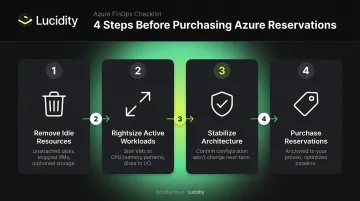
For storage, this sequence is especially important. Lucidity's AutoScaler continuously expands and shrinks Azure managed disk volumes based on actual utilization — so when you do commit to Azure Disk Storage reservations, the reserved capacity reflects genuine usage rather than over-provisioned headroom.
Commit to the Durable Baseline, Not Peak Demand
Microsoft recommends basing reservation quantities on consistent base usage — not projected peaks or seasonal spikes. Practical rules to follow:
- Anchor quantities to the last 30–60 days of stable, observed usage
- Buy smaller amounts more frequently rather than large, infrequent bets
- Treat each purchase as a review point, not a set-and-forget decision
Layer Savings Plans First, Then Reservations
For most organizations:
- Use Savings Plans to cover dynamic or uncertain compute — the flexible discounts absorb workload variability
- Layer Reservations on top only for the stable, configuration-locked subset where maximizing savings is the priority
- Hold off on heavy Reservation commitments for environments still in flux
Assign Clear Ownership
Reservations sit at the intersection of forecasting, infrastructure decisions, and billing. Without named owners, commitments drift. Define responsibility for:
- Baseline usage forecasting
- Purchase and renewal decisions
- Scope reviews when subscriptions change
- Utilization monitoring and alerting
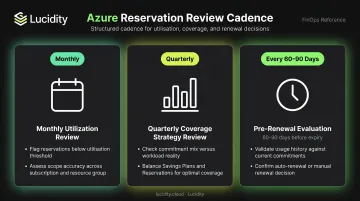
Build a Structured Review Cadence
| Review Type | Frequency | What to Check |
|---|---|---|
| Utilization review | Monthly | Flag reservations consistently below threshold; assess scope accuracy |
| Coverage strategy review | Quarterly | Does commitment mix still reflect workload reality? Are Savings Plans and Reservations balanced correctly? |
| Pre-renewal evaluation | 60–90 days before expiry | Validate last 60–90 days of usage; confirm auto-renewal or manual renewal is the right call |
Automating Azure Reservation Management with APIs
Azure exposes a full suite of REST APIs covering the reservation lifecycle — from identifying purchase candidates through monitoring and operational changes.
Core APIs for the Reservation Lifecycle
| API | Endpoint Pattern | Use Case |
|---|---|---|
| Reservation Recommendations | GET .../Microsoft.Consumption/reservationRecommendations |
Identifies purchase candidates using 7, 30, or 60-day usage lookbacks |
| Reservation Order Purchase | PUT .../Microsoft.Capacity/reservationOrders/{orderId} |
Programmatic purchasing with configurable term, scope, quantity, instance flexibility |
| Reservations Summaries | GET .../Microsoft.Consumption/reservationSummaries |
Daily or monthly utilization monitoring by reservation order |
| Reservation Update | PATCH .../Microsoft.Capacity/reservationOrders/{orderId}/reservations/{id} |
Scope changes and attribute updates |
| Reservation Split | POST .../Microsoft.Capacity/reservationOrders/{orderId}/split |
Divide a reservation across subscriptions as team structures change |
| Reservation Merge | POST .../Microsoft.Capacity/reservationOrders/{orderId}/merge |
Consolidate reservations after workload consolidation |
| Consumption Usage Details | GET .../{scope}/providers/Microsoft.Consumption/usageDetails |
Analyze baseline usage to identify reservation candidates before purchasing |
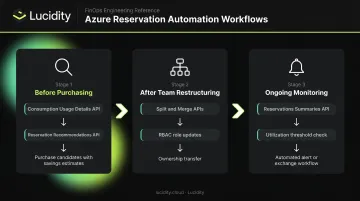
Practical Automation Workflows
Before purchasing: Use the Consumption Usage Details API to identify consistent baseline usage over 30–60 days. Feed this into the Reservation Recommendations API (which analyzes 7, 30, and 60-day patterns) to generate purchase candidates with estimated savings figures.
After team restructuring: Use the Split and Merge APIs to reassign reservation portions without canceling and repurchasing. Combine with RBAC role assignments via REST, PowerShell, or CLI to update access as ownership transfers. Note that reservations are only supported on Enterprise Agreement, Pay-As-You-Go, and Microsoft Customer Agreement subscriptions.
Ongoing monitoring: Schedule Reservations Summaries API calls to track daily utilization. When a reservation drops below your defined threshold, trigger an automated alert or workflow to investigate scope, instance flexibility settings, or exchange eligibility.
Azure Advisor Integration: Useful but Imperfect
Azure Advisor evaluates hourly usage over 30 days and generates reservation purchase recommendations with estimated savings. It works well for single-subscription views, but has real limitations teams should know before relying on it:
- Recommendations aren't generated for resources that shut down regularly
- Advisor provides single-subscription scope recommendations by default (use the Cost Management portal for billing-scope-wide views)
- Shared-scope recommendations can take up to 5 days to disappear after a purchase, so don't double-buy based on stale Advisor data
Frequently Asked Questions
What is the difference between Azure Reserved Instances and Azure Savings Plans?
Reserved Instances commit to a specific resource configuration (VM size, region, service) for maximum savings of up to 72%. Savings Plans commit to a fixed hourly spend that applies flexibly across eligible compute services for up to 65% savings. Reservations favor stable, predictable workloads; Savings Plans favor flexibility when infrastructure configurations change.
How do Azure Reservation discounts apply to running resources?
Azure automatically matches reservation attributes (resource type, size, region, scope) to running usage each hour and applies the discounted rate. No workload changes are needed. Unused reserved hours in a given hour are forfeited and cannot carry forward to the next billing cycle.
Can I cancel or exchange an Azure Reservation before it expires?
Exchanges are allowed at any time at no penalty, provided the replacement reservation's total commitment equals or exceeds the remaining value of the original. Cancellations yield a prorated refund; Microsoft currently waives early termination fees but may charge up to 12% in the future. Cancellations are capped at $50,000 per billing scope in a 12-month rolling window.
How can I tell if my Azure Reservations are underutilized?
Azure Cost Management's reservation utilization reports and the Reservations Summaries API are the primary tools. Azure Advisor surfaces underutilization alerts with recommended corrective actions (scope changes, instance flexibility adjustments, or exchanges) and lets you configure utilization threshold alerts directly within Cost Management.
What resources are eligible for Azure Disk Storage reservations?
Azure Disk Storage reservations apply to Premium SSD managed disks of P30 size or larger (through P80). Unmanaged disks, disk snapshots, Ultra Disks, and smaller Premium SSD tiers are ineligible. The reservation covers storage capacity costs only.
How do I automate Azure Reservation purchases using APIs?
Use the Reservation Recommendations API to identify purchase candidates based on usage patterns, then execute purchases via the following endpoint:
PUT https://management.azure.com/providers/Microsoft.Capacity/reservationOrders/{reservationOrderId}?api-version=2022-11-01
Specify SKU, location, term, quantity, scope, and instance flexibility settings in the request body.