Introduction
Azure storage pricing trips up even experienced cloud teams. The complexity isn't just the per-GB rate — it's the combination of storage types, access tiers, redundancy options, regional variation, operation charges, and egress fees that each appear as separate line items on your bill.
That gap between expectation and reality hits teams in two predictable ways. A team that budgets only for storage capacity gets a shock when egress and transaction costs arrive. A team that provisions Managed Disks for temporary workloads keeps paying for those disks long after the VMs are gone.
This guide breaks down what Azure charges for each storage type, walks through the factors that move costs up or down, and provides worked examples you can use to build a realistic budget — including the hidden costs that most teams discover the hard way.
Key Takeaways
- Azure storage costs range from $0.00099/GB/month (Archive tier, LRS) to $135+/month for a single Premium SSD Managed Disk
- Four factors drive most of your bill: storage tier, redundancy level, transaction operations, and data egress
- Pay-as-you-go suits variable workloads; reserved capacity is better for predictable, steady-state usage
- Watch for hidden costs: egress fees, early deletion penalties, transaction charges, and idle Managed Disks billing after VM deletion
Azure Storage Pricing Overview: What Are You Actually Paying For?
Azure storage billing has four separate layers, and each one shows up as its own charge:
- Data at rest — the per-GB/month cost to store data
- Operations — per-10,000-request charges for reads, writes, lists, and deletes
- Data retrieval — additional per-GB fees when reading from colder tiers (Cool, Cold, Archive)
- Data egress — per-GB charges for data leaving an Azure region
Missing any of these leads to underbudgeting (forgetting egress and operations) or overprovisioning (paying for capacity that never gets used). Accurate cost modeling before you provision prevents both.
Pricing by Storage Type: Quick Reference
All prices below are East US retail/pay-as-you-go rates as of June 2026, from the Azure Retail Prices API.
| Storage Type | Starting Price | Unit | Primary Use Case |
|---|---|---|---|
| Azure Blob Storage (Hot LRS) | $0.0208 | per GB/month | Unstructured data, object storage |
| Azure Files (Hot LRS) | $0.0287 | per GB/month | Managed SMB/NFS file shares |
| Azure Table Storage (Standard LRS) | $0.045 | per GB/month | NoSQL key-value storage |
| Azure Queue Storage (Standard LRS) | $0.045 | per GB/month | Async message queuing |
| Azure Managed Disks (Standard HDD S4, LRS) | $1.536 | per disk/month | Block storage for Azure VMs |
Storage Tiers Within Blob Storage
Blob Storage offers four access tiers, each trading storage cost against retrieval cost. The colder the tier, the cheaper the storage — but the more expensive and slower the access.
| Tier | Storage Cost (LRS) | Retrieval Cost | Min. Retention |
|---|---|---|---|
| Hot | $0.0208/GB/month | None | None |
| Cool | $0.0152/GB/month | $0.01/GB | 30 days |
| Cold | $0.0036/GB/month | $0.03/GB | 90 days |
| Archive | $0.00099/GB/month | $0.02/GB (standard) | 180 days |
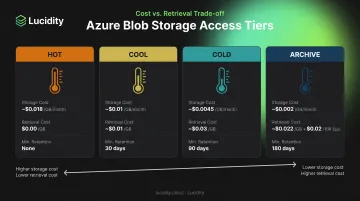
Early deletion matters. Moving a blob out of Cool, Cold, or Archive before its minimum retention period triggers a prorated charge for the remaining days. Per Microsoft Learn, deleting a Cool-tier blob after 21 days incurs a charge equivalent to 9 days of storage. Lifecycle management policies automate tier transitions to prevent these penalties.
Key Factors That Drive Your Azure Storage Bill
Four variables determine what you'll actually pay for Azure storage: redundancy level, geographic region, transaction volume, and egress. Getting any one of these wrong — especially tier-to-access-pattern mismatches — can turn a predictable bill into an unpleasant surprise.
Redundancy Level
Every Azure storage account replicates data for durability — and each step up in redundancy increases the per-GB cost. The four options for Blob Hot tier in East US:
| Redundancy | Price (Hot tier) | Premium Over LRS | How It Works |
|---|---|---|---|
| LRS | $0.0208/GB/month | — | 3 copies within one datacenter |
| ZRS | $0.0260/GB/month | +25% | 3 copies across availability zones |
| GRS | $0.0458/GB/month | +120% | LRS + async replication to secondary region |
| GZRS | $0.0468/GB/month | +125% | ZRS + async replication to secondary region |
The jump from LRS to GRS more than doubles your storage cost. For workloads where cross-region disaster recovery is genuinely required, that premium is justified. Dev/test environments and non-critical data rarely need anything beyond LRS.
Geographic Region
Azure storage prices vary by region. Current Azure pricing lists East US Hot LRS at $0.0208/GB/month, while West Europe comes in at $0.0196/GB/month and Southeast Asia at $0.0200/GB/month — both slightly cheaper for this tier. A few practical considerations for multi-region deployments:
- Pricing differences of 5-10% across regions add up quickly at petabyte scale
- Choosing a region closer to end users can reduce egress costs, partially offsetting higher per-GB rates
- Always verify current prices on the Azure pricing calculator before finalizing architecture decisions — rates change
Data Operations and Transactions
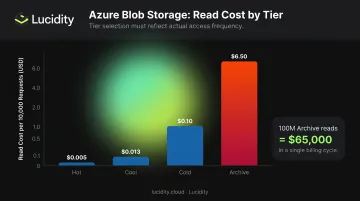
Every API call against your storage is billed separately from capacity. Write and read costs scale with tier:
| Tier | Write Operations | Read Operations |
|---|---|---|
| Hot | $0.05/10K requests | $0.005/10K requests |
| Cool | $0.10/10K requests | $0.013/10K requests |
| Cold | $0.18/10K requests | $0.10/10K requests |
| Archive | $0.10/10K requests | $6.50/10K requests* |
*Archive read operations are extremely expensive. Archive is for data you almost never access.
A workload generating 100 million read operations per month against Archive tier would cost $65,000 in reads alone — more than the storage itself at most scales. That number climbs fast. Tier selection needs to reflect real access frequency, not just storage economics.
Data Egress
Egress — data leaving an Azure region — is charged per GB. Ingress is free. East US outbound rates:
- First 100 GB/month: free
- 100 GB – 10 TB: $0.08/GB
- 10 TB – 50 TB: $0.065/GB
- 50 TB – 150 TB: $0.06/GB
- Above 150 TB: $0.04/GB
Workloads that regularly serve data externally or replicate across Azure regions will see egress become a material cost. A workload pushing 20 TB outbound monthly, for example, pays roughly $1,350 in egress alone — before any storage or transaction charges.
Azure Storage Cost Examples by Type
Abstract pricing tables only tell part of the story. The examples below show how costs accumulate across common workloads. Verify all numbers against the Azure pricing calculator before publishing or using in a budget.
Azure Blob Storage: 50 TB Hot LRS
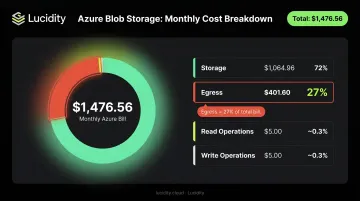
Scenario: 50 TiB stored in Hot tier with LRS, 10 million read operations and 1 million write operations per month, 5 TiB data egress.
| Component | Calculation | Cost |
|---|---|---|
| Storage (51,200 GB) | 51,200 × $0.0208 | $1,064.96 |
| Reads (10M requests) | 1,000 × $0.005 | $5.00 |
| Writes (1M requests) | 100 × $0.05 | $5.00 |
| Egress (5,120 GB − 100 free GB) | 5,020 × $0.08 | $401.60 |
| Monthly Total | $1,476.56 |
Egress is 27% of this bill despite representing a fraction of the total data stored. Ignoring egress during budgeting is the single fastest way to blow a storage estimate.
Azure Managed Disks: P30 vs. S30
Managed Disk pricing is based on disk type and provisioned size — not actual usage. Current East US prices:
| Disk | Type | Size | Monthly Price |
|---|---|---|---|
| P30 | Premium SSD | 1,024 GiB | $135.17/month |
| S30 | Standard HDD | 1,024 GiB | $40.96/month |
The P30 costs 3.3× more than the S30. For workloads that don't require premium IOPS performance, running on Premium SSD is expensive. The challenge: most teams don't regularly audit whether their workloads actually need the tier they're provisioned on.
Azure Files: 5 TiB Hot LRS
Scenario: 5 TiB file share under the pay-as-you-go Hot tier, with 1 million write operations.
| Component | Calculation | Cost |
|---|---|---|
| Storage (5,120 GiB) | 5,120 × $0.0287 | $146.94 |
| Writes (1M requests) | 100 × $0.065 | $6.50 |
| Approximate Monthly Total | ~$153.44 |
Azure Files also offers provisioned capacity for Premium SSD shares, billed per provisioned GiB regardless of actual usage. If you provision generously on a slow-fill workload, you'll pay for capacity you're not using from day one.
Azure Tables and Queue Storage: 500 GB LRS
Unlike Blob and Files, Tables and Queue Storage follow a simpler model: flat per-GB storage plus per-10,000 operation fees.
Table Storage scenario: 500 GB with LRS, 50 million operations per month.
| Component | Calculation | Cost |
|---|---|---|
| Storage | 500 × $0.045 | $22.50 |
| Operations (50M requests) | 5,000 × $0.00036 | $1.80 |
| Monthly Total | $24.30 |
Queue Storage follows the same pricing structure. At this scale, Tables and Queues are among the cheapest Azure storage options available.
Pay-as-You-Go vs. Reserved Capacity: Which Makes Sense?
Azure offers reserved capacity for Blob Storage and Azure Files — you commit to a fixed amount (in 100 TB or 1 PB increments) for 1 or 3 years in exchange for a lower per-GB rate. Azure Disk Storage also supports reservations for eligible disk types.
The right choice comes down to predictability:
- Pay-as-you-go: Variable or unpredictable workloads, early-stage products, seasonal data, workloads with significant volume variability
- Reserved capacity: Steady-state workloads where storage volumes are predictable over 12–36 months — data lakes, backup repositories, compliance archives
To evaluate the break-even point, use the Microsoft Learn methodology: divide the monthly reserved cost by the pay-as-you-go per-GB rate to find the GB threshold at which reserved becomes cheaper. If your actual usage consistently stays above that threshold, reserve. If it fluctuates below it, don't.
Both models carry real financial risk at scale:
- Reservations: You commit to capacity you may not use — wasted spend if volumes shrink
- Pay-as-you-go: You pay a per-GB premium on every gigabyte that a reservation would have covered cheaper
Pull 3–6 months of actual usage data before committing to either path.
Hidden Costs Most Teams Overlook on Their Azure Storage Bill
Early Deletion Penalties
Moving a blob to a colder tier and then retrieving or deleting it before the minimum retention period triggers a prorated early deletion charge. At scale — particularly with automated processes that move data between tiers — these charges compound quickly. Lifecycle management policies solve this by automating transitions and preventing premature deletions, but they require upfront configuration.
Idle and Unattached Managed Disks
Managed Disks bill monthly whether or not they're attached to a running VM. Teams that spin up VMs for testing, migrations, or temporary workloads and then delete those VMs without deleting the associated disks will accumulate persistent charges for zero utility. An S30 disk at $40.96/month sitting idle for 12 months costs nearly $500 for nothing.
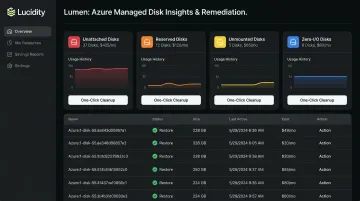
What makes this worse: these disks rarely surface in Azure's native cost management views. Lucidity's Lumen addresses this directly — identifying and prioritizing four idle disk types across Azure environments: unattached, reserved, unmounted, and zero-I/O.
For each idle disk, Lumen:
- Surfaces disks that don't appear in native cloud dashboards
- Shows how long each disk has been idle and its usage history
- Enables one-click cleanup without scripts or manual audits
Together, these four categories can account for up to 70% of unused block storage spend.
Additional Blob Feature Costs
Enabling specific Blob Storage features adds incremental costs that compound at scale:
| Feature | Price |
|---|---|
| SFTP access | $0.30/hour |
| Encryption Scopes (Hot LRS named scopes) | $1.00/month per scope |
| Blob Index Tags | $0.03 per 10,000 tags |
| Change Feed | ~$0.01 per 10,000 changes (verify in current pricing UI) |
A storage account with SFTP access enabled continuously racks up $216/month in feature charges alone — before a single GB is stored.
Conclusion
Azure storage pricing isn't difficult to understand once you see the full structure, but that structure has more layers than most teams account for when building initial budgets. The per-GB storage cost is the starting point, not the total cost.
These charges stack on top of that baseline:
- Operations (read/write transactions)
- Egress and data transfer
- Redundancy tier selection
- Early deletion and retention penalties
- Idle or unattached disks
- Optional features like snapshots and advanced threat protection
Several of these are invisible until you look for them.
The teams that manage Azure storage costs well do two things consistently: they match configuration to actual workload requirements (right tier, right redundancy, right disk type), and they maintain ongoing visibility into what's actually being used versus what's provisioned. Provisioned capacity that sits idle is the quietest budget drain in cloud infrastructure — and the hardest to surface without dedicated observability tooling. Tools like Lucidity's Lumen identify idle and unattached disks across your Azure environment, so waste doesn't stay hidden in your monthly bill.
Frequently Asked Questions
How much does Azure storage cost per TB?
Costs vary by storage type and tier. Blob Storage in the Hot tier runs approximately $20–$22 per TB/month under pay-as-you-go (East US LRS), while Archive tier can be as low as ~$1 per TB/month. Check the Azure Blob Storage pricing page for current rates in your region.
How much does Azure storage disk cost?
Azure Managed Disk pricing depends on disk type and provisioned size. A Standard HDD S10 (128 GiB) runs $5.89/month, while a Premium SSD P30 (1,024 GiB) runs $135.17/month in East US. See the Azure Managed Disks pricing page for a full breakdown by disk tier and size.
What is the cheapest Azure storage option?
Archive tier Blob Storage with LRS redundancy — at $0.00099/GB/month — is the lowest-cost option for data at rest. The catch: retrieval is expensive ($0.02–$0.10/GB) and rehydration takes up to 15 hours. It's only practical for compliance data or backups that are rarely accessed.
How do Azure storage tiers affect pricing?
It's a trade-off: hotter tiers cost more per GB stored but less to access; colder tiers cost less per GB but charge significantly more for retrieval and transactions. Choosing the right tier means knowing how frequently your data is actually accessed — not just how it's classified.
Does Azure charge for data egress?
Yes. Transferring data out of an Azure region costs $0.08/GB for the first 10 TB (after a free 100 GB/month). Ingress is free. For workloads that regularly serve data externally or replicate across regions, egress becomes a significant cost driver.
What is the difference between Azure Blob Storage and Azure Managed Disks pricing?
Blob Storage is object storage billed per GB of data actually stored across your chosen tier. Managed Disks are block storage volumes billed by provisioned disk size — you pay for the full capacity regardless of actual usage, which means over-provisioned disks generate waste that Blob Storage billing doesn't.