Introduction
Enterprise cloud storage spending is on track to more than double — from $57B in 2023 to $128B by 2028, according to Omdia. Alongside that growth, Lucidity estimates $21.5 billion in wasted cloud block storage spend by 2028 — driven not by Azure pricing itself, but by how organizations provision, manage, and retire storage.
That waste has a direct cost inside your organization. Engineering teams burn 100+ hours on manual provisioning tasks. Finance teams absorb unpredictable monthly bills. DevOps teams face a persistent tension: over-provision for safety and waste money, or provision tightly and risk downtime.
Azure storage isn't inherently expensive — it becomes expensive through poor decisions and insufficient governance. Across 600+ assessments analyzing 100+ petabytes, Lucidity has found that the average enterprise uses only 30% of the block storage it pays for.
Here's what's driving that gap — and how to close it.
Key Takeaways
- Azure storage costs accumulate quietly across idle disks, wrong access tiers, over-redundancy, and orphaned resources
- Top cost drivers: over-provisioned disks, Hot-tier data that's rarely accessed, mismatched redundancy, and unmonitored egress charges
- Cost reduction operates at three levels: pre-provisioning decisions, active management practices, and workload context
- Manual audits don't scale — automation and continuous visibility are what make savings stick
- Lifecycle policies, idle disk cleanup, reserved capacity, and right-sized redundancy reduce Azure storage spend without sacrificing performance
How Azure Storage Costs Typically Build Up
Azure storage costs don't arrive as a single line item. They accumulate across multiple billing meters simultaneously, each running independently and compounding over time.
Microsoft's billing structure for Blob Storage covers volume of data stored, quantity and type of operations (reads, writes, deletes), selected redundancy option, data retrieval fees, and egress. Managed Disk costs layer on additional charges based on provisioned tier and size.
Each of those meters runs whether the underlying workload is active or not — which is where costs start silently compounding.
The Gradual Accumulation Problem
Most cost growth stays invisible until scale or an audit forces the issue:
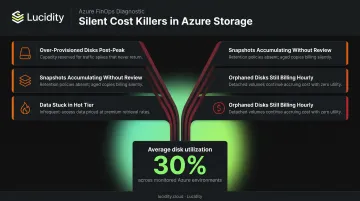
- Storage provisioned for a peak workload stays provisioned after demand drops
- Snapshots and disk versions accumulate without active review
- Data never transitions out of Hot tier because no lifecycle policy exists
- Decommissioned workloads leave disks attached to nothing — still billing hourly
When no team owns cleanup after a workload is decommissioned, these charges persist for months or years undetected. Across Lucidity's assessment data spanning 600+ enterprise environments, the average disk utilization sits at just 30% — meaning organizations are carrying roughly **three times the block storage spend** they actually need.
Key Cost Drivers for Azure Storage
Understanding where costs originate shapes which strategies to apply. Four drivers account for the majority of Azure storage waste.
Access Tier Misalignment
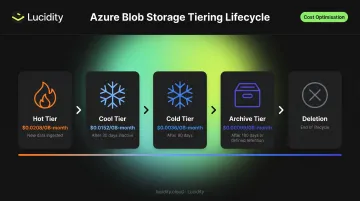
Data defaults to Hot tier at creation and stays there unless a lifecycle policy says otherwise. The cost gap is substantial — Azure Blob Storage LRS pricing in East US ranges from $0.0208/GB-month for Hot down to $0.00099/GB-month for Archive, roughly a 21x difference. Yet most organizations never move data between tiers without an explicit policy in place.
The trade-off matters: Cold and Archive tiers have minimum storage durations (90 and 180 days respectively) and higher retrieval costs, so tier selection needs to account for access patterns — not just capacity pricing.
Storage Over-Provisioning
Managed Disks are billed to the closest tier accommodating disk size, charged hourly. Unused provisioned capacity remains billable until resized or deleted. Unlike object storage, block storage can't be downsized without downtime risk — so teams rarely reclaim headroom once provisioned.
A disk provisioned for peak load at 512 GiB but running at 150 GiB of actual utilization pays for the full provisioned tier every hour it exists — that gap compounds silently across every over-sized disk in the environment.
Redundancy Over-Selection
Redundancy level multiplies every gigabyte stored:
| Redundancy | Hot LRS | Hot GRS | Hot RA-GRS |
|---|---|---|---|
| Cost/GB-month | $0.0208 | $0.0458 | $0.0589 |
Applying GRS or RA-GRS to non-critical, internal, or easily-recreatable workloads — where LRS would suffice — is a common and expensive default. The premium is justified for production workloads requiring cross-region disaster recovery; everywhere else, it's unnecessary spend.
Egress and Transaction Charges
These are separate from storage capacity and grow with usage intensity. Key rates:
- Intra-continental transfers between North American or European regions: $0.02/GB
- Internet egress beyond the free 100 GB/month tier: $0.087/GB
- Archive read operations: $5.00 per 10,000 operations (vs. $0.004 for Hot)
High-frequency read/write patterns, redundant metadata lookups, and unoptimized API call structures each compound these charges — and without tagging or cost allocation policies, the bills arrive with no clear owner.
Cost-Reduction Strategies for Azure Storage
No single strategy fixes everything. The right approach depends on where the cost originates — whether from upfront decisions, active management gaps, or the surrounding workload environment.
Strategies That Change Decisions
These approaches reduce cost by altering choices made before or during provisioning.
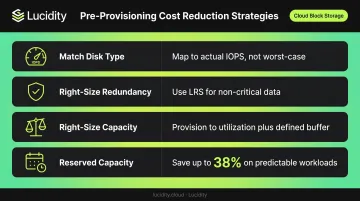
Match disk type to actual workload requirements. Defaulting to Premium SSD for workloads that only need Standard SSD or Standard HDD performance is common and costly. Before provisioning, map disk selection to actual IOPS and latency requirements — not worst-case assumptions.
Lucidity's Lumen product continuously scores existing disks against actual usage (IOPS, throughput, latency) and surfaces tier-change recommendations backed by usage history going back 30+ days, including one-click execution to move volumes from Premium SSD to Standard SSD without a maintenance window.
Select redundancy only as critical as the data warrants. Audit existing storage accounts to identify where GRS or RA-GRS is applied to workloads that don't require cross-region disaster recovery. LRS is appropriate for non-critical data, non-production environments, and anything that can be recreated from another source. Downgrading selectively produces immediate per-GB savings.
Right-size capacity from the start. Provisioning at worst-case projections without a downsizing plan creates permanent cost drag. Establish provisioning standards tied to current utilization plus a defined headroom buffer — not theoretical peaks.
Commit to reserved capacity for predictable workloads. Azure Blob Storage reserved capacity is available in 100 TB and 1 PB increments for 1- or 3-year terms, and can save up to 38% compared to pay-as-you-go rates. Premium SSD disk reservations reduce cost further by committing to one year of capacity. Reserved capacity is appropriate for steady, foreseeable storage growth — not volatile or experimental workloads where commitments become liabilities.
Strategies That Change How Storage Is Managed
These approaches reduce cost by improving control, visibility, and consistency during active use.
Identify and eliminate idle storage systematically. Unattached disks, orphaned snapshots, unmounted volumes, and zero-I/O disks all continue billing after the workloads they served are decommissioned or resized. Microsoft's own guidance recommends snapshotting and deleting unattached disks — but native Azure tools only detect attachment state via the ManagedBy property, missing the other three idle disk categories entirely.
Lucidity Lumen identifies all four idle disk types — unattached, reserved, unmounted, and zero-I/O — surfacing waste that doesn't appear in Azure Advisor or Cost Management dashboards. Each flagged disk includes age, attachment state, and usage history, with one-click cleanup that's auditable and reversible.
Across enterprise environments, these four idle disk categories together can account for up to 70% of unused block storage spend.
Implement Blob Storage lifecycle management policies. Azure's lifecycle management uses JSON rules based on creation time, last modified time, and last accessed time to automatically transition blobs between tiers or delete them. A basic policy structure:
- Move to Cool after 30 days of inactivity
- Move to Archive after 90–180 days of inactivity
- Delete at end of defined retention period
Note: policy changes can take up to 24 hours to start, and tier transitions trigger standard Set Blob Tier API charges. The savings from avoiding months of Hot-tier storage far outweigh these operational costs in most environments.
Two operational practices close the loop on ongoing visibility. First, tag every resource by project, team, environment, and application — untagged storage is the last to get cleaned up because no team claims ownership, and tagging enables chargeback models and faster orphan identification. Second, use Azure Cost Management proactively: set budget alerts, review cost analysis dashboards regularly, and schedule recurring utilization reviews. Reactive cost management misses savings windows that compound over weeks and months.
Strategies That Change the Context Around Storage
These approaches address external factors: where data lives relative to compute, how operations are executed, and how Azure's newest tiering capabilities reduce manual overhead.
Co-locate storage and compute in the same Azure region. Cross-region data transfers incur egress fees that accumulate quickly at scale. The fix is architectural: ensure applications and the storage they access reside in the same region. For globally distributed content, use Azure CDN (Zone 1 pricing starts at $0.081/GB for the first 10 TB) instead of direct cross-region egress from a single storage account.
Reduce transaction volume through batching and caching. High-frequency read/write patterns, redundant metadata lookups, and unoptimized API calls each generate per-operation charges that compound significantly at scale. Batching write operations, caching frequently accessed objects, and reviewing API call patterns in analytics workloads can cut transaction costs without changing storage configuration.
Evaluate Azure Smart Tier for unpredictable access patterns. Smart Tier became generally available on April 14, 2026 for both Azure Blob Storage and Azure Data Lake Storage. It automatically moves objects between Hot, Cool, and Cold tiers based on usage — new data starts in Hot, moves to Cool after 30 days without access, and to Cold after 90 days. Smart Tier is well suited for analytics pipelines, logs, and telemetry data where access frequency changes over time and manual lifecycle rules would require constant adjustment. Note: Archive is not part of the Smart Tier transition set.
Conclusion
Azure storage costs grow from predictable sources — decisions made without matching workload requirements, resources left running after workloads change, and environmental factors like cross-region egress that accumulate silently. Reducing them requires identifying which category applies before deciding where to act.
Storage cost optimization isn't a one-time project. As workloads evolve, data volumes grow, and team ownership shifts, costs re-accumulate without continuous visibility and governance in place. Durable savings come from embedding optimization into how storage is provisioned, monitored, and retired — not surfaced reactively during a quarterly cleanup sprint.
A practical starting point for each of those areas:
- Provision: Match disk type and size to actual workload requirements; avoid over-provisioning for headroom
- Monitor: Instrument storage utilization continuously — tools like Lucidity's Lumen surface idle disks, tiering gaps, and anomalies in real time
- Retire: Build decommissioning triggers into your workflows so unused volumes don't persist after workloads change
- Govern: Use Azure Policy and tagging standards to prevent cost drift across teams and subscriptions
Frequently Asked Questions
What is cost optimization in Azure?
Azure cost optimization is the ongoing practice of aligning cloud resource usage — storage, compute, networking — with actual business needs to eliminate waste. For storage specifically, it involves decisions around access tiers, redundancy levels, provisioning size, and idle resource management.
Why is Azure storage so expensive?
Azure storage becomes expensive primarily through management gaps, not the platform itself. Over-provisioned disks, data left in Hot tier regardless of access frequency, orphaned resources, and unmonitored egress and transaction charges accumulate silently over time.
What are the Azure Blob Storage access tiers and which is most cost-effective?
Azure Blob Storage offers Hot ($0.0208/GB-month), Cool ($0.0152/GB-month), Cold ($0.0036/GB-month), and Archive ($0.00099/GB-month) tiers. Archive offers the lowest per-GB cost but carries retrieval latency of up to 15 hours and higher read operation fees — making it appropriate only for compliance or rarely accessed data.
How do I identify and clean up unattached or idle disks in Azure?
Azure Resource Manager can identify unattached disks via the ManagedBy property, but this only catches one idle disk category. Zero-I/O, unmounted, and reserved idle disks require additional analysis. Manual audits work at small scale. Platforms like Lucidity automate detection across all four idle disk types as environments grow.
What is Azure lifecycle management and how does it reduce storage costs?
Azure Blob Storage lifecycle management lets teams define policy rules that automatically transition blobs between access tiers or delete them after specified inactivity periods. This removes manual tier management and prevents paying Hot-tier rates for data that's rarely accessed.
How much can organizations realistically save by optimizing Azure storage?
Lucidity's customer data shows reductions of 50–70% on block storage spend are achievable. Block storage — where over-provisioning and idle disks are most concentrated — tends to yield the highest savings of any optimization category.