Introduction
Enterprise cloud storage spending is projected to more than double from $57B in 2023 to $128B by 2028, driven largely by AI-related data requirements. Yet much of that spend isn't generating value — Harness research found that 21% of enterprise cloud infrastructure spend, roughly $44.5B in 2025, is wasted on underutilized resources.
For Azure AI teams, this waste has a specific shape: training jobs finish, VMs stop, but provisioned disks keep billing. Experiment pipelines create new volumes with every iteration. Model checkpoints, preprocessing artifacts, and inference logs accumulate without any cleanup trigger — the result of dozens of small provisioning choices that compound quietly over time.
This article examines Azure AI workload storage costs through three lenses: provisioning decisions, active management practices, and surrounding architecture. Each represents a distinct source of waste, and identifying which applies to your environment is the first step toward fixing it.
Key Takeaways
- Azure AI storage costs build invisibly: idle disks from finished training jobs, over-provisioned volumes, and artifact sprawl accumulate without triggering alerts
- The biggest cost drivers are often persistent, unmanaged resources — not large files
- Right-sizing storage types and setting retention policies at provisioning prevents waste before it starts
- Lifecycle automation and idle disk identification recover costs from resources already accumulating charges
- Architectural changes like centralized data stores and co-location eliminate structural redundancy that inflates storage TCO
How Storage Costs for Azure AI Workloads Typically Build Up
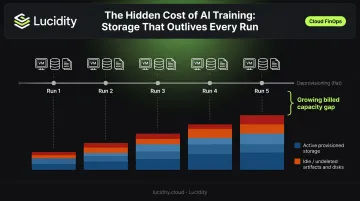
AI workload storage costs accumulate episodically. Each training run adds volumes. Each experiment spawns checkpoints. Each model iteration creates a new artifact store. But deprovisioning almost never keeps pace.
The billing mechanism makes this worse. Azure Managed Disks are billed at full provisioned capacity whether the attached VM is running or stopped. When a VM is deleted, Azure deliberately does not auto-delete attached disks to prevent data loss, which means those disks continue accruing charges until someone explicitly removes them.
That's where the compounding effect catches teams off guard. An AI team running iterative experiments across multiple model versions can generate dozens of persistent disks and terabytes of artifact storage within weeks. No single decision looks reckless. The aggregate bill does.
Why These Costs Stay Hidden
- Unattached disks don't generate performance alerts — they just bill silently
- Azure Cost Management shows spend by resource type, but doesn't automatically flag disks as idle
- Teams reviewing cloud spend tend to focus on compute costs, where the numbers are larger and more visible
- Azure Cost Management doesn't categorize unattached disks as waste by default, so they never appear on a remediation list
Key Storage Cost Drivers for Azure AI Workloads
Three structural patterns drive most Azure AI storage waste.
Over-Provisioning
AI teams provision Managed Disks at peak anticipated size to avoid mid-job interruptions. That's a reasonable instinct, but it means paying for capacity that rarely gets used. Azure bills to the nearest disk tier, so a 200 GiB workload provisioned on a 256 GiB Standard SSD is billed at the E15 tier regardless of actual usage.
Across hundreds of storage assessments covering over 17 petabytes of data, Lucidity has found the average enterprise disk utilization sits around 30% — meaning roughly 70% of provisioned capacity goes unused.
Data Proliferation
Without cleanup policies, AI workloads accumulate data fast. Common sources include:
- Training datasets saved across multiple versions
- Model checkpoints written at every epoch
- Inference logs and preprocessing outputs
- Experiment artifacts retained indefinitely
Large-scale ML checkpointing workloads can reach petabyte scale, and without automated retention enforcement, that data accumulates unchecked.
Storage Type Mismatches
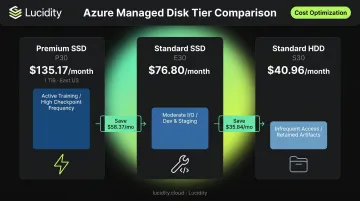
The price gap between storage tiers is substantial — and the wrong choice compounds at scale. In East US, a 1 TiB Premium SSD P30 costs $135.17/month, while the equivalent Standard HDD S30 runs $40.96/month, a difference of $94.21/month per disk. Using premium block storage for infrequently accessed datasets means paying a performance premium for data that doesn't need it.
| Disk Type | 1 TiB Monthly Cost (East US) | Best Fit |
|---|---|---|
| Premium SSD P30 | $135.17 | Active training, high checkpoint frequency |
| Standard SSD E30 | $76.80 | Moderate I/O, dev/staging |
| Standard HDD S30 | $40.96 | Infrequent access, retained artifacts |
Cost-Reduction Strategies for Azure AI Workload Storage
Effective storage cost reduction depends on where in the lifecycle costs are generated. Some savings require changing provisioning decisions before a job starts. Others require active management of running or idle resources. Others require redesigning the environment those workloads run within.
Strategies That Reduce Costs by Changing Decisions
These approaches target the root of over-spending before it occurs.
Right-size Managed Disks from the start. Rather than provisioning maximum anticipated disk size upfront, use Azure Monitor metrics (specifically Data Disk IOPS Consumed Percentage, Bandwidth Consumed Percentage, and Queue Depth) from previous training runs to determine realistic requirements. Plan to expand dynamically if needed rather than statically over-provisioning.
Match storage type to workload phase. Reserve Azure Premium SSD or Ultra Disk for scenarios where IOPS genuinely matter: active training with high checkpoint frequency, latency-sensitive model serving. Use Standard HDD or Standard SSD for dev, staging, and preprocessing environments where throughput requirements are lower and the cost difference is significant.
Define data retention policies before experimentation begins. Establish team-level agreements on how long model checkpoints, experiment logs, and intermediate datasets are retained. Enforcing these at project kickoff prevents the artifact sprawl that compounds storage spend across long-running AI projects.
Evaluate ephemeral OS disks for interruptible training. Azure Spot VMs configured with ephemeral OS disks eliminate persistent disk costs for training jobs that can tolerate interruption. The OS disk is tied to the VM lifecycle and is not billed independently (note: Stop-Deallocate is not supported on ephemeral Spot VMs— deletion is required).
Strategies That Reduce Costs by Changing How Storage Is Managed
These approaches recover cost from existing waste rather than preventing it at provisioning.
Implement Azure Blob Storage lifecycle management. Automated policies can move objects from Hot to Cool tier after a defined period of inactivity, and to Archive tier for long-term retention. The per-GB cost difference is significant:
| Blob Tier | Cost/GB-Month (East US LRS) | Minimum Duration |
|---|---|---|
| Hot | $0.0208 | None |
| Cool | $0.0150 | 30 days |
| Cold | $0.0036 | 90 days |
| Archive | $0.00099 | 180 days |
A dataset sitting in Hot tier that hasn't been accessed in 90 days costs roughly 21x more than Archive tier. Lifecycle policies automate the transition without manual intervention.
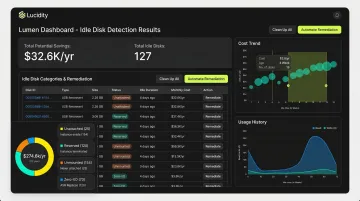
Identify and remove idle disks from completed training jobs. Azure environments routinely accumulate unattached volumes, reserved disks, and zero-I/O disks that continue billing at full provisioned capacity. Azure portal and CLI scripts can surface unattached disks, but they require periodic manual effort and don't cover all idle disk categories.
Lucidity's Lumen product takes a more comprehensive approach. It continuously scans for four distinct idle disk types (unattached, reserved, unmounted, and zero-I/O) that together can represent up to 70% of unused block storage spend — including disks that don't appear in native Azure dashboards or standard Advisor recommendations.
Each identified disk comes with full context: age, attachment state, type, usage history, and cost trends. Teams can act on findings with one-click execution from the dashboard. No scripts, no manual audits, no engineering overhead.
Apply consistent tagging across all storage resources. Without granular tagging by project, experiment, team, and environment, storage cost attribution is opaque. Tagging enables Azure Cost Management to surface which experiments or pipelines are driving disproportionate spend, giving teams the data to act on cost accountability by project or experiment.
Build cleanup into MLOps pipeline teardown stages. Add cleanup steps to CI/CD or MLOps pipeline lifecycle gates so that disks, containers, and artifact stores created for a training run are evaluated for deletion or archival automatically when the job completes. Without pipeline cleanup steps, idle resources quietly accumulate until the next billing cycle.
Strategies That Reduce Costs by Changing the Context Around Storage
In many environments, the surrounding data architecture is the real driver of storage cost growth, not the size or tier of any individual disk. These approaches address structural inefficiencies.
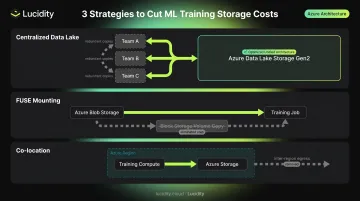
Replace per-experiment storage silos with centralized data stores. When every team or experiment maintains its own copy of training data, storage costs scale with team size rather than actual data growth. Centralizing shared datasets in Azure Data Lake Storage Gen2 eliminates redundant copies while preserving access control by project through role-based access control and ACLs.
Serve training data from object storage via FUSE mounting. Using Azure ML Datastores with ro_mount or rw_mount modes lets jobs read directly from Blob Storage rather than copying data onto block storage volumes for each run. This reduces the need for large persistent Managed Disks and keeps training data costs within Blob Storage's lower per-GB pricing.
Co-locate compute and storage within the same region. Azure charges $0.02/GB for inter-region transfers within North America, with higher rates for other continents. AI pipelines that move training data, model weights, or inference outputs between regions accumulate egress fees that inflate the effective cost of storage well beyond the per-GB storage rate. Co-location eliminates this entirely.
Reduce parallel dev and staging environments. AI teams often maintain multiple near-identical environments for different model versions or experiments, each with its own persistent volumes. Consider rationalizing these by:
- Sharing a single staging environment across model versions where feasible
- Using ephemeral storage for non-production runs instead of persistent volumes
- Limiting full environment clones to production-bound experiments only
This reduces baseline storage spend without affecting production workloads.
Conclusion
Azure AI workload storage costs don't primarily result from storage being expensive. They result from provisioning decisions that outpace actual needs, management practices that allow idle resources to persist, and architectural patterns that create structural redundancy. Reducing costs requires identifying which of these is the dominant driver in a given environment — not applying generic cuts across the board.
Cost reduction in this context isn't a one-time project. As AI pipelines evolve, datasets grow, and experiments multiply, the gap between provisioned and utilized storage widens again unless teams maintain active control over three things:
- Visibility into actual utilization across every volume, not just aggregate capacity
- Automation that adjusts allocation as workload patterns shift — without manual intervention
- Regular cleanup of idle disks, orphaned snapshots, and over-provisioned tiers that accumulate between experiment cycles
Tools like Lucidity's Lumen provide the observability layer to surface these gaps in real time, while AutoScaler handles the remediation autonomously — so the discipline becomes infrastructure rather than habit.
Frequently Asked Questions
What types of Azure storage are most commonly used for AI workloads, and how do their costs differ?
Azure AI workloads typically use Managed Disks for active training compute, Blob Storage for datasets and model artifacts, and Azure NetApp Files for high-performance scenarios. Costs vary by tier and access pattern — Managed Disks bill at full provisioned size regardless of actual utilization, while Blob Storage bills on consumed capacity.
Why do Azure AI workload storage costs keep rising even when training jobs are not actively running?
Azure Managed Disks are billed at full provisioned size whether the attached VM is running or stopped. When a VM is deleted, disks are intentionally preserved and continue accruing charges until explicitly deleted — making idle resource accumulation the primary driver of background storage cost growth.
How can I identify orphaned or idle disks left behind by Azure AI training jobs?
Azure Monitor and Azure Cost Management surface unattached disks but require manual effort and miss several idle disk categories. Lucidity's Lumen continuously scans for all four idle disk types — unattached, reserved, unmounted, and zero-I/O — with one-click cleanup and full usage context for each finding.
Is storage tiering alone enough to significantly reduce Azure AI workload storage costs?
Tiering addresses per-GB pricing inefficiency but doesn't resolve over-provisioning, idle disk accumulation, or architectural redundancy. The most impactful savings typically require combining tiering with right-sizing, idle resource cleanup, and governance over data retention — each targeting a different cost driver.
What is the difference between optimizing Azure Blob Storage versus Azure Managed Disks for AI workloads?
Blob Storage optimization focuses on access tier transitions and lifecycle policies. Managed Disk optimization centers on right-sizing provisioned capacity, removing idle volumes, and matching disk type to actual IOPS requirements — each requiring separate tooling and governance approaches.
How does autonomous storage optimization differ from manual right-sizing for Azure AI workloads?
Manual right-sizing requires periodic engineering effort and tends to miss idle resources between review cycles. Lucidity's AutoScaler and Lumen continuously monitor disk utilization, IOPS, throughput, and latency — expanding or shrinking disks in real time and surfacing actionable recommendations for idle disk cleanup without added operational overhead.