Introduction
Storage architecture is one of the least glamorous, most consequential decisions in any AI deployment. AI pipelines impose different demands than traditional enterprise applications: a training job needs to saturate GPU nodes with sequential bulk reads, an inference endpoint demands sub-millisecond random I/O, and a RAG agent requires a continuously refreshed knowledge store. Each phase has its own performance profile — and the wrong storage choice for any one of them creates real operational pain.
Choose the wrong storage and you'll face GPU starvation during training runs, latency spikes that degrade inference quality, or storage bills that balloon with every new model experiment.
According to Gartner's analysis of public cloud storage costs, overprovisioning, poor lifecycle management, and manual controls are the primary drivers of runaway cloud storage spend — a pattern that accelerates sharply with AI workloads.
This guide covers the six best Azure storage options for AI workloads — across training, inference, and RAG pipelines — with a practical framework for matching each service to the right phase of your AI lifecycle.
Key Takeaways
- No single Azure storage service covers the full AI lifecycle — a layered architecture is essential
- Azure Blob Storage is the durable foundation; Azure Managed Lustre is the high-throughput parallel layer for active training
- Azure Managed Disks (Ultra Disk, Premium SSD v2) serve low-latency inference and vector database workloads
- Azure Elastic SAN handles pooled block storage; Azure Container Storage manages Kubernetes-native volumes for AKS-hosted AI
- Average enterprise disk utilization sits around 30% before active optimization — over-provisioning is the most common, and most expensive, mistake
Why Azure Storage Requirements Differ for AI Workloads
Traditional enterprise applications have relatively predictable I/O patterns — steady transaction rates, bounded data growth, consistent latency requirements. AI pipelines don't work that way.
A single AI environment might simultaneously need:
- High sequential throughput to feed GPU nodes during distributed training (storage-starved GPUs are idle GPUs)
- Sub-millisecond random I/O for vector databases and inference-serving backends
- Parallel namespace access so hundreds of training workers can read the same dataset concurrently without contention
- Fresh data availability for RAG agents that query knowledge stores updated by continuous document ingestion pipelines
These four requirements pull in different directions. High throughput favors large sequential block sizes and parallel file systems. Low latency demands NVMe-backed block storage. Parallel access needs a distributed file system, while cold archival economics call for tiered blob storage.
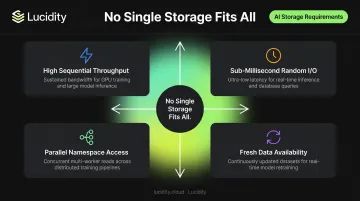
No single Azure service optimizes all four simultaneously.
The practical consequence: teams that default to one storage type for all AI stages either hit I/O bottlenecks during training or overpay for high-performance storage where cold archival tiers would work fine. A layered architecture — one durable foundation paired with purpose-built hot layers — addresses both failure modes, cutting unnecessary spend without sacrificing throughput where it matters.
Best Azure Storage Options for AI Workloads
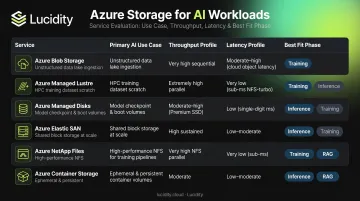
These six options were assessed on criteria directly relevant to AI workloads: throughput, latency profile, scalability, cost structure, integration with Azure AI services, and operational complexity across training, inference, and agent workloads.
Azure Blob Storage
Azure Blob Storage is the durable backbone of the entire AI lifecycle. From raw data ingestion and preprocessing through checkpoint management, model artifact storage, and RAG knowledge stores, Blob handles it all at exabyte scale. Standard storage accounts support up to 5 PiB default capacity, with select regions reaching 60 Gbps ingress, 200 Gbps egress, and 40,000 requests/sec.
What makes Blob particularly well-suited for AI is its flexibility across access patterns. The same storage layer can be accessed as:
- Object storage via SDK/REST for model artifact management
- Filesystem mount via BlobFuse2 for training frameworks that expect POSIX-style access
- Data lake via ADLS Gen2 hierarchical namespace for Spark jobs and analytics pipelines
- RAG knowledge store with Premium Blob's SSD-backed lower-latency retrieval
Lifecycle management rules automatically move data through hot, cool, cold, and archive tiers based on access patterns — keeping frequently accessed training data in hot tier while older model versions automatically move to cheaper tiers.
| Details | |
|---|---|
| Best AI Use Cases | Data ingestion, checkpoint storage, RAG knowledge store, model serving, ADLS Gen2 analytics pipelines |
| Key Performance Specs | Up to 5 PiB capacity; 60 Gbps ingress / 200 Gbps egress in select regions; Premium Blob uses SSDs for lower-latency retrieval |
| Pricing Model | Pay-as-you-go per GB; varies by redundancy (LRS/GRS) and access tier (hot/cool/cold/archive); lifecycle rules automate cost optimization |
Azure Managed Lustre
When training jobs need to saturate GPU nodes without storage becoming the bottleneck, Azure Managed Lustre (AMLFS) is the answer. It's a fully managed parallel file system purpose-built for distributed AI training at terabyte-to-petabyte scale, with current durable SKUs offering 40, 125, 250, and 500 MBps per TiB of throughput.
The AMLFS 20 preview (announced November 2025) pushes this further: a single namespace supporting up to 25 PiB and 512 GBps of total bandwidth, purpose-built for the largest distributed training runs.
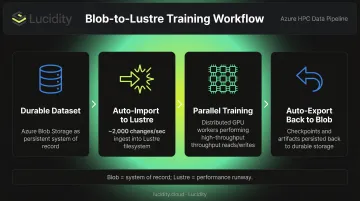
The standard pattern: Blob Storage holds the durable dataset. Before training begins, data stages into Managed Lustre via auto-import (which tracks Blob changes at approximately 2,000 changes/sec). Training workers perform parallel reads and writes directly against Lustre at GPU speed. When the run completes, auto-export copies checkpoints and results back to Blob. Blob remains the system of record; Lustre is the performance-critical hot runway.
| Details | |
|---|---|
| Best AI Use Cases | Large-scale distributed model training, fine-tuning runs requiring parallel I/O, HPC data preprocessing |
| Key Performance Specs | Durable SKUs: 40–500 MBps/TiB; AMLFS 20 preview: 25 PiB namespace, 512 GBps total bandwidth |
| Pricing Model | Provisioned capacity model: $0.103–$0.419/GiB-month depending on SKU |
Azure Managed Disks (Premium SSD v2 and Ultra Disk)
For AI-adjacent workloads that need consistently low latency — vector databases, ML metadata stores, high-frequency inference backends — block storage is the right tool. Azure's two highest-performance managed disk options cover this range:
Ultra Disk reaches 400,000 IOPS and 10,000 MBps per disk, with sub-millisecond average latency. Capacity, IOPS, and throughput are provisioned independently, so teams only pay for the performance dimensions they actually need.
Premium SSD v2 reaches 80,000 IOPS and 2,000 MBps, also with independent provisioning. It carries a lower cost baseline than Ultra Disk for workloads that don't require maximum IOPS. The Premium SSD v2 baseline includes 3,000 IOPS and 125 MBps without additional provisioning charges.
Both disk types now support Instant Access Snapshots (public preview as of Q4 2025), which eliminates restore-time penalties. This is useful for AI experiment reproducibility and fast environment cloning without snapshot hydration delays.
One practical note: block storage for AI is frequently over-provisioned because teams size for peak demand and rarely reclaim unused capacity. Lucidity's internal data from 600+ enterprise assessments shows average disk utilization sitting at roughly 30% before optimization. That means enterprises are provisioning approximately 3x more block storage than they actually use. Tools like Lucidity's AutoScaler autonomously expand and shrink Azure Managed Disk volumes without downtime, keeping utilization closer to 75% and cutting storage costs substantially.
| Details | |
|---|---|
| Best AI Use Cases | Vector databases, high-frequency transactional AI backends, ML metadata stores, low-latency model-serving infrastructure |
| Key Performance Specs | Ultra Disk: 400,000 IOPS, 10,000 MBps, sub-ms latency; Premium SSD v2: 80,000 IOPS, 2,000 MBps, sub-ms latency |
| Pricing Model | Ultra Disk: ~$0.120/GiB-month + IOPS/MBps provisioning; Premium SSD v2: ~$0.081/GiB-month + IOPS above 3K baseline |
Azure Elastic SAN
Azure Elastic SAN provides cloud-native, fully managed SAN-style block storage designed for shared, multi-workload environments. It's a better fit than per-VM managed disks when multiple AI workloads need to share pooled block storage capacity.
Performance scales with base capacity: each base TiB adds 5,000 IOPS and 200 MBps. At high LRS scale, an Elastic SAN can reach 2 million IOPS and 80,000 MBps, enough for large shared training clusters. Volume groups support up to 1,000 volumes each, and volumes range from 1 GiB to 64 TiB.
One important nuance: Elastic SAN's autoscale policy expands additional capacity in 1 TiB increments, but does not autoscale performance. If a workload hits an IOPS ceiling, adding capacity-only units won't resolve it — base TiB provisioning drives performance. Plan base capacity sizing carefully.
The AKS integration via Azure Container Storage makes Elastic SAN a natural choice for Kubernetes-hosted AI inference workloads requiring shared persistent volumes across pods.
| Details | |
|---|---|
| Best AI Use Cases | Multi-workload AI environments, AKS-hosted inference services, shared block storage pools for training clusters |
| Key Performance Specs | 5,000 IOPS + 200 MBps per base TiB; max LRS scale: 2M IOPS, 80,000 MBps; volumes up to 64 TiB |
| Pricing Model | LRS Premium Base Unit: ~$93.18/TiB-month; Capacity Scale Unit: ~$69.89/TiB-month (no additional IOPS/MBps) |
Azure NetApp Files
Azure NetApp Files (ANF) delivers enterprise-grade NFS and SMB file storage with POSIX semantics. It's the right choice for HPC-adjacent AI workloads where shared filesystem access across compute nodes matters more than raw object throughput.
Large volumes support up to 12,800 MiBps throughput performance, with standard large volume capacity up to 2 PiB and cool-access large volumes reaching 7.2 PiB. Service levels (Standard at 16 MiBps/TiB, Premium at 64 MiBps/TiB, Ultra at 128 MiBps/TiB) let teams choose the performance-to-cost ratio that fits their workload.
Cool access and clone capabilities make ANF cost-efficient for AI dev/test environments. Teams can create clones of large datasets for experiment branches without duplicating the full dataset. Cache volumes (available via REST API) bring frequently accessed data closer to compute.
ANF is well-suited for EDA, seismic interpretation, reservoir simulation, and similar computation-heavy HPC workloads that feed AI models. For large-scale distributed deep learning training, Managed Lustre typically delivers better economics and parallel performance.
| Details | |
|---|---|
| Best AI Use Cases | HPC-adjacent AI (EDA, simulation), shared NFS/SMB access for AI pipelines, structured enterprise data feeding AI models |
| Key Performance Specs | Large volumes: 12,800 MiBps throughput; capacity up to 2 PiB standard, 7.2 PiB with cool access |
| Pricing Model | Service level-based capacity pool pricing; Ultra approximately $0.393/GiB-month (varies by region) |
Azure Container Storage
Azure Container Storage (version 2.x.x) is the Kubernetes-native storage management layer for AKS, enabling containerized AI workloads to consume local NVMe and Azure block storage via familiar persistent volume semantics — without custom storage driver configurations.
It supports two primary backends for AI inference workloads:
- Local NVMe: Ultra-low-latency ephemeral storage for inference caching and temporary model state. Performance inherits from the underlying VM's local NVMe specification
- Azure Elastic SAN: Durable, shared block storage with the scale characteristics described above, accessed via iSCSI with PVC semantics
This combination covers the full latency spectrum for AKS-hosted AI: NVMe ephemeral storage for hot inference caching, Elastic SAN for persistent shared volumes across inference pods.
One clarification on pricing: Azure Container Storage charges a fee per provisioned GiB for the orchestration layer in addition to underlying storage costs. It's not purely a pass-through to Elastic SAN or NVMe billing. Verify current rates on the Azure pricing page before estimating deployment costs.
| Details | |
|---|---|
| Best AI Use Cases | Kubernetes-hosted inference APIs, AKS-based model-serving pods, containerized AI pipelines requiring PVC-based storage |
| Key Performance Specs | Local NVMe: inherits VM NVMe performance; Elastic SAN-backed: subject to Elastic SAN volume/SAN limits |
| Pricing Model | Orchestration fee per provisioned GiB + underlying storage (NVMe ephemeral or Elastic SAN) at standard rates |
How to Match Azure Storage to Your AI Workload Phase
Each AI lifecycle phase has distinct I/O characteristics. Matching storage to the phase — rather than defaulting to one service for everything — is where architecture decisions translate directly into cost and performance outcomes.
Training: Throughput-First Architecture
The training phase is dominated by high-throughput sequential reads across large datasets. GPU nodes need continuous data feed; any storage bottleneck directly wastes expensive compute time.
Recommended pattern:
- Store raw and curated datasets in Azure Blob Storage with lifecycle rules for cost control
- Before training, stage the active dataset into Azure Managed Lustre via auto-import
- Training workers perform parallel reads/writes directly against Lustre at full throughput
- Auto-export checkpoints and model artifacts back to Blob after each run
This keeps long-term storage economics on Blob while ensuring GPU nodes are never waiting on I/O.
Inference and RAG: Latency-First Architecture
Inference endpoints and RAG agents have opposite requirements from training: lower throughput, stricter latency budgets, and a need for data freshness.
Recommended pattern:
- For vector databases and model-serving backends, use Azure Managed Disks (Premium SSD v2 or Ultra) where sub-millisecond I/O is required
- For AKS-hosted inference, use Azure Container Storage with local NVMe for hot model caches and Elastic SAN for shared persistent volumes
- For RAG, keep the knowledge corpus in Azure Blob Storage (Premium tier for lower-latency retrieval) and connect to Azure AI Search via Blob indexer; use scheduled or event-triggered index refresh to keep agents querying current data
Quick Decision Guide
| Dominant I/O Pattern | Recommended Service |
|---|---|
| Sequential bulk reads (training) | Azure Managed Lustre |
| Random low-latency (inference, vector DB) | Ultra Disk or Premium SSD v2 |
| Parallel shared file access (HPC/EDA) | Azure NetApp Files |
| Object storage at scale (corpus, artifacts) | Azure Blob Storage |
| Kubernetes-native persistent volumes | Azure Container Storage |
| Shared block pool (multi-workload AKS) | Azure Elastic SAN |
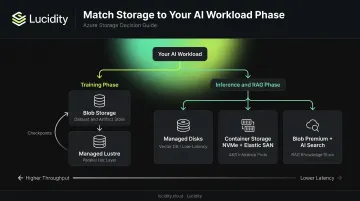
Most production AI environments use at least two of these services in combination, typically Blob plus one performance layer.
Avoiding the Over-Provisioning Trap
Choosing the right service is only half the problem. Sizing it correctly is the other half, and AI workloads make this especially hard.
Training jobs create sharp, unpredictable spikes in storage demand. Inference loads vary with request volume. RAG pipelines grow as knowledge stores expand.
Teams responding to this unpredictability commonly provision for worst-case demand and leave excess capacity idle indefinitely. Lucidity's data across 600+ enterprise assessments analyzing 100+ PB of cloud storage finds average disk utilization around 30% — roughly 70% of provisioned block storage capacity sitting unused at any given time.
The remedies are practical:
- Apply lifecycle rules and Smart Tiering on Azure Blob to automatically move infrequently accessed artifacts to cheaper tiers
- Size Elastic SAN base capacity for expected steady-state performance, not peak spikes (autoscale only adds capacity, not IOPS)
- For Azure Managed Disks specifically, autonomous tools like Lucidity's AutoScaler automatically expand and shrink volumes based on actual utilization — without downtime — keeping provisioned capacity proportional to real demand rather than worst-case estimates
Static provisioning decisions made at deployment time drift further from reality with every training run, model update, and inference traffic shift. The teams that close that gap fastest are the ones that stop treating storage sizing as a one-time decision.
Frequently Asked Questions
What is the difference between Azure Blob Storage and Azure Managed Lustre for AI training?
Azure Blob Storage is the durable, cost-effective system of record for the full AI lifecycle. Azure Managed Lustre is a high-throughput parallel file system used as a hot staging layer during active training runs — data imports from Blob into Lustre for GPU-speed parallel access, then checkpoints export back to Blob for long-term storage. Use both together, not one instead of the other.
Which Azure storage option is best for RAG applications?
Azure Blob Storage — especially Premium Blob for lower-latency retrieval — is the recommended durable knowledge store for RAG, paired with Azure AI Search for indexing and retrieval. Blob change detection is handled automatically by AI Search indexers, with scheduled or event-triggered refresh keeping the index current.
How does Azure Elastic SAN differ from Azure Managed Disks for AI workloads?
Managed Disks are per-VM block volumes suited for dedicated low-latency workloads like vector databases or inference backends. Elastic SAN is a pooled, shared block service built for multi-workload environments — including Kubernetes-native consumption via AKS. Choose Managed Disks for dedicated single-workload performance; use Elastic SAN for shared AI infrastructure.
What is Smart Tiering in Azure Blob Storage and how does it help with AI storage costs?
Azure Blob lifecycle management rules monitor access patterns and automatically move objects between hot, cool, cold, and archive tiers. Frequently accessed training data stays hot; older model versions migrate to cheaper tiers automatically, cutting costs without any application changes.
Can Azure NetApp Files be used for AI and ML workloads?
Yes, particularly for HPC-adjacent AI workloads requiring shared NFS or SMB file access — such as EDA, seismic simulation, and risk modeling. For large-scale distributed deep learning training, Managed Lustre typically delivers better parallel performance. For object-heavy RAG pipelines, Blob Storage is the more cost-effective fit.
How do I avoid over-provisioning Azure storage for AI workloads?
Apply lifecycle rules on Blob Storage, size Elastic SAN base capacity for steady-state IOPS rather than spike demand, and use autonomous tools that expand and shrink block storage volumes in response to actual utilization. Lucidity's AutoScaler continuously right-sizes Azure Managed Disk volumes without downtime, stopping the over-provisioning creep that inflates storage bills as AI workloads scale.
The right Azure storage architecture depends on the phase of your AI workload. Azure Blob anchors the durable foundation; Managed Lustre or high-performance block storage handles compute-critical phases; intelligent tiering and autoscaling keep costs aligned with actual usage — not worst-case provisioning assumptions.
For enterprises running AI workloads on Azure that want to eliminate manual storage provisioning and right-size block storage autonomously, Lucidity provides an autonomous optimization layer across Azure Managed Disks — helping teams cut storage costs without infrastructure changes or downtime.