Introduction
Azure Elastic SAN and Managed Disks both persist data for compute workloads, but picking the wrong one carries real cost consequences.
Pick Managed Disks for a workload that would benefit from shared pooled storage, and you end up provisioning multiple individual disks, each billed at full capacity regardless of use. Pick Elastic SAN for a handful of isolated VMs, and you're paying for SAN-level infrastructure complexity you don't need.
Azure's provisioned pricing model means you're charged for reserved capacity whether or not you use it. Add unattached disks that linger after VM deletion, snapshot accumulation, and bursting fees, and the gap between what you pay and what you actually consume can grow fast.
This guide breaks down both services — what they are, how they're priced, and which workloads each is actually built for — so you can make the right call before capacity is provisioned.
Key Takeaways
- Managed Disks attach per-VM and bill by provisioned tier : straightforward to set up, but inflexible at scale
- Elastic SAN pools performance across volumes via iSCSI : purpose-built for multi-workload, high-density environments
- At 4 TiB, Elastic SAN (all-base) costs $372.74/month vs. Premium SSD P50 at $450.56/month — with 2.7x more IOPS
- The right choice depends on workload density, I/O patterns, and management tolerance, not per-GB price alone
Azure Elastic SAN vs Managed Disks: Quick Comparison
Here's how the two storage options compare across cost, performance, connectivity, and management overhead at a 4 TiB workload — the four dimensions that matter most when sizing Azure block storage.
Cost at 4 TiB (LRS, storage only)
| Option | Monthly Cost | IOPS | Throughput |
|---|---|---|---|
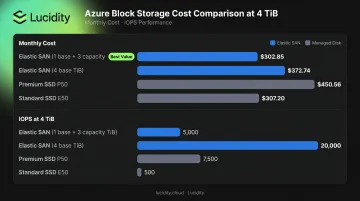
| Elastic SAN (1 base + 3 capacity TiB) | $302.85 | 5,000 pooled | 200 MB/s |
| Elastic SAN (4 base TiB) | $372.74 | 20,000 pooled | 800 MB/s |
| Premium SSD P50 | $450.56 | 7,500 per disk | 250 MB/s |
| Standard SSD E50 | $307.20 | 500 per disk | 100 MB/s |
Prices retrieved June 2026 from official Azure pricing pages.
Elastic SAN's all-base 4 TiB configuration costs 17% less than a single P50 while delivering 20,000 pooled IOPS — nearly 3x the P50's 7,500. Add more workloads to the same SAN, and those IOPS spread across all volumes at no additional cost.
Performance
- Elastic SAN scales to up to 2,000,000 IOPS and 80,000 MB/s in higher-capacity LRS regions; individual volumes support up to 80,000 IOPS
- Premium SSD v2 reaches 80,000 IOPS per disk; Ultra Disk reaches 400,000 IOPS per disk
- Premium SSD P50 caps at 7,500 IOPS baseline, 30,000 with on-demand bursting (at extra cost)
Connectivity and Access
| Feature | Elastic SAN | Managed Disks |
|---|---|---|
| Protocol | iSCSI | Direct VM attachment |
| Multi-VM access | Yes — multiple VMs simultaneously | No (shared disk feature required, limited to clustered apps) |
| Shared disk max | N/A | Up to 15 (Ultra/Premium SSD v2); up to 5 (P30–P50) |
Management Complexity
- Managed Disks: Simple per-disk provisioning; choose type, size, done. Complexity grows when managing dozens of disks across many VMs.
- Elastic SAN: Requires upfront SAN planning — base units, volume groups, volumes. More overhead initially, but consolidates cross-workload storage into a single management plane.
What Is Azure Elastic SAN?
Azure Elastic SAN is Microsoft's fully managed, cloud-native Storage Area Network — announced as generally available in February 2024 and designed to bring cloud-native SAN capabilities to Azure-native workloads. The core use case: replace on-premises SAN appliances and consolidate block storage across hundreds of workloads in one provisioned pool.
Resource Hierarchy
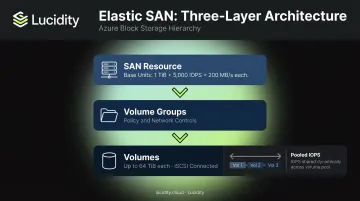
Three layers make up every Elastic SAN deployment:
- SAN — the top-level resource; provisioned using base units (each adding 1 TiB capacity, 5,000 IOPS, and 200 MB/s throughput) and optional capacity-only scale units
- Volume Groups — management constructs that apply network and encryption policies
- Volumes — individual storage units that workloads connect to via iSCSI (up to 64 TiB each)
Adding more base units increases the SAN's total pooled IOPS and throughput. Capacity-only scale units add storage without adding performance.
Performance Pooling — The Core Advantage
Elastic SAN shares provisioned IOPS dynamically across all volumes — if some volumes sit idle, others absorb that headroom. This pooled architecture is the fundamental difference from per-disk provisioning.
Microsoft's own documentation illustrates this: 100 TiB of base capacity provides 500,000 IOPS and 20,000 MB/s distributed across however many volumes you create. In mixed database and VDI environments, peak I/O across workloads is rarely simultaneous — so you need far less total provisioned performance than if each workload held its own dedicated disk.
Redundancy Options
- LRS — three copies stored within a single Azure storage cluster
- ZRS — three copies spread across availability zones (writes complete synchronously across all replicas)
Use Cases for Elastic SAN
Elastic SAN delivers the most value for:
- Large relational databases (SQL Server, Oracle, PostgreSQL) — Microsoft publishes a dedicated SQL Server on Azure VMs configuration guide specifically for Elastic SAN, noting that performance can be shared dynamically across consolidated workloads
- Virtual Desktop Infrastructure (VDI) — many concurrent users with uneven, bursty I/O patterns
- SAP/ERP systems — high availability requirements combined with mixed I/O profiles
- HPC workloads — intensive I/O with variable demand across compute nodes
- On-premises SAN migrations — direct architectural equivalent for teams moving off physical SAN hardware
With Elastic SAN, performance distribution is handled at the SAN level — so you're no longer making individual disk-type decisions for every workload. That operational simplification matters most in large environments with dozens of applications sharing the same storage tier.
What Are Azure Managed Disks?
Azure Managed Disks are block-level storage volumes that attach directly to VMs — essentially a physical disk in the cloud. Azure handles all backend storage account management, placement, and redundancy.
Five Disk Types
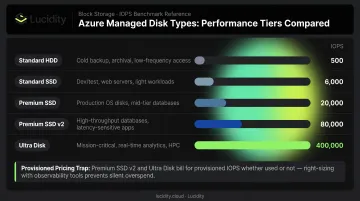
| Type | Best For | IOPS (max) |
|---|---|---|
| Standard HDD | Dev/test, infrequent access | 500 |
| Standard SSD | Web servers, lightly used apps | 6,000 |
| Premium SSD | Production databases, performance-sensitive workloads | 20,000 (P80) |
| Premium SSD v2 | High-traffic workloads needing decoupled IOPS/throughput scaling | 80,000 |
| Ultra Disk | Latency-sensitive transaction systems | 400,000 |
Disk type is the primary cost driver — and choosing the wrong one is surprisingly easy.
The Provisioned Pricing Trap
You pay for reserved capacity regardless of actual use. A disk provisioned at 1 TiB costs the same whether it's 10% full or 90% full. Disks also round up to the nearest size tier — a 200 GiB disk maps to the 256 GiB offer, for example.
Key enterprise capabilities:
- 99.999% availability backed by three data replicas
- Up to 50,000 disks per disk type per region per subscription (Premium SSD v2 and Ultra Disk default to 1,000)
- Encryption by default via server-side encryption with platform-managed keys; ADE and encryption at host also available
- Shared disk support for clustered applications (requires a cluster manager like Windows Server Failover Cluster)
Use Cases for Managed Disks
Managed Disks work well for:
- Single-VM OS and data disk deployments
- Isolated production workloads with predictable, per-disk performance requirements
- Dev/test environments where Standard SSD or HDD tiers suffice
- Clustered applications using shared disks
Hidden Cost Pitfalls
These are the cost drivers that rarely show up in initial estimates:
- Unattached managed disks continue billing after VM deletion; they don't disappear automatically
- Premium SSD full snapshots on Premium storage run $0.18/GB-month and accumulate quickly
- P30 and larger Premium SSDs carry a $24.576/month bursting enablement fee plus $0.005 per 10,000 additional IOs
- Teams frequently bump to a larger disk tier just to unlock needed IOPS, paying for unused capacity throughout
These idle disk costs compound fast. Lucidity's Lumen identifies four categories of idle disk waste — unattached, reserved, unmounted, and zero-I/O — which together can represent up to 70% of wasted block storage spend, most of which never surfaces in native Azure dashboards.
Azure Elastic SAN vs Managed Disks: Which Is Better?
Neither service is universally superior. The decision comes down to three variables: workload density, the ratio of performance needs to capacity needs, and management model preference.
Choose Managed Disks When
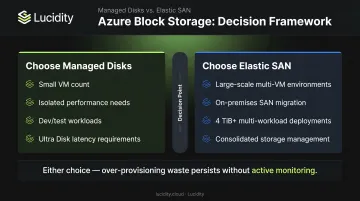
- You have a small number of VMs with distinct, isolated performance requirements
- Simple per-disk provisioning matters more than storage consolidation
- Workloads are dev/test, backup, or lightly used — Standard SSD or HDD tiers are sufficient
- You need Ultra Disk's sub-millisecond latency for transaction-intensive systems
Choose Elastic SAN When
- You're running large-scale workloads with variable, uneven I/O across many VMs — performance pooling directly reduces what you need to provision
- You're migrating from an on-premises SAN and want architectural continuity
- Storage management across many databases, VDI sessions, or ERP systems needs consolidation under a single interface
- You're operating at 4 TiB+ across multiple workloads where the per-GB economics favor Elastic SAN
The Cost Efficiency Tipping Point
At 4 TiB, Elastic SAN's all-base configuration ($372.74/month, 20,000 pooled IOPS) beats a single Premium SSD P50 ($450.56/month, 7,500 IOPS) on both cost and performance. That advantage widens as you scale, because each additional base TiB adds both capacity and performance to the shared pool rather than requiring an entirely new provisioned disk.
The caveat: Elastic SAN's minimum-performance configuration ($302.85/month with only 5,000 IOPS) is actually comparable in price to Standard SSD E50 ($307.20/month) — but with far less per-volume performance. If you're not fully utilizing that pooled IOPS budget across multiple volumes, the Standard SSD is simpler and just as economical.
The Over-Provisioning Problem Doesn't Go Away
Whichever option you choose, wasted capacity remains a persistent issue. Managed Disks lock capacity at provisioning time, and resizing down is complex enough that most teams simply don't do it. Elastic SAN pools performance, but base units still represent committed spend whether or not workloads are actively consuming that IOPS budget.
Lucidity's AutoScaler autonomously expands and shrinks Azure block storage volumes with zero downtime, while Lumen continuously scores every disk's tier against actual usage, flagging over-provisioned Premium SSDs and recommending tier changes backed by historical IOPS, throughput, latency, and cost data. Across customer environments, Lucidity has raised average disk utilization from 30% to 75%, cutting storage spend without infrastructure changes.
Conclusion
Managed Disks remain the right default for isolated, per-VM workloads — straightforward provisioning, predictable performance, and no SAN-level architecture required. Elastic SAN earns its place when storage needs to be shared and consolidated: multi-workload environments, on-premises SAN migrations, and high-density deployments where performance pooling reduces total provisioned spend.
Once the choice is made, the harder ongoing challenge is preventing either option from accumulating waste — zombie disks, over-provisioned tiers, stale snapshots. As storage footprints grow, the cost of poor visibility compounds fast.
Lucidity identifies idle capacity, right-sizes volumes in real time, and surfaces evidence-backed tiering recommendations across Azure block storage — keeping storage costs aligned with actual utilization rather than worst-case provisioning estimates.
Frequently Asked Questions
What is the difference between managed and unmanaged disks in Azure?
Unmanaged disks require you to manually create and manage storage accounts and VHD files. Managed Disks abstract all of that — Azure handles placement, replication, and scaling automatically. Microsoft has flagged unmanaged disks for retirement on March 31, 2026, and recommends migrating existing workloads to managed disks.
What is a significant benefit of Azure Managed Disks?
Managed Disks are designed for 99.999% availability backed by three data replicas, supporting up to 50,000 disks per disk type per region per subscription. Native integration with Azure availability sets and zones makes them well-suited for production workloads requiring redundancy and geographic resilience.
What is Azure Elastic SAN?
Azure Elastic SAN is Microsoft's fully managed, cloud-native Storage Area Network service, generally available since February 2024. It consolidates block storage into a shared pool accessible by multiple VMs via iSCSI — designed as a cloud-native alternative to on-premises SAN appliances for large-scale, multi-workload environments.
When should I choose Azure Elastic SAN over Managed Disks?
Elastic SAN fits large-scale, multi-workload environments — databases, VDI, SAP — where shared performance pooling lets you provision fewer total IOPS than individual Premium SSD Managed Disks would require. The cost-performance advantage becomes meaningful at 4 TiB and above across concurrent workloads.
Can Azure Elastic SAN and Managed Disks be used together?
Yes — they're complementary. Most teams use Managed Disks for OS disks and isolated workloads while directing high-density data workloads to Elastic SAN for shared storage benefits. Both can coexist within the same Azure environment without conflict.