Introduction
Choosing the wrong Azure managed disk type is an architectural decision that compounds over time. Select a disk that's too powerful for your workload and you pay for performance you'll never use. Select one that's too weak and your applications throttle, queues back up, and latency spikes — often during peak demand, when it hurts most.
Azure offers five distinct managed disk types, each with different IOPS ceilings, throughput limits, latency profiles, and cost structures:
- Ultra Disk
- Premium SSD v2
- Premium SSD
- Standard SSD
- Standard HDD
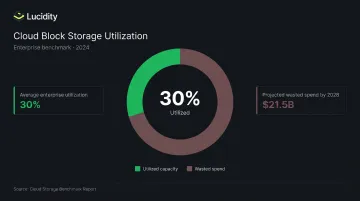
Most teams pick a type during initial provisioning and rarely revisit it. That's how over-provisioning becomes the norm — and how average enterprise disk utilization ends up around 30%, meaning organizations pay for roughly three times the storage they actually use.
This guide breaks down each disk type, how to match them to real workloads, and where the wrong choice costs you.
Key Takeaways
- Azure managed disks span five types — Ultra Disk, Premium SSD v2, Premium SSD, Standard SSD, Standard HDD — each targeting a distinct performance and cost tier
- Ultra Disk and Premium SSD v2 offer independently configurable IOPS, throughput, and capacity; neither can be used as an OS disk
- Premium SSD is the default choice for most production workloads; Standard SSD suits moderate-I/O apps; Standard HDD is for latency-tolerant archival scenarios only
- Wrong disk selection produces two failure modes: throttling and downtime (under-provisioned) or permanent wasted spend (over-provisioned)
- The average enterprise runs at 30% disk utilization, which means post-provisioning monitoring matters as much as initial type selection
What Are Azure Managed Disks?
Azure managed disks are block-level storage volumes managed entirely by Azure. You specify disk type and size; Azure handles redundancy, placement, and scaling. The underlying storage account infrastructure is fully abstracted.
Three Disk Roles Within a VM
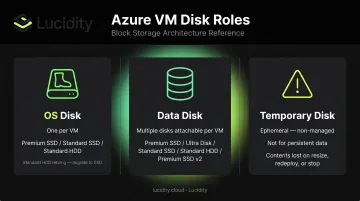
Every Azure VM works with three storage roles, and disk type selection applies differently to each:
- OS disk — the boot volume, one per VM. Supports Premium SSD, Standard SSD, and Standard HDD (HDD OS disks retire September 8, 2028)
- Data disk — application and workload storage, multiple attachable. Supports all five disk types
- Temporary disk — ephemeral, non-managed, lost on VM reallocation. Not a managed disk; don't use it for persistent data
Managed vs. Unmanaged Disks
Unmanaged disks are VHDs stored in user-managed Azure Storage accounts. They impose per-account IOPS limits and require manual storage account management. Managed disks remove those constraints entirely: no storage account quotas to track, no manual placement to manage. Azure retired unmanaged disks in 2024, making managed disks the only supported path for new deployments.
The Five Azure Managed Disk Types Explained
Azure's five managed disk types span from magnetic-backed archival storage to NVMe-backed sub-millisecond block storage — each priced and optimized for a different workload profile. Knowing which fits your use case prevents both over-spend and performance bottlenecks.
Standard HDD
Magnetic disk-backed storage with the lowest cost per GiB. Designed for latency-tolerant, large-sequential-I/O workloads.
- Maximum: 2,000 IOPS and 500 MB/s (S70/S80 tiers)
- Latency target: write latency under 10 ms, read latency under 20 ms for most operations — with higher variance than SSD types
- Best for: backups, dev/test environments, infrequently accessed archives
- Note: Standard HDD OS disks retire on September 8, 2028; data disks and snapshots are unaffected
Standard SSD
SSD-backed storage optimized for consistent, predictable performance at a moderate price point.
- Maximum: 6,000 IOPS and 750 MB/s (E80 tier)
- Performance target: single-digit millisecond latency, delivered 99% of the time
- Billing note: I/O operations larger than 256 KiB count as multiple transactions
- Best for: web servers, lightweight enterprise apps, workloads graduating from HDD that don't need premium performance
Premium SSD
The primary production-grade disk type. Delivers provisioned IOPS and throughput guarantees at the tier level, 99.9% of the time.
Representative P-series values:
| Tier | IOPS | Throughput |
|---|---|---|
| P10 | 500 | 100 MB/s |
| P20 | 2,300 | 150 MB/s |
| P30 | 5,000 base / 8,000 expanded | 200 / 300 MB/s |
| P40 | 7,500 base / 16,000 expanded | 250 / 600 MB/s |
- Bursting: Credit-based bursting available for P20 and smaller (up to 30-minute windows); on-demand bursting available for P30 and larger
- VM requirement: Premium-storage-compatible VM sizes only (DS, DSv2, FS, GS series and equivalents)
- Best for: production databases, high-I/O enterprise applications
Premium SSD v2
Premium SSD v2 decouples capacity, IOPS, and throughput into independently adjustable parameters — no fixed size tiers. You pay for exactly what you configure.
- Baseline included: 3,000 IOPS and 125 MB/s at no extra charge
- Maximum: 80,000 IOPS and 1,200 MB/s
- Latency: sub-millisecond
- Key constraints: data disk only (no OS disk), requires zonal VM placement in supported regions, no host caching support
- Best for: general production workloads where right-sizing performance independently of capacity reduces cost
Ultra Disk
The highest-performance option. Performance is independently configurable at runtime — no VM restart required.
- Maximum: 400,000 IOPS and 10,000 MB/s per disk
- Runtime adjustments: IOPS and throughput can be changed up to four times within a 24-hour window without detaching the disk
- Key constraints: data disk only, requires Ultra Disk-compatible VM sizes (FSv2, LSv2, Lsv3, NCv3, and others), not available in all regions, no availability set support, no disk caching
- Best for: SAP HANA, top-tier OLTP databases, latency-critical analytics workloads
Key Performance Parameters Across Disk Types
IOPS, throughput, and latency determine what each disk type can handle under load. How each disk type delivers — or limits — these metrics directly shapes which tier fits your workload.
IOPS and Throughput: Provisioned vs. Actual
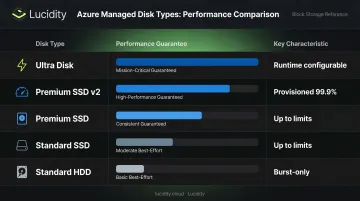
| Disk Type | Performance Guarantee |
|---|---|
| Premium SSD | Provisioned IOPS/throughput delivered 99.9% of the time |
| Ultra Disk | Independently configurable; adjustable at runtime |
| Premium SSD v2 | Independently configurable; near-guaranteed |
| Standard SSD | "Up to" table limits, 99% of the time |
| Standard HDD | "Up to" limits; highest variance |
A concrete billing example for Premium SSD v2: a 256 GiB disk provisioned at 4,000 IOPS is billed for capacity plus 1,000 IOPS above the 3,000 baseline. The 125 MB/s throughput baseline is included — charges apply only above that floor.
VM-level IOPS cap: VM-level IOPS limits cap disk performance regardless of what the disk is provisioned for. A Standard_D8s_v3 VM with 12,800 uncached IOPS will throttle a workload requesting 15,000 IOPS even if the attached disk can handle more. Always validate that the VM tier matches the disk's performance ceiling.
Disk Bursting
Disk bursting lets a disk temporarily exceed its provisioned performance to handle I/O spikes:
- Premium SSD (P20 and smaller): credit-based bursting, up to 30-minute burst windows
- Premium SSD (P30 and larger): on-demand bursting, must be enabled, adds charges
- Standard SSD (E30 and smaller): credit-based bursting
- Ultra Disk and Premium SSD v2: no bursting model — performance is configurable at runtime instead
For workloads with predictable spikes, factor burst duration into type selection. A workload that spikes for 45 consecutive minutes will exhaust credit-based bursting and may need a higher base tier or on-demand bursting.
Burst behavior also affects cost — each disk type charges differently for the performance it delivers.
Billing Model Differences
- Standard HDD: provisioned tier size + transactions (per 10,000 disk operations)
- Standard SSD: provisioned tier size + transaction charges (I/O > 256 KiB counts as multiple transactions)
- Premium SSD: provisioned tier size only; no transaction fees (exception: on-demand bursting for P30+ adds charges if enabled)
- Premium SSD v2: per-GiB capacity + IOPS above 3,000 baseline + throughput above 125 MB/s baseline
- Ultra Disk: separate charges for provisioned capacity, IOPS, and throughput
Choosing the Right Azure Managed Disk Type for Your Workload
Three inputs should guide your disk type selection: workload I/O profile, usage pattern, and total cost of ownership. Evaluate all three together — optimizing for one while ignoring the others leads to either overspending or performance gaps.
Matching Workload Profile to Disk Type
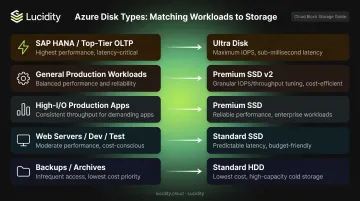
| Workload | Recommended Disk Type |
|---|---|
| SAP HANA, top-tier OLTP, latency-critical analytics | Ultra Disk |
| General production workloads, right-sized performance | Premium SSD v2 |
| Production apps with predictable high I/O | Premium SSD |
| Web servers, dev/test, moderate-I/O apps | Standard SSD |
| Backups, archives, large sequential files | Standard HDD |
Important: Ultra Disk and Premium SSD v2 cannot serve as OS disks. VMs using either type for data storage must pair them with a Premium SSD (or compatible type) as the OS disk.
VM Compatibility and Regional Constraints
Not all disk types work with all VM sizes or all regions:
- Ultra Disk: requires compatible VM series (FSv2, Famsv6, LSv2, Lsv3, Lasv3, NCv3, NCasT4_v3, ND, NDv2, NVv3, NVv4, HC, HBv2 and others); regional availability varies — some regions support three availability zones, others are regional-only
- Premium SSD: requires premium-storage-compatible VM sizes
- Premium SSD v2: requires zonal VM placement in supported regions; several regions (including Australia Southeast, North Central US, West US, and others) currently lack availability zone support for this disk type
- Standard SSD and Standard HDD: compatible with all VM types
Verify regional availability before committing to Ultra Disk or Premium SSD v2 in your architecture.
Sizing Disks Correctly
For fixed-tier disk types (Premium SSD, Standard SSD, Standard HDD), billing is based on the provisioned tier, regardless of actual usage. Choosing a P30 over a P20 to reach a higher IOPS ceiling is a valid strategy, but you pay for that tier whether the disk is at 5% or 95% utilization.
For Ultra Disk and Premium SSD v2, granular per-GiB provisioning reduces the cost of over-sizing capacity, but independently provisioned IOPS and throughput still accrue costs if not right-sized. According to FinOps Foundation analysis, moving a P30-equivalent configuration to Premium SSD v2 can produce an 18% cost saving for equivalent performance.
The Cost of Getting Disk Type Selection Wrong
Disk type misselection produces two failure modes.
Over-Provisioning: The Silent Budget Drain
Most organizations provision generous buffers for peak demand — then never right-size downward. Shrinking Azure managed disks requires downtime and careful planning, so it rarely happens. The result: provisioned-but-unused capacity accumulates across the environment.
The average enterprise runs at 30% disk utilization, meaning most organizations pay for roughly three times the storage they actually consume. Across the industry, this pattern is projected to generate an estimated $21.5 billion in wasted cloud block storage spend by 2028.
That gap between provisioned and consumed is exactly what Lucidity's platform targets. Its AutoScaler autonomously expands, shrinks, and right-sizes disk capacity in real time with zero downtime, requiring no application changes or manual intervention.
Lumen tackles the visibility side: it identifies over-provisioned and idle disk volumes, surfacing all four categories of idle disks (unattached, reserved, unmounted, and zero-I/O) that typically don't appear in native cloud dashboards. Together, the two tools help enterprises increase storage utilization from roughly 30% to 75% on average, reducing block storage costs by up to 70%.
Under-Provisioning: Throttling and Downtime
When Standard SSD or HDD is selected for a workload that exceeds its IOPS or throughput ceiling, the disk throttles I/O. The result: elevated application latency, transaction queuing, and — in sustained cases — service degradation.
This is particularly common when development-environment disk types are carried into production without re-evaluation. A dev workload running fine on Standard SSD at 500 IOPS can fail badly in production at 3,000 IOPS. When a disk's consumed percentage hits 100%, the resource is at its cap. From that point, every additional I/O request queues or fails — users see latency spikes, transactions stall, and in sustained cases, services go down.
Common Misconceptions About Azure Managed Disk Types
"Premium SSD v2 is just a faster Premium SSD"
These are architecturally different products. Premium SSD v2 decouples capacity, IOPS, and throughput pricing entirely — no fixed size tiers, no host caching support, no OS disk eligibility. For read-heavy, cache-friendly workloads where host caching delivers meaningful benefit, a Premium SSD with caching enabled can outperform a Premium SSD v2 with higher IOPS specs on paper. The right choice depends on the workload's caching characteristics, not just raw IOPS numbers.
"Provisioned IOPS equals delivered IOPS under all conditions"
Not all disk types honor their specs equally:
- Standard SSD and HDD: Performance figures are "up to" values — actual delivery varies with traffic patterns and I/O size
- Premium SSD, Ultra Disk, and Premium SSD v2: Near-guaranteed provisioned performance, but still subject to VM-level IOPS caps if the VM tier is undersized
Disk performance is always bounded by the lower of disk limits and VM limits.
"You can always upgrade disk types without disruption"
Changing disk type — for example, Standard SSD to Premium SSD — requires stopping and deallocating the VM, and can only be done twice per 24-hour period.
Size changes carry their own constraints. Disk size increases can be done online for most types, but crossing the 4 TiB boundary requires VM deallocation even for smaller disks. Azure doesn't natively support shrinking disk size at all. Given these limits, tracking actual vs. provisioned performance continuously is the most reliable way to catch mismatches before they force a disruptive change.
Frequently Asked Questions
What is the difference between Azure managed and unmanaged disks?
Unmanaged disks are VHDs stored in user-managed Azure Storage accounts, requiring manual management and subject to per-account throughput caps. Managed disks abstract the storage account entirely — Azure handles placement, redundancy, and scaling. Unmanaged disks were retired in 2024; managed disks are the only supported option for new deployments.
Can I change Azure managed disk types after provisioning?
Disk type changes (for example, Standard SSD to Premium SSD) require stopping and deallocating the VM, with a maximum of two changes per 24 hours. Size increases can be performed online for most types, but shrinking is not natively supported and requires third-party tooling or manual data migration.
Which Azure managed disk type is best for production databases?
For most production relational databases, Premium SSD or Premium SSD v2 is appropriate. For top-tier OLTP systems (SAP HANA, high-frequency transaction workloads) with sub-millisecond latency requirements, Ultra Disk is the right option. Match the tier to your IOPS, throughput, and latency targets.
What is disk bursting and which Azure disk types support it?
Disk bursting allows a disk to temporarily exceed its provisioned performance limits. Premium SSD and Standard SSD support credit-based bursting; Premium SSD P30 and larger also supports on-demand bursting. Ultra Disk and Premium SSD v2 skip the bursting model entirely — performance is configured directly at runtime.
Can Ultra Disks or Premium SSD v2 disks be used as OS disks?
Neither can be used as an OS disk. VMs using Ultra Disk for data storage must pair it with a Premium SSD for the OS volume. Standard SSD and Premium SSD are the commonly used OS disk types; Standard HDD OS disks are being retired in September 2028.
How is Azure managed disk pricing calculated?
Standard HDD and Standard SSD are billed by provisioned tier size plus transaction fees. Premium SSD is billed by provisioned tier with no transaction fees (on-demand bursting adds charges if enabled). Ultra Disk and Premium SSD v2 bill separately for capacity (per GiB), IOPS, and throughput, giving more granular cost control but adding billing complexity.