The stakes are real. A 512 GiB P20 disk costs $73.22/month in East US, compared to $38.40/month for an equivalent E20 Standard SSD. Multiply that gap across dozens or hundreds of VMs, and the wrong default becomes a serious line item.
This article covers the precise performance specs for both tiers, decision criteria based on real workload patterns, and where the over-provisioning trap catches most teams.
Key Takeaways
- Premium SSD (P-series): Guaranteed IOPS from 120 to 20,000 baseline (bursting to 30,000+), single-digit millisecond latency, 99.9% performance SLA — built for production databases and latency-sensitive workloads
- Standard SSD (E-series): Up to 6,000 IOPS on larger sizes, 99% SLA, cost-optimized — best for web servers, dev/test, and lightly used apps
- Standard SSD charges per I/O operation — high-transaction workloads can quietly accumulate costs that Premium SSD's flat provisioned model avoids
- The right tier depends on your IOPS requirements, latency tolerance, and what application degradation actually costs your business
Azure Premium SSD vs Standard SSD: Quick Comparison
According to Microsoft's managed disk types documentation, here's how the two tiers stack up side by side:
| Dimension | Premium SSD (P-series) | Standard SSD (E-series) |
|---|---|---|
| Disk size range | P1 (4 GiB) – P80 (32,767 GiB) | E1 (4 GiB) – E80 (32,767 GiB) |
| Max baseline IOPS | 20,000 (P80) | 6,000 (E80) |
| Max throughput | 900 MB/s (P80) | 750 MB/s (E80) |
| Burst IOPS | Up to 30,000 (on-demand, P30+) | Up to 1,000 (credit-based, E30 and smaller) |
| Latency | Single-digit millisecond | Single-digit millisecond |
| Performance SLA | 99.9% | 99% |
| Performance guarantee | Provisioned and guaranteed | May vary with traffic patterns |
| VM compatibility | Premium Storage-compatible VMs only | All Azure VM series |
| Sector size | 512E | 512E |
| OS disk support | Yes | Yes |
| Billing model | Flat provisioned rate | Base rate + per-transaction charges |
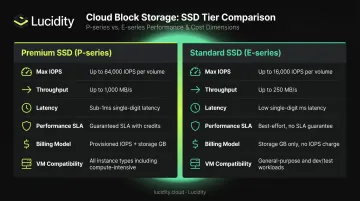
Premium SSD performance (capacity, IOPS, and throughput) is guaranteed at provisioning time. Standard SSD targets are delivered 99% of the time, with Microsoft explicitly noting that "actual IOPS and throughput may vary sometimes depending on traffic patterns." That 1% variability gap matters when your application is transactional.
What Is Azure Premium SSD?
Azure Premium SSD is a high-performance managed disk tier built for IO-intensive, production-grade workloads. Performance is tied to disk size — you pick a tier, and you get the IOPS and throughput specified for that tier, guaranteed 99.9% of the time.
P-Series Performance by Tier
| Tier | Size (GiB) | Baseline IOPS | Baseline MB/s | Burst IOPS / Duration |
|---|---|---|---|---|
| P10 | 128 | 500 | 100 | 3,500 / 30 min |
| P20 | 512 | 2,300 | 150 | 3,500 / 30 min |
| P30 | 1,024 | 5,000 | 200 | 30,000 / Unlimited* |
| P50 | 4,096 | 7,500 | 250 | 30,000 / Unlimited* |
| P80 | 32,767 | 20,000 | 900 | 30,000 / Unlimited* |
*On-demand bursting to 30,000 IOPS and 1,000 MB/s applies to P30 and above, requires explicit enablement, and incurs additional hourly charges.
P20 and smaller disks use credit-based bursting: 3,500 IOPS and 170 MB/s for up to 30 minutes. Useful for OS boot events, but not a substitute for baseline performance on sustained workloads.
The IOPS-Ties-to-Size Problem
Unlike Premium SSD v2 (which lets you provision capacity, IOPS, and throughput independently), classic Premium SSD bundles all three. Need 5,000 IOPS? You're buying a P30 at 1,024 GiB — even if your actual data footprint is 200 GiB.
Use Cases
Premium SSD is the right tier for:
- Production SQL Server, Oracle, and SAP HANA deployments
- Financial systems and ERP applications (SAP, Dynamics)
- High-throughput data analytics with sustained IO demands
- Containerized production workloads with latency SLAs
- Any application where IO throttling has direct business impact
Compatibility note: Premium SSD only works with Premium Storage-compatible VM series — DSv3, Esv5, M-series, and similar. Verify compatibility before selecting a VM size, or the disk option won't be available.
What Is Azure Standard SSD?
Standard SSD sits between Standard HDD and Premium SSD in Azure's managed disk lineup. It delivers solid-state consistency at a lower price point — but unlike Premium SSD, it doesn't guarantee IOPS, which matters when sizing for production workloads.
E-Series Performance by Tier
| Tier | Size (GiB) | Baseline IOPS | Baseline MB/s | With Performance Plus |
|---|---|---|---|---|
| E1–E20 | 4–512 | Up to 500 | Up to 100 | N/A |
| E30 | 1,024 | Up to 500 | Up to 100 | Up to 1,500 IOPS |
| E50 | 4,096 | Up to 500 | Up to 100 | Up to 6,000 IOPS |
| E60 | 8,192 | Up to 2,000 | Up to 400 | Up to 6,000 IOPS / 750 MB/s |
| E80 | 32,767 | Up to 6,000 | Up to 750 | Up to 6,000 IOPS / 750 MB/s |
Burst note (E30 and smaller): Burst capability runs 600–1,000 IOPS for up to 30 minutes via a credit-based mechanism.
The Transaction Cost Trap
Standard SSD's billing model includes per-transaction charges on top of the base disk rate. Every I/O operation of 256 KiB or less counts as one transaction; larger I/Os are billed as multiples of 256 KiB. The Azure pricing page shows E20 LRS disk operations priced at $0.002 per 10,000 transactions.
For low-traffic workloads, this is negligible. For anything with sustained IO — even a moderately busy web server — transaction costs can accumulate in ways that erode the apparent price advantage over Premium SSD. Run the numbers before assuming Standard SSD is always cheaper.
Use Cases
Standard SSD fits well for:
- Web tier servers and low-IOPS application servers
- Development and test environments
- Backup target disks and staging environments
- Lightly used enterprise applications migrating off on-premises HDD
- Non-production database replicas
- Non-production database replicas
- Any VM series that doesn't support Premium Storage (Standard SSD is compatible across all Azure VM types)
That last point matters more than it looks. Premium SSD requires a Premium-compatible VM — Standard SSD doesn't, making it the practical fallback when VM type is locked.
Premium SSD vs Standard SSD: Which Should You Choose?
Decision Criteria
Three factors drive the choice:
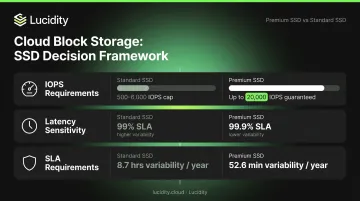
IOPS requirements — Standard SSD caps at 500 IOPS for E1–E50 (base) and 6,000 IOPS at E80 with Performance Plus. If your workload regularly exceeds these limits, you'll hit throttling. Premium SSD provides guaranteed IOPS from the moment the disk is provisioned.
Latency sensitivity — Both tiers target single-digit millisecond latency, but Premium SSD guarantees it 99.9% of the time. Standard SSD's 99% SLA leaves room for performance variability that transactional applications will feel.
SLA requirements — The 0.9% gap between 99.9% and 99% sounds small. In practice, it translates to roughly 8.7 hours of performance variability per year versus 52.6 minutes. For financial systems or customer-facing applications, that difference is meaningful.
Situational Recommendations
| Choose Premium SSD when... | Choose Standard SSD when... |
|---|---|
| Running production databases (SQL, Oracle, SAP HANA) | Hosting dev/test environments |
| Financial or ERP systems with transaction SLAs | Running web tier servers with moderate load |
| Latency directly affects user experience | Using backup or staging disks |
| Consistent IOPS above 500 are required | VM type doesn't support Premium Storage |
| Performance degradation has a business cost | Workload IOPS rarely exceed 500 |
The Cost Reality
A 512 GiB P20 costs $73.22/month versus $38.40/month for an E20 — a $34.82/month difference per disk. Across 50 disks, that's over $20,000/year in potential savings if the workloads don't actually need Premium performance.
The calculus flips when you factor in application downtime. A throttled database causing 30 minutes of degraded performance per month — in lost transactions or SLA penalties — can quickly justify the Premium price difference.
Mixed Tier Architecture
Given that cost reality, most enterprises land on a hybrid model rather than applying one tier uniformly:
- Premium SSD for OS disks and data disks on production VMs
- Standard SSD for dev/test clones, secondary replicas, and non-critical workloads
This approach makes financial sense, but it requires ongoing visibility — workload profiles change, and a disk provisioned as Premium for a launch-period production workload may not need that tier six months later.
The Over-Provisioning Problem
The most common mistake is defaulting to Premium SSD across the board. Teams provision Premium out of caution, then never revisit actual utilization. Based on Lucidity's analysis of enterprise storage environments, the average disk utilization across enterprise deployments sits around 30% before optimization — meaning most organizations are paying for performance they're not consuming.
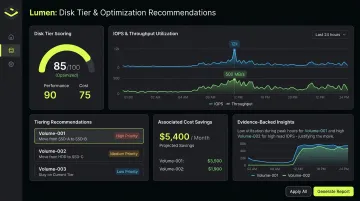
Lucidity's Lumen product addresses this directly. Lumen continuously scores every disk's tier against actual usage, analyzing IOPS, throughput, latency, and cost, then surfaces evidence-backed recommendations for tier transitions — including Premium SSD to Standard SSD downgrades for workloads that don't justify the cost.
One example from Lumen's recommendation engine surfaced 125 tiering recommendations with $2.2M/year in potential savings across a single customer environment. Every recommendation is backed by historical performance trends, not point-in-time snapshots. Identifying these opportunities across dozens or hundreds of VMs manually isn't practical at enterprise scale.
Frequently Asked Questions
What is the main difference between Azure Premium SSD and Standard SSD?
Premium SSD provisions guaranteed IOPS (up to 20,000 baseline, bursting beyond 30,000), single-digit millisecond latency, and a 99.9% performance SLA — built for production and mission-critical workloads. Standard SSD caps at 6,000 IOPS with a 99% SLA, making it the right fit for moderate-load or non-critical applications at lower cost.
Can I switch from Standard SSD to Premium SSD without downtime?
According to Microsoft's disk conversion documentation, changing disk type requires the VM to be stopped and deallocated first — live hot-swap is not supported. The change can be made through the Azure Portal, CLI, or PowerShell, but is limited to twice per day.
How does Azure Premium SSD pricing compare to Standard SSD?
Premium SSD carries a higher flat monthly rate because performance is provisioned and guaranteed: a P20 (512 GiB) runs $73.22/month versus $38.40/month for an E20 in East US. Standard SSD also adds per-transaction I/O charges, which can erode its cost advantage on high-IO workloads. Use the Azure pricing calculator for current regional figures.
What IOPS can I expect from Azure Standard SSD?
Base IOPS cap at 500 for E1–E50 sizes, scaling to 2,000–6,000 IOPS for E60–E80. With Performance Plus enabled, E50 through E80 can reach up to 6,000 IOPS and 750 MB/s throughput. Actual IOPS may vary based on traffic patterns, as Microsoft explicitly notes for this tier.
Does Azure Standard SSD support disk bursting?
Yes — E30 and smaller disks support credit-based bursting: E1–E20 burst to 600 IOPS and 150 MB/s for up to 30 minutes; E30 bursts to 1,000 IOPS and 250 MB/s. This helps absorb short spikes like OS boot events but is not a substitute for sustained baseline performance.
Which Azure SSD type is better for SQL Server workloads?
For production SQL Server, Premium SSD is the clear choice: guaranteed IOPS, consistent sub-millisecond latency, and a 99.9% SLA directly support query performance and transaction throughput. Standard SSD works for dev/test environments where occasional IO variability has no business impact.