The real complexity isn't the per-GiB cost. It's how transaction fees, performance bundling, redundancy options, and bursting behavior stack on top of that base price. This article breaks down exactly how each billing component works, where the hidden costs hide, and how to choose the right disk type for your actual workload.
Key Takeaways
- Standard SSD (E-series) charges a flat monthly rate plus per-transaction fees; Premium SSD (P-series) bundles performance into a fixed tier price with no transaction fees under normal use
- High I/O on E30 ($76.80/month baseline) can push total cost past $163.20/month — more than a P30 at $135.17/month flat
- Standard SSD fits web servers, dev/test, and low-IOPS apps; Premium SSD is the right call for production databases, OS disks, and latency-sensitive workloads
- The biggest cost leak for both disk types is overprovisioning — you pay for provisioned capacity, not actual usage
Standard SSD vs Premium SSD: Pricing at a Glance
Azure managed disk pricing is not a simple cost-per-GB comparison. Each disk type follows a different billing model, and the gap between them changes dramatically based on how the disk is actually used.
The most common mistake: teams pick Standard SSD for its lower sticker price without modeling transaction costs, or they overprovision Premium SSD as a performance buffer and pay for IOPS headroom they never consume.
Standard SSD (E-Series) Pricing
Standard SSDs use a flat monthly rate per provisioned disk size tier (E1 through E80, from 4 GiB to 32,767 GiB). Below are representative LRS prices for East US, sourced from the Azure Managed Disks pricing page:
| Disk Tier | Size | Monthly Price (LRS) |
|---|---|---|
| E10 | 128 GiB | $9.60 |
| E30 | 1,024 GiB | $76.80 |
| E70 | 16,384 GiB | $1,228.80 |
Standard SSD also charges a per-transaction fee of $0.002 per 10,000 I/O operations on top of the base price. Azure does cap billable transactions per hour per disk (for example, 829,200/hour for E30), which protects against runaway costs during burst events. Consistent moderate I/O, however, will accumulate charges steadily over the billing period.
Premium SSD (P-Series) Pricing
Premium SSDs are priced per provisioned performance tier (P1 through P80), with capacity, baseline IOPS, and throughput all bundled into one price. Equivalent LRS prices for East US:
| Disk Tier | Size | Monthly Price (LRS) |
|---|---|---|
| P10 | 128 GiB | $19.71 |
| P30 | 1,024 GiB | $135.17 |
| P70 | 16,384 GiB | $1,802.06 |
Premium SSD carries no per-transaction fee for I/O that stays within provisioned limits. However, enabling on-demand bursting changes that: it adds a flat enablement fee of $24.576/month plus $0.005 per 10,000 burst transactions beyond provisioned targets.
What Drives the Price Gap Between Standard SSD and Premium SSD
Four factors determine what you actually pay each month: provisioned capacity, performance bundling, transaction fees, and redundancy configuration. Understanding each one prevents the most common Azure storage budgeting mistakes.
Provisioned Capacity vs. Actual Use
Both disk types bill based on provisioned size, not data written. A 1 TiB disk that's 30% full still costs 100% of its monthly rate. This is where most overprovisioning waste hides, and it's why right-sizing before choosing a disk tier matters more than which tier you pick.
Performance Bundling vs. Separate Billing
Premium SSD guarantees IOPS and throughput at each size tier. A P30 delivers 5,000 IOPS and 200 MB/s at its fixed monthly price, scaling up to 20,000 IOPS and 900 MB/s at P80. Standard SSD provides best-effort performance — E80 tops out at 6,000 IOPS and 750 MB/s with no SLA-backed guarantee. When workloads require predictable performance for cost planning, Premium SSD's bundled model is far easier to forecast accurately.
Transaction Fees
Standard SSD charges per I/O operation at $0.002 per 10,000 transactions — and those charges add up fast. Consider a 1 TiB E30 running a moderate workload:
| Component | Calculation | Cost |
|---|---|---|
| Sustained I/O | 500 IOPS × 8 hrs/day × 30 days | 432M operations |
| Transaction units | 432M ÷ 10,000 | 43,200 units |
| Transaction charge | 43,200 × $0.002 | $86.40 |
| E30 total | $76.80 base + $86.40 | $163.20/month |
| P30 total | Flat rate, no transaction fee | $135.17/month |
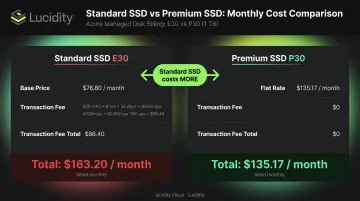
At just 500 IOPS over an 8-hour workday, Standard SSD already exceeds Premium SSD's total cost. Teams comparing sticker prices alone will consistently underestimate Standard SSD's real monthly bill.
Redundancy Options (LRS vs. ZRS)
Both Standard SSD and Premium SSD support LRS (locally redundant) and ZRS (zone-redundant) configurations. ZRS adds a consistent 50% premium over LRS for both disk types in East US:
| Disk | LRS Price | ZRS Price | Increase |
|---|---|---|---|
| E30 | $76.80/month | $115.20/month | +50% |
| P30 | $135.17/month | $202.73/month | +50% |
ZRS is worth the cost for multi-availability-zone deployments and workloads with strict high-availability requirements. For single-zone or non-critical workloads, LRS avoids that 50% surcharge.
Reserved Capacity
Premium SSD (P30 and above) supports 1-year reserved capacity commitments. A P30 LRS reservation costs $1,541.00/year versus $1,622.04 pay-as-you-go, saving roughly 5% annually. The discount is modest but meaningful for stable, long-running fleets at scale. Standard SSD has no equivalent reserved pricing option, so for stable, consistently-loaded workloads where P30+ sizing fits, reservations tip the total cost comparison further toward Premium SSD.
Standard SSD vs Premium SSD — A Side-by-Side Cost Breakdown
Total disk cost goes beyond the monthly provisioned price. Both disk types carry additional billing components that frequently get missed during initial cost estimation. Here's how each component breaks down — and where the surprises tend to hide.
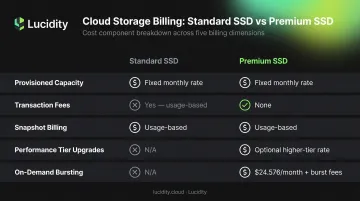
| Cost Component | Standard SSD | Premium SSD |
|---|---|---|
| Provisioned capacity | Fixed monthly rate by tier | Fixed monthly rate by tier |
| Transaction fees | Yes — per I/O, usage-based | None under standard use |
| Snapshot billing | Based on used data | Based on used data |
| Performance tier upgrades | Not applicable | Optional; billed at higher tier rate |
| On-demand bursting | Not applicable | $24.576/month + burst transaction fees |
Provisioned Disk Capacity
Both disk types charge a fixed monthly rate based on provisioned tier, regardless of actual data usage. This baseline cost appears on every Azure bill and scales linearly with the number of disks in the environment.
Transaction Costs
Standard SSD accrues per-transaction billing that compounds with workload intensity. The hourly cap limits worst-case exposure, but consistent moderate-to-high I/O workloads generate material charges month over month. Premium SSD has no transaction fees under standard use — making it straightforward to budget for in I/O-heavy environments.
Snapshot Costs
Snapshots are billed based on used data, not provisioned disk size. Using the Azure incremental snapshot model versus full snapshots makes a significant difference:
- Full snapshot of a 1 TiB disk with 200 GiB used: 200 × $0.05 = $10.00/month
- Incremental snapshot capturing a 10 GiB delta: 10 × $0.05 = $0.50/month
Incremental snapshots are 20x cheaper in this example. For environments with frequent snapshot schedules, this is not a trivial line item.
Performance Tier Upgrades and Bursting Fees
Premium SSD users can temporarily set a higher performance tier — upgrading a P30 to run at P40 performance levels, for example — which shifts billing to the higher tier for the duration. Separately, enabling on-demand bursting adds $24.576/month plus burst transaction charges.
Both are optional features. The problem is they appear on bills without obvious line-item context, and teams regularly forget to disable them after enabling during a performance incident.
How to Choose — and Avoid Overpaying for Azure SSDs
The right disk is the one that matches your actual workload requirements — not the cheapest option, and not the highest tier provisioned out of caution.
Factors to Consider When Choosing Between Standard and Premium SSD
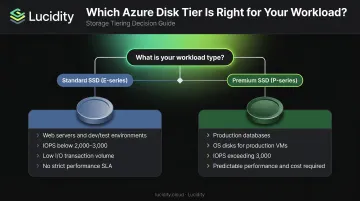
Choose Standard SSD (E-series) when:
- Running web servers, dev/test environments, or lightly used enterprise applications
- Workload IOPS are predictable and consistently below 2,000–3,000
- I/O volumes are low enough that transaction fees won't erode the base-price advantage
- Performance SLAs are not a hard requirement
Choose Premium SSD (P-series) when:
- Running production databases (SQL Server, Oracle) or latency-sensitive applications
- The OS disk supports a production VM where sub-millisecond latency matters
- Workload IOPS regularly exceed 3,000 or throughput requirements are consistent
- Predictable performance and cost modeling are both required
Right-Sizing Before You Choose a Tier
Choosing the wrong tier is expensive — but picking the right tier in the wrong size is just as costly. Across hundreds of Assessments analyzing over 100 PB of storage data, Lucidity has found that the average enterprise runs at roughly 30% average disk utilization — meaning most environments are paying for 2–3x more capacity than they actually consume.
Lucidity's free Assessment tool scans Azure environments with no agents and no infrastructure changes required. In about 5 minutes, it surfaces disk utilization metrics, identifies overprovisioned and idle disks, and shows exactly what an optimized environment would cost down to the volume level.
For ongoing tier optimization, Lucidity Lumen continuously scores every disk against actual IOPS, throughput, latency, and cost data. When a volume belongs on a different tier — say, a Premium SSD running at consistently low IOPS — Lumen flags the recommendation with supporting evidence. The change executes in one click.
Once tier and size are dialed in, evaluate 1-year reserved capacity for stable P30+ Premium SSD workloads. At scale, even a 5% reserved discount adds up across large fleets.
Frequently Asked Questions
What is the difference between Standard SSD and Premium SSD in Azure?
Standard SSD (E-series) delivers best-effort performance at lower IOPS with a per-transaction billing model. Premium SSD (P-series) bundles guaranteed IOPS and throughput into each tier price with no transaction fees under normal use. Use Premium SSD for I/O-intensive, latency-sensitive production workloads; Standard SSD for general-purpose or light workloads where transaction volumes stay low.
How much does Azure SSD cost?
Standard SSD starts at $9.60/month for a 128 GiB E10 LRS disk in East US, with additional per-transaction fees at $0.002 per 10,000 operations. Premium SSD starts at $19.71/month for an equivalent P10 LRS disk. Costs vary by region, redundancy option, and disk size. Check the Azure Managed Disks pricing page for current rates.
Does Azure charge transaction fees for Premium SSD?
Premium SSD has no transaction fees under normal use within provisioned limits. Enabling on-demand bursting adds a $24.576/month flat fee plus $0.005 per 10,000 burst transactions beyond provisioned targets. Standard SSD always carries per-transaction fees regardless of bursting configuration.
Can I switch from Standard SSD to Premium SSD without downtime?
No. Azure requires the VM to be stopped and deallocated before changing disk types. Conversion works in both directions, but the VM size must support Premium storage. Plan a maintenance window before making the switch.
How does LRS vs. ZRS redundancy affect pricing?
Both Standard SSD and Premium SSD support LRS and ZRS, with ZRS costing exactly 50% more than LRS for both disk types in East US. An E30 LRS costs $76.80/month; E30 ZRS costs $115.20/month. ZRS is worth the premium for workloads deployed across multiple availability zones where zone-level resilience is required.
When does Premium SSD v2 make more sense than Premium SSD?
Premium SSD v2 decouples capacity, IOPS, and throughput into separate billing components, so you pay only for the performance you actually need rather than an entire P-series tier. This makes it more cost-effective when you need high IOPS at moderate capacity. Key constraints: it cannot serve as an OS disk, requires zonal VM attachment, and is only available in select regions.