This guide cuts through the confusion. We'll cover what each service actually does, how they compare on performance and cost, and how to make the right call based on your specific workload.
Key Takeaways
- Azure Blob Storage is object storage for unstructured data (images, videos, logs, backups) accessed via HTTP/REST APIs.
- Azure File Storage is a managed cloud file share using SMB/NFS protocols, ideal for shared access and lift-and-shift migrations to the cloud.
- Azure Disk Storage is block-level storage attached to VMs for databases, OS disks, and high-IOPS workloads where latency matters.
- The right choice depends on how your application accesses data, not just what type of data it stores.
Azure Blob vs File vs Disk: Quick Comparison
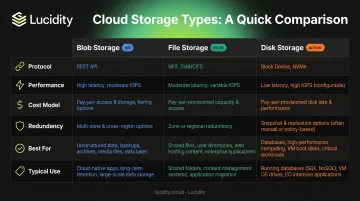
Here's how Blob, File, and Disk Storage compare across the six dimensions that most often drive the decision.
| Dimension | Blob Storage | File Storage | Disk Storage |
|---|---|---|---|
| Protocol | HTTP/HTTPS REST API (also NFS 3.0, SFTP) | SMB 3.x, NFS 4.1 | Block I/O, VM-attached |
| Performance | High throughput; not for low-latency transactions | Up to 102,400 IOPS (Premium SSD); 20,000 IOPS (Standard pay-as-you-go) | Up to 400,000 IOPS (Ultra Disk); lowest latency |
| Cost Model | Pay-as-you-go; hot/cool/cold/archive tiers | Provisioned (Premium) or pay-as-you-go (Standard) | Provisioned per disk size and type |
| Redundancy | LRS, GRS, RA-GRS | LRS, GRS, RA-GRS | LRS; ZRS for Premium SSD and Standard SSD only |
| Best For | Media, backups, data lakes, analytics | Shared drives, legacy migration, VDI profiles | VM OS disks, databases, Kubernetes volumes |
On redundancy: Ultra Disk and Premium SSD v2 are limited to LRS — no ZRS, no GRS. That's a hard constraint for high-availability architectures, so confirm your redundancy requirements before choosing a disk type.
What Is Azure Blob Storage?
Azure Blob Storage is Microsoft's object store for unstructured data — text files, images, video, logs, binary files, ML artifacts. Data is stored as discrete objects (blobs) inside containers, not as files in a folder hierarchy. Applications access blobs via HTTP/HTTPS REST APIs, though Microsoft also supports NFS 3.0 and SFTP for specific scenarios.
Blob Types and When They Matter
Microsoft documents three blob types, each suited to different workloads:
- Block blobs — optimized for uploading large amounts of data; the default choice for media files, backups, and data lake assets
- Append blobs — optimized for append-only operations like logging and telemetry pipelines
- Page blobs — designed for random read/write access; they underpin Azure VM managed disks internally
Access Tiers and Lifecycle Management
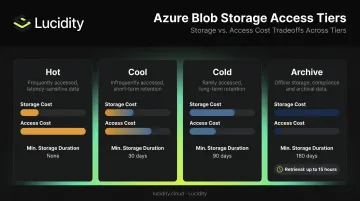
The tiered pricing model is where Blob Storage earns its reputation for cost efficiency:
| Tier | Min Storage Duration | Storage Cost | Access Cost |
|---|---|---|---|
| Hot | None | Highest | Lowest |
| Cool | 30 days | Lower | Moderate |
| Cold | 90 days | Lower still | Higher |
| Archive | 180 days | Lowest | Highest (up to 15-hour retrieval) |
Lifecycle management policies automate transitions between tiers based on last-access time. For compliance archives, old log files, and completed project assets, automated tiering keeps storage costs in check without manual intervention.
Standard storage accounts support up to 5 PiB of capacity. Azure Data Lake Storage Gen2 is built directly on Blob Storage and adds a hierarchical namespace for analytics workloads — relevant if you're running Synapse, Databricks, or Data Factory pipelines.
Use Cases
Blob Storage fits when your application reads and writes data via API calls, not file system operations:
- Media streaming and content delivery (paired with Azure CDN)
- ML training datasets and model artifact storage
- Backup and disaster recovery archives
- Static website hosting
- IoT and log data ingestion pipelines
- Big data analytics with Synapse, Databricks, or Data Factory
What Is Azure File Storage?
Azure File Storage provides fully managed cloud file shares accessible over SMB (versions 2.1, 3.0, and 3.1.1) and NFS 4.1. It's the only Azure storage service that behaves like a traditional file server — applications can mount it as a network drive and use standard file system operations without any code changes.
Performance Tiers
Two main tiers, with meaningfully different billing models:
- Standard (HDD-backed) — pay-as-you-go based on used storage, transactions, and data transfer; suited for general-purpose file sharing where latency tolerance is reasonable; up to 20,000 IOPS for pay-as-you-go shares
- Premium (SSD-backed) — provisioned model where you pay for allocated capacity, not used capacity; up to 102,400 IOPS and 10,340 MiB/s throughput; suited for latency-sensitive workloads
The provisioned model on Premium is a planning consideration teams frequently underestimate. You're paying for what you allocate from day one, regardless of actual usage. Size carefully — over-allocating on Premium shares is one of the more common sources of avoidable Azure storage spend.
Azure File Sync
Azure File Sync turns on-premises Windows Servers into local caches of Azure file shares. Users get local-speed access; data lives in the cloud. It's a practical hybrid architecture for organizations that need cloud-backed storage without replacing existing on-premises infrastructure immediately.
Use Cases
File Storage fits when your application or users need to mount a share and interact with it as a file system:
- Replacing on-premises NAS or file servers
- Sharing application configuration files across multiple VMs
- VDI user profile storage via FSLogix (Azure Virtual Desktop)
- Development environments where teams need shared read/write access
- Lift-and-shift migrations for Windows and Linux file-server workloads
What Is Azure Disk Storage?
Azure Disk Storage is block-level storage — virtual hard disks that attach directly to Azure VMs or Kubernetes nodes via the Azure Disk CSI driver. It delivers the lowest latency and highest IOPS of the three storage types, and it's the only option when an application needs a mounted, persistent drive.
Managed Disk Types
Microsoft offers five managed disk types, each targeting a different performance and cost tier:
| Disk Type | Max IOPS | Max Throughput | Primary Use Case |
|---|---|---|---|
| Ultra Disk | 400,000 | 10,000 MB/s | SAP HANA, top-tier transactional databases |
| Premium SSD v2 | 80,000 | 2,000 MB/s | Most production workloads; independently adjustable performance |
| Premium SSD | 20,000 | 900 MB/s | Production databases, business-critical apps |
| Standard SSD | 6,000 | 750 MB/s | Web servers, dev/test environments |
| Standard HDD | 2,000 | 500 MB/s | Backups, archiving, low-priority workloads |
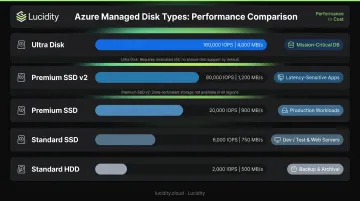
A few key constraints apply to the top tiers: Ultra Disk cannot serve as an OS disk, doesn't support disk caching, and is only available in select Azure regions and VM series. Premium SSD v2 also cannot be used as an OS disk.
The Over-Provisioning Problem
Disk Storage has a built-in cost trap. Because disks are provisioned at fixed sizes — and Microsoft explicitly states that shrinking an existing disk isn't supported — teams consistently over-provision to avoid running out of space. The alternative, detaching and recreating a disk at a different size, carries downtime risk and operational overhead.
Across hundreds of storage assessments covering over 100 PB of enterprise cloud storage, Lucidity found that the average enterprise runs at just 30% disk utilization before optimization. That's roughly 70% of provisioned capacity sitting idle, accumulating charges every month — a pattern Lucidity estimates will account for $21.5 billion in wasted cloud block storage spend by 2028.
Platforms like Lucidity's AutoScaler address this directly — autonomously expanding and shrinking Azure managed disks in response to actual workload demand, with zero downtime and no infrastructure changes required. Dometic, for example, reduced their cloud storage spend by 52% after deployment.
Use Cases
For workloads that need low-latency, block-level access, Disk Storage is the right fit:
- Azure VM OS and data disks
- SQL Server, Oracle, and other relational databases
- Kubernetes stateful workloads (persistent volume claims via Azure Disk CSI)
- High-frequency transactional applications
- Any workload that mounts a drive and requires consistent sub-millisecond latency
Which Azure Storage Type Should You Use?
The single most reliable decision criterion is access pattern — how does your application actually read and write data?
- API-based access with no file system semantics → Blob Storage
- Mounted drive with directory structures, SMB/NFS protocol compatibility → File Storage
- Block-level I/O from a VM or container, low latency, high IOPS required → Disk Storage
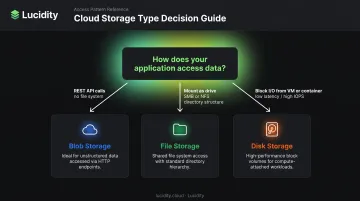
Situational Decision Guide
Choose Blob if:
- You're storing media, ML datasets, logs, or backups accessed programmatically
- Your application uses REST API calls to read and write data
- Cost optimization via tiering (hot/cool/archive) is a priority
Choose File if:
- Multiple VMs or users need simultaneous access to the same folder structure
- You're migrating a legacy Windows or Linux file server to the cloud
- You need VDI user profile storage or shared configuration files across app instances
Choose Disk if:
- Your workload is a VM-hosted database or the VM's OS drive
- The application mounts a drive and requires consistent IOPS and low latency
- You're running Kubernetes stateful workloads with persistent volume claims
Common Overlap Scenarios
Two comparisons trip teams up most often:
Blob vs. File: Blob is cheaper and scales further for large unstructured datasets, but has no file system semantics. If your application uses open(), read(), write(), or file locks, it needs File Storage — not Blob. If it calls a REST API, Blob is almost certainly the better choice.
File vs. Disk: Both can be mounted, but they're not interchangeable. File Storage supports simultaneous multi-client access; Disk Storage is exclusive to a single VM by default (shared disks exist for clustered workloads, but they're the exception). Disk also delivers far higher IOPS and lower latency than File for write-intensive workloads.
The Cost Reality
Flexera's 2026 State of the Cloud Report estimates 29% of IaaS/PaaS cloud spend is wasted, with 84% of organizations identifying cloud cost management as their top challenge. Disk Storage is where the most preventable waste lives — provisioned at fixed sizes, rarely right-sized downward, and billing for unused capacity every month.
For enterprises running mixed workloads — data lakes, VM-based databases, shared development environments — the answer is usually all three storage types, deployed at the right layer. The real cost risk is making that call passively.
Disk Storage waste compounds without active monitoring: unused provisioned capacity keeps billing at full price regardless of utilization. Quantifying that exposure — across every volume in your environment — is the first step toward controlling it. Lucidity's free Storage Assessment identifies exactly where that spend is accumulating.
Frequently Asked Questions
What is the difference between Azure Disk and Azure File Storage?
Azure Disk is block-level storage attached exclusively to a single VM, designed for high-IOPS, low-latency workloads like databases and OS drives. Azure File is a managed file share accessible by multiple clients simultaneously over SMB or NFS, suited for shared folder access and lift-and-shift file server migrations.
Which Azure disk type offers the highest performance?
Ultra Disk reaches up to 400,000 IOPS and 10,000 MB/s throughput, making it the right choice for SAP HANA and top-tier transactional databases. Note that it cannot serve as an OS disk, doesn't support disk caching, and is only available in select regions and VM series.
What are the limitations of Ultra Disk?
Ultra Disk cannot be used as an OS disk, does not support disk caching or availability sets, and only supports LRS redundancy (no ZRS or GRS). Regional and VM series availability is limited — verify availability for your target region before designing around it.
When should I use Azure File Storage instead of Blob Storage?
Use File Storage when your application needs to mount storage as a drive and interact with it through standard file system operations (open, read, write, lock) over SMB or NFS. Use Blob when your app reads and writes through REST API calls and doesn't require protocol-level compatibility or directory structures.
Can Azure Blob Storage replace a traditional file server?
No. Blob Storage lacks SMB/NFS protocol support and file system semantics, so applications expecting a mounted drive won't work with it. Azure File Storage paired with Azure File Sync is the correct replacement for on-premises file servers.
How can I reduce Azure Disk Storage costs?
Start by right-sizing disks, deleting unattached volumes, and moving cold data to lower-cost tiers. For ongoing optimization, Lucidity AutoScaler autonomously resizes Azure managed disks based on real utilization — enterprises typically see utilization climb from 30% to 75%, cutting storage costs by up to 70%.