Introduction
Picking the wrong storage type doesn't just slow down your application—it can inflate your cloud bill by thousands of dollars a month without any warning. As enterprises migrate workloads to AWS, Azure, and GCP, the choice between block storage and blob storage trips up even experienced infrastructure teams.
Part of the confusion is naming. "Blob storage" isn't a distinct storage paradigm—it's Microsoft Azure's branded implementation of object storage. Understanding that distinction matters before you can make an informed architecture decision.
The stakes are real. According to Gartner's 2025 report on public cloud storage costs, rising storage spend stems directly from "overprovisioning, poor data life cycle management and outdated manual controls."
That waste adds up fast. Flexera's 2026 State of the Cloud report estimates wasted IaaS/PaaS cloud spend has reached 29% of total cloud budgets.
This article breaks down how block storage and blob storage work, where each fits, and what the real cost and performance trade-offs look like when you choose—or manage—the wrong one.
Key Takeaways
- Block storage stores data in fixed-size chunks, built for low-latency, high-IOPS workloads like databases and VMs
- Blob storage (Azure's object storage) stores unstructured data as objects in a flat namespace—ideal for backups, media, and analytics datasets
- Block storage costs more per GB but delivers sub-millisecond latency; cheaper blob storage trades that speed for scale
- Right workload, right storage: databases, VMs, and containers belong on block; archives, media, logs, and ML datasets belong on blob
- Most enterprises waste the majority of their block storage budget—Lucidity's data shows average utilization sits at just 30% of provisioned capacity
Block Storage vs Blob Storage: Quick Comparison
Use this table as a quick reference before the full breakdown.
| Dimension | Block Storage | Blob Storage |
|---|---|---|
| Cost | Higher per GB; pre-allocated fixed volumes | Lower per GB; consumption-based with tiered pricing |
| Performance | Sub-millisecond latency, high IOPS | Higher latency; optimized for throughput |
| Scalability | Scales by adding/expanding volumes | Near-infinite; designed for petabyte-scale |
| Data Access | Mounted as OS disk (SAN/iSCSI) | REST API / HTTP/HTTPS; decoupled from compute |
| Best For | Databases, VMs, containers, HPC | Media, backups, logs, ML datasets, static assets |
Approximate pricing (as of Q3 2025, region-dependent — verify current rates on provider pricing pages):
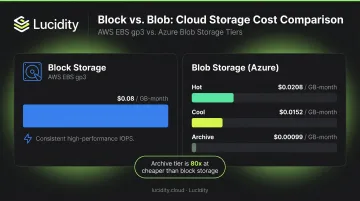
- AWS EBS gp3: ~$0.08/GB-month
- Azure Blob Hot LRS (East US): ~$0.0208/GB-month
- Azure Blob Cool LRS (East US): ~$0.0152/GB-month
- Azure Blob Archive LRS (East US): ~$0.00099/GB-month
The cost gap widens dramatically at the archive tier: block storage at ~$0.08/GB versus blob archive at under $0.001/GB. For FinOps teams managing large datasets, getting tiering right can translate directly to six-figure annual savings.
What Is Block Storage?
Block storage breaks data into fixed-size chunks called blocks. Each block gets a unique identifier and is stored independently across the underlying infrastructure. When your application requests data, the storage system reassembles those blocks on demand.
From the operating system's perspective, a block storage volume looks and behaves exactly like a physical disk—whether it's an SSD or HDD. That means any file system or database engine can run on it without application-level changes. No API calls, no special drivers. You mount it, format it, and use it.
Performance Capabilities
This direct integration with the OS is what enables block storage's defining characteristic: speed.
Official cloud provider benchmarks show what premium block storage can deliver:
- AWS EBS io2 Block Express: Under 500 microseconds average latency; up to 256,000 IOPS
- Azure Ultra Disk: Sub-millisecond latency; up to 400,000 IOPS and 10,000 MB/s
- GCP Extreme Persistent Disk: Up to 120,000 read/write IOPS per instance
These figures apply to specific high-performance disk classes, not all block storage tiers. Standard and balanced tiers deliver lower—but still respectable—performance.
Cloud Block Storage Equivalents
The three major cloud providers each offer their own block storage services:
- AWS: Elastic Block Store (EBS) — attached to EC2 instances as block devices
- Azure: Managed Disks — registered as SCSI drives within the VM OS
- GCP: Persistent Disk — accessed as network block devices attached to Compute Engine instances
Each service offers multiple tiers—from budget-friendly standard disks to SSD options tuned for low-latency, high-throughput workloads. Choosing the wrong tier is one of the fastest ways to overpay.
The Over-Provisioning Problem
Block storage must be pre-provisioned in fixed volumes. Teams allocate capacity upfront to handle peak demand—which sounds prudent, but creates a persistent cost problem.
Based on Lucidity's analysis of over 600 enterprise assessments covering more than 100 petabytes of data, the average enterprise operates at roughly 30% disk utilization. That means approximately 70% of provisioned capacity sits idle, generating cost with no corresponding value.
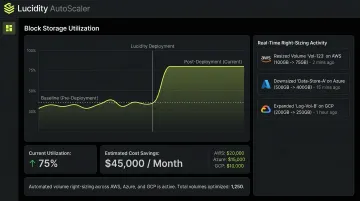
Lucidity's AutoScaler tackles this by autonomously expanding and shrinking block storage volumes across AWS, Azure, and GCP in real time—without downtime or infrastructure changes. Dometic cut cloud storage spend by 52% after deployment.
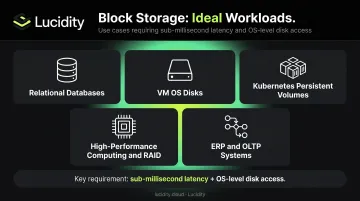
Use Cases for Block Storage
- Relational databases (MySQL, PostgreSQL, Oracle)
- VM operating system disks
- Kubernetes persistent volumes
- High-performance computing and RAID configurations
- ERP and OLTP systems requiring consistent low latency
A financial services application needing consistent sub-5ms read latency for transaction processing is a straightforward block storage use case—blob storage's API-based access model simply can't meet that bar.
What Is Blob Storage?
"Blob" stands for Binary Large Object. Azure Blob Storage is Microsoft's object storage service for storing massive amounts of unstructured data—images, video, audio, documents, logs, and backups—as discrete objects in a flat namespace.
Each object contains the data itself, associated metadata, and a unique identifier. Objects are organized into containers (analogous to AWS S3 buckets). There's no directory hierarchy by default, though virtual folder paths can be simulated using delimiter characters in blob names.
Blob Storage vs. Object Storage: Terminology Across Providers
Blob storage is Azure's branded name for what the industry calls object storage. The equivalents across providers are:
- Azure: Blob Storage
- AWS: Amazon S3
- Google Cloud: Cloud Storage
They follow the same architectural model—objects stored in flat namespaces, accessed via REST APIs or HTTP/HTTPS, decoupled from any specific compute instance.
Within Azure Blob Storage, there are three blob types:
| Blob Type | Purpose |
|---|---|
| Block blobs | Text and binary data (files, streaming, documents) |
| Append blobs | Optimized for append operations (log files) |
| Page blobs | Random read/write access; used to back Azure VM disks |
Page blobs are worth calling out specifically: they behave similarly to block storage for VM disk use cases, which is a frequent source of confusion when comparing storage types.
Azure Blob Storage Tiering
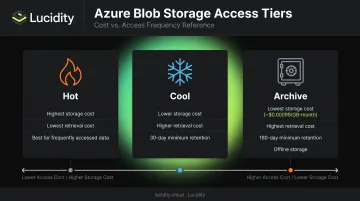
Azure Blob Storage offers three access tiers that trade storage cost against retrieval cost:
- Hot: Highest storage cost, lowest access cost — for frequently accessed data
- Cool: Lower storage cost, higher access cost — minimum 30-day retention
- Archive: Lowest storage cost (~$0.00099/GB-month in East US), highest retrieval cost — minimum 180-day retention, offline storage
Tier selection directly affects your bill. Archive retrieval is expensive and slow by design — it's built for data you genuinely won't need quickly, and misclassifying active data into Archive can create both cost spikes and operational delays.
Use Cases for Blob Storage
- Media file storage and delivery (product images, video assets)
- Data lake storage for ML training datasets and analytics
- Backup and disaster recovery archives
- Log file storage and long-term retention
- Static website hosting
An e-commerce platform storing millions of product images is a strong blob storage use case. The images are infrequently updated, accessed via HTTP, and can scale to petabytes with no OS-level disk management overhead. Attempting the same with block storage would mean paying per-provisioned-GB for largely static files — the cost structure simply doesn't fit.
Block Storage vs Blob Storage: Which Should You Choose?
The right answer depends on four factors:
- Access pattern — How often does your application read or write this data?
- Performance requirements — Does your workload need sub-millisecond latency, or is throughput sufficient?
- Data type — Is the data structured and transactional, or unstructured and static?
- Cost sensitivity — Are you optimizing per-GB cost, or total infrastructure efficiency?
Decision Guide
Choose block storage when:
- Your application requires OS-level disk access
- You need consistent low latency (databases, transactional systems)
- The workload involves frequent random read/write operations
- You're running Kubernetes persistent volumes or VM OS disks
Choose blob storage when:
- You're storing large volumes of unstructured data at scale
- Access is infrequent and API-based
- Cost efficiency is the primary driver (backups, archives, ML input data)
- The data doesn't need to be mounted as a disk
The Hybrid Architecture
Most mature enterprise architectures use both storage types simultaneously—and that's the right approach.
A common pattern: block storage handles the transactional layer (databases, application servers, container volumes), while blob storage handles cold data, backups, log archives, and analytics input. AWS makes this explicit—EBS snapshots are stored in Amazon S3 as incremental backups. GCP uses a similar model, with Persistent Disk snapshots stored in Cloud Storage.
These provider patterns reflect a broader cost principle: tiering data between block and blob storage can cut per-GB costs dramatically. Moving infrequently accessed data off provisioned block volumes to blob's cool or archive tiers drops the rate from roughly $0.08/GB-month down to fractions of a cent for archived objects.
The Block Storage Cost Trap
Selecting the right storage type is straightforward. Keeping block storage efficient at scale is where most enterprises run into trouble.
Because block volumes must be pre-provisioned, teams over-provision to prevent capacity-related downtime—and rarely shrink volumes once they've been allocated. Lucidity's data, drawn from hundreds of enterprise assessments, consistently shows average disk utilization sitting at 30%. That unused capacity is pure wasted spend.
Flexera's 2025 research found that 84% of organizations struggle to manage cloud spend, with budgets exceeding limits by an average of 17%. Storage over-provisioning is a meaningful contributor.
Lucidity's AutoScaler addresses this by continuously right-sizing block storage volumes across AWS, Azure, and GCP in real time—no downtime, no manual intervention required. Customers have achieved up to 70% reduction in block storage costs, with utilization improving from the 30% baseline to around 75% post-deployment.
Conclusion
Block storage wins when performance and OS-level integration are non-negotiable—databases, VMs, containers, and latency-sensitive applications all belong on block. Blob storage takes over when you need to store large volumes of unstructured data cheaply and durably, accessed via API.
Most production cloud architectures use both, with block storage handling the hot transactional layer and blob storage absorbing cold, archival, and analytical data. The harder problem is keeping that architecture cost-efficient after it's in place.
The second step—often neglected—is managing block storage efficiently. Over-provisioned volumes don't announce themselves. They just cost money every month without delivering value. Most enterprises run block storage at around 30% utilization—meaning roughly 70% of provisioned capacity is paid for but unused. If your team hasn't assessed that recently, Lucidity's free storage Assessment can show exactly where the waste is, without requiring any infrastructure changes.
Frequently Asked Questions
Is Azure Blob Storage a block storage?
No. Azure Blob Storage is Microsoft's object storage service for unstructured data, accessed via REST API. Azure's block storage equivalent is Azure Managed Disks, which attach to VMs as high-performance block-level volumes registered as SCSI drives in the OS.
When should you use block vs object storage?
Block storage is best for low-latency, transactional workloads—databases, VMs, and Kubernetes volumes where the OS needs direct disk access. Blob and object storage suits large volumes of unstructured, infrequently accessed data like backups, log archives, and media files where API access is acceptable.
What is the difference between block blobs and page blobs in Azure?
Within Azure Blob Storage, block blobs store text and binary data in chunks and are ideal for files, streaming, and large uploads. Page blobs support random read/write operations up to 8 TiB and serve as the backing storage for Azure VM disks, making them functionally closer to block storage despite living within the blob service.
Is blob storage cheaper than block storage?
Yes, by a wide margin. Azure Blob Archive storage costs around $0.00099/GB-month versus roughly $0.08/GB-month for AWS EBS gp3. However, retrieval costs and latency tradeoffs make block storage more cost-effective for high-I/O workloads where frequent access is required.
Can you use block storage and blob storage together?
Most enterprise architectures do exactly this—block storage for performance-sensitive workloads and blob storage for archiving, backups, and analytics input. Both AWS and GCP natively use object storage to back block volume snapshots. Tiering cold data from block to blob storage is a common cost optimization strategy.
What is the main disadvantage of block storage in the cloud?
Block storage must be pre-provisioned in fixed volumes, which drives over-provisioning. Teams allocate capacity for peak demand but rarely shrink volumes afterward, leaving average utilization around 30% across enterprises and turning idle capacity into one of the largest sources of avoidable cloud storage spend.