The root problem isn't storage pricing. It's the gap between what gets provisioned and what actually gets used. Lucidity's assessment data, drawn from over 600 assessments covering more than 100 petabytes of storage, consistently finds that enterprise environments operate at roughly 30% average disk utilization. That means most organizations are provisioning three times more storage than their workloads require — and paying for all of it, month after month.
None of this is inevitable. Cloud storage costs become expensive through decisions: over-provisioning at setup, leaving idle disks undetected, and managing capacity reactively rather than continuously. This guide covers four specific, high-impact ways to address those root causes.
Key Takeaways
- Cloud storage waste stems from over-provisioning, idle disks, and lack of active management — pricing is rarely the real problem
- Enterprise environments average ~30% storage utilization
- The four highest-impact levers: size disks accurately at provisioning, reclaim idle disks, automate scaling, and apply tiering policies
- Sustained savings require ongoing practice, not one-time audits
- Teams addressing all four areas have cut block storage costs by up to 70% without performance trade-offs
How Cloud Storage Costs Build Up
Cloud block storage costs accumulate in layers — quietly, across dozens of volumes — and most teams don't notice until a bill spike or FinOps audit forces a closer look.
The billing model is the same across all three major clouds — you pay for what you provision, not what you use:
- AWS EBS charges by provisioned GB-month until the volume is released
- Azure Managed Disks bill hourly based on provisioned disk size
- Google Persistent Disk charges for provisioned space regardless of how much is actually written to
Every GB allocated starts billing immediately and keeps billing until it's explicitly released.
What makes this compound is that resizing block storage isn't simple. Unlike object storage, shrinking a block volume carries downtime risk and requires engineering time most teams don't have spare. So capacity added during initial setup or a demand spike tends to stay.
Why Waste Stays Hidden
Most cloud billing dashboards aggregate costs at the account or service level. They don't surface per-volume utilization clearly, which means idle and over-provisioned disks blend into the total storage line. Teams typically discover the problem in one of two ways:
- A monthly cloud bill spikes unexpectedly
- A FinOps review flags storage as a high-waste category
By the time either happens, months of avoidable spend have already accumulated.
Key Cost Drivers for Cloud Storage
Three drivers account for the majority of cloud block storage waste:
1. The provisioned-vs-used gap Teams provision to worst-case scenarios because they can't confidently predict demand. The result is storage allocated at 3x actual usage, all of it billing at the same per-GB rate.
AWS Compute Optimizer identifies underutilized EBS volumes using 14 days of CloudWatch data. It's a reliable detection signal, but most teams aren't acting on it consistently.
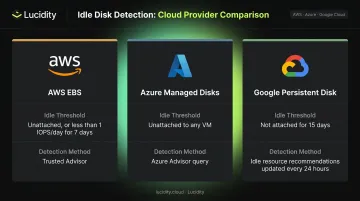
2. Idle and unattached disks Disks accumulate silently. Instances get decommissioned, autoscaling groups fail to clean up volumes, and test environments get forgotten. Each provider flags idle storage differently:
| Provider | Idle threshold | Detection method |
|---|---|---|
| AWS EBS | Unattached or <1 IOPS/day for 7 days | Trusted Advisor / Cost Optimization checks |
| Azure Managed Disks | Unattached to any VM | Azure Advisor Unattached Managed Disks query |
| Google Persistent Disk | Not attached to VM for 15 days | Idle resource recommendations (updated every 24 hours) |
3. Performance tier mismatch Not every workload needs high-performance storage, but many run on it. AWS EBS gp3 runs at $0.08/GB-month versus gp2 at $0.10/GB-month — a 20% difference at the same performance level. At the cold end, sc1 drops to $0.015/GB-month. At scale, choosing the wrong tier by default — rather than by workload requirement — can mean paying 5x more than necessary.
4 Surefire Ways to Control Cloud Storage Costs
Controlling cloud storage costs requires acting across multiple dimensions simultaneously: what you provision upfront, what's running and idle, how scaling happens, and what tier each workload actually needs.
Way #1: Right-Size Storage at Provisioning
Over-provisioning starts at the provisioning decision. Engineers add buffer because they can't confidently predict future demand, and because correcting it later is harder than getting it right the first time.
Right-sizing in practice looks different from either under-provisioning or worst-case provisioning:
- Use historical utilization data to set baselines — AWS Compute Optimizer analyzes 14 days of CloudWatch metrics to generate EBS configuration recommendations
- Provision against observed peaks, not theoretical maximums
- Establish periodic provisioning reviews as a recurring practice, not a one-time setup decision
- Pair right-sized allocations with a mechanism to scale when demand genuinely exceeds allocation
Right-sizing isn't about running lean to the point of risk. It's about using utilization evidence to provision accurately, then maintaining a safety net for genuine demand growth. The provisioning decision and the scaling mechanism are two separate problems that need to be solved together.
Right-sizing isn't the only lever at provisioning time. Switching volume types can yield immediate savings with no utilization changes — moving from gp2 to gp3 on AWS, for example, delivers up to 20% lower price per GB while allowing IOPS and throughput to be set independently from storage capacity.
Way #2: Identify and Reclaim Idle and Wasted Disks
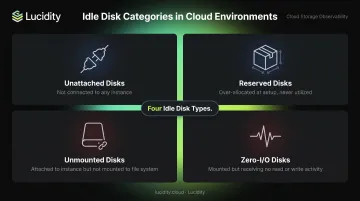
Not all idle disks look the same, which is why generic "unused storage" checks miss a significant portion of waste. There are four distinct types that accumulate in cloud environments:
- Unattached disks — not connected to any instance, billing with no active workload
- Reserved disks — over-allocated during initial setup, never utilized
- Unmounted disks — attached to an instance but not mounted to the file system
- Zero-I/O disks — mounted but receiving no read or write activity
Native cloud dashboards catch unattached disks reasonably well. They rarely surface unmounted or zero-I/O disks — which means a meaningful portion of idle storage stays invisible without deeper volume-level visibility.
Lucidity's Lumen identifies all four categories, exposing idle disks that don't appear in standard advisor recommendations. It provides full context on disk age, attachment state, usage history, and type before any action is taken.
The reclamation process should follow a structured sequence: audit across all cloud accounts, tag volumes by activity status, verify before deletion, notify workload owners for any ambiguous volumes, and archive where required before releasing.
The cost impact is direct. According to Google Cloud's idle resource documentation, deleting an idle disk saves 100% of its cost, while snapshot-then-delete reduces maintenance costs by 35%–92%.
Way #3: Automate Storage Scaling to Match Real Demand
Manual scaling has a structural flaw: storage gets expanded reactively, after an outage or alert, but rarely shrinks afterward. The engineering cycles required for manual resizing don't happen on a routine basis, so every reactive expansion becomes a permanent over-provision.
The shift to autonomous scaling removes that cycle entirely. Systems that continuously monitor utilization in real time and automatically expand or shrink block storage volumes — without downtime and without code changes — eliminate both the reactive expansion problem and the over-provisioning that follows it.
Lucidity's AutoScaler operates as an application-agnostic layer across AWS, Azure, and Google Cloud, expanding and shrinking volumes based on actual utilization with no infrastructure modifications required. The results across their customer base are consistent: average storage utilization increases from approximately 30% to 75%, with cost reductions of up to 70%.
Customer outcomes validate the approach:
"Lucidity helped us to eliminate the risk of possible downtimes, and reduce our cloud storage spend by 52%." — Henrik Floden, Lead – Cloud Center of Excellence, Dometic
"We used to spend countless hours provisioning our cloud block storage. With Lucidity, we were able to not only free up that time by automating our storage management, but were able to save significant cost on our annual block storage spend." — Brian Lupson, Director of Operations & Governance, Iron Mountain
Lucidity has eliminated over 517,000 manual SRE tasks across its customer base. ESO reclaimed weeks of engineering time after implementing AutoScaler — time that had previously gone to ticket triage, manual resizing, and reactive capacity planning.
Way #4: Apply Storage Tiering and Lifecycle Policies
Not all data justifies the same storage price. Frequently accessed, latency-sensitive data belongs on high-performance block storage. Older or infrequently accessed data can move to lower-cost tiers without any impact on active workloads.
The AWS EBS tier spread illustrates the opportunity:
| Volume type | Price (US East) | Best for |
|---|---|---|
| io1/io2 | $0.125/GB-month + IOPS | High-IOPS databases |
| gp3 | $0.08/GB-month | Most application workloads |
| gp2 | $0.10/GB-month | Legacy general purpose |
| st1 | $0.045/GB-month | Throughput-intensive, sequential |
| sc1 | $0.015/GB-month | Cold, infrequently accessed |
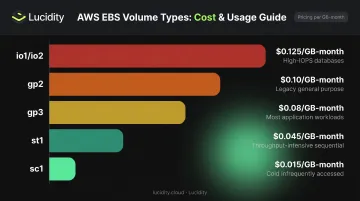
Lifecycle policies automate these transitions — defining rules that move data to cheaper tiers based on access frequency, age, or workload type. The result is reduced cost for data that no longer justifies premium storage, while keeping it accessible when needed.
Tiering addresses the data and workloads that block storage serves, not the volumes themselves. It works best when combined with right-sizing and idle disk reclamation. Lumen's tiering recommendations score every disk's tier against actual IOPS, throughput, latency, and cost metrics — surfacing specific migration actions with supporting evidence for each recommendation.
Conclusion
Cloud storage costs compound when left unmanaged. The real issue isn't what storage costs per GB — it's the gap between what's provisioned, what's idle, and what workloads actually need.
Each of the four levers addresses a distinct part of that gap:
- Right-sizing closes the provisioning gap between allocated and actual capacity
- Idle disk reclamation eliminates spend attached to volumes doing nothing
- Automated scaling prevents reactive over-provisioning from hardening into permanent cost
- Tiering aligns the broader storage environment to actual workload requirements
None of these are one-time fixes. Teams that operationalize them as continuous practices — rather than periodic audits — recover meaningful budget without sacrificing performance or reliability.
The organizations seeing the largest reductions aren't doing anything exotic. A free storage assessment is often the fastest way to see exactly where the gaps are — and which lever to pull first.
Frequently Asked Questions
How do you lower cloud storage costs?
The highest-impact actions are eliminating idle and over-provisioned resources, automating scaling to match actual demand, and applying storage tiering. Switching providers or renegotiating contracts typically delivers far less savings than reducing waste that already exists in your current environment.
What is cloud block storage and why does it cost more than object storage?
Block storage (AWS EBS, Azure Managed Disks, Google Persistent Disk) provides low-latency, high-IOPS storage suited for databases and applications. It's priced at a persistent per-GB rate regardless of actual utilization, making over-provisioning especially costly compared to object storage's usage-based pricing model.
What causes cloud storage over-provisioning?
Teams over-provision to meet performance SLAs and absorb demand spikes, and because resizing block storage manually carries downtime risk and requires engineering effort. Capacity added during peak planning rarely gets reclaimed, leading to sustained over-allocation across the entire storage estate.
How do I find unused or idle cloud storage volumes?
Audit volumes by checking attachment status, mount status, and I/O activity across cloud accounts. Native dashboards catch unattached disks but typically miss unmounted and zero-I/O volumes. Dedicated observability tools like Lucidity's Lumen surface all four idle disk types — unattached, reserved, unmounted, and zero-I/O — that standard advisor recommendations skip.
What is a good cloud storage utilization rate to target?
Most enterprise environments average around 30% storage utilization. Targeting 70–75% utilization through right-sizing and active optimization is a practical benchmark that significantly reduces waste without introducing capacity risk.
What is the 3-2-1 rule for storage?
The 3-2-1 rule means keeping 3 copies of data, on 2 different storage media types, with 1 copy stored offsite. It's a widely recognized backup best practice, but in cloud environments, implementing it without careful planning can create unnecessary duplicate storage volumes that inflate costs.