That waste isn't random. It traces back to specific decisions: how resources get provisioned, what pricing models teams use, and whether anyone reviews utilization after deployment. The result is a recurring bill built on over-sized instances, storage volumes provisioned at full capacity but used at a fraction, and workloads running on on-demand pricing when they qualify for significant discounts.
AWS and Azure costs are controllable. The challenge is knowing where to look. This article examines cost reduction at three levels: the decisions made before resources launch, how those resources are managed day-to-day, and the architectural environment around them.
Key Takeaways
- 29% of cloud spend is estimated waste — most of it predictable and preventable
- The biggest cost drivers: over-provisioned compute and storage, idle resources, pricing model mismatches, and data egress fees
- Block storage (AWS EBS and Azure Managed Disks) bills on provisioned capacity, not actual usage — a persistently overlooked cost driver
- Cost reduction works at three levels: provisioning decisions, ongoing resource management, and surrounding architecture
- Sustained cost control requires ongoing discipline — not a single audit and done
How Cloud Costs Typically Build Up on AWS and Azure
Cloud billing charges you for what you provisioned, not what you consumed. Provision a storage volume or launch an instance, and the meter runs on what you reserved — whether you use it or not.
The problem compounds gradually. A modest over-provision across hundreds of instances or volumes is invisible on any single line item. It only becomes obvious when a finance team asks why spend jumped 30% with no corresponding increase in usage.
Default dashboards don't surface this proactively. Common culprits include:
- Unattached storage volumes billing at full provisioned size
- Stopped VMs still attached to expensive block storage
- Forgotten dev and staging environments running 24/7
- Over-sized instances with single-digit CPU utilization
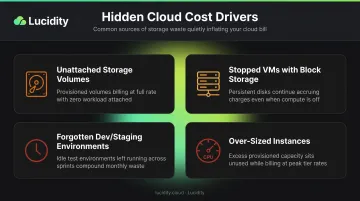
None of these trigger automatic alerts. Without proactive visibility into provisioned-vs-consumed gaps, the waste compounds month over month.
Key Cost Drivers for AWS and Azure Cloud Spend
Resource Over-Provisioning
The most persistent cost driver is over-provisioning — sizing resources for theoretical peak demand rather than actual workloads. Instances get launched large as a precaution. Storage volumes get provisioned with headroom that never gets used.
Block storage is particularly problematic. Both AWS EBS volumes and Azure Managed Disks are billed on provisioned capacity, not actual I/O or utilization. A volume provisioned at 1 TB but using 300 GB is billed at the full 1 TB — every month, continuously, until someone acts.
Shrinking that volume requires manual effort, carries downtime risk, and imposes a performance tax during resizing. So it rarely happens. Across hundreds of enterprise storage assessments covering 17+ petabytes, Lucidity has found that the average enterprise operates at approximately 30% disk utilization before optimization — meaning 70% of provisioned block storage capacity is paid for but unused.
Pricing Model Mismatch
Teams running steady, predictable workloads on on-demand pricing are paying a significant premium. The discount available through commitment-based pricing is substantial:
| Pricing Model | Potential Discount |
|---|---|
| AWS Standard Reserved Instances | Up to 72% vs. on-demand |
| AWS Savings Plans | Up to 72% vs. on-demand |
| Azure Reservations | Up to 72% vs. pay-as-you-go |
| Azure Hybrid Benefit + Reservations | Up to 85% for SQL Server workloads |
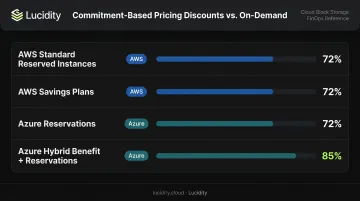
For any workload that's been running reliably for months, on-demand pricing is simply the most expensive option available.
Data Egress and Network Transfer Fees
Network charges don't appear on dashboards until they've already accumulated. Common egress costs include:
- Cross-AZ EC2 data transfer: $0.01/GB in each direction
- NAT Gateway: $0.045/hour plus $0.045/GB processed (US East)
- Azure internet egress: Free for the first 100 GB/month, then $0.087/GB for the next 10 TB
These charges rarely factor into architecture decisions. Microservice traffic crossing availability zones, workloads routing through NAT instead of VPC endpoints, and cross-region replication all generate fees that grow proportionally with scale — making egress one of the fastest-compounding line items on enterprise cloud bills.
Cost-Reduction Strategies for AWS and Azure
Cost reduction strategies need to match the level at which cost originates. Fixing provisioning decisions doesn't help if management practices allow idle resources to accumulate. Addressing management without reviewing architecture leaves egress and transfer charges untouched.
Strategies That Change Provisioning Decisions
The most lasting savings come from better decisions made before resources deploy. A correctly sized resource at launch avoids months of overspend that resizing after the fact can't recover.
Right-size at selection. Use AWS Compute Optimizer and Azure Advisor to baseline actual CPU, memory, and IOPS requirements before choosing instance types or storage volumes. AWS Compute Optimizer analyzes CloudWatch metrics across EC2, Auto Scaling groups, EBS volumes, Lambda, and ECS on Fargate. Azure Advisor flags VMs as shutdown candidates when P95 CPU stays below 3% and outbound network stays under 2% over seven days.
Match pricing model to workload predictability. The decision logic is straightforward:
- On-demand: Variable or unpredictable workloads, short-lived environments
- Reserved Instances or Savings Plans: Steady workloads running reliably for six months or more
- Spot/Preemptible: Fault-tolerant, interruptible workloads like batch jobs and CI/CD pipelines
AWS Savings Plans offer more flexibility than Reserved Instances — discounts apply across instance families, sizes, and regions in exchange for a per-hour spend commitment. Azure Reservations are more rigid but stack with Azure Hybrid Benefit for additional Windows Server and SQL Server savings.
Set storage tier at provisioning based on access patterns. AWS offers tiers from S3 Standard to Glacier; Azure from Hot to Archive. Provisioning data into a higher tier than its access frequency requires is a recurring decision-level cost that compounds as data volumes grow.
Enforce tagging before resources launch. Without tags mapping to team, environment, and cost center, spend becomes untraceable. Use AWS Service Control Policies or Azure Policy to enforce tagging as a provisioning gate — not as a cleanup exercise afterward.
Strategies That Change How Resources Are Managed
Even well-provisioned resources drift into waste. Workloads change, environments get abandoned, and storage volumes outlive the instances they supported.
Eliminate idle and orphaned resources on a regular cadence. Common sources of zero-value spend include:
- Unattached EBS volumes and Azure Managed Disks billing at full provisioned size
- Stopped VMs still generating storage charges
- Reserved IP addresses with no active association
- Load balancers with no active targets
A regular audit cadence — or automated policy enforcement — is one of the highest-ROI management practices available.
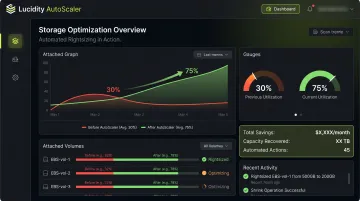
Automate block storage right-sizing. Manual storage resizing is operationally complex, carries downtime risk, and simply doesn't happen at scale. The result is static provisioning that grows stale as workloads evolve.
This is the gap that platforms like Lucidity's AutoScaler address: continuously monitoring actual utilization across all attached volumes and automatically expanding or shrinking storage with zero downtime. Enterprises that have deployed this approach move from approximately 30% average disk utilization to 75%, with storage cost reductions of up to 70%.
Set budgets, alerts, and anomaly detection. AWS Budgets and Cost Anomaly Detection, along with Azure Cost Management equivalents, provide early warning before overruns escalate. Set alerts at both service-level and account-level to catch unexpected spend before it becomes a budget conversation.
Schedule non-production environments. Dev, staging, and test environments running 24/7 pay for uptime that no one's consuming. AWS Instance Scheduler can reduce costs by up to 70% for instances only needed during business hours. Azure Start/Stop VMs v2 and DevTest Labs autoshutdown provide equivalent functionality on Azure.
Architecture-Level Cost Strategies
In many cases, the surrounding architecture — how traffic routes, where data lives, how services communicate — generates more cost than the resources themselves.
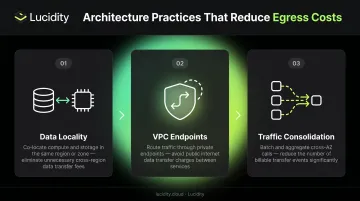
Optimize data transfer architecture. Three practices meaningfully reduce network charges:
- Data locality: place data stores close to the compute that consumes them to minimize cross-service transfer
- VPC endpoints: use AWS gateway endpoints (no additional charge) to keep traffic off the public internet and away from NAT Gateway fees
- Traffic consolidation: reduce unnecessary cross-AZ service communication; AWS Cost Explorer and Azure Cost Analysis can identify where unexpected inter-zone traffic originates
Use spot and preemptible instances for appropriate workloads. AWS Spot Instances and Azure Spot VMs both offer discounts of up to 90% versus on-demand pricing. Lyft's Jenkins CI/CD pipelines running on EC2 Spot Instances are a well-documented example of this in practice.
Strong candidates for spot pricing include:
- CI/CD pipelines and build systems
- Batch data processing jobs
- Non-critical background workers
- HPC workloads with checkpoint capability
Evaluate serverless for variable workloads. For workloads with significant traffic variance, AWS Lambda or Azure Functions eliminate the baseline cost of always-on compute. The decision should be workload-driven: serverless has cold-start latency and execution cost trade-offs that matter for some use cases. For genuinely event-driven workloads, though, eliminating idle capacity cost is material.
Conclusion
Reducing AWS and Azure cloud costs isn't about cutting budgets across the board. It's about identifying where cost originates — a provisioning decision, a management gap, or an architectural pattern — and removing waste at that specific level. Broad cuts without that diagnosis will compromise performance and reliability without delivering savings that hold.
The organizations that consistently control cloud spend treat cost optimization as an ongoing operational discipline, not a one-time project. That means building repeatable practices into normal operations:
- Resource tagging enforced at launch, not retroactively
- Idle resource audits run on a fixed schedule
- Rightsizing recommendations reviewed monthly
- Automated tooling covering areas where manual processes break down at scale
Start with one practice, get it running reliably, then build from there. Sustained savings come from process — not cleanup sprints.
Frequently Asked Questions
How do I reduce the cost of AWS cloud?
Start with AWS Compute Optimizer and Cost Explorer to identify rightsizing opportunities across EC2 and EBS. Move steady workloads to Reserved Instances or Savings Plans, deprovision idle and unattached resources, and configure AWS Budgets with anomaly detection to catch unexpected spend before it escalates.
What is the biggest source of hidden cloud cost waste on AWS and Azure?
Idle and orphaned resources — particularly unattached storage volumes and over-provisioned block storage billed at provisioned capacity rather than actual usage. Because EBS and Managed Disks charge for what's provisioned, not what's used, this waste accumulates silently and is rarely surfaced by default dashboards.
What is the difference between AWS Savings Plans and Reserved Instances?
AWS Savings Plans offer flexible discounts across instance families, sizes, and regions in exchange for a per-hour spend commitment. Reserved Instances lock a discount to a specific instance type and region. For teams with evolving workloads, Savings Plans are the more practical choice for most teams.
How does block storage over-provisioning contribute to cloud bills?
AWS EBS and Azure Managed Disks are billed on provisioned capacity, not utilization. A volume provisioned at 1 TB but using 300 GB incurs the full 1 TB charge every month. Because resizing carries downtime risk and operational complexity, most organizations never do it — and the waste compounds indefinitely.
How much can enterprises save by rightsizing cloud resources?
Compute rightsizing savings vary by workload and initial over-provisioning levels. For block storage, the gap is often larger: enterprises that move from manual provisioning to automated storage optimization typically see utilization climb from around 30% to 75%, with storage cost reductions of up to 70%.
How should FinOps teams approach continuous cloud cost optimization?
Establish resource tagging and ownership enforcement from day one. Run regular audits for idle and orphaned resources, review rightsizing recommendations monthly, and set budget alerts at both service and account levels. Automate wherever manual processes create delays — storage management in particular benefits most from removing it from operational queues.