Introduction
Enterprise cloud storage spending hit $57 billion in 2023 and is projected to reach $128 billion by 2028. Yet a substantial portion of that spend is pure waste — Lucidity's data, drawn from over 600 assessments analyzing more than 100 petabytes of storage, shows the average enterprise operates at just 30% disk utilization. Organizations are paying for roughly 3x the block storage they actually use.
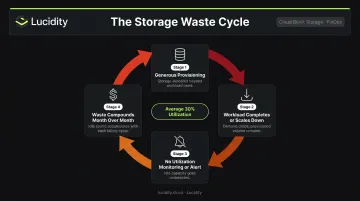
This isn't carelessness. Block storage is priced per GB provisioned regardless of how much is used, and shrinking a live volume carries downtime risk — so teams provision generously and move on. Without real-time visibility into utilization, that gap between provisioned and used capacity compounds month after month — and nothing flags it until the bill arrives.
Over-provisioning isn't the only cost driver. Storage type and tier selection compound the problem. AWS EBS gp3 runs at $0.08/GB-month, while sc1 cold HDD costs $0.015. Object storage and archive tiers cost a fraction of premium block pricing. Every mismatched decision locks in avoidable cost.
This article examines cloud storage cost optimization across three dimensions: the decisions made at provisioning time, how storage is governed once it's live, and the broader architectural context that drives storage demand in the first place.
Key Takeaways
- Average enterprise disk utilization sits at 30% before optimization (most organizations pay for roughly 3x what they actually use)
- The biggest cost drivers are over-provisioned block volumes, idle and unattached disks, snapshot sprawl, and data egress fees
- Optimization spans upfront discipline — right-sizing, tier selection, committed pricing — and continuous management to catch waste as it accumulates
- Data architecture choices (movement, retention, backup duration) often drive as much cost as the storage volumes themselves
How Cloud Storage Costs Typically Build Up
Cloud storage costs don't announce themselves. They accumulate in small recurring charges — one unattached volume here, a year of forgotten snapshots there — until scale turns a manageable line item into a budget problem.
Several factors make this accumulation hard to detect:
- Native billing dashboards report aggregate spend, not per-volume utilization. You can see total storage cost but not which specific volumes are provisioned at 3x actual need.
- Block storage can't be easily shrunk. AWS directs teams to Trusted Advisor and CloudWatch to identify over-provisioned EBS volumes — but even after identification, resizing carries performance risk and operational complexity that discourages action.
- Teams move on. A volume provisioned for a project that wound down six months ago keeps generating charges. No alert fires. No ticket gets created.
Why the Problem Compounds
The math is straightforward and unfavorable. A 1TB gp3 volume running at 30% utilization costs the same $80/month as one running at 90%. But the 30%-utilized volume represents $56/month in capacity that delivers no value.
Multiply that across hundreds or thousands of volumes — typical for mid-to-large enterprises — and that $56/month becomes tens of thousands of dollars in monthly spend that never appears as a single identifiable line item.
The provisioning decision made on day one largely determines the cost structure the organization carries indefinitely. Without ongoing utilization visibility, there's no mechanism to correct those decisions after the fact — and the waste compounds quietly until someone decides to look.
Key Cost Drivers for Cloud Storage
Cloud storage bills don't spike randomly — they follow predictable patterns. Four cost drivers account for the majority of avoidable spend.
Storage Type and Tier Selection
The cost spread between storage options is substantial:
| Storage Type | Provider | Price |
|---|---|---|
| EBS gp3 (SSD) | AWS | $0.08/GB-month |
| EBS sc1 (Cold HDD) | AWS | $0.015/GB-month |
| SSD Persistent Disk | GCP | ~$0.17/GiB-month |
| Standard Persistent Disk | GCP | ~$0.04/GiB-month |
| Azure Blob Hot LRS | Azure | $0.0208/GB-month |
| Azure Blob Archive LRS | Azure | $0.00099/GB-month |
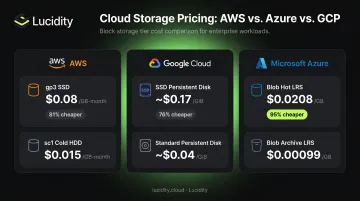
Using premium SSD block storage for a workload that cold HDD would handle equally well costs more than 5x the necessary amount on AWS alone. This decision is often difficult to reverse post-deployment.
Over-Provisioning
Over-provisioning is a rational response to genuine operational pressures, not carelessness. Two factors push teams toward it consistently:
- Performance SLAs create real anxiety around under-provisioning
- Resizing block storage post-deployment is complex and carries downtime risk
Teams provision generously as a hedge, then rarely revisit the allocation.
On Azure, Premium SSD v1 ties higher IOPS to larger disk capacity, which structurally forces over-provisioning just to meet performance requirements. Switching to Premium SSD v2 — which allows independent IOPS provisioning — can deliver roughly 18% cost savings on equivalent workloads.
Data Egress and Cross-Region Transfer
Egress charges appear on a separate line item and are often overlooked until they become material:
- AWS: same-AZ transfer is free; cross-region transfer is always charged
- Azure: first 100 GB/month internet egress is free; intra-continental transfers run ~$0.02/GB
- GCP: same-zone is free; cross-zone within a region runs $0.01/GiB; inter-region ranges $0.02–$0.14/GiB
Snapshot and Backup Accumulation
Snapshots are among the least-visible storage costs. AWS warm snapshot storage runs $0.05/GB-month; archived snapshots drop to $0.0125/GB-month but carry a 90-day minimum retention. On GCP, automatically scheduled snapshots are retained permanently if the source disk is deleted, unless explicitly removed. Without retention policies, snapshots accumulate indefinitely.
Cost-Reduction Strategies for Cloud Storage
Effective cloud storage cost reduction works across three layers: the decisions made before provisioning, the governance of volumes already in production, and the data architecture that creates storage demand. All three typically need attention simultaneously.
Strategies That Reduce Costs by Changing Storage Decisions
Right-size volumes based on actual workload data, not peak estimates. Lucidity's assessment data shows the average enterprise operates at 30% disk utilization, implying most volumes are provisioned at roughly 3x actual need. Before setting initial volume size, analyze I/O patterns, throughput requirements, and historical usage data.
This matters most for premium SSD tiers where the per-GB cost is highest. A gp3 volume at $0.08/GB-month that's half the size costs half as much — right-sizing at provisioning time locks in savings permanently.
Match storage type to actual workload requirements. Block storage is appropriate for databases and applications requiring low-latency random I/O. Object storage (priced per GB stored, not per GB provisioned) suits unstructured data, media files, and logs. Using block storage for workloads where object or file storage would perform equally well is a common and expensive mismatch — and one that's difficult to undo after deployment.
Adopt committed or reserved pricing for stable, predictable volumes. Azure offers disk storage reservations for Premium SSD managed disks that reduce cost for committed capacity. GCP provides committed use discounts for eligible resources. The tradeoff is straightforward: committed pricing delivers meaningful savings on stable workloads but creates risk if the workload's storage needs change materially before the commitment period ends. Reserve capacity you're confident will remain consistent.
Strategies That Reduce Costs by Changing How Storage Is Managed
Gain per-volume utilization visibility across every account and region. Without granular data at the volume level, there's no reliable way to distinguish appropriately-sized storage from chronically over-provisioned storage. Native cloud cost dashboards report aggregate spend; they don't surface which specific volumes are running at 15% utilization.
Lumen addresses this directly, tracking IOPS, throughput, latency, and cost trends per volume across AWS, Azure, and Google Cloud. It surfaces idle disks and tiering inefficiencies that don't appear in cloud consoles or standard advisor recommendations, giving teams the specific evidence needed to prioritize cleanup.
Identify and reclaim idle storage volumes systematically. Idle storage is not a single problem — it's four distinct problems requiring different remediation:
- Unattached volumes — not connected to any instance, generating charges with no workload to justify them
- Reserved disks — allocated but never actively used
- Unmounted volumes — attached to an instance but not in use by the application
- Zero-I/O disks — attached and mounted but receiving no read or write activity for extended periods
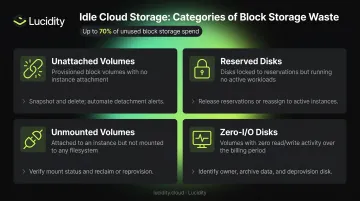
Each category represents a different governance gap. Together, they can account for up to 70% of unused block storage spend. Identifying them requires per-volume utilization monitoring, not aggregate billing reports. Lucidity's Lumen uniquely identifies and prioritizes all four categories across AWS, Azure, and Google Cloud, enabling teams to clean up idle disks directly from the dashboard without manual auditing or engineering cycles.
Automate storage expansion and contraction based on real utilization. Over-provisioned volumes stay oversized permanently in most organizations because manually shrinking block storage is operationally complex and carries downtime risk at scale. The provisioning decision made at deployment is effectively permanent, which is why waste compounds over time.
Lucidity's AutoScaler addresses this by autonomously expanding storage before workloads hit capacity thresholds and shrinking it when utilization drops, keeping provisioned capacity aligned with actual need. Customers have seen disk utilization improve from 25% to 75% and storage costs reduced by up to 70%. Dometic, for example, reduced cloud storage spend by 52% while eliminating downtime risk.
Strategies That Reduce Costs by Changing the Context Around Storage
Some of the largest cost drivers exist outside the volume itself — in the data architecture and governance structures that determine how storage is consumed.
Implement data tiering and automated lifecycle policies. Moving from Azure Blob Hot to Archive tier cuts the storage unit price by roughly 95% (from $0.0208/GB-month to $0.00099/GB-month). On GCP, Archive storage runs about 94% lower than Standard tier per GiB-month. Lifecycle policies automate this transition for infrequently accessed data — logs, media files, historical records — without manual intervention. The opportunity is largest for unstructured data, which tends to be the fastest-growing and least-managed storage category.
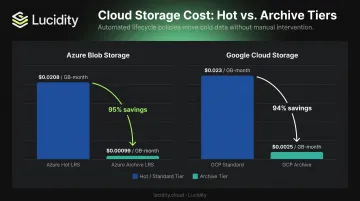
Note: data tiering for object storage falls outside Lucidity's current product scope. Lumen's tiering capabilities focus on block storage tiers — optimizing within the block storage layer across providers rather than managing transitions between block and object or archive storage classes.
Enforce snapshot and backup retention policies. Defining granular retention windows — daily snapshots retained 7 days, weekly retained 30, monthly retained 90 — prevents indefinite accumulation. Policy documentation alone isn't sufficient; enforcement mechanisms are required. Without them, snapshots grow silently. AWS warm snapshot storage at $0.05/GB-month adds up quickly across large environments with no cleanup policy.
Minimize egress by addressing architectural root causes. The most durable fix for egress costs is co-locating storage and compute within the same region, which eliminates cross-region transfer charges entirely. For hybrid environments, direct connectivity options — AWS Direct Connect, Azure ExpressRoute, GCP Cloud Interconnect — can substantially reduce egress rates compared to standard internet transfer pricing. CDNs handle content delivery more cost-effectively than repeated egress from origin storage.
Conclusion
Cloud storage cost reduction isn't a uniform exercise. Applying budget pressure without understanding where cost originates — over-provisioning decisions made at deployment, idle volume sprawl in production, or data architecture that drives storage demand — often sacrifices performance without addressing the actual problem.
The more durable approach is continuous and contextual. Workloads evolve, data grows, and utilization patterns shift. A one-time cleanup initiative captures some savings; ongoing visibility and automated governance compounds those savings over time as the environment changes.
For organizations where the average disk utilization sits at 30%, the headroom is significant. The difference between capturing that headroom once and capturing it continuously comes down to instrumentation — real-time visibility into every volume, automated governance that acts on what it finds, and the ability to right-size without manual intervention. Tools like Lucidity's free Storage Assessment give teams a concrete starting point: an unbiased view of where waste actually lives before committing to any approach.
Frequently Asked Questions
What are the strategies for cloud cost optimization?
The core pillars for block storage cost optimization are:
- Right-size provisioned volumes based on actual utilization data
- Eliminate idle and orphaned volumes (unattached, reserved, unmounted, zero-I/O)
- Apply tiering and lifecycle policies to move cold data to lower-cost storage tiers
- Enforce snapshot retention limits to prevent silent accumulation
- Adopt committed pricing for predictable workloads
How much does 20 TB of cloud storage cost?
Costs vary widely by storage type and provider. Block storage runs $1,600–$3,482/month for 20 TB provisioned (AWS EBS gp3 ~$1,600; GCP SSD Persistent Disk ~$3,482; Azure E80 ~$2,457). Object storage is far cheaper — AWS S3 Standard runs ~$460/month for the same volume — because you pay per GB stored, not per GB provisioned.
What causes cloud storage costs to increase unexpectedly?
The most common culprits are accumulating snapshots without retention policies, undetected idle or orphaned volumes, data growth that outpaces lifecycle management, and over-provisioned volumes that were never right-sized after initial deployment. These charges appear across separate line items and rarely trigger alerts, which is why they compound before anyone notices.
How do I identify and eliminate idle or unused cloud storage volumes?
Idle volumes fall into four categories — unattached, unmounted, reserved, and zero-I/O — each requiring different remediation. Identifying them requires per-volume utilization monitoring, not aggregate billing dashboards. Lucidity's Lumen surfaces all four categories simultaneously across AWS, Azure, and Google Cloud, enabling cleanup without manual auditing.
What is the difference between block storage and object storage costs?
Block storage is priced per GB provisioned regardless of how much is actually used — so a 1TB volume running at 20% utilization costs the same as one running at 95%. Object storage is priced per GB stored. This structural difference makes right-sizing block storage volumes particularly high-impact: every GB of over-provisioned block storage is a direct, ongoing cost with no corresponding workload value.
How much can organizations save by optimizing cloud storage?
Savings depend on current utilization. Most organizations Lucidity assesses run at around 30% utilization, leaving significant headroom. Customers combining idle volume cleanup, right-sizing, and tiering have achieved up to 70% reduction in block storage costs — Dometic cut costs by 52%, and one information management firm saved over $1.5M across Azure and Google Cloud.