Introduction
Both AWS and Azure promise elasticity and pay-as-you-go efficiency. Most enterprises still end up overspending — not because cloud is inherently expensive, but because pricing structures are complex, costs accumulate in unexpected places, and optimization gets treated as a quarterly exercise rather than a continuous discipline.
The scale of the problem is well-documented:
- Flexera's 2026 State of the Cloud report found wasted IaaS and PaaS spend hit 29% — reversing a five-year downward trend
- HashiCorp's 2024 survey found 91% of organizations report wasted cloud spend, with overprovisioning (40%) and idle resources (35%) as the top culprits
This guide breaks down how AWS and Azure pricing models differ, where costs accumulate on each platform, and which optimization strategies deliver the highest ROI. Block storage gets dedicated attention — it's one of the most underestimated cost drivers on both platforms, and the tactics for managing it are platform-specific.
Key Takeaways
- AWS and Azure both offer pay-as-you-go, reserved, and spot pricing — but billing granularity and discount structures differ in ways that affect your actual bill
- Common hidden cost drivers include over-provisioned resources, data egress fees, idle workloads, NAT gateway charges, and orphaned assets
- Rightsizing, reserved capacity, autoscaling, and idle resource cleanup deliver the highest ROI on both platforms
- Both Amazon EBS and Azure Managed Disks bill for provisioned capacity, not actual usage — block storage quietly drains budgets even when disks sit idle
- Native tools like AWS Cost Explorer and Azure Advisor cover single-cloud basics but lack cross-cloud visibility and autonomous remediation
AWS vs Azure Pricing Models: Key Differences That Affect Your Bill
Both platforms share a common architecture: consumption-based billing, commitment discounts, and cheaper interruptible compute. The differences that actually affect enterprise budgets are subtler, and worth understanding before you commit resources.
Billing Granularity
AWS EC2 On-Demand instances are billed in one-second increments with a 60-second minimum. Azure's current pricing pages state VMs are also charged by the second with no long-term commitments required.
The practical implication: for short-lived or bursty workloads — CI/CD jobs, data processing pipelines, ephemeral test environments — billing granularity at the second level matters. Teams running large volumes of short-duration jobs should verify current billing behavior directly against each provider's pricing documentation before assuming parity.
Savings Plans vs Azure Reservations
These commitment programs look similar on paper but behave differently in practice:
| Feature | AWS Savings Plans | Azure Reservations |
|---|---|---|
| Discount vs on-demand | Up to 66% (Compute) / 72% (EC2 Instance) | Up to 72% |
| Flexibility | Across instance families, sizes, regions, OS | Locked to specific SKU and region |
| Commitment term | 1 or 3 years | 1 or 3 years |
| Best for | Evolving, flexible workloads | Stable, well-defined workloads |
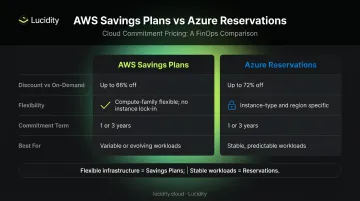
AWS Compute Savings Plans apply across EC2, Fargate, and Lambda usage, making them forgiving when infrastructure changes mid-commitment. Azure Reservations work differently: unused reserved capacity in a given hour expires without credit and doesn't carry forward.
If your Azure workloads are predictable and stable, that rigidity is a non-issue. If they're not, you'll pay for capacity you never used.
Azure Hybrid Benefit: A Significant Cost Lever for Microsoft Shops
Azure Hybrid Benefit is unique to Azure and worth calling out explicitly. Organizations with existing Windows Server or SQL Server licenses (with active Software Assurance or qualifying subscriptions) can apply those licenses to Azure workloads — with Microsoft claiming savings of:
- Up to 80% vs pay-as-you-go for Windows Server on Azure VMs
- Up to 85% vs pay-as-you-go for SQL Server on Azure
For enterprises migrating from on-premises Microsoft environments, this alone can make Azure the more cost-effective choice for Windows/SQL workloads, regardless of raw compute pricing comparisons.
Spot Instances vs Spot VMs
Both platforms offer discounts of up to 90% for interruptible workloads. The key operational difference is eviction behavior:
- AWS Spot Instances: 2-minute interruption notice before stop or termination
- Azure Spot VMs: At least 30 seconds advance notice via Scheduled Events
AWS's Spot market has broader instance type availability. Azure Spot VMs integrate tightly with Azure Virtual Machine Scale Sets. Both are suited for fault-tolerant, stateless workloads — batch processing, CI/CD pipelines, model training jobs — and should not be used for anything requiring persistent state.
Understanding these pricing mechanics is the baseline. The next step is mapping them to your actual workload mix to determine where each platform's model works in your favor.
Hidden Cost Drivers in AWS and Azure (That Most Teams Miss)
The gap between estimated cloud costs and actual bills is almost always explained by the same predictable set of factors. They exist on both platforms and compound quietly over time.
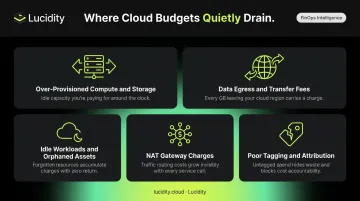
Over-Provisioned Compute and Storage
Provisioning "just in case" — oversized instances, autoscaling thresholds set too high, storage volumes allocated beyond actual needs — is the single largest driver of cloud waste. Both Amazon EBS and Azure Managed Disks charge based on provisioned capacity, not actual usage. A 1TB volume using 200GB still incurs the full 1TB cost.
This makes storage over-provisioning especially easy to miss: unlike idle compute, which shows up in utilization metrics, an oversized attached disk appears perfectly "in use" in native dashboards.
Data Egress and Inter-Region Transfer Fees
Inbound data is free on both platforms. Outbound is not:
- AWS: First 100 GB/month free; approximately $0.09/GB for internet egress (US East, Ohio)
- Azure: First 100 GB/month free; $0.087/GB for the next 10 TB from North America/Europe
Inter-region and inter-AZ transfer adds further cost. Azure charges $0.02/GB for intra-continental transfers within North America or Europe, and $0.05/GB for inter-continental transfers. These fees are especially unpredictable in distributed architectures, active-passive replication setups, or globally distributed applications.
Idle Workloads and Orphaned Assets
Stopped VMs, unattached storage volumes, abandoned snapshots, unused load balancers — these continue generating charges even though they deliver zero business value. Manual audits catch some of it, but at scale they fall short.
Practical starting points for reclaiming idle spend:
- Schedule automated scans using AWS Config rules or Azure Policy to flag unattached disks and stopped instances
- Set lifecycle policies on snapshots to expire older backups automatically
- Use cost anomaly alerts to surface unexpected charges from orphaned resources
NAT Gateway Costs
NAT gateways often surprise teams because the charges stack with egress fees and don't appear prominently in cost dashboards. Both AWS and Azure charge:
- $0.045/hour per availability zone for the gateway itself
- $0.045/GB for all data processed through it
Those processing fees add up fast in architectures with heavy outbound traffic. Quick mitigations include:
- Use VPC Endpoints (AWS) or Azure Private Endpoints to route traffic off the public internet
- Minimize unnecessary internet-bound calls from private subnets
- Consolidate gateway usage across AZs where architecture permits
Poor Tagging and Cost Attribution
Without consistent resource tagging, there's no reliable way to attribute spend to specific teams, applications, or environments. That makes identifying waste — let alone enforcing accountability — nearly impossible. Both platforms support tagging, but enforcement requires policy-as-code to work at scale.
Cost Optimization Strategies That Work on Both AWS and Azure
Rightsize Compute Resources
Rightsizing means matching instance type and size to actual workload requirements, using real utilization data rather than peak assumptions.
- AWS: Use AWS Compute Optimizer, which applies ML-based analysis to EC2, RDS, and Lambda usage history
- Azure: Use Azure Advisor, which provides rightsizing recommendations using resource configuration and telemetry
Start with your highest-spend resources. Use a minimum 2-4 week lookback window to avoid making decisions based on anomalous peaks. A single rightsizing pass on your top 20 resources by spend often captures 20–40% of available savings.
Use Reserved Capacity Strategically
Both platforms offer commitment discounts of up to 66–72% vs on-demand rates, but the right approach depends on workload predictability:
- AWS workloads (flexible/evolving): Use Compute Savings Plans — discounts apply across instance families, regions, and services without re-purchasing
- Azure workloads (stable/predictable): Use Reserved VM Instances — the rigidity is fine when you know exactly what you're running
One warning that gets ignored too often: over-committing is wasted spend. Unused reservations don't refund themselves. Start with a conservative commitment on your most stable workloads. Measure actual utilization first, then expand.
Implement Autoscaling to Match Supply with Demand
Autoscaling prevents both failure modes: paying for idle capacity and running into performance issues under load. Core mechanisms:
- AWS: Auto Scaling Groups for EC2; cluster autoscaler for EKS
- Azure: Virtual Machine Scale Sets; cluster autoscaler for AKS
For Kubernetes workloads, tools like Karpenter (AWS) provide node-level autoscaling that goes beyond standard cluster autoscaler behavior — provisioning right-sized nodes in response to actual pod requirements.
Clean Up Idle Resources Continuously
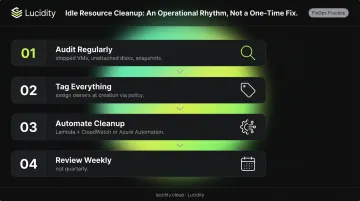
This should be an operational rhythm, not a one-time project. A structured approach:
- Audit regularly — stopped VMs, unattached disks, unused snapshots, zombie load balancers
- Tag everything — assign resource owners at creation time using policy enforcement
- Automate cleanup — use AWS Lambda + CloudWatch Events or Azure Automation + Azure Monitor to act on idle resource signals
- Review weekly — not quarterly
Optimize Network Egress and Data Transfer
Four tactics that reduce egress costs:
- Data locality: Keep compute and storage in the same region
- Private endpoints: Use VPC Endpoints (AWS) or Azure Private Endpoints to keep traffic off the public internet
- CDN caching: Use AWS CloudFront or Azure CDN to serve content closer to end users
- Traffic analysis: Use Cost Explorer or Azure Cost Management to identify unexpected cross-region or cross-AZ traffic patterns
Set Budgets, Alerts, and Continuous Monitoring
Cost monitoring needs to operate like infrastructure monitoring — continuously, with clear ownership, not as a monthly finance review.
- AWS: Cost Explorer + AWS Budgets + CloudWatch anomaly detection
- Azure: Microsoft Cost Management + Billing + Azure Monitor
Set tiered alerts at 50%, 80%, and 100% of budget thresholds. Assign specific owners to investigate anomalies — "the team" is not an owner.
Storage Cost Optimization: The Overlooked Savings Lever
Storage — particularly block storage — is one of the most consistently undermanaged cost categories in cloud environments. Unlike compute, which teams actively watch, storage volumes get provisioned, attached, and forgotten.
The core pricing problem is straightforward but underappreciated: both Amazon EBS and Azure Managed Disks charge on provisioned capacity, not actual I/O usage. A volume provisioned at 1TB costs the same whether it's 20% full or 95% full. Based on Lucidity's analysis of over 600 assessments covering more than 100 petabytes of storage data, the average enterprise disk utilization sits around 30% — meaning organizations are effectively paying for roughly 70% of their provisioned block storage without using it.
The Four Types of Idle Disk Waste
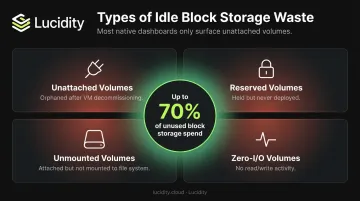
Idle and wasted disks accumulate in four distinct categories, each generating charges while delivering no value:
- Unattached volumes — orphaned after VM decommissioning, still billed at full provisioned capacity
- Reserved volumes — held for anticipated use but never deployed
- Unmounted volumes — attached to an instance but not mounted to the file system
- Zero-I/O volumes — attached and mounted, but receiving no read or write activity for extended periods
Together, these four types can represent up to 70% of unused block storage spend. The challenge is that most native cloud dashboards only surface unattached volumes — the other three categories are effectively invisible without purpose-built tooling.
How Lucidity Surfaces and Eliminates Storage Waste
Lucidity's Lumen product identifies all four idle disk types across AWS, Azure, and Google Cloud — including volumes that don't appear in native dashboards or standard advisor recommendations. For each flagged disk, it surfaces the context needed to act safely:
- Disk age and attachment state
- Full usage history and I/O activity
- How long the disk has been idle
- Recommended action with reversibility built in
Cleanup is auditable and reversible with no infrastructure changes, agent installation, or code modifications required. The free Assessment tool surfaces utilization, waste, and downtime risk metrics in approximately 5 minutes.
In practice, enterprises using Lucidity's platform typically see disk utilization increase from ~30% to ~75% post-optimization. Dometic, for example, achieved a 52% reduction in cloud storage spend after deployment, while Iron Mountain eliminated the manual provisioning burden that was consuming engineering hours across their team.
Native Cost Management Tools: AWS vs Azure
AWS Native Tools
- Cost Explorer — usage visualization, cost forecasting, custom reporting
- Compute Optimizer — ML-based rightsizing recommendations for EC2, RDS, Lambda
- Trusted Advisor — real-time checks across cost, security, and performance
- AWS Budgets — threshold alerts, spending controls, coverage tracking
These tools are well-integrated and useful in AWS-only environments.
Azure Native Tools
- Microsoft Cost Management + Billing — budget tracking, detailed reporting, AI-driven recommendations
- Azure Advisor — recommendations for rightsizing, idle resource cleanup, and reservation purchases
- Azure Monitor — real-time resource usage tracking with custom alert capabilities
Azure also provides native integration with Hybrid Benefit tracking, which is a meaningful advantage for Microsoft-licensed environments.
When Native Tools Aren't Enough
Both toolsets work well in single-cloud environments. They fall short when:
- Teams manage workloads across AWS and Azure (or Google Cloud) simultaneously and need unified visibility
- Cost allocation by team, product, or feature requires depth that provider dashboards don't support
- Optimization needs to be autonomous rather than recommendation-based — native tools surface suggestions; someone still has to act on them
- Specific resource categories like block storage require specialized detection that provider advisors miss
The FinOps Foundation notes that cloud providers use distinct tools, names, and metrics for the same FinOps capabilities — creating real friction for practitioners working across providers. At that point, the gap isn't just inconvenient — it's a source of untracked spend and delayed action.
Frequently Asked Questions
Is AWS more cost-effective than Azure?
Neither platform is universally cheaper. The answer depends on workload type, your licensing situation (Azure Hybrid Benefit gives Azure a clear edge for Windows/SQL Server workloads), commitment strategy, and region. Model your specific workloads using both providers' pricing calculators before committing to either platform.
What is Azure cost optimization?
Azure cost optimization is the ongoing process of reducing Azure spending while maintaining performance — not a one-time project. It covers rightsizing resources, using reservations and savings plans, eliminating idle assets, and optimizing storage and network configurations.
What is the most effective approach for building a cost optimization program in AWS?
Start with visibility — use Cost Explorer and enforce consistent tagging, then eliminate idle resources and rightsize compute with Compute Optimizer. Layer in Savings Plans for committed workloads. Treat it as an ongoing discipline: the first pass sets a baseline, and savings compound from there.
What are the hidden cost drivers in AWS and Azure?
The most common: data egress fees (especially cross-region and internet-bound traffic), NAT gateway processing charges, over-provisioned storage volumes charged on provisioned capacity, orphaned assets, and idle workloads still accruing charges.
How do AWS Savings Plans compare to Azure Reservations?
AWS Savings Plans are more flexible — discounts apply across instance families, sizes, and regions. Azure Reservations lock discounts to a specific SKU and region for 1-3 years. Both can deliver up to 66-72% savings vs on-demand for predictable workloads. AWS's model suits teams with changing infrastructure; Azure Reservations work best for stable, well-defined workloads.
What is the best way to reduce storage costs on AWS and Azure?
Implement lifecycle policies to automate tiering for infrequently accessed data, then prioritize idle disk cleanup. Unattached, unmounted, and zero-I/O volumes — on both EBS and Azure Managed Disks — charge on provisioned capacity whether used or not, making them one of the highest-ROI targets available.