
Introduction
Choosing between Azure Blob Storage and Azure Files is straightforward on paper — until you're three weeks into an architecture decision that affects multiple teams, live applications, and a migration timeline that can't slip. Both services live under the Azure Storage Account umbrella, both store data, and both appear in the same portal blade. The overlap makes the confusion easy to understand.
The problem is they're built for fundamentally different access patterns. Pick Blob when you need Files, and you're rewriting application code. Pick Files when Blob would do, and you're paying a significant cost premium for storage that didn't need shared mount access.
This article breaks down exactly how each service works, where each belongs, and how to make the right call without second-guessing your architecture six months later.
Key Takeaways
- Azure Blob Storage is object storage for unstructured data (images, video, logs, backups), accessed via REST APIs and SDKs
- Azure Files is a managed file share service using SMB or NFS protocols, mountable as a network drive across Windows, Linux, and macOS
- Blob is cheaper for large-scale unstructured data, especially with tiered pricing (Hot/Cool/Cold/Archive)
- Azure Files costs more but supports shared, simultaneous mount access across multiple VMs
- Most enterprises use both — Blob for object/media workloads, Files for shared application configs and legacy app migrations
Azure Blob Storage vs Azure Files: Quick Comparison
Both services live inside an Azure Storage Account, but their architectures serve different workloads: object storage (Blob) versus a distributed file system (Files). Choosing the wrong one creates real cost and compatibility problems — this table gives you a direct side-by-side.
| Dimension | Azure Blob Storage | Azure Files |
|---|---|---|
| Data type | Unstructured data (images, video, logs, backups, ML datasets) | Files and directories requiring shared access |
| Access protocol | HTTP/HTTPS, Azure Storage REST API, client libraries | SMB 2.1/3.0/3.1.1, NFS 4.1 |
| Typical use case | Cloud-native apps, data lakes, media streaming, backups | Lift-and-shift migrations, shared file servers, VM configs |
| Pricing model | Tiered (Hot/Cool/Cold/Archive) per GB/month + transactions | Standard: pay-as-you-go per GB; Premium: provisioned capacity |
| East US LRS pricing | Hot: $0.021/GB-month; Archive: $0.00099/GB-month | Standard LRS: $0.06/GB-month; Premium LRS: $0.16/GB-month |
| Max share/object size | Block blob: ~190.7 TiB; Page blob: 8 TiB | HDD pay-as-you-go: 100 TiB; SSD provisioned v2: 256 TiB |
| Access control | Azure RBAC, SAS, Entra ID (with Data Lake Gen2) | RBAC, SAS, SMB identity auth, Windows ACLs, AD DS/Entra ID |
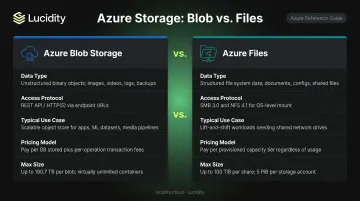
Pricing sourced from the Azure Retail Prices API for East US LRS, as of June 2026. Verify current rates before budgeting.
Azure Storage also includes Queues (message queuing), Tables (NoSQL key-value store), Managed Disks (block storage for VMs), and Elastic SAN — but Blob and Files are the two services architects most often need to choose between.
What Is Azure Blob Storage?
Azure Blob Storage is Microsoft's cloud object storage solution for massive volumes of unstructured data. Unstructured means no required schema or format — this covers images, video files, log outputs, ML training sets, and raw binary data.
Resource Hierarchy
The structure follows three tiers:
Storage Account → Container → Blob
Containers organize blobs similarly to folders, and a single storage account can hold unlimited containers with unlimited blobs inside each.
Three Blob Types
| Type | Best For | Size Limit |
|---|---|---|
| Block Blob | Text, binary data, documents, images, backups | ~190.7 TiB |
| Append Blob | Log-write scenarios, VM diagnostics | ~195 GiB |
| Page Blob | Random-access files, VHD files for Azure VMs | 8 TiB |
Access Tiers
Choosing the right tier directly affects your costs. Cooler tiers charge less for storage but more for retrieval — and carry minimum duration requirements:
- Hot — frequent access, lowest retrieval cost, no minimum duration
- Cool — infrequent access, lower storage cost, 30-day minimum
- Cold — rare access, 90-day minimum
- Archive — offline storage, lowest cost at ~$0.00099/GB-month, 180-day minimum, requires rehydration before access
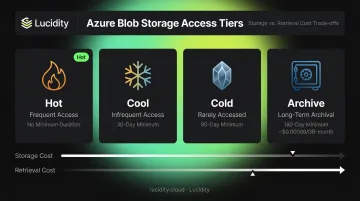
Moving data out of Cool, Cold, or Archive before the minimum duration triggers an early deletion charge.
Primary Use Cases
Blob Storage fits workloads that need programmatic, API-driven access at scale:
- Serving static web assets (images, documents) directly to browsers
- Storing and streaming video or audio content
- Aggregating log files from distributed applications
- Backing up databases and archiving compliance data
- Storing large datasets for analytics and AI/ML model training via Azure Data Lake Storage Gen2
A media platform, for example, stores video files in Blob Storage, serves them via CDN integration, and manages costs by automatically tiering older content to Cool or Archive. The REST API handles uploads and retrieval — no shared mount access required. That distinction matters when comparing it to Azure Files, which takes a fundamentally different approach.
What Is Azure Files?
Azure Files is Microsoft's fully managed cloud file share service. It uses SMB (2.1, 3.0, 3.1.1) and NFS 4.1 protocols, so it can be mounted as a network drive on Windows, Linux, and macOS — the same way a traditional on-premises file server works.
How It Works
File shares are created within a Storage Account and can be mounted simultaneously by multiple VMs or on-premises machines. Identity-based access control works over SMB via:
- On-premises Active Directory Domain Services (AD DS)
- Microsoft Entra Domain Services
- Microsoft Entra Kerberos (for hybrid identities)
This makes Azure Files the right fit whenever applications rely on Windows ACLs and NTFS-style permission inheritance — something Blob Storage cannot provide natively.
Azure File Sync
Azure File Sync extends Azure Files into hybrid environments. It caches frequently accessed files on local Windows Servers while the full dataset lives in Azure. For distributed teams, this means local-speed access to files without giving up centralized cloud storage.
Performance Tiers
| Tier | Storage | Billing Model | IOPS | Best For |
|---|---|---|---|---|
| Standard | HDD-backed | Pay-as-you-go | Up to 20,000 | General file sharing, cost-sensitive workloads |
| Premium | SSD-backed | Provisioned capacity | Up to 102,400 | Latency-sensitive, I/O-intensive workloads |
Note: Premium Azure Files bills on provisioned capacity, not actual consumption — meaning you pay for what you allocate, not just what you use.
Primary Use Cases
- Replacing or supplementing on-premises file servers and NAS devices
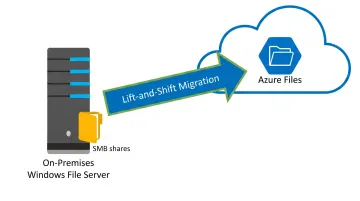
- Lift-and-shift migrations of legacy applications that rely on file system APIs
- Storing shared configuration files or development tools accessible across multiple VMs
- Supporting Linux workloads via NFS 4.1
A practical example: an IT team migrating an on-premises Windows file server to Azure Files retains NTFS permissions, existing access patterns, and drive mapping. No application code changes are required.
Azure Blob Storage vs Azure Files: Key Differences Explained
Data Structure and Access Model
Blob Storage uses a flat object model (Storage Account → Container → Object) accessed via HTTP REST APIs, SDKs, and tools like Azure Storage Explorer. Azure Files uses a true hierarchical file system (Storage Account → Share → Directory/File) accessible via SMB/NFS and mountable as a local drive.
The practical implication: Blob requires application-level integration. Files works transparently with existing applications that use native file system calls.
Access Protocols and Compatibility
- Blob Storage: REST API access over HTTP/HTTPS makes it ideal for programmatic, cloud-native workloads and cross-platform application integration
- Azure Files: SMB/NFS support integrates directly with operating systems; critical for applications that use native
read,write, andseekcalls and cannot be refactored to use REST APIs
If your application was written to open a file path like \\fileserver\share\config.ini, it needs Azure Files. If it calls a storage endpoint via SDK, Blob works fine.
Protocol compatibility determines more than convenience — it often determines whether a migration is even feasible. That constraint shapes which workloads each service can realistically handle.
Performance Characteristics
| Workload Type | Better Choice |
|---|---|
| High-throughput sequential operations (large uploads, streaming) | Blob Storage |
| Shared concurrent access, random I/O | Azure Files |
| I/O-intensive databases or analytics on shared files | Azure Files Premium (up to 102,400 IOPS) |
| Bulk data ingestion at massive scale | Blob Storage |
Security and Access Control
Both services cover the same baseline controls:
- AES-256 encryption at rest and in transit
- Azure RBAC for role-based access
- Shared Access Signatures (SAS) for delegated, time-limited access
Where they diverge is fine-grained permissions at the file and directory level:
- Azure Files supports Windows ACLs and NTFS-style directory/file permissions over SMB with AD-based identities — essential for enterprises with existing permission structures
- Blob Storage with Hierarchical Namespace (Data Lake Gen2) supports POSIX-like ACLs at the file/folder level using Entra ID identities, which suits enterprise data governance in analytics pipelines
Pricing and Cost Structure
Azure Blob Storage pricing varies by access tier, making it cost-efficient for mixed-temperature data. Azure Files pricing uses flat per-GB billing with no tiering:
- Blob Hot tier: ~$0.021/GB-month, plus transaction and retrieval costs
- Blob Archive tier: ~$0.00099/GB-month, but retrieval incurs significant latency and cost
- Azure Files Standard LRS: ~$0.06/GB-month (pay-as-you-go, no tiering)
- Azure Files Premium LRS: ~$0.16/GB-month (provisioned — you pay for allocated capacity)
For large-scale infrequently accessed data, Blob's Archive tier is roughly 60x cheaper per GB than Azure Files Standard. For data requiring regular access across multiple machines, Azure Files' flat per-GB rate is the more predictable choice — even at a higher unit cost.

Which One Should You Choose?
Choose Azure Blob Storage When:
- Your application accesses storage via REST APIs or SDKs
- You're storing large volumes of unstructured data — media files, backups, logs, ML datasets
- You need tiered storage to manage costs as data ages (Hot → Cool → Archive)
- You're building cloud-native applications or data lake architectures on ADLS Gen2
- Cost efficiency for large-scale or infrequently accessed data is a priority
Choose Azure Files When:
- Multiple VMs or users need to simultaneously mount and access files as a network drive
- You're migrating legacy applications that depend on file system APIs without rewriting code
- You need Active Directory authentication and NTFS permission inheritance
- You're replacing or supplementing on-premises file servers or NAS devices
- Your Linux workloads require NFS 4.1 protocol support
Using Both Together
These services aren't mutually exclusive. Many enterprise architectures use Blob Storage for unstructured data and media assets while running Azure Files for shared application configurations, logs, and legacy workloads. Match each service to the workload it was built for, and you'll get the best of both.
One area these architecture decisions often leave untouched is the Azure managed disks attached to the VMs running these workloads. Teams that carefully optimize their Blob tiers and Files configurations sometimes overlook real cost waste in over-provisioned or idle block storage volumes sitting alongside them.
Lucidity's Lumen product identifies four types of idle disks — unattached, reserved, unmounted, and zero-I/O — across Azure environments, and continuously scores every disk's tier against actual IOPS, throughput, and latency usage.
For example, when a volume is provisioned as a Premium SSD but consistently runs at Standard SSD utilization levels, Lumen flags it, shows the evidence, and can execute the tier change without a maintenance window. Teams running Lucidity's free storage assessment typically find their disks averaging around 30% utilization — well below what they're paying for.
Frequently Asked Questions
What are the differences between Azure Files and Azure Blob Storage?
Azure Blob Storage is object storage for unstructured data accessed via REST APIs and SDKs, while Azure Files is a managed file share service accessed via SMB or NFS protocols and mountable as a network drive. The core difference is access model: Blob requires application-level integration; Files works transparently with existing OS-level file operations.
What are the main types of Azure Storage?
Azure Storage includes six core services:
- Azure Blobs — object storage for unstructured data
- Azure Files — managed SMB/NFS file shares
- Azure Queues — message queuing
- Azure Tables — NoSQL key-value store
- Azure Managed Disks — block storage for VMs
- Azure Elastic SAN — cloud-native storage area network
Blob and Files are the most frequently compared of the six.
Is Azure Files part of Azure Storage?
Yes. Azure Files is a service within the Azure Storage platform. Both Azure Files and Azure Blob Storage are created and managed within an Azure Storage Account, alongside Queues and Tables — they're different storage services under the same account structure.
Can you use Azure Blob Storage and Azure Files together?
Yes, and many enterprises do. A typical pattern pairs Blob Storage for large unstructured datasets and media assets with Azure Files for shared configs, development tooling, or legacy workloads that need a mountable network drive across multiple VMs.
Which is cheaper: Azure Blob Storage or Azure Files?
Blob Storage is generally cheaper for large-scale storage, particularly with Cool, Cold, or Archive tiers. Azure Files Standard charges ~$0.06/GB-month, while Blob Archive runs ~$0.00099/GB-month. That said, Blob's retrieval fees climb for infrequently accessed data — if you're pulling data often, the gap narrows quickly.
When should I use Azure Files instead of Azure Blob Storage?
Azure Files is the right choice when:
- Multiple VMs or users need to simultaneously mount and access files as a network drive
- You're migrating on-premises file servers without rewriting application code
- Active Directory authentication and NTFS permission inheritance are required
If your application references file paths rather than calling storage APIs, Azure Files is the right fit.