
Introduction
According to Flexera's 2026 State of the Cloud Report, an estimated 29% of cloud spend is wasted—and a 2024 HashiCorp survey found that **91% of organizations report wasted cloud spending**, with overprovisioning and idle resources among the leading causes. Azure Files teams contribute to that number more often than they realize.
Azure Files isn't inherently expensive. Costs climb through specific decisions: choosing the wrong billing model, defaulting to Premium tiers for general workloads, carrying redundancy levels that exceed actual requirements, and leaving snapshots unmanaged for months. Each is fixable once you know where to look.
Key Takeaways
- Azure Files costs accumulate through billing model mismatches, tier overselection, redundancy defaults, and unmanaged snapshots
- Billing model choice (Provisioned v1/v2 vs. Pay-as-you-go) has an outsized cost impact and must match your actual workload behavior
- Most savings come from decisions made before a share is deployed: tier, redundancy, and billing model
- Ongoing management—snapshot policies, idle share audits, utilization monitoring—is the second critical layer
- Egress, hybrid sync costs, and poor service-fit decisions compound Azure Files spend beyond the main storage line item
How Azure Files Costs Typically Build Up
Azure Files costs rarely arrive as a single visible spike. They accumulate gradually through three recurring patterns.
Front-loaded provisioned costs: Provisioned v2 charges for allocated storage, IOPS, and throughput regardless of actual consumption. Teams that provision generously at deployment and never revisit those allocations pay for capacity that sits idle.
Usage-triggered surprises in Pay-as-you-go: This model charges for used storage and protocol transactions. Teams that underestimate transaction volume — particularly for shares with frequent small I/O operations — can find transaction charges rival or exceed storage costs.
Invisible accumulation from secondary sources: These typically stay off the radar until a billing audit:
- Snapshot differential storage charged against used storage in Pay-as-you-go
- Egress fees for cross-region access from VMs in different regions
- Azure File Sync endpoint fees ($5 per Sync Server per month) in hybrid deployments
Each pattern compounds quietly. By the time a billing audit surfaces the waste, costs have been accruing for weeks or months across all three.
Key Cost Drivers for Azure Files
Five factors drive the majority of Azure Files spend: billing model, tier selection, redundancy, snapshots, and egress. Getting any one of these wrong compounds costs across the others.
Billing Model Selection
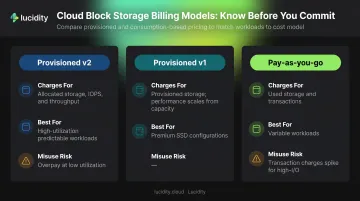
Azure Files supports three billing models: Provisioned v2, Provisioned v1, and Pay-as-you-go. The model you choose determines what gets billed.
| Billing Model | What Gets Billed | Best For |
|---|---|---|
| Provisioned v2 | Provisioned storage, IOPS, and throughput—regardless of usage | Predictable, high-utilization workloads |
| Provisioned v1 | Provisioned storage; performance scales from capacity | SSD/Premium classic shares |
| Pay-as-you-go | Used storage, data transfer, and transactions | Variable or low-volume workloads |
Teams that pick Provisioned v2 for a share running at 20% utilization consistently overpay. Teams that pick Pay-as-you-go for a high-transaction workload face compounding transaction charges. Picking the wrong model for your actual usage pattern is the cost driver—not the model itself.
Tier Selection
Current East US retail storage prices illustrate the spread clearly:
- Premium SSD (Provisioned v1): $0.16/GB-month
- Transaction Optimized (PAYG): $0.06/GB-month
- Hot (PAYG): $0.0287/GB-month
- Cool (PAYG): $0.0228/GB-month
Premium SSD delivers consistent latency under 2 ms and supports up to 102,400 IOPS. Those specs matter for latency-critical applications. For general-purpose file shares, archival data, or infrequently accessed content, that performance premium adds nothing. Deploying Premium for workloads that don't need sub-millisecond latency is one of the most common avoidable costs in Azure Files.
Data Redundancy
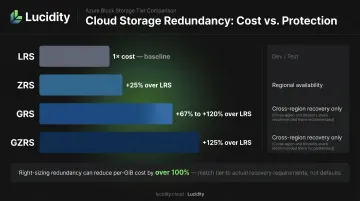
Redundancy is a direct cost multiplier that many teams inherit as an organizational default without validating whether it's warranted:
- ZRS adds approximately +25% over LRS
- GRS adds approximately +67% over LRS for Transaction Optimized; for Hot and Cool tiers, current East US retail pricing shows closer to +120%
- GZRS adds approximately +125% over LRS
A large Hot-tier share on GZRS that only needs LRS durability is paying more than double the storage rate for redundancy it doesn't require.
Snapshots
Azure Files snapshots are differential—they store only changed data. But billing nuances matter:
- Pay-as-you-go: Differential snapshot usage counts as normal used storage at the standard tier rate
- Provisioned v1: Snapshot usage billed via a separate, reduced-price Premium Snapshots meter
- Provisioned v2: Snapshot usage is free within the provisioned share size; overflow usage is billed separately
Without a retention policy, snapshots from active shares accumulate continuously. On a heavily written Pay-as-you-go share, differential snapshot storage can approach the cost of the primary share over time.
Egress and Hybrid Sync Costs
These don't appear as "storage" on invoices, which is why they're frequently missed:
- Data transferred out of an Azure region costs $0.087/GB (after the first 100 GB/month free) for North America and Europe
- Azure File Sync charges $5 per Sync Server per month per registered server endpoint
- Cross-region VM access to file shares triggers egress charges on every read and write
Each of these drivers requires a different optimization lever—understanding which ones apply to your environment is the starting point for meaningful cost reduction.
Cost-Reduction Strategies for Azure Files
Effective cost reduction targets where costs actually originate. The strategies below address billing model decisions, deployment choices, and ongoing management gaps.
Strategies That Change Upfront Decisions
These are the highest-leverage optimizations because they set the cost structure before a share is even created.
Match the tier to access frequency. Before provisioning, classify the workload:
- Daily access → Hot or Transaction Optimized
- Monthly or less → Cool
- Sub-millisecond latency required → Premium SSD
- Archival or infrequent access → evaluate Azure Blob Storage Cool or Archive instead
Select the billing model based on usage predictability. Use this decision rule:
- Workload runs near provisioned limits consistently → Provisioned v2
- Workload is variable, low-volume, or unpredictable → Pay-as-you-go
- Transaction volume is high → avoid Pay-as-you-go; transaction charges compound fast
Right-size redundancy to actual risk requirements. Audit each share's availability and compliance requirements:
- Dev/test or non-critical shares → LRS
- Regional availability needs → ZRS
- Genuine cross-region recovery requirements → GRS or GZRS only
Removing geo-redundancy from large shares that don't need it can reduce per-GiB cost by over 100% on Hot and Cool tiers.
Use reserved capacity for stable, long-running shares. Azure Files reservations can reduce storage costs by up to 36%. Reservations are available for:
- SSD Provisioned v1 and HDD Pay-as-you-go Hot and Cool tiers
- 10 TiB and 100 TiB increments
- 1-year (~18% discount) and 3-year (~34–36% discount) terms
Reserve only for shares with at least 6 months of consistent usage. Locking into reserved capacity for variable workloads eliminates the discount benefit.
Strategies That Improve Ongoing Management
These costs don't show up on dashboards until someone looks for them — which most teams don't do on a regular cadence.
Implement snapshot retention policies. Define a retention window (30 days for daily snapshots is a reliable starting point) and automate deletion of snapshots outside that window using Azure Automation or scheduled scripts. Without this, snapshot differential storage grows indefinitely on active shares.
Audit and decommission idle file shares quarterly. Shares created for migrations, projects, or temporary workloads are rarely deleted when the use case ends. Use Azure Resource Graph or Azure Monitor to identify shares with zero or near-zero I/O over a rolling 30-day period, then decommission or downgrade them.
For teams running broader Azure storage audits, Lucidity's Lumen identifies four categories of idle block storage resources (unattached, reserved, unmounted, and zero-I/O) that often surface waste invisible to native cloud dashboards.
Monitor provisioned-to-utilized ratios in Provisioned v2. In Provisioned v2, you pay for what you allocate. Set up Azure Monitor Storage Insights to track actual IOPS and throughput consumed against provisioned limits. Shares that consistently operate at 20–30% of provisioned capacity are candidates for downward adjustment.
Configure Cost Management budgets scoped to storage. Set per-subscription or per-resource-group cost alerts for Azure Files. Wire alerts to trigger on snapshot growth, egress spikes, or transaction cost deviations from baseline. Catching a spike in week one of a billing cycle is far cheaper than discovering it after 30 days.
Strategies That Address the Deployment Context
Sometimes the surrounding environment is the real cost driver, not the file share itself.
Co-locate compute and file shares in the same region and availability zone. Accessing a file share from a VM in a different region triggers egress charges on every operation. Keep VMs and file shares in the same region. For latency-sensitive SSD shares, Microsoft documentation confirms that zonal placement can reduce latency by up to 30% and eliminates intra-region transfer costs.
Audit Azure File Sync endpoints. File Sync charges $5 per Sync Server per month per registered server. Audit whether all registered servers are still active and needed. Consolidate endpoints where possible. Two servers syncing the same share for legacy reasons represent unnecessary spend.
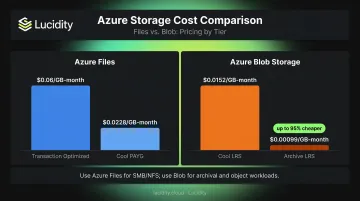
Reassess whether Azure Files is the right service. Some workloads land on Azure Files out of familiarity rather than fit. For archival logs, backup data, or large sequential write datasets that don't require SMB or NFS protocols, Azure Blob Storage is significantly cheaper:
| Service/Tier | East US LRS Price |
|---|---|
| Azure Files Cool (PAYG) | $0.0228/GB-month |
| Azure Blob Cool LRS | $0.0152/GB-month |
| Azure Blob Archive LRS | $0.00099/GB-month |
If a share is used primarily for archival rather than active file access via SMB/NFS, Blob Archive can represent a 95%+ reduction in per-GiB storage cost.
Conclusion
Azure Files cost reduction depends on diagnosing where the cost originates. The cost drivers generally fall into two categories:
- Upfront decisions: Billing model mismatches and tier overselection create structural waste from day one
- Ongoing management gaps: Redundancy defaults, unmanaged snapshots, and unchecked egress compound quietly over months
Each category requires a different fix—and both require attention.
No one-time audit fixes this permanently. Tier requirements shift as workloads evolve, snapshot volumes grow as shares stay active, and provisioned capacity drifts from actual utilization as teams scale.
The teams that consistently control Azure Files costs treat optimization as an operational discipline—with monitoring, retention policies, and regular audits built into standard workflows. A practical starting point: run a storage assessment to establish a utilization baseline, then set a monthly review cadence for tier alignment and snapshot cleanup.
Frequently Asked Questions
What is the cheapest Azure Files tier for infrequently accessed data?
The Cool tier under the Pay-as-you-go HDD model offers the lowest per-GiB storage rate for Azure Files at $0.0228/GB-month (East US LRS). It's most cost-effective for data accessed less than once a month, since retrieval and transaction costs apply and can offset savings for more frequently accessed content.
How do I avoid overpaying in the Azure Files provisioned billing model?
Overpayment occurs when provisioned storage, IOPS, and throughput significantly exceed actual usage. Track real consumption via Azure Monitor Storage Insights and reduce provisioned values for shares that consistently operate well below their allocated performance limits.
Does Azure Files support lifecycle management policies like Azure Blob Storage?
Azure Files does not support Blob-style automated tier-transition lifecycle policies. Instead, manage tiering and cleanup through manual tier changes, PowerShell/CLI scripts, Azure Automation runbooks, or Azure File Sync cloud tiering for on-premises cache management.
What are the hidden costs of Azure Files I should watch out for?
The three most common: differential snapshot storage charged at the standard tier rate in Pay-as-you-go, egress fees for cross-region access at $0.087/GB, and Azure File Sync server endpoint charges at $5 per Sync Server per month. None of these surface in a single billing line item, so they're easy to miss.
How does data redundancy affect Azure Files pricing?
Redundancy is a direct cost multiplier: ZRS adds roughly 25% over LRS, GRS adds about 67–120% depending on the tier, and GZRS adds approximately 125%. Audit each share's actual availability requirements before defaulting to higher redundancy levels.
When should I use Azure Files vs. Azure Blob Storage from a cost perspective?
Azure Files is the right choice when workloads require SMB or NFS file share protocols. For archival, object, or sequential data access that doesn't need a file system interface, Azure Blob Storage Cool or Archive tiers are cheaper per GiB—up to 95% cheaper at the Archive tier.