Introduction
According to the Wasabi 2025 Global Cloud Storage Index, 62% of organizations exceeded their cloud storage budgets in 2024—up from 53% the year before. Budget overruns are no longer an outlier—they're the norm for teams that haven't restructured how they pay for storage.
For teams running Azure Files at scale, the math is straightforward: pay-as-you-go rates are the default, and most organizations stay there far longer than they should. Stable, predictable file share workloads accumulate PAYGO charges month after month, even when a reservation would cut those costs by up to 36% compared to standard rates.
The catch? That discount only materializes when the reservation is properly matched to actual usage, the correct billing model, the right tier, and the appropriate redundancy configuration. Miss any of those variables and the reservation either goes partially unused or fails to cover the data you thought it would.
This guide breaks down where Azure Files costs accumulate, how to size and validate a reservation before committing, and what ongoing management looks like once it's active—so you capture the full discount rather than leaving savings on the table.
Key Takeaways
- Azure Files reservations offer discounts up to 36% on storage capacity for SSD provisioned v1 and HDD pay-as-you-go (hot/cool) file shares; provisioned v2 and the transaction optimized tier are excluded
- Reservations are use-it-or-lose-it hourly—unused capacity doesn't roll over, so right-size your estimate before you commit
- The discount covers storage capacity only; transactions, bandwidth, and metadata charges remain at PAYGO rates
- Match your reservation scope—single subscription, shared, or management group—to where your actual consumption lives, or the discount won't apply where you need it
- Most teams skip three steps: auditing current usage, staging purchases gradually, and setting expiry reminders—each one is recoverable; skipping all three isn't
How Azure Files Reserved Capacity Costs Build Up
Without reservations, Azure Files costs accumulate at PAYGO rates across multiple meters simultaneously—storage capacity, transactions, data transfer, and snapshots. At small scale, the total looks manageable. At enterprise scale, the delta between PAYGO and reserved pricing becomes significant fast.
The build-up is gradual. As file share usage grows, each gigabyte added at PAYGO costs more than it would under a reservation. Organizations that delay adoption pay a compounding premium—and the longer they wait, the more those cumulative overpayments stack up.
Tier and billing model misalignment is where costs quietly compound. Organizations that stay on PAYGO for hot-tier file shares with stable, predictable usage patterns are forgoing reservation discounts on every storage hour. Full transaction costs stack on top. Neither category surfaces clearly in standard billing views until someone pulls a detailed breakdown.
A few patterns drive this delayed discovery:
- Storage billing is spread across multiple meters, making it hard to see the total picture
- Native Azure dashboards rarely surface all optimization opportunities, so teams assume they're not missing anything
- Billing model eligibility (provisioned v1 vs. v2) isn't widely understood, leading to reservation purchases that can't be applied
Key Cost Drivers for Azure Files Reserved Capacity
Four drivers account for most Azure Files reserved capacity overspend. Knowing which one is hitting you determines where to act first.
The Capacity-Reservation Gap
The primary driver is the mismatch between actual storage consumption and reservation size. Over-reserve and you're paying for committed capacity that sits unused. Under-reserve and the overflow runs at full PAYGO rates.
Reservations come in 10 TiB and 100 TiB increments, with larger blocks delivering higher discounts. The incremental nature means there's almost always some gap—the goal is minimizing it, not eliminating it entirely.
Tier and Redundancy Lock-In
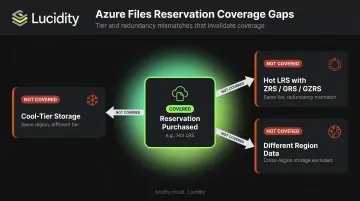
A reservation purchased for the hot tier with LRS applies only to hot-tier LRS data. It doesn't cover:
- Cool-tier data in the same region
- Hot-tier data with ZRS, GRS, or GZRS redundancy
- Data in a different region
Any storage that doesn't match the exact region, access tier, and redundancy combination falls outside the reservation and bills at PAYGO. Mismatched configurations mean you're paying twice—once for the unused reservation, once for the uncovered data.
Transaction and Operational Costs
Reservations cover storage capacity only. Organizations with high file operation volumes—reads, writes, metadata updates—continue generating PAYGO transaction charges regardless of reservation status. For workloads with heavy I/O patterns, transaction costs can represent a substantial share of total Azure Files spend — and no reservation covers them.
Term Length vs. Growth Trajectory
- 3-year term: Deepest discount, higher risk if storage requirements shift
- 1-year term: More flexibility, smaller discount
Choosing the wrong term regularly causes either wasted commitment (over-reserved, long term) or missed savings (under-committed, short term). The right choice depends on how predictable your file share workloads actually are.
Cost-Reduction Strategies for Azure Files Reserved Capacity
Reserved capacity costs break down into three categories: the decisions made before purchase, how the reservation is managed once active, and the surrounding storage environment that determines whether the reservation is sufficient on its own.
Strategies That Change the Purchase Decision
These are the choices made before or at purchase. Get them wrong and the reservation generates waste from day one, regardless of how well it's managed afterward.
1. Verify billing model eligibility first. Azure Files reservations only apply to SSD provisioned v1 file shares and HDD pay-as-you-go shares in the hot and cool tiers. The provisioned v2 billing model and the transaction optimized tier are not eligible. Confirm which billing model your file shares use before purchasing, or you'll commit budget to a reservation that can never be applied.
2. Right-size to confirmed consumption, not projected peaks. Pull 30–90 days of Azure Cost Management data to identify average monthly consumption per tier and redundancy combination, then purchase the increment that matches stable, confirmed usage. Reservations sized to anticipated peaks consistently generate wasted hours in the early months.
3. Lock in tier and redundancy before committing. Changing a file share's tier or redundancy after purchasing a reservation removes it from coverage, leaving the reservation unused and the data billed at PAYGO. Confirm that both settings are finalized before you purchase.
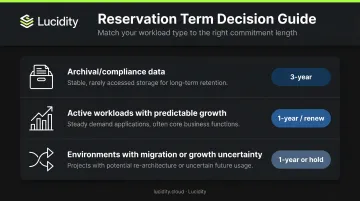
4. Match term length to workload stability.
| Workload Type | Recommended Term |
|---|---|
| Archival or compliance data (stable, multi-year) | 3-year |
| Active workloads with predictable growth | 1-year, renew |
| Environments with pending migration or growth uncertainty | 1-year or hold |
Strategies That Improve Active Reservation Management
A well-purchased reservation still requires active management. Without it, underutilization accumulates quietly and unused hours are never recovered.
1. Monitor utilization continuously. Unused reservation hours are forfeited hourly and never recovered. Any period where actual storage falls below reserved capacity is direct financial loss. Azure Cost Management surfaces reservation utilization data — set up regular reviews and act on persistent underutilization by adjusting scope or initiating an exchange.
2. Optimize reservation scope. Reservations can be scoped to a single subscription, shared across subscriptions, or applied at the management group level. For organizations with Azure Files usage distributed across multiple subscriptions, a shared or management group scope allows the discount to automatically shift to wherever matching file shares exist, reducing waste from consumption imbalances between subscriptions.
3. Build expiry management into your FinOps workflow. Azure reservation auto-renewal is enabled by default at purchase, but it can be turned off. Microsoft sends expiration notifications 30 days before expiry for reservations of one year or longer. Whether auto-renewal is on or off, treat the renewal date as a trigger for a utilization review — confirm that the renewed reservation size still reflects actual consumption before it rolls.
4. Use storage visibility tooling to assess consumption stability. The decision to reserve should rest on consumption data, not estimates. Tools that surface historical storage trends (rather than point-in-time snapshots) give FinOps and ITOps teams a clear picture of whether usage is stable enough to warrant a multi-month or multi-year commitment before budget is committed.
Strategies That Address the Broader Storage Context
Even a correctly sized, well-managed reservation won't capture every cost reduction opportunity. These strategies address the adjacent factors that a reservation alone can't fix.
1. Stage reservation purchases as data volume grows. Purchasing a full reservation before a data migration or ingestion is complete means the early months of the term generate wasted reserved hours. A staged approach — buying smaller blocks as usage crosses defined thresholds — aligns commitment with confirmed consumption. The per-block discount is slightly smaller, but utilization rates stay higher and total cost comes down.
2. Reduce transaction costs independently. Since reservations don't cover transactions, workloads with high read/write volumes will continue generating significant PAYGO charges no matter how well the reservation is sized. Practical steps:
- Reduce unnecessary metadata operations
- Batch file access patterns where possible
- Review whether workloads are correctly placed on hot vs. cool tier based on actual access frequency
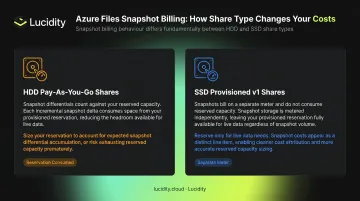
3. Account for snapshot billing correctly. The billing behavior differs by file share type:
- HDD pay-as-you-go shares: Snapshot differentials count against the reservation — they consume reserved capacity
- SSD provisioned v1 shares: Snapshots are billed on a separate meter and do not count against the reservation
Getting this wrong leads to either incorrect reservation sizing (too small, because snapshot storage wasn't accounted for) or unexpected PAYGO charges (too large, because snapshots were double-counted).
Conclusion
Capturing the full Azure Files reservation discount requires identifying exactly where costs leak—unused reserved hours, tier or redundancy mismatches, uncovered transaction costs, poorly scoped commitments—and addressing each one with intention.
The organizations that consistently capture the full reservation discount treat it as an ongoing FinOps discipline, not a one-time purchase. Usage patterns shift, data volumes grow, and billing models change — a reservation that was well-matched at purchase can be 20–30% misaligned within a year without active monitoring.
Three habits that separate teams who capture the discount from those who don't:
- Audit before committing — validate actual consumption patterns against the reservation scope
- Monitor utilization throughout the term — track against the 100% utilization threshold monthly, not annually
- Build a formal renewal review — force a consumption check before any reservation automatically carries forward
Frequently Asked Questions
What is Azure Files reserved capacity?
Azure Files reserved capacity is a commitment-based pricing model where organizations pre-commit to a fixed amount of storage—in 10 TiB or 100 TiB increments—for a 1-year or 3-year term. In exchange, Microsoft applies a discount on storage capacity charges compared to pay-as-you-go rates, with 3-year commitments delivering discounts of up to 36%.
How do I use Azure Files reserved capacity?
Purchase the reservation through the Azure portal by selecting the region, access tier, redundancy, increment size, and term. The discount then applies automatically to matching Azure Files resources within the selected scope. No configuration is needed on the file share itself.
What is the minimum capacity of Azure Files Premium reservations?
Reservations for Azure Files Premium (SSD provisioned v1) are available in minimum increments of 10 TiB. This is separate from the minimum provisioned share size of 100 GiB for individual Premium file shares. Check the Azure Files pricing page for current figures.
Which billing models support Azure Files reserved capacity?
Reservations apply to SSD provisioned v1 file shares and HDD pay-as-you-go file shares in the hot and cool tiers only. The provisioned v2 billing model and the transaction optimized tier are not eligible for reserved capacity discounts.
Does Azure Files reserved capacity cover transaction or bandwidth costs?
No. The reservation discount applies only to storage capacity charges. Transaction costs, bandwidth, data transfer, and metadata storage charges are excluded and continue to bill at pay-as-you-go rates regardless of reservation status.
Can Azure Files reservations be exchanged or refunded?
Yes. Reservations can be exchanged for another Azure Files reservation of equal or greater remaining value, currently at no fee. Refunds are prorated based on remaining days; Microsoft is not currently charging early termination fees, though a 12% fee may apply in the future. See Microsoft's self-service exchange and refund documentation for current terms.