Introduction
Azure's breadth of services and pricing models gives engineering teams genuine flexibility — but that same flexibility creates real financial exposure. Flexera's 2026 State of the Cloud report estimates that 29% of cloud IaaS and PaaS spend is wasted, and a separate Flexera survey found that 84% of organizations struggle to manage cloud spend, with budgets exceeding targets by an average of 17%.
For organizations with meaningful Azure commitments, those numbers aren't abstract. Overprovisioned VMs, idle managed disks, misaligned reservations, and gaps in cost attribution all accumulate until the monthly bill arrives.
Azure FinOps is the operating model that brings engineering, finance, and business teams into alignment around shared cost accountability. It's an ongoing practice, not a one-time cleanup.
This guide covers:
- What Azure FinOps is and why it matters
- The key cost drivers most organizations overlook
- How to build a solid foundation for cost governance
- Actionable optimization strategies
- Native and third-party tools that support execution
Key Takeaways
- Azure FinOps aligns finance, engineering, and business teams around shared cloud cost accountability and data-driven decisions.
- Top Azure cost drivers: overprovisioned VMs, idle storage (unattached disks, zero-I/O volumes), misaligned reservations, and poor cost attribution.
- Start by forming a cross-functional team, enforcing tagging standards, and setting budgets before you optimize anything.
- Core strategies: rightsize compute, automate autoscaling, apply storage lifecycle policies, and shut down non-production workloads.
- Azure's native tools (Cost Management, Advisor, Budgets) cover the basics; Lucidity adds autonomous block storage optimization on top.
What Is Azure FinOps?
The FinOps Foundation defines FinOps as "an operational framework and cultural practice" that maximizes business value by enabling timely, data-driven decisions and creating financial accountability through collaboration between engineering, finance, and business teams.
Applied to Azure specifically, FinOps means building the organizational discipline to treat every Azure service as a shared financial responsibility — not just a technical resource.
The Three Pillars
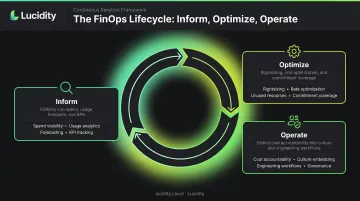
The FinOps Foundation's three iterative phases structure how organizations mature their practice:
- Inform — Gain visibility into spend, usage, forecasts, and KPIs so teams know what they're consuming and what it costs
- Optimize — Identify efficiency opportunities: rightsizing, rate optimization, unused resources, and commitment coverage
- Operate — Embed cost accountability into team culture, engineering workflows, and governance processes as an ongoing practice
FinOps vs. Cost Management
This distinction matters: Azure Cost Management is a specific monitoring and reporting tool. Azure FinOps is the broader organizational practice that uses tools like Cost Management alongside cross-functional processes, shared accountability structures, and continuous optimization cycles.
A dashboard tells you what you're spending. FinOps determines what you do about it — and who's responsible. Organizations that treat FinOps as a tool deployment tend to see short-term visibility gains without the sustained cost discipline that cross-functional accountability produces.
Why Azure Costs Spiral: Key Cost Drivers to Understand
You can't stop money from leaking until you know where it's going. These five drivers consistently account for the majority of Azure waste.
Overprovisioned Virtual Machines
Azure offers hundreds of VM SKUs — general-purpose, compute-optimized, memory-optimized, storage-optimized. When teams size for worst-case scenarios and never revisit those decisions, persistent over-allocation follows.
Azure Advisor flags VMs for shutdown when P95 max CPU utilization stays under 3% and outbound network stays under 2% over seven days. For rightsizing, Advisor uses P95 thresholds of 40% or lower for user-facing workloads. Many enterprise VMs sit well within those thresholds for extended periods — with no one acting on them.
Static Workloads Without Autoscaling
Applications with variable traffic are frequently deployed on fixed-capacity infrastructure sized for peak load. Azure supports autoscaling across:
- VM Scale Sets — load-balanced, autoscaling VM groups
- App Service — automatic scaling based on incoming HTTP traffic (Premium v2/v3/v4 tiers)
- AKS — cluster autoscaler that adds nodes when pods can't be scheduled, removes underutilized nodes when demand drops
- Azure Functions — infrastructure scales automatically based on trigger events
Despite these capabilities, many organizations don't use them. The result: peak-load prices during off-peak hours, paid indefinitely.
Storage Waste Hiding in Plain Sight
Most teams default to Premium SSD or Ultra Disks even for dev, backup, or archival workloads where Standard HDD would suffice. But the more insidious problem is idle storage that generates charges in the background without producing anything useful.
Four specific categories drive significant Azure block storage waste:
- Unattached managed disks — disks no longer associated with any VM, still billing at full rate
- Orphaned snapshots — point-in-time copies of deleted or repurposed disks
- Unmounted volumes — disks attached to VMs but not mounted or in active use
- Zero-I/O disks — disks with no read/write activity, often from deprecated workloads
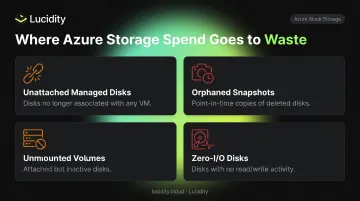
These categories are particularly difficult to catch because they don't appear prominently in native Azure dashboards or standard Advisor recommendations. Without dedicated tooling, teams are left doing manual investigation — often missing idle resources entirely.
Lucidity's Lumen product is built specifically to surface all four, exposing idle disks with full context on how long each has been idle so teams can act safely. Based on data from over 600 enterprise assessments, Lucidity observes average disk utilization of roughly 30% before optimization, rising to approximately 75% after deployment.
Misaligned Reservations and Savings Plans
Azure Reserved VM Instances can save up to 72% compared to pay-as-you-go pricing, and Azure Savings Plans offer up to 65% off for flexible compute commitments. But there are two failure modes:
- Overcommitting early — locking into 1- or 3-year commitments before usage patterns are understood, then sitting on unused reservation hours
- Undercommitting — relying entirely on pay-as-you-go and missing available discounts on steady-state workloads
The fix is ongoing calibration: track reservation utilization and coverage monthly, adjusting commitment levels as usage patterns become clearer — rather than treating purchasing as a one-time decision.
Poor Cost Attribution and Tagging Gaps
Azure's billing hierarchy — management groups, subscriptions, resource groups — provides the structure for cost allocation. But structure alone doesn't create accountability. Without a consistent tagging strategy enforced through Azure Policy or infrastructure as code, you can't map costs to business units, teams, or products.
Each Azure resource supports up to 50 tag name-value pairs, and resources don't automatically inherit tags from parent scopes. Without enforcement from day one, tagging compliance degrades as teams deploy resources under time pressure. The FinOps team is left without the attribution data needed to drive cost ownership at the team level.
Building Your Azure FinOps Foundation
Before optimizing anything, the organizational and operational groundwork needs to exist. Optimization without accountability just produces one-time wins that drift back toward waste.
Assemble a Cross-Functional FinOps Team
The FinOps Foundation personas span finance, engineering, product, procurement, and leadership — FinOps is not performed by a single team. A practical starting composition for most Azure environments:
- Finance — primary cost stakeholder, owns budget targets and variance reporting
- DevOps/engineering — direct Azure expertise, executes optimization changes
- Product management — sets business priorities that govern trade-offs between cost and capability
- Tech lead — understands how services map to business outcomes
Keep the team small and focused on short cycles of review and action. The team justifies its existence by continuously surfacing new savings opportunities each month — not by completing a one-time audit and moving on.
Establish Tagging, Budgets, and Cost Reporting Standards
Tagging is the prerequisite for everything else. Define a schema and enforce it through Azure Policy before you start optimizing — retroactive tagging campaigns are painful and consistently incomplete.
At minimum, your tagging schema should cover:
- Business unit — maps costs to the team or department responsible
- Environment — separates production, staging, and dev spend
- Owner — identifies who to notify when budgets spike
- Workload — ties resources to the application or service they support
For budgets, set alerts at the subscription and resource group level with thresholds at 80% and 100% of expected spend. Budget alerts notify teams early but don't stop resource consumption — the value is a warning before the monthly bill arrives, not a hard stop after the fact.
Make Engineers Cost-Aware from Day One
Engineers control cloud usage but typically operate without cost visibility. The fix isn't a separate finance review after deployment — it's integrating cost data directly into engineering workflows:
- Sprint reviews that include cost per feature or environment
- IaC templates with approved SKU defaults
- Deployment checklists that include storage tier selection and autoscaling configuration
- Dashboard visibility into the cost impact of resource changes
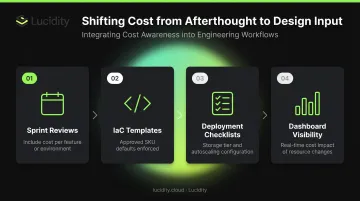
That shift — from cost as an afterthought to cost as a design input — is what separates teams that sustain savings from those that lose them between quarters.
Azure FinOps Strategies and Best Practices
Rightsize Compute and Eliminate Over-Provisioned Resources
Use Azure Advisor and Monitor Metrics Explorer to identify VMs and PaaS services that are consistently underutilized over time — not just peak snapshots. Advisor's default lookback window is seven days, configurable up to 90 days; longer windows give a more accurate picture of actual steady-state behavior.
A few practical rules for rightsizing:
- Split scale-down into steps (e.g., two sizes down, not four at once) and validate performance after each before proceeding
- Align service tiers to actual SLA requirements — Standard HDD instead of Premium SSD for non-production, lower Redis cache tiers for dev workloads
- Reserve top-tier configurations only where business requirements demand them
Note that Azure Advisor's estimated savings don't currently account for Reserved Instances or Savings Plans, so actual savings from rightsizing may differ from what Advisor surfaces.
Optimize Storage Costs with Lifecycle Management and Rightsizing
For blob and object storage, implement lifecycle rules that move data between Azure's tiers based on access frequency:
- Hot — recent, frequently accessed data (UI display, active transactions)
- Cool — less frequent access (BI queries, reporting workloads)
- Cold/Archive — infrequently accessed or archival data at a fraction of Hot-tier pricing
For block storage (managed disks), the optimization challenge is different. The four idle disk categories described earlier — unattached, orphaned snapshots, unmounted volumes, and zero-I/O disks — require continuous scanning rather than lifecycle rules.
Lucidity's Lumen identifies all four categories across Azure environments with full context: how long each disk has been idle, associated resource details, and direct deletion from the dashboard — no scripts, no manual investigation. The platform has optimized over 15 petabytes of capacity across multi-cloud environments, with enterprises seeing block storage cost reductions of up to 70%.
Lumen also surfaces tiering recommendations for active disks — flagging Premium SSD volumes that would perform identically on Standard SSD based on actual IOPS, throughput, and latency patterns rather than point-in-time snapshots.
Leverage Reservations and Savings Plans Strategically
The gradual commitment approach reduces risk:
- Identify steady-state workloads that run 24/7 with predictable, consistent demand
- Purchase conservative 1-year reservations first — avoid 3-year commitments until patterns are proven
- Monitor utilization and coverage monthly using Azure Cost Management's reservation utilization reports
- Increase commitment levels incrementally only after usage patterns have been stable across multiple billing periods
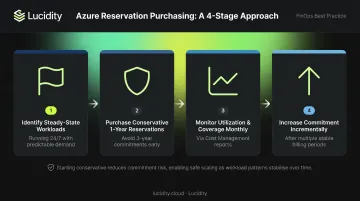
Reservations are best for stable usage tied to specific VM configurations. Savings Plans are more flexible — they apply to a fixed hourly spend commitment across eligible compute usage rather than specific instance types. For environments with variable workload mix, Savings Plans often provide better coverage than instance-specific reservations.
Automate Non-Production Workloads and Implement Governance Guardrails
Non-production environments running around the clock are one of the most straightforward sources of waste to address:
- Use Azure DevTest Labs autoshutdown schedules or Start/Stop VMs v2 to power down dev and test environments during off-hours and weekends
- Establish lifecycle policies with expiration dates on temporary resources so zombie infrastructure doesn't accumulate
- Set resource locks on persistent infrastructure to prevent accidental deletion while allowing scheduled automation
For governance, use Azure Policy to prevent waste from being created in the first place rather than cleaning it up after the fact:
- Restrict premium SKUs in dev/test environments
- Require tags on all new resource deployments (deny non-compliant deployments)
- Limit deployments to approved regions
- Enforce approved VM SKU lists per environment type
Track FinOps KPIs and Review on a Regular Cadence
Executing these strategies only delivers value if you can see the results. Track these core metrics on a shared dashboard visible to both technical and business stakeholders:
| KPI | What It Measures |
|---|---|
| Cost per business unit | Spend attribution accuracy and accountability |
| Reservation utilization rate | Effectiveness of commitment purchasing |
| Reservation coverage rate | Percentage of eligible spend covered by commitments |
| Identified waste as % of total spend | Overall efficiency of the environment |
| Unit economics (cost per user/transaction) | Business value delivered per dollar spent |
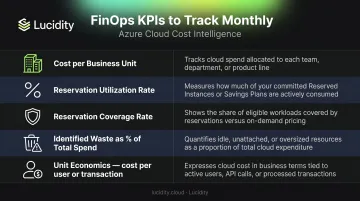
Review these on a fixed monthly cadence with both technical and business stakeholders present. The goal is making cost performance as visible as reliability or performance metrics.
Azure FinOps Tools You Need to Know
Native Azure Tools
Azure Cost Management and Billing is the core native tool for monitoring, forecasting, and reporting. Key capabilities include:
- Cost breakdown by subscription, resource group, tag, or service
- Budget setting with configurable alert thresholds
- Usage exports for offline analysis and custom reporting
It works well for single-tenant environments. Cross-tenant analysis and business-context grouping (mapping costs to specific teams or products) require additional tooling.
Azure Advisor functions as the built-in recommendation engine — it flags underutilized VMs, overprovisioned storage, idle services, and Reserved Instance opportunities. It's a solid starting point for quick wins. Coverage isn't universal across all resource types, and every recommendation requires manual action to execute.
Azure Policy and Azure Budgets form the governance layer. Azure Policy enforces standards — required tagging, approved SKUs, allowed regions, deny/audit/modify for non-compliant deployments. Azure Budgets provides the early warning system with spend threshold alerts at the subscription and resource group level. Together they shift FinOps from reactive to preventive.
Third-Party Tools and What to Look For
Third-party tools fill the gaps when organizations need capabilities that native tools don't cover:
- Cross-tenant visibility and business-aligned cost reporting mapped to teams or products
- Advanced anomaly detection with alerts routed to Slack or Teams
- Automated optimization actions (not just recommendations)
- Reservation purchase recommendations with execution capability
Turbo360 and CloudZero are established options for organization-wide Azure cost visibility, anomaly detection, and cross-subscription reporting. They're generalist platforms that span compute, storage, networking, and database costs.
Lucidity serves a different, more specialized function. Rather than broad FinOps visibility, it provides autonomous optimization specifically for Azure block storage. It continuously scans for four idle disk categories, surfaces tiering recommendations backed by historical IOPS and throughput data, and executes storage right-sizing with zero downtime. This makes it a natural complement to broader FinOps platforms — adding storage depth that generalist tools typically don't reach.
Frequently Asked Questions
What are the three pillars of FinOps?
The FinOps Foundation defines three pillars:
- Inform — visibility into cloud spend, usage, and forecasts
- Optimize — acting on efficiency opportunities like rightsizing and rate optimization
- Operate — embedding cost accountability into team culture as a continuous practice
What are the Azure FinOps tools?
Key native tools include Azure Cost Management and Billing, Azure Advisor, Azure Policy, Azure Budgets, and the Azure Pricing Calculator. Third-party platforms like Turbo360 and CloudZero add cross-tenant visibility and business-aligned cost reporting, while storage-specific platforms like Lucidity provide autonomous optimization for block storage waste that native tools don't surface.
What is the difference between Azure FinOps and Azure Cost Management?
Azure Cost Management is a specific tool for monitoring, reporting, and forecasting Azure spend. Azure FinOps is a broader organizational practice that uses tools like Cost Management alongside team accountability structures, governance processes, and ongoing optimization workflows.
How do I get started with FinOps in Azure?
Form a cross-functional team, establish a tagging schema enforced through Azure Policy, and set budgets and cost alerts at the subscription and resource group level. Then build a spend baseline in Azure Cost Management and identify your top cost drivers — typically compute rightsizing, idle storage cleanup, and reservation gaps.
What is the FinOps lifecycle in Azure?
The FinOps lifecycle runs in continuous iterations of Inform, Optimize, and Operate. Each cycle builds on the last — as workloads change and new cost drivers emerge, teams return to the Inform phase to reassess and act again.