Introduction
Cloud waste isn't a niche problem. According to the Flexera 2026 State of the Cloud Report, 29% of cloud spend is wasted—a figure that climbed after five years of decline. For a $12.5M Azure environment, that's roughly $3.6M evaporating annually with little visibility into where it went.
Unchecked Azure costs compress IT margins, force reactive infrastructure decisions, and divert budget from strategic initiatives. The pressure compounds quickly.
Azure isn't inherently expensive—it becomes expensive through accumulated choices: oversized VMs provisioned at launch and never rightsized, storage capacity that grows on demand but never shrinks back, development environments that outlive their projects by months.
This article examines Azure FinOps cost efficiency across three dimensions:
- Pre-deployment decisions — architecture and provisioning choices that determine your cost baseline
- Operational management — how actively resources are monitored, rightsized, and retired during use
- Organizational governance — the team structures, policies, and accountability models that either contain costs or let them drift
Key Takeaways
- Azure costs compound quietly through overprovisioning, idle resources, and pay-as-you-go pricing on commitment-eligible workloads
- The highest-leverage cost moves happen at the planning stage—service selection, sizing, and pricing model choices
- Tagging, alerting, and right-sizing give you the visibility any FinOps practice depends on
- Storage is a chronic blind spot: unattached disks, unmounted volumes, and zero-I/O disks drain budgets without triggering obvious alerts
- Cost governance requires ongoing review across finance, engineering, and operations—not a one-time cleanup
How Azure FinOps Costs Typically Build Up
Azure bills don't arrive with one large surprise line item. Costs accumulate incrementally across subscriptions, resource groups, and services over weeks—making the total difficult to perceive until the invoice lands.
The pattern is compounding. Common contributors include:
- Resources provisioned generously at launch that are never scaled back
- Storage that grows with usage but rarely shrinks
- Dev environments intended to be temporary that run for months
- Idle disks accumulating charges with zero active workloads
None of these feel expensive in isolation. Together, they add up fast.
Most of these costs are invisible until scale forces a reckoning. Without consistent tagging, budget alerts, or a regular review cadence, the monthly Azure bill becomes a lagging indicator — you're reacting to what already happened rather than shaping what comes next.
Azure cost data is typically available within 8 to 24 hours, and budget thresholds can be evaluated daily—meaning the infrastructure for proactive visibility exists. The missing piece is rarely a tool. It's the process: who reviews the data, how often, and what decisions that review actually triggers.
Key Cost Drivers in Azure Environments
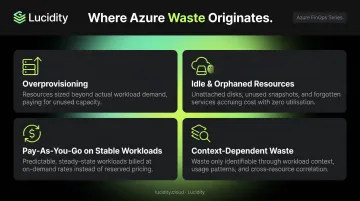
Understanding where cost originates matters more than knowing the total bill. Four drivers account for the majority of Azure waste:
- Overprovisioning: Teams default to larger VM SKUs, higher-tier services, and more storage than workloads actually require. Resizing after deployment feels risky, so provisioned capacity stays inflated.
- Idle and orphaned resources: Resources created for projects, tests, or temporary workloads persist long after their purpose ends. Block storage is a specific culprit — unattached disks, unmounted volumes, and zero-I/O disks keep accruing charges even when no workload references them. Azure Advisor flags some of these through its Unattached Managed Disks query, but not all idle disk categories surface in native tools.
- Pay-as-you-go pricing for stable workloads: Organizations running predictable compute on on-demand rates forgo substantial savings. Azure Reserved VM Instances can reduce costs by up to 72% compared to on-demand pricing — yet many teams never act on the switch.
- Context-dependent waste: Where waste concentrates depends on the organization. Startups tend to lose most to compute overprovisioning; enterprises often lose more to idle storage, unused reserved capacity, or shadow resources scattered across subscriptions with no clear owner.
Azure FinOps Cost-Reduction Strategies
The most effective strategies target where costs actually originate. The breakdown below organizes approaches by whether they address planning decisions, operational management, or organizational structure.
Strategies That Change Decisions Before Deployment
A significant portion of Azure waste is locked in before a single workload runs.
Right-size service selection from the start. Teams frequently choose premium database tiers or ultra-performance storage for workloads that would run identically on lower tiers. The FinOps team should challenge these assumptions during planning—after deployment, the conversation becomes much harder.
Commit to Reserved Instances or Azure Savings Plans for stable workloads. Organizations paying pay-as-you-go rates for predictable compute are overpaying substantially.
| Commitment Type | Discount vs. Pay-as-You-Go | Best Fit |
|---|---|---|
| Reserved VM Instances (1 or 3 year) | Up to 72% | Stable workloads with consistent VM size and region |
| Azure Savings Plans (1 or 3 year) | Up to 65% | Variable compute needs across regions or instance types |
Reservations apply before Savings Plan benefits because they're more restrictive and typically offer larger discounts.
Use Azure Spot VMs for interruptible workloads. Dev/test environments, batch processing, CI/CD pipelines, and rendering jobs don't need guaranteed uptime. Azure Spot VMs can provide discounts up to 90% compared to on-demand pricing, with the caveat that they can be evicted with 30 seconds notice. Match workload tolerance for interruption carefully.
Select deployment regions with cost in mind. Azure pricing varies meaningfully by region. For a Standard_D2s_v5 Linux VM, East US runs at $0.096/hour versus $0.124/hour in Japan East, a 29% difference for identical compute. Non-latency-sensitive workloads can be placed in lower-cost regions, though data residency requirements and compliance obligations must be evaluated alongside pricing.
Strategies That Change How Azure Is Managed
Even well-chosen services generate excessive costs when visibility is absent and accountability is unclear.
Build a comprehensive tagging strategy and enforce it with Azure Policy. Cost allocation is impossible without consistent tags by environment, team, project, and owner. Untagged resources create financial blind spots—you can't allocate what you can't identify. The FinOps Foundation sets a realistic target of under 10% untagged resource costs as an initial benchmark. Azure Policy's modify effect can create and enforce tag governance on both new and existing resources.
Right-size VMs and eliminate idle resources—including storage. Azure Advisor uses machine-learning across CPU, memory, and network signals (with a configurable 7–90 day lookback) to identify underutilized VMs. But Advisor's coverage of idle storage is incomplete.
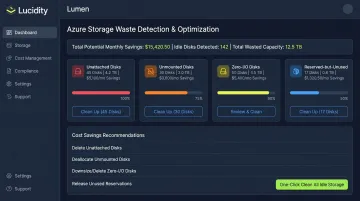
Unattached disks, unmounted volumes, zero-I/O disks, and reserved-but-unused storage frequently evade native tooling. These four idle disk types can account for up to 70% of unused block storage spend.
Lucidity's Lumen platform identifies all four categories, surfaces recommendations backed by actual usage history, and enables one-click cleanup directly from the dashboard—no scripts, no guesswork. Enterprise customers have used this to reduce storage costs by up to 70%.
Configure budget alerts and anomaly detection as proactive guardrails. Reviewing spend after the bill arrives allows waste to accumulate for an entire billing cycle. Azure Cost Management supports budget thresholds from 0.01% to 1,000% of the budget, with alert notifications sent within roughly one hour of evaluation. Cost anomaly detection catches unexpected spend changes in real time—before they compound.
Automate non-production resource scheduling. Dev, staging, and testing environments run overnight and on weekends with no active usage. Azure DevTest Labs autoshutdown and Start/Stop VMs v2 support automated shutdown schedules across subscriptions, enforced by policy to prevent users from opting out. This is one of the simplest, highest-ROI operational changes available.
Strategies That Change the Organizational Context
In many organizations, team structure and decision ownership drive more cost than any individual Azure resource. The resources are just the output.
Three structural changes have the most leverage here:
- Assign cost ownership to product and engineering teams, not just a central FinOps function. When each team owns its Azure spend—with finance, engineering, and operations collaborating—accountability lands where spending decisions are actually made.
- Replace static over-provisioning with autoscaling. Azure autoscaling for Virtual Machine Scale Sets, AKS clusters, and App Service adjusts resource levels to actual demand. You pay for what workloads require, not for what they might need at peak.
- Run FinOps as a continuous cycle, not a project. The Inform → Optimize → Operate loop needs to repeat: cost data surfaces decisions, optimization actions reduce waste, and governance policies keep new resources from recreating old problems.
Teams that treat this as an ongoing operational rhythm—rather than a quarterly review exercise—typically close cost gaps faster and keep them closed.
Conclusion
Reducing Azure costs requires identifying where cost originates—in planning decisions, operational management gaps, or structural conditions—rather than indiscriminately cutting services or capacity. The most expensive mistake is treating FinOps as a one-time cleanup.
Organizations that embed visibility, accountability, and iterative governance into how Azure is selected, managed, and governed achieve better unit economics over time. The tools and strategies exist — but they only deliver results when cost efficiency is treated as a continuous discipline, not a periodic cleanup exercise. Teams that build ongoing review cycles into their Azure operations compound those gains over time; those that don't find themselves back at square one with every budget cycle.
Frequently Asked Questions
What is Azure FinOps and how does it differ from general cloud cost management?
Azure FinOps applies the FinOps framework to Microsoft Azure, treating cost optimization as a shared discipline across finance, engineering, and operations. General cost management typically focuses on tooling or periodic reporting. FinOps goes further by requiring continuous iteration and cross-functional accountability tied directly to business outcomes.
What is the biggest source of wasted spend on Azure?
Overprovisioning is the most common culprit—VMs sized for peak demand that run underutilized for months. Idle storage is a close second: unattached disks, unmounted volumes, and zero-I/O disks continue accruing charges with no active workload attached, often evading standard advisor recommendations without triggering alerts.
What is the difference between Azure Reserved Instances and Azure Savings Plans?
Reserved Instances lock in a specific VM size and region for discounts up to 72%, while Savings Plans offer flexible discounts up to 65% across compute services regardless of instance type or region in exchange for an hourly spend commitment. Both require predicting usage; reservations are more rigid but typically deliver larger discounts.
How do I start building an Azure FinOps practice from scratch?
Start with cost visibility: implement consistent tagging and configure Azure Cost Management to surface spend by team and resource group. Then form a small cross-functional group across finance, engineering, and operations and establish a regular review cadence starting with your highest-cost resource groups.
How does autoscaling help reduce Azure costs?
Autoscaling eliminates the need to permanently provision resources at peak capacity. Resources scale up under load and down during low-usage periods, so you pay only for what workloads actually require at any given time rather than maintaining idle capacity as a permanent baseline.
Are Azure-native tools sufficient for enterprise-scale FinOps?
Azure Cost Management, Advisor, and Policy provide solid baseline visibility. However, enterprise environments with complex allocation needs or storage-specific waste often benefit from dedicated platforms. Lucidity's Lumen, for example, identifies four idle disk categories—unattached, reserved, unmounted, and zero-I/O—that don't consistently surface in native Azure dashboards, allowing teams to act on waste that would otherwise go undetected.