Introduction
According to Flexera's 2026 State of the Cloud Report, enterprises waste an estimated 29% of their cloud IaaS and PaaS spend — and that figure held above 30% for years before that. For a company spending $10M annually on Azure, that's roughly $2.9M disappearing into idle VMs, orphaned disks, and forgotten Reserved Instances.
The real problem is invisibility. Azure anomaly detection runs on a 36-hour lag. Budget evaluations cycle every 24 hours. By the time finance spots the overrun, the waste has already compounded across hundreds of resource types and dozens of subscriptions.
Azure cloud waste is a governance and visibility failure. Resources are provisioned quickly and deprovisioned slowly, if at all. Nobody owns the cleanup because nobody owns the cost.
This article covers where Azure waste originates, what drives the largest categories of overspend, and which strategies produce durable savings — not just one-time fixes.
Key Takeaways
- Cloud waste averages ~29% of total Azure spend, per Flexera's most recent data — higher for organizations without structured FinOps practices
- The biggest waste categories: idle/underutilized compute, orphaned and over-provisioned storage, unused Reserved Instances, and networking inefficiencies
- Waste accumulates through lifecycle drift: resources outlive their projects with no cleanup automation in place
- Reduction requires both quick tactical fixes and structural changes to governance, tagging, and ownership
- Storage waste is among the most overlooked categories — and rarely surfaces without purpose-built visibility tools
How Azure Cloud Waste Accumulates Over Time
Lifecycle Drift: The Billing Meter That Never Stops
The cloud is engineered for availability, not retirement. Provisioning a dev environment or spinning up a proof-of-concept VM takes minutes. Deprovisioning those same resources — deliberately, safely, completely — requires intentional action that teams rarely take.
The result: a dev environment created for a two-week sprint runs for 18 months. A project-specific managed disk outlives the VM it supported by years. The billing meter doesn't pause waiting for someone to notice.
Why Waste Stays Hidden
Azure offers no built-in signal when resources go idle. Cost accumulates quietly until the monthly bill forces a conversation nobody wanted to have. Three structural blind spots drive this:
- No performance alerts for idle resources or orphaned disks
- No notifications when a Reserved Instance goes unmatched
- Gradual drift stays invisible — Azure's native anomaly detection uses a 60-day baseline, so slow waste accumulation falls below the detection threshold almost by design

The Tagging Problem at Scale
Weak tagging compounds everything. When resources lack clear owners, expiry signals, or cost center attribution:
- Cost cannot be traced back to a team or project
- Nobody is accountable for the specific line item
- Audit cycles require manual investigation across hundreds of subscriptions
- Waste persists simply because no one has the context to act
The root cause is governance, not technology. The larger the Azure estate, the more subscriptions exist where nobody owns the cleanup work.
Key Drivers of Azure Cloud Waste
Idle and Underutilized Compute
Azure Advisor flags VMs as underutilized when CPU usage sits at 5% or below and network usage stays under 7 MB for four or more consecutive days. Microsoft's own cost optimization guidance suggests automating shutdown for VMs running below 10% CPU utilization for even one hour.
The gap between provisioned capacity and actual consumption is wide. Teams over-provision for anticipated peak loads that never materialize, adding buffer "just in case," and those buffers run continuously at full cost.
Azure Advisor surfaces right-sizing recommendations automatically. The problem is that most organizations receive those recommendations and don't act on them, treating them as advisory rather than actionable.
Over-Provisioned and Orphaned Storage
When an Azure VM is deleted, its managed disks are not deleted by default. The disks remain, billed hourly, with no active workload attached. Microsoft identifies these by checking whether the ManagedBy property is null — but that check requires someone to run it.
The waste extends well beyond obviously unattached disks. Lucidity's platform data, drawn from 600+ assessments covering 100+ petabytes of storage, consistently finds that the average enterprise runs at roughly 30% disk utilization — meaning 70% of provisioned capacity delivers no value. Lucidity identifies four distinct categories of idle disk waste that standard tools miss:
- Unattached disks — no VM attached, still billing
- Reserved disks — attached to deallocated VMs, accruing charges with no active workload
- Unmounted disks — attached to a running VM but not mounted by the OS
- Zero-I/O disks — appear active but show no read/write activity
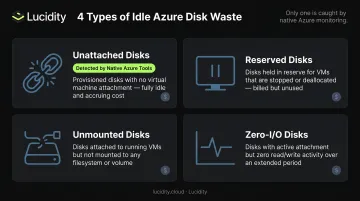
Azure's native tools typically surface only the first category. The other three persist undetected in standard cost reviews.
Unused Reserved Instances and Savings Plans
Azure Reserved VM Instances offer savings of up to 72% versus pay-as-you-go pricing. That discount only materializes when the reservation matches an actively running workload. When it doesn't — because the workload was retired, resized, or never fully deployed — the committed spend runs with no corresponding consumption.
Flexera's 2026 State of the Cloud data shows fewer than half of organizations use any single commitment discount per cloud provider, and RI adoption increased only four percentage points year over year. Many organizations are simultaneously paying for unused reservations and still running workloads on pay-as-you-go pricing.
Networking and Egress Inefficiencies
Networking costs accumulate quietly across several line items that rarely appear in per-resource cost reviews:
- Internet egress: $0.087/GB after the first 100 GB free per month
- Cross-region transfers: additional per-GB charges on top of egress
- Static public IPs: billed continuously, even when the associated resource is stopped
The larger exposure sits at the circuit level. ExpressRoute Direct ports for 10 Gbps connections run at $6,000/month. An oversized circuit running at 20% utilization carries $4,800/month in waste. In multi-region architectures with high data volumes, that figure compounds across every region.
Governance and Tagging Gaps
Without consistent tagging, cloud cost is a total with no breakdown. Finance sees an Azure bill. Engineering sees resource consumption. Neither can connect spend to a specific team, product, or business unit.
The FinOps Foundation's 2025 State of FinOps report identifies workload optimization and waste reduction as the top current priority for FinOps practitioners — with implementing governance and policy at scale as a leading future priority. Most organizations already have enough tooling to surface waste. What they lack is the ownership model and tagging discipline to act on it consistently.
Cost-Reduction Strategies for Azure Cloud Waste
No single tactic eliminates Azure waste. The drivers are different — some rooted in provisioning decisions, some in active management, some in structural architecture — and so are the fixes.
Strategies That Change Decisions at Provisioning Time
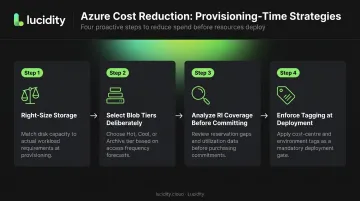
Right-size storage before deployment. The most cost-efficient moment to eliminate waste is before it's incurred. Matching disk tier to actual workload requirements — rather than defaulting to the next size up — removes a large share of waste structurally. Treat Azure Advisor output as a required input to provisioning decisions, not a post-deployment afterthought.
Select Blob storage tiers deliberately. Azure Blob supports Hot, Cool, Cold, and Archive tiers with meaningfully different price points. Minimum retention periods enforce real cost tradeoffs: 30 days for Cool, 90 for Cold, 180 for Archive. Defaulting all data to Hot when access frequency doesn't justify it is a consistent, avoidable cost.
Analyze RI coverage before committing. The 72% discount Azure offers on Reserved Instances disappears entirely when the reservation goes unmatched. Analyzing workload patterns before purchasing commitments — rather than reacting to a high bill — prevents committed waste before it starts.
Enforce tagging at deployment time with Azure Policy. Tags applied after resources are created miss entire resource groups. Azure Policy can block any deployment that lacks required metadata: owner, cost center, environment, and expiry date. Tagging enforced at the gate is more effective than any remediation campaign after the fact.
Strategies That Change How Azure Is Managed
Auto-shutdown non-production environments. Dev and test environments running around the clock waste the majority of their compute cost with no productivity benefit. Azure's auto-shutdown feature lets teams configure specific shutdown times with 30-minute email or webhook notifications. At scale, this is one of the highest-ROI actions available and requires minimal implementation effort.
Eliminate idle storage waste through autonomous optimization. Manually auditing managed disks across a large Azure environment is slow and misses entire categories of idle disk. Standard cost reviews catch unattached disks; they routinely miss reserved, unmounted, and zero-I/O volumes.
Lucidity's Lumen surfaces all four idle disk categories simultaneously, with full context on disk age, attachment state, and usage history to support confident cleanup decisions. Remediation happens directly from the dashboard — no scripts, no manual querying required.
For Dometic, an Azure customer, this approach delivered a **52% reduction in cloud storage spend** while eliminating downtime risk.
Automate Blob storage lifecycle management. Azure Storage lifecycle policies can automatically transition data from Hot to Cool, Cold, or Archive based on access patterns — removing the dependency on manual review cycles. Organizations without these policies leave a recurring, predictable cost category unaddressed indefinitely.
Actively manage the Reserved Instance portfolio. Purchasing RIs and leaving them static generates committed waste as workloads evolve. Tracking RI coverage rate, exchanging mismatched reservations through Azure's exchange process, and reviewing the portfolio on a defined cadence converts a fixed cost into an actively managed discount.
Strategies That Change the Structural Context
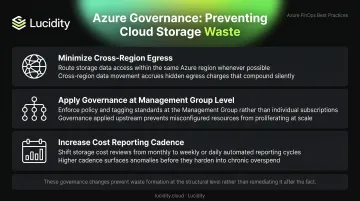
Three structural changes prevent waste from forming in the first place:
- Minimize cross-region egress by reviewing inter-region data flows during architecture reviews and consolidating workloads within the same region where feasible. Transfer charges from siloed team decisions rarely surface in standard waste audits.
- Apply governance at the Management Group level. Subscription-by-subscription policies create inconsistencies; local exceptions in one subscription become precedents in others. Policies applied at the Management Group level cascade uniformly to every child subscription, preventing new waste at the edges as the organization scales.
- Increase cost reporting cadence. Monthly finance reviews create a feedback loop too slow to catch gradual accumulation. Weekly cost visibility — owned by engineering teams, not just finance — surfaces anomalies before they compound and creates accountability where spending decisions are actually made.
Conclusion
Reducing Azure cloud waste requires tracing cost back to its origin — not applying uniform cuts that may sacrifice performance without addressing the actual source of excess. Idle compute, governance gaps, storage accumulation, and architectural inefficiency each demand a different response.
Sustainable cost reduction is built on visibility, ownership, and automation. Organizations that make accountability structural — through tagging enforcement, management group governance, and automated lifecycle management — don't just reduce costs once. They eliminate the conditions that let waste creep back in.
The audit surfaces the problem. The governance model prevents recurrence. But neither delivers value without a clear starting point — knowing exactly where your storage spend is going, which disks are idle, and which volumes are over-provisioned. Lucidity's free Storage Assessment gives Azure teams that baseline in minutes, without requiring infrastructure changes or agent deployments.
Frequently Asked Questions
What percentage of Azure cloud spend is typically wasted?
Industry research from Flexera puts cloud waste at approximately 29% of IaaS and PaaS spend as of 2026, down slightly from the 30-32% range cited in prior years. That figure varies significantly by governance maturity — organizations without structured FinOps practices tend to waste well above that figure.
How do I find orphaned or unattached disks in Azure?
You can identify unattached managed disks through the Azure portal by filtering on "Unattached" status, or via Azure Resource Graph querying microsoft.compute/disks where properties.diskState == 'Unattached'. Platforms like Lucidity go further by surfacing all four idle disk categories — unattached, reserved, unmounted, and zero-I/O — that native tools miss.
What is the fastest way to reduce Azure cloud costs?
The highest-ROI immediate actions are: enabling auto-shutdown schedules for dev and test VMs, deleting orphaned managed disks, and activating Blob storage lifecycle policies. These typically require minimal implementation effort and deliver measurable cost reduction within the first billing cycle.
What tools does Azure provide natively for cloud waste detection?
Azure's native toolkit includes Advisor (right-sizing and shutdown recommendations), Cost Management (spend visibility and budget alerts), Resource Graph (inventory queries at scale), and Policy (governance enforcement). Each is effective — but only when actively configured and reviewed, which is where most organizations fall short.
How does storage over-provisioning contribute to Azure cloud waste?
Most teams provision more disk capacity than workloads ever consume, and the problem compounds when VMs are deleted without cleaning up their managed disks. Lucidity's data across 600+ enterprise assessments puts average disk utilization around 30% — meaning roughly 70% of provisioned block storage capacity delivers no value.
What is the difference between a cloud waste audit and ongoing cloud cost optimization?
A waste audit is a point-in-time assessment that identifies where excess spend currently exists. Ongoing optimization is a continuous practice — enforcing governance, automating lifecycle management, and reviewing cost data on a regular cadence. Without the ongoing practice, audit findings go stale and waste accumulates again within months.