Introduction
According to Flexera's 2025 State of the Cloud Report, 84% of organizations struggle to manage cloud spend, with budgets exceeding limits by an average of 17%. For FinOps and DevOps teams managing Azure environments, that gap rarely comes from a single bad decision — it compounds across subscriptions without triggering a single alert.
Cloud spend is projected to grow 28% in the coming year, yet waste accumulates faster than most teams can audit it. Orphaned disks, idle load balancers, stopped VMs that were never deallocated — none of these trigger alerts by default. They just run up the bill.
Azure unused resources aren't inherently expensive. They become expensive because of visibility gaps, absent governance, and manual processes that break down at scale. The good news: most of that waste is findable, fixable, and preventable — once you know where to look.
Key Takeaways
- Unattached managed disks, stopped-but-not-deallocated VMs, empty App Service Plans, and idle networking resources accumulate silently and carry real monthly costs
- Waste compounds gradually — not from a single event, but from provisioning decisions that are never revisited
- Storage and compute are the highest-cost offenders — networking resources like NAT gateways and Application Gateways add fixed hourly charges regardless of traffic volume
- Cutting waste requires tactical discovery (Azure Advisor, Resource Graph, KQL) paired with structural prevention through tagging policies and FinOps governance
- One-time cleanup doesn't stick — automation and governance are what prevent waste from returning
How Unused Azure Resources Silently Drain Your Budget
Azure waste doesn't show up as a single line item in Cost Management. It accumulates across resource groups, subscriptions, and regions as resources outlive their purpose — without any platform-side alerts or notifications.
The core problem: Azure does not automatically remove unused resources. When a VM is deleted, Microsoft confirms that its OS disk and attached data disks remain in the resource group and continue incurring charges unless manually deleted.
The same applies to network interfaces, public IPs, and security groups that were associated with that VM — all orphaned, all billing.
A few specific billing traps to understand:
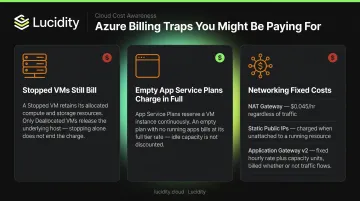
- Stopped VMs are still billed. A VM in
StoppedorPoweredOffstate remains allocated on a host and continues to incur compute charges. OnlyDeallocatedreleases the underlying hardware and stops instance billing. - Empty App Service Plans charge in full. Plans with no associated apps still reserve configured VM instances — Microsoft confirms they incur charges regardless of whether any apps are running.
- Networking resources carry fixed costs. NAT Gateway charges $0.045/hour whether or not subnets or public IPs are attached. Application Gateway v2 charges a fixed gateway-hour rate on top of capacity units. Static public IPs bill continuously from the moment they're created.
None of these appear on a dashboard as "unused." They surface as ordinary line items — indistinguishable from active spend — which means they typically require manual audits across every resource group and subscription to catch.
Key Drivers That Make Azure Waste Hard to Catch
The root cause is a structural gap: teams provision resources quickly, but there's no corresponding cleanup process when projects end, VMs are replaced, or environments are decommissioned. That asymmetry is what turns temporary resources into permanent costs.
Block Storage Is the Quietest Cost Driver
Managed disks are one of the most persistent sources of Azure waste. When a VM is deleted, its disks stay behind. Premium SSD storage runs at roughly $0.12/GB per month — 50 unattached 1TB Premium SSDs add up to over $6,000 monthly, sitting unused.
Azure identifies unattached managed disks by checking whether ManagedBy is null. That catches one category of idle disk. But it misses others.
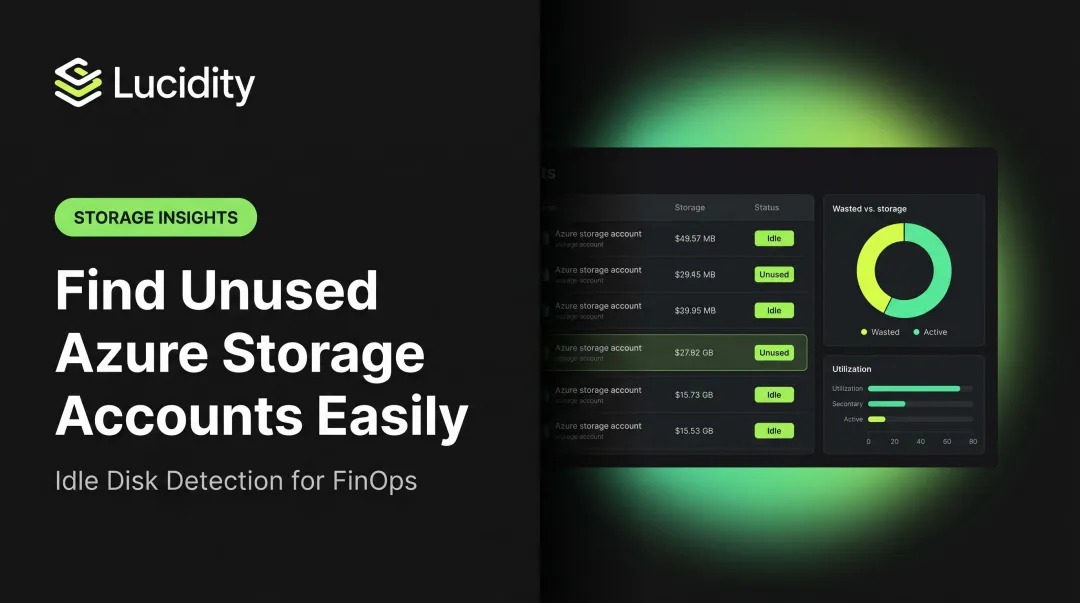
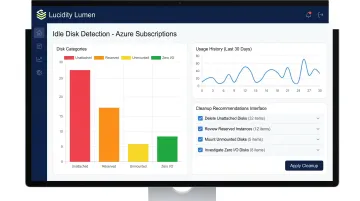
Lucidity Lumen identifies four distinct categories of idle disks — unattached, reserved, unmounted, and zero-I/O — that together can represent up to 70% of unused block storage spend. Lumen surfaces idle disks that don't appear in native Azure dashboards or standard Advisor recommendations, and provides disk age, attachment state, and usage history so teams have enough context to act decisively.
Compute and Networking Add Up Fast
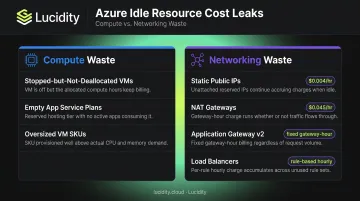
Storage isn't the only culprit. Compute and networking resources follow similar patterns — provisioned for a purpose, then left running with no active workload. Lucidity's tooling focuses on block storage, but these categories are worth auditing alongside it:
Compute:
- Stopped-but-not-deallocated VMs continue billing for instance usage
- Empty App Service Plans on dedicated tiers bill at full rate regardless of how many apps are running
- Oversized VM SKUs that were provisioned "just in case" and never right-sized
Networking:
- Static public IPs: ~$0.004/hour from creation to deletion
- NAT Gateways: $0.045/hour with no utilization threshold
- Application Gateway v2: fixed gateway-hour charge plus capacity units
- Load Balancers: rule-based hourly charges, even with no backend traffic
The challenge scales with maturity. In early-stage environments, the problem is missing lifecycle governance. In mature environments with hundreds of subscriptions, the problem is volume — too many resources for manual auditing to stay current.
Cost-Reduction Strategies for Unused Azure Resources
Strategies fall into three buckets depending on where the waste originates: provisioning decisions, active management, or the governance context around the team.
Strategies That Change Provisioning Decisions
Orphaned resources often start as reasonable provisioning choices that were never revisited. Fixing the upstream decision is cheaper than cleaning up downstream.
Right-size before provisioning. Defaulting to the largest available disk SKU or VM size embeds waste from day one. Match storage tier and compute capacity to actual workload requirements — Azure's own VM cost optimization best practices explicitly recommend this as a primary cost lever.
Enforce tagging at creation time. Requiring Owner, Environment, and ReviewDate tags at provisioning — using Azure Policy deny effects — means every resource has an owner and a built-in accountability trigger. Without tags, cleanup means manually tracing hundreds of resources with no clear owner to contact.
Build lifecycle rules for non-production environments. Dev, test, and sandbox resources should carry explicit expiry conditions: auto-shutdown schedules, time-limited resource groups, or budget alerts that trigger deprovisioning. The goal is making "off by default" the standard — not the exception.
Strategies That Change How Resources Are Managed
Waste that already exists requires systematic discovery before it can be addressed.
Start with Azure Advisor, which surfaces underutilized VMs, idle databases, unprovisioned ExpressRoute circuits, and empty App Service Plans with estimated savings. It's a solid first pass — but it misses many orphaned resource types, particularly at the storage level.
For targeted discovery, Azure Resource Graph supports Kusto Query Language queries across subscriptions — enabling teams to find unattached disks, unassociated public IPs, orphaned NSGs, and NICs with no VM association. The Azure Orphaned Resources Workbook, an open-source GitHub project, centralizes these queries into a single dashboard covering compute, storage, and networking resource types.
For enterprises managing hundreds of volumes across Azure subscriptions, basic "unattached" detection leaves significant waste on the table. Lucidity Lumen identifies all four idle disk categories — unattached, reserved, unmounted, and zero-I/O — and enables one-click cleanup directly from its dashboard. Recommendations are backed by historical IOPS, throughput, latency, and cost trends rather than point-in-time snapshots, which reduces false positives.
Lucidity's free Assessment tool can scan an Azure environment and surface idle disk waste in five minutes, with no agents or infrastructure changes required.
Automate ongoing cleanup with Azure Automation runbooks. Scheduling runbooks on a weekly or monthly cadence to identify and report (or delete) unused resources converts cleanup from a periodic project into a continuous operational practice. Manual audits create cleanup cycles — automation creates a steady state.
Strategies That Change the Governance Context
In many organizations, the real driver of Azure sprawl isn't technical — it's organizational. Engineering teams that never see cost data have no incentive to deprovision resources they've finished using.
Embed FinOps practices to create shared cost accountability. When cloud cost data stays with a central finance team, engineering has no feedback loop. Showback models — which surface cost data by team without moving budget — create visibility without friction. According to HashiCorp's 2024 State of Cloud Strategy Survey, 66% of organizations now incentivize cost optimization through showback or chargeback for business units. Teams that see their own cost data make different provisioning decisions.
Use Azure Policy to enforce governance at scale. Policy assignments can deny resource creation without required tags, restrict resource types to approved SKUs, and audit for orphaned configurations — consistently, across every subscription, without relying on individual team compliance.
Make resource audits a recurring operational practice. One-time cleanup doesn't address root causes. Waste returns without embedded governance. Quarterly or monthly structured reviews using Azure Cost Management + Billing alongside Resource Graph queries catch new waste before it compounds.
Conclusion
Sustainable Azure cost reduction starts with understanding where waste originates — whether at provisioning, during active management, or at the governance level. Cleanup that ignores root causes will keep repeating itself.
Tactical cleanup with Azure Advisor, Resource Graph, and tools like Lucidity Lumen addresses existing waste. Tagging policies, lifecycle rules, and FinOps governance prevent it from returning. The two approaches depend on each other. Periodic manual audits aren't a substitute for automation that catches waste as it accumulates.
The compounding nature of Azure waste means resources left unaddressed for months cost significantly more than if caught early. Treat cleanup as an operational practice — build it into your team's regular workflow, automate what you can, and review what automation misses. That's the difference between managing cloud spend and being managed by it.
Frequently Asked Questions
What are the most common types of unused Azure resources that drive up costs?
The highest-cost orphaned resource types are unattached managed disks, stopped-but-not-deallocated VMs, empty App Service Plans, static public IPs, idle NAT gateways, and load balancers with no backend members. Storage and compute typically generate the most waste, while networking resources contribute fixed hourly charges that are easy to overlook.
How does Azure Advisor help identify unused resources?
Azure Advisor analyzes usage patterns and surfaces cost recommendations for underutilized VMs, idle databases, and empty App Service Plans with estimated savings. Advisor misses certain orphaned resource types — particularly unattached managed disks — so pairing it with Azure Resource Graph queries gives more complete coverage.
What is the Azure Orphaned Resources Workbook and how does it work?
It's an open-source workbook available on GitHub (dolevshor/azure-orphan-resources) that uses Azure Resource Graph KQL queries to centralize and visualize orphaned resources across subscriptions in a single dashboard. It covers compute, storage, networking, and other resource types, making it easier to spot waste without writing custom queries from scratch.
How often should I audit my Azure environment for unused resources?
Automated discovery via Azure Automation runbooks or third-party tools beats periodic manual audits. For cost-sensitive environments, running Cost Management + Billing alongside Resource Graph queries on a monthly cadence is a practical minimum.
Can unused Azure resources pose a security risk beyond wasted cost?
Yes. Unmanaged public IPs, misconfigured NSGs, and forgotten network interfaces can expand the attack surface. Microsoft Defender for Cloud flags permissive NSG inbound rules and evaluates internet exposure through unmanaged public endpoints — orphaned network resources directly increase this exposure risk.
How can I prevent unused Azure resources from accumulating in the future?
Prevention comes down to three levers: enforce tagging and lifecycle rules at provisioning via Azure Policy deny effects, automate cleanup on a scheduled cadence using runbooks or dedicated tooling, and embed FinOps cost accountability so engineering teams see — and own — the cost impact of resources they create.