Introduction
According to Flexera's 2025 State of the Cloud report, **84% of organizations struggle to manage cloud spend**, with cloud budgets exceeding limits by an average of 17%. That gap doesn't show up as one dramatic overrun — it compounds across dozens of teams making provisioning decisions with no visibility into downstream cost impact.
FinOps teams end up absorbing budget overruns that originated in engineering decisions made weeks earlier. Engineering teams spend time on manual cost triage instead of shipping. And nobody can agree on which workload caused the spike.
Azure costs get expensive primarily because of decisions, not because Azure itself is unmanageable. Over-provisioned VMs, unattached disks that persist after decommissioning, shared infrastructure costs floating in an unclaimed bucket — these are governance and accountability gaps that compound over time.
This article covers both sides: specific strategies to reduce Azure costs — from tagging and rightsizing to idle disk cleanup — and how chargeback structures create the accountability that makes cost control stick long-term.
Key Takeaways
- Azure costs accumulate gradually through over-provisioning, resource sprawl, and shared infrastructure that no team owns
- Chargebacks create direct financial ownership of consumption; visibility alone doesn't change team behavior
- Tagging is the non-negotiable foundation; without consistent tags, neither cost analysis nor chargeback attribution works
- Cost control requires action across pre-deployment decisions, active management, and organizational accountability
- Block storage is often the largest hidden waste category: unattached disks and over-provisioned volumes rarely surface in native dashboards
How Azure Costs Typically Build Up Without Oversight
Azure cost accumulation is gradual, not episodic. Teams provision resources, workloads evolve, and the original sizing decisions are never revisited. Each resource quietly adds to the monthly bill while no single line item looks alarming enough to act on.
The Shared Infrastructure Problem
Shared infrastructure creates costs that are genuinely hard to attribute. The FinOps Foundation defines shared costs as charges used by or attributable to multiple owners, and notes that unallocated shared costs directly hinder cost transparency. Common culprits include:
- Networking and egress charges
- Monitoring and observability tooling
- Shared databases and caching layers
- Management and orchestration overhead
No single team claims ownership of these costs, so no team optimizes them — and they grow quietly in the background.
Defensive Over-Provisioning
Without accountability, teams naturally size resources for peak or worst-case demand and leave that headroom permanently allocated. The logic is sensible at the individual level — a team that gets paged at 2am for a storage outage learns to buffer generously.
Block storage is where this pattern is most persistent. Resizing a managed disk carries real operational risk — it requires careful planning, introduces a performance tax, and can cause downtime if executed incorrectly. So it's rarely done.
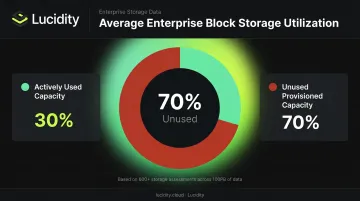
Lucidity's analysis across 600+ storage assessments covering over 100PB of data found that the average enterprise uses only about 30% of its provisioned block storage capacity — meaning roughly 70% sits unused.
The Decision-Visibility Gap
There's a structural mismatch between when Azure costs are caused (during provisioning) and when they appear (on the monthly bill). Azure Cost Management data is refreshed every four hours, and budget alerts are evaluated every 24 hours. By the time anyone reviews the numbers, the decisions driving those costs are weeks old and difficult to trace back to a specific team or deployment.
That lag is precisely why tagging standards, cost allocation policies, and real-time visibility tools matter — without them, you're always reacting to costs you can no longer control.
Key Cost Drivers in Azure Environments
Generic cost-cutting rarely sticks. The teams that control Azure spend most effectively start by identifying exactly where waste originates — and four categories account for the majority of it.
Compute Over-Provisioning
VMs sized for peak load that run at low average utilization represent direct wasted spend. HashiCorp's 2024 State of Cloud Strategy Survey found that **40% of respondents cited over-provisioning as a contributor to cloud waste**, with another 35% pointing to idle or underused resources.
Azure Advisor identifies underutilized VMs using the last 7 days of utilization data by default, flagging machines where CPU usage stays at 5% or below for four or more days. Most organizations have more of these than they realize.
Block Storage Waste
When a VM is deleted, Microsoft retains attached managed disks by default to prevent accidental data loss — which means those disks keep billing. You continue paying for storage that no workload is using.
The four waste categories that accumulate in Azure block storage:
- Unattached disks that survive VM decommissioning and keep billing with no workload attached
- Unmounted disks sitting on a live VM but invisible to the operating system
- Zero-I/O disks that are mounted and attached yet receive no actual read/write activity
- Reserved disks holding allocated capacity that no application is consuming
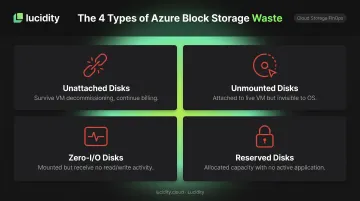
These categories together can represent up to 70% of unused block storage spend, according to Lucidity's Lumen detection data. None of these conditions surface reliably in native Azure dashboards or standard Advisor recommendations.
Reserved Instance Misalignment
Azure Reserved VM Instances can save up to 72% compared with pay-as-you-go pricing for 1-year or 3-year commitments — but only when matched to stable, predictable workloads. When workloads shift after purchase, the reservation either goes unused or applies to the wrong resource type.
The cost still needs to be allocated. Many chargeback implementations miss reserved instance costs entirely because they show up differently in billing data than on-demand charges.
Data Egress and Shared Service Costs
Cross-region data transfers generate charges — for example, transfers between regions within North America run at $0.02/GB. These costs land in a shared bucket and are rarely attributed to the team or workload that caused them. Without clear ownership, egress charges accumulate quietly — and no team feels the financial pressure to change how they route traffic.
How to Control Azure Costs and Chargebacks
Effective Azure cost control requires action at three distinct levels: decisions made before and around resource deployment, management practices applied while resources are active, and the organizational structures that determine whether accountability exists at all.
Strategies That Reduce Costs by Changing Decisions
Right-size before deployment. Azure Advisor surfaces resize and shutdown recommendations based on historical usage, but the higher-leverage moment is before a resource enters the environment. Using Advisor recommendations and actual usage data during the provisioning decision prevents waste from being created in the first place. Remediating waste after the fact costs far more time and money.
Match commitment-based pricing to workload predictability. Reserved Instances work well for stable, predictable workloads. Azure Savings Plans (up to 65% savings) provide more flexibility for dynamic workloads. Treating reservations as a blanket cost-reduction lever is the common mistake: a reservation on a workload decommissioned in six months becomes a sunk cost.
Define a mandatory tag taxonomy before provisioning starts. The required tags — cost center, department, project, environment, owner — need to exist as a policy before any resource is created. Azure Policy's deny effect can block creation of untagged resources at the subscription or management group level. Retroactive tagging costs far more in effort than enforcement at creation time.
Choose a chargeback model deliberately. Three models exist:
| Model | How It Works | Best For |
|---|---|---|
| Resource-based | Costs tied to specific resources by tag or account | Teams with dedicated infrastructure |
| Usage-based | Costs allocated by consumption metrics (compute hours, storage used) | Shared platforms with measurable usage |
| Proportional shared | Shared infrastructure costs distributed by agreed formula | Networking, monitoring, security tooling |
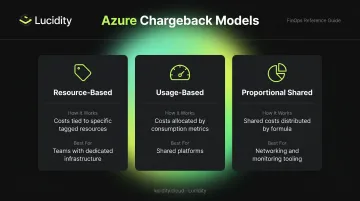
Most organizations should start with showback — making costs visible without charging them back — to build trust in the allocation data before moving to actual chargeback.
Strategies That Reduce Costs by Changing How Azure Is Managed
Once governance policies are in place, operational discipline determines whether they actually hold. These practices keep costs in check as your Azure environment grows.
Enforce tagging continuously. Azure Policy supports tag inheritance, which applies resource group and subscription tags to child resource usage records. Configure compliance reports and set a measurable target — a common benchmark is keeping untagged spend below 5% of total Azure spend.
Set layered budget alerts at the department and team level. Configure both forecasted threshold alerts (warn before overspend occurs) and actual spend alerts in Azure Cost Management. Route these to the department leads who own the spend, not just central cloud ops. When the people responsible for spend receive the alerts, accountability follows.
Automate chargeback reporting. Manual reporting creates lag, introduces inconsistency, and erodes trust in the data. Schedule cost exports from Azure Cost Management and consume them via Power BI or your finance system. Using amortized cost data properly spreads reserved instance charges across the teams that consumed the capacity.
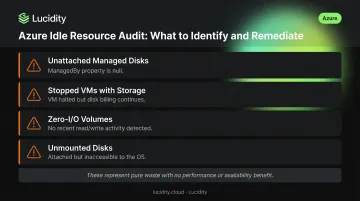
Conduct regular idle resource audits. Identify and remediate:
- Unattached managed disks (ManagedBy property is null)
- Stopped VMs with attached storage still billing
- Zero-I/O volumes with no recent read/write activity
- Unmounted disks that are attached but inaccessible
These represent pure waste with no performance or availability benefit.
Strategies That Reduce Costs by Changing the Organizational Context
Operational fixes only stick when the organizational structure reinforces them. This tier addresses the governance and finance integration that makes chargeback durable.
Establish and document a shared cost allocation methodology. Shared infrastructure costs should be allocated using an agreed model: even split, proportional to direct spend, or usage-based. Document the methodology so departments can predict and plan for their allocated share. Undocumented allocation creates disputes; documented allocation creates accountability.
Integrate chargeback into existing finance systems. Chargeback only works when it connects to the budgets that actually govern team spending. Use amortized cost exports from Azure Cost Management and connect them to the accounting system where budgets are managed, not a separate cloud reporting dashboard that finance never reviews.
Align Azure's organizational hierarchy to your business unit structure. When subscriptions map to cost centers, cost attribution becomes more reliable even when tagging is incomplete. Azure management groups provide a governance scope above subscriptions and let organizations build a hierarchy that matches chargeback reporting needs.
Address block storage over-provisioning continuously. Native Azure tooling shows storage costs, but right-sizing hundreds of volumes on an ongoing basis requires more than governance policies. Lucidity's Lumen identifies all four types of idle disks — unattached, unmounted, zero-I/O, and reserved — including conditions that don't surface in standard Azure Advisor recommendations. For each disk, it shows attachment state, age, usage history, and idle duration, enabling one-click cleanup without scripts or manual triage.
Keeping volumes right-sized after cleanup is a separate challenge. Lucidity's AutoScaler handles this autonomously, expanding and shrinking block storage in real time with zero downtime, which eliminates the chronic over-provisioning that makes block storage one of the harder Azure cost categories to govern through policies alone.
Conclusion
Controlling Azure costs and implementing chargebacks both depend on the same underlying requirement: knowing where costs actually originate. Whether the source is a provisioning decision made three months ago, a tag taxonomy that was never enforced, or shared infrastructure costs floating without an owner — you can't reduce what you can't trace.
Effective Azure cost management is continuous. Technical controls — tagging policies, budget alerts, automated exports, idle disk audits — handle the mechanics. Organizational alignment — agreed allocation models, department ownership, regular reviews — determines whether those controls actually change behavior. Without both working together, even well-designed controls tend to decay: teams stop reviewing reports, tags drift, and unowned costs accumulate again.
Storage is often where Azure waste compounds quietly. Idle disks, over-provisioned volumes, and unattached resources accumulate without clear ownership. Tools like Lucidity give FinOps and ITOps teams real-time visibility into Azure block storage spend — so the idle disk audits and cost tracing described throughout this guide can run continuously, not just at review time.
Frequently Asked Questions
What is chargeback in Azure?
Azure chargeback is the process of attributing Azure usage costs to specific departments, teams, or projects and billing those costs against their internal budgets. Unlike showback, where costs are visible but remain in a central budget, chargeback actually deducts consumption from departmental P&Ls.
What is the difference between showback and chargeback in Azure?
Showback gives departments visibility into their Azure spend without affecting their budget — it's reporting without financial consequence. Chargeback sends those costs to the department's actual budget. Most organizations start with showback to build trust in the allocation model before making the shift to chargeback.
What are the three types of chargebacks?
The three main models are resource-based (costs tied to specific resources a team consumed), usage-based (costs distributed by actual metrics like compute hours or storage used), and proportional shared cost allocation (shared infrastructure split across teams using an agreed formula — equal, fixed percentage, or variable by usage).
How do I dispute a charge on Azure?
Azure billing disputes can be raised through a support request in the Azure portal under Cost Management + Billing. For internal chargeback disputes, resolution runs through your organization's allocation methodology and the team owning chargeback reporting — Azure support handles platform billing only.
What tools does Azure provide for cost management and chargeback?
Azure Cost Management + Billing covers cost analysis, budget alerts, and scheduled exports. Azure Policy enforces tag compliance, and the Microsoft Cost Management connector for Power BI supports custom reporting for EA and MCA customers. All three depend on a consistent tag taxonomy to produce reliable chargeback data.
How do you handle untagged resources in Azure chargeback?
Track untagged resources as an "unallocated" cost bucket and use Azure Policy compliance reports to identify and remediate gaps. A common target is keeping untagged spend below 5% of total Azure spend. Assign remediation ownership to the team that provisioned the resource, not to a central team — this creates the right accountability structure.