Introduction
Cloud bills don't lie. Without proper tagging, though, they don't tell you much. Many FinOps teams discover their tagging gaps only when they try to run cost allocation reports, at which point months of spend are already unattributable.
An Azure tagging strategy is a structured system of key-value metadata labels applied to Azure resources to enable cost attribution, governance, and optimization across the enterprise cloud environment. Without it, you're managing a budget blind.
This guide is written for FinOps, DevOps, and ITOps teams managing Azure at scale. According to Flexera's 2025 State of the Cloud report, 84% of organizations struggle to manage cloud spend — and unattributed resources are at the root of that problem.
Tagging isn't optional; it's the prerequisite for any serious cloud financial management practice.
Key Takeaways
- Azure tags are key-value metadata pairs that power cost allocation, chargeback/showback, governance, and optimization decisions
- A FinOps-aligned strategy requires defining mandatory tag categories, enforcing them via Azure Policy, and auditing regularly
- Align finance, engineering, and leadership on tag governance before resources are deployed; retroactive tagging is expensive and rarely complete
- Start with 6–8 essential tags, implement in phases, and measure compliance as a recurring FinOps KPI
What Is an Azure Tagging Strategy for FinOps?
Tags without a strategy are just noise. Azure lets you attach metadata to any resource, but the act of tagging and the discipline of a tagging strategy are very different things.
A tagging strategy is the deliberate plan covering:
- Which tags to apply and why
- What values are acceptable (and what format they follow)
- Who is responsible for applying and maintaining them
- How compliance is defined, measured, and enforced
In FinOps terms, the strategy exists to achieve specific outcomes:
- Accurate cost allocation to business units, projects, or cost centers
- Identification of idle or wasted spend
- The ability to run chargeback or showback reports without reverse-engineering your Azure bill
Strategy vs. Ad Hoc Tagging
The gap between having tags and having a strategy shows up fast in Azure Cost Management. Ad hoc tagging produces inconsistent data — different teams use different values for the same concept, some resources go untagged entirely, and cost grouping breaks down.
A structured strategy includes:
- A defined tag taxonomy with purpose-built categories
- Naming conventions (PascalCase keys, lowercase values, no spaces)
- Clear mandatory vs. optional tag designations
- Enforcement mechanisms that prevent non-compliant resources from being deployed
The FinOps Foundation defines Allocation as assigning cost and usage through accounts, tags, labels, and other metadata to create accountability among teams. Tags are the primary mechanism for that accountability in Azure.
Essential Azure Tag Categories for FinOps
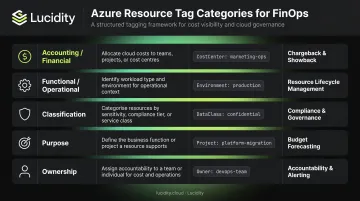
The Microsoft Cloud Adoption Framework (CAF) defines five foundational tag categories. Each serves a distinct FinOps purpose.
| Category | Purpose | Example Key-Value |
|---|---|---|
| Accounting/Financial | Chargeback, budget tracking | costcenter: 55332, department: finance |
| Functional/Operational | Resource identification, lifecycle | env: prod, app: catalogsearch1 |
| Classification | Governance, security policy | confidentiality: private, sla: 24hours |
| Purpose | Connect spend to business outcomes | businessimpact: moderate, revenueimpact: high |
| Ownership | Accountability, incident response | businessunit: marketing, opsteam: cloud-operations |
Key Rules for Tag Values
Tag formatting has a direct impact on cost reporting accuracy. A few rules that consistently trip up teams:
- Tag names are case-insensitive for operations, but resource providers may preserve original casing in cost reports
- Tag values are case-sensitive —
Production,production, andprodeach appear as separate values in Azure Cost Management, breaking cost grouping entirely - Never store sensitive data in tag values — passwords and personal identifiers are stored as plain text, visible in cost reports, API responses, and deployment histories
How Many Tags Is Enough?
Once your value formatting is consistent, the next question is quantity. Start with 6–8 mandatory tags. Too few leaves spend unattributed; too many creates tag sprawl that teams stop maintaining.
Azure imposes a hard limit of 50 tag name-value pairs per resource or resource group — and some resource types (including Azure Automation and Azure CDN) support only 15. Not all resource types support tags at all. Check Microsoft's official tag support reference before building your taxonomy.
If your organization runs AWS or GCP alongside Azure, align tag key and value conventions to the strictest common character limits across all platforms from the start.
How to Build Your Azure Tagging Strategy: A Phased Approach
Prerequisites Before You Tag Anything
Before a single tag gets applied, three things must happen:
- Audit your organizational structure: document cost centers, departments, and active projects to define your tag taxonomy
- Get stakeholder alignment: finance, engineering, and executive leadership must agree on mandatory vs. optional tags before deployment begins
- Document the policy: create a centralized taxonomy document covering tag purpose, acceptable values, naming rules, and ownership
This upfront work matters because tags cannot be applied retroactively to historical cost data. A tag applied today only flows into reports from that date forward.
Once alignment is in place, run Azure Resource Graph queries to baseline your current state before tagging begins:
- Identify resources missing mandatory tags
- Quantify what percentage of cloud spend is currently unattributed
- Prioritize remediation on high-spend resources first
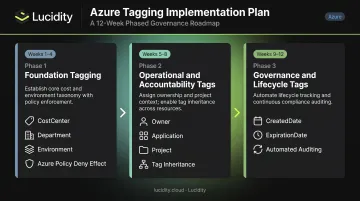
Phase 1: Foundation Tagging (Weeks 1–4)
With your baseline established, focus on financial and organizational tags that unlock basic cost allocation:
- Deploy mandatory tags:
CostCenter,Department,Environment - Apply Azure Policy with a "Deny" effect on new resource creation without required tags
- Embed tags in IaC templates (Bicep, ARM, Terraform) so they're applied automatically at deployment — not added manually afterward
Phase 2: Operational and Accountability Tags (Weeks 5–8)
Extend tagging to enable granular cost attribution:
- Add
Owner,Application, andProjecttags across resources - Configure resource group-level tag inheritance so child resources automatically inherit parent group tags (Azure Cost Management has a separate tag inheritance setting that applies billing profile and resource group tags to usage records)
- Begin grouping costs by tag in Azure Cost Management + Billing to link spend to specific teams and projects
Phase 3: Governance and Lifecycle Tags (Weeks 9–12)
Establish compliance and long-term governance controls:
- Implement
CreatedDate,ExpirationDate,DataClassification, andComplianceScopetags - Set up automated tag validation using Azure Automation runbooks — using
Update-AzTagwith Merge, Replace, or Delete operations — to flag or remediate non-compliant values - Establish a monthly audit cadence and assign formal tag governance ownership
Enforcing and Auditing Azure Tags
Azure Policy: Your Primary Enforcement Mechanism
Azure Policy supports several effects for tag governance. The right choice depends on whether you're dealing with new or existing resources:
| Policy Effect | Behavior | Best For |
|---|---|---|
Deny |
Blocks resource creation without required tags | New resources, greenfield environments |
Audit |
Reports violations without blocking | Soft enforcement, understanding compliance gaps |
Modify |
Adds or updates tags automatically | Remediation of existing resources |
Microsoft's tag governance tutorial uses a practical pattern: deny resource groups missing CostCenter, then use Modify to inherit CostCenter from the parent resource group for resources missing it. Policies can be scoped to management groups, subscriptions, or resource groups.
Recommended approach:
- Start with
Auditmode to measure your compliance gap without disrupting teams - Switch to
Denyfor new resource creation once teams understand requirements - Use
Modifywith remediation tasks for existing non-compliant resources
Auditing and Ongoing Governance
Azure Resource Graph Explorer lets you query across management groups and subscriptions to identify resources missing mandatory tags and spot non-standard values. Run these queries monthly and build dashboards that show tagging compliance scores across teams.
Publishing those scores to leadership accelerates adoption. When engineering managers see their team's compliance standing next to peers, tag coverage improves — fast.
Where Native Azure Tools Fall Short
Even solid tag coverage has a blind spot: idle block storage volumes. Unattached, reserved, unmounted, and zero-I/O disks frequently slip through standard Azure Cost Management views and advisor recommendations. Because these resources are inactive, they rarely trigger alerts — and without tags driving cost attribution, they become invisible to FinOps teams entirely.
Lucidity's Lumen fills this gap directly. It surfaces all four idle disk types at the individual volume level, showing disk age, attachment state, type, and usage history — giving FinOps teams the context to act. These idle disk categories can represent up to 70% of unused block storage spend, and Lumen enables one-click cleanup directly from the dashboard without scripts or manual operations.
Common Azure Tagging Pitfalls and Misconceptions
The Three Operational Failures
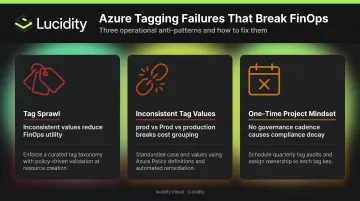
- Tag sprawl — Creating dozens of tags without governance renders them useless. If you can't aggregate cost data because values are inconsistent or a tag exists on only 30% of resources, it isn't doing FinOps work.
- Inconsistent tag values — Allowing
prod,Prod, andproductionas free-text for the same environment breaks cost grouping in Azure Cost Management. Enforce an approved value list through Azure Policy. - Treating tagging as a one-time project — Tags require ongoing ownership. Resources get created, teams change, projects end — without a governance cadence, compliance degrades quickly.
The Retroactive Tagging Trap
This catches most organizations off guard. In Azure, a tag applied today does not appear in historical billing data — it only flows into reports from the date it was applied forward. A cost allocation report run for the previous quarter will show every resource as untagged for every day before tagging was applied.
Enforcement before deployment matters far more than retroactive remediation. Past attribution is gone once the billing period closes — future reports are the only thing you can fix.
When Tags Aren't Enough
Tags handle resource-level attribution well, but two scenarios require additional approaches:
- Shared infrastructure — networking costs, shared platform services, and support fees used by multiple teams can't always be split through resource-level tags alone. The FinOps Foundation outlines three allocation methods for these costs: even split, fixed proportional, and variable proportional.
- Untaggable resource types — some Azure resources don't support tags at all, making 100% compliance impossible. Target 80% of taggable resource cost as a practical benchmark — this aligns with the FinOps Foundation's Cloud Cost Allocation Guide guidance for mature allocation practices.
- Subscription-level charges — marketplace fees, support plans, and reserved instance charges often sit at the subscription level and won't carry resource tags. These typically need manual allocation rules in Azure Cost Management or a cost allocation policy layer.
Frequently Asked Questions
What is the maximum number of tags you can apply to a single Azure resource?
Azure allows a maximum of 50 tag name-value pairs per resource or resource group. Some resource types — including Azure Automation, Azure CDN, and Azure Public DNS zones — support only 15 tags. Tags applied at the resource group level do not automatically inherit to child resources unless configured through Azure Policy.
Can Azure tags be applied retroactively to historical cost data?
No. A tag applied today only appears in billing and cost reports from that date forward. Historical records will show resources as untagged for every day before the tag was applied, so teams that tag resources mid-project will have gaps in their allocation history.
How do Azure tags support chargeback and showback models?
Tags like CostCenter, Department, or Project allow FinOps teams to filter and group Azure Cost Management reports by team, project, or department. This directly supports internal billing (chargeback) and cost visibility reporting (showback) without requiring separate subscription structures.
What is the difference between using tags and using resource groups to organize Azure resources?
Resource groups are structural containers with lifecycle implications — deleting a resource group deletes everything in it. Tags are flexible metadata that cross resource group and subscription boundaries, making them better suited for multi-dimensional cost allocation across departments, projects, and environments simultaneously.
How do you enforce mandatory tagging in Azure without disrupting existing workflows?
Azure Policy supports Audit mode (flags non-compliance without blocking) and Deny mode (blocks resource creation without required tags). Start with Audit to understand the compliance gap, then switch to Deny for new resources. Embedding tags in IaC templates minimizes friction for engineering teams.
What tagging compliance percentage should FinOps teams target in Azure?
The FinOps Foundation measures tagging compliance as compliant taggable resource cost divided by total taggable cloud resource cost. Targeting above 80% of taggable resource cost aligns with mature allocation practices, acknowledging that 100% compliance is practically unachievable because some Azure resource types don't support tagging.