The core problem isn't that Archive Storage is poorly designed. It's that teams often apply it to the wrong data, without a clear retention plan, and without understanding how the cost structure actually works.
This article covers exactly when Archive delivers genuine value, the warning signs that it's the wrong choice, and how to avoid the most common—and expensive—mistakes.
Key Takeaways
- Archive Storage is appropriate only when data won't be accessed for at least 180 days and retrieval latency of up to 15 hours is acceptable
- Best use cases: compliance records, closed project archives, raw data preservation, and cold disaster recovery backups
- Data moved before 180 days incurs early deletion penalties that can wipe out any storage savings
- Automate Archive transitions with lifecycle management policies; skip this step and you risk expensive mistiering
- Monitor retrieval frequency and storage costs to verify the Archive tier is actually saving money
Why Your Archive Decision Directly Affects Azure Costs
Azure Blob Storage offers four access tiers with an inverted cost structure: storage costs decrease as you move from Hot to Archive, but retrieval costs increase sharply. ### The Numbers Behind the Trade-Off
Based on Microsoft's Retail Prices API for East US LRS:
| Tier | Storage (per GB/month) | Read Operations (per 10,000) | Data Retrieval (per GB) |
|---|---|---|---|
| Hot | $0.0208 | $0.004 | N/A |
| Cool | $0.0152 | $0.01 | $0.01 |
| Cold | $0.0036 | $0.10 | $0.03 |
| Archive | $0.00099 | $5.00 (standard) / $50.00 (priority) | $0.02 / $0.10 |
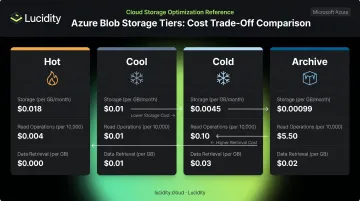
That read operation differential is stark: Archive standard reads cost $5.00 per 10,000 operations versus $0.004 for Hot—a 1,250x difference, not the "50x" figure that often circulates. A single unexpected retrieval job on large archived datasets can cost more than months of Hot storage.
The 180-Day Minimum Retention Rule
Archive imposes a 180-day minimum retention period. Delete, overwrite, or move a blob before that threshold, and Azure charges a prorated early deletion fee for the remaining days.
The math hurts fast. Archive a dataset at day 0, move it back to Hot at day 45, and you owe 135 days of Archive storage charges on top of the rehydration cost. Teams that archive data without a confirmed retention plan regularly trigger this penalty.
Archive Is an Offline Tier
Cost penalties aren't the only risk. Archive also introduces access latency that can disrupt operations if teams haven't planned for it.
Archived blobs cannot be read or modified directly. Before any access, blobs must be rehydrated to an online tier—Hot, Cool, or Cold. Standard rehydration takes up to 15 hours. High-priority rehydration can complete in under 1 hour for blobs under 10 GB. It does, however, cost 10x more than standard and is not guaranteed during periods of high demand.
Confirm your acceptable recovery window before archiving. If a dataset might be needed within hours—not days—Archive is the wrong tier regardless of the storage savings.
When to Use Azure Archive Storage
The right time to use Archive comes down to three conditions that must all be true simultaneously:
- Data is rarely or never accessed
- Retrieval latency of hours is acceptable for the use case
- Data must be retained for at least 180 days—typically much longer
All three must hold. If even one condition fails, a warmer tier will serve you better on both cost and performance.
Compliance and Regulatory Requirements
Regulated industries—finance, healthcare, legal—frequently mandate multi-year data retention for audit trails, transaction logs, financial statements, and customer records. Archive Storage paired with Azure Immutable Blob Storage supports WORM (Write-Once-Read-Many) policies, which Microsoft has validated for SEC Rule 17a-4, SEC Rule 18a-6, FINRA 4511, and CFTC 1.31 through a 2024 Cohasset Associates assessment.
Unlike traditional tape, archived blob metadata stays readable without rehydration. Compliance teams can run audits, litigation holds, or eDiscovery searches against blob properties and index tags without triggering a full retrieval job. For organizations managing large volumes of regulatory data, that operational difference reduces both cost and friction at audit time.
Compliance requirements are one driver—but most data that ages into Archive gets there through normal business lifecycle patterns, not regulatory mandate.
Data Lifecycle and Access Patterns
Several common enterprise scenarios align naturally with Archive:
- Completed projects: finished engagements, closed contracts, decommissioned applications—zero active access, but legally required retention
- Ex-employee records: HR and access logs that must be kept for statutory periods but serve no operational function
- Raw source data: original scientific datasets, unedited high-resolution media, satellite imaging files retained alongside processed outputs for compliance or reproducibility
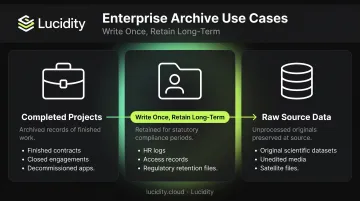
Forrester predicted in 2024 that enterprise-managed unstructured data would double that year. Most of that growth consists of data that gets written once, validated, and then left untouched. Archive is built for exactly that pattern.
The signal to watch: if Azure Monitor logs show zero reads or writes on a dataset for 90–180 consecutive days, it's a strong candidate.
Disaster Recovery and Cold Backup Strategy
Archive works for secondary or tertiary disaster recovery backups—not primary backups. The critical question is RTO (recovery time objective). If your recovery scenario tolerates hours or days, Archive is viable. If you need same-day or next-day recovery, Archive will fail that requirement.
A few technical constraints to factor into your backup architecture:
- Supported redundancy: LRS, GRS, and RA-GRS — suitable for geographically distributed cold copies
- Not supported: ZRS, GZRS, and RA-GZRS — account configuration must be set before data lands in Archive
- Encryption: All data at rest uses 256-bit AES-GCM
Signs Your Data Is Ready for the Archive Tier
Rather than guessing, use these concrete signals to make the Archive decision objective:
- Zero access for 90–180+ days: Azure Monitor metrics and Blob Storage resource logs showing no reads or writes for 90+ consecutive days (ideally 180+) is the clearest signal. Enable last-accessed time tracking in lifecycle management policies to automate this check.
- Processing is complete: Once source files are fully processed and outputs are validated, originals kept only for compliance belong in Archive — not Hot or Cool.
- Storage cost is disproportionate to usage: 100 TB in Hot (East US LRS) costs approximately $2,039/month in capacity alone. The same volume in Archive costs $99/month — a difference of over $1,940/month before any retrieval activity. For genuinely dormant data, that's real savings.
- Lifecycle policy has run its course: When a blob progresses through defined stages — created in Hot, aged to Cool after 30 days, then aged to Archive after another 150 days — the decision follows observed data, not guesswork.
When You Should Avoid Azure Archive Storage
This is where many teams get into trouble. The cost savings that look compelling on a spreadsheet disappear quickly when the wrong data ends up in Archive.
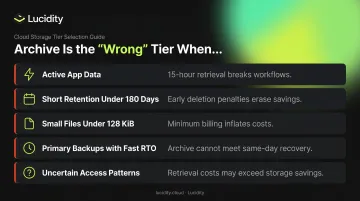
Avoid Archive for:
- Active application data or databases — a 15-hour retrieval wait breaks any workflow expecting millisecond response, with no workaround
- Short-retention data (under 180 days) — early deletion penalties will outpace storage savings in most scenarios
- Small files under 128 KiB — starting July 1, 2026 (new accounts) and July 1, 2027 (existing accounts), these are billed at the 128 KiB minimum, making large populations of small logs disproportionately expensive
- Primary backups with same-day or next-day RTO — Archive can't meet recovery time objectives measured in hours or less
- Data with uncertain access patterns — if you don't know whether something will be needed in the next six months, Archive is the wrong tier
The cost of a wrong archiving decision compounds fast. Archive standard read operations are 1,250x more expensive than Hot reads. A single recovery incident with dozens of retrieval operations can wipe out months of storage savings. Add potential early deletion charges for data moved back before 180 days, and the financial case for Archive evaporates entirely. Audit access patterns before archiving — not after.
Best Practices for Using Azure Archive Storage Effectively
Automate Tier Transitions with Lifecycle Policies
Never archive data manually without confirmed access patterns. Configure Azure Blob Storage lifecycle management policies to move blobs based on last-modified or last-accessed time:
- Hot → Cool after 30 days of no access
- Cool → Archive after an additional 150 days (reaching the 180-day total)

This removes human judgment from the decision and guarantees the 180-day threshold is met before any blob enters Archive.
Pre-Stage Uncertain Data in Cold or Cool
If there's a realistic chance data will be needed within the next few weeks, keep it in Cold or Cool rather than Archive. Cold tier storage costs $0.0036/GB/month with millisecond retrieval. The latency gap between Cold and Archive is the difference between a functional recovery and a 15-hour operational stall. For data that might be needed within weeks, the storage cost difference is a reasonable trade.
Compress and Batch Small Files Before Archiving
Given the 128 KiB minimum billing change rolling out in 2026–2027, packing small log files, granular records, or small objects into compressed archives (Gzip, TAR, Parquet) before moving to Archive reduces both file count and per-GB costs. Microsoft explicitly recommends this approach to reduce operation costs when moving many small blobs to cooler tiers.
Monitor Costs and Access Patterns Consistently
Use Azure Cost Management and Monitor to:
- Track retrieval frequency across archived blobs
- Catch unexpected access spikes before they become large bills
- Validate that lifecycle policies are functioning as configured
- Review whether archived data has aged past its retention requirement and can be deleted
Extend Visibility to Block Storage
For enterprises managing Azure at scale, blob-level archive decisions are only one part of the storage cost picture. Azure Managed Disks carry their own over-provisioning and idle resource challenges that native tooling often misses.
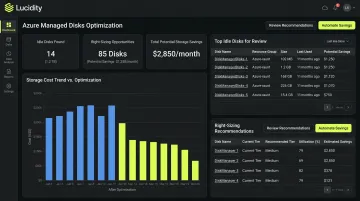
Platforms like Lucidity address this side of the equation — identifying idle disks (unattached, reserved, unmounted, and zero-I/O), right-sizing volumes continuously, and surfacing tier recommendations across Azure Managed Disk environments. Enterprises using Lucidity have reduced block storage spend by up to 70% and reclaimed hundreds of engineering hours previously spent on manual provisioning. That complements, rather than duplicates, what Azure Cost Management provides for blob storage.
Set Budget Alerts and Governance Guardrails
Configure Azure Budget alerts before archiving large datasets. Set governance rules that require explicit approval before deleting or moving archived data within the 180-day window. Early deletion accidents are common in teams where multiple people manage storage—a guardrail prevents a costly mistake from becoming a recurring one.
Frequently Asked Questions
When should you use Azure Archive Storage?
Archive is appropriate when data won't be accessed for at least 180 days, retrieval latency of up to 15 hours is operationally acceptable, and the data must be retained long-term for compliance, disaster recovery, or historical preservation. If any of these three conditions is absent, a warmer tier is the safer choice.
How does Azure Archive Storage work?
Data moved to the Archive tier is stored offline as blobs and cannot be read or modified directly. Before access, blobs must be "rehydrated"—copied or tiered to an online tier (Hot, Cool, or Cold)—before any read or write operations can occur.
What is the difference between Cold storage and Archive storage in Azure?
Cold is an online tier with millisecond retrieval latency and a 90-day minimum retention period. Archive is an offline tier with up to 15-hour retrieval latency and a 180-day minimum retention. Archive has lower storage costs ($0.00099/GB/month vs. $0.0036/GB/month) but significantly higher read operation and retrieval costs.
What is the 180-day early deletion penalty in Azure Archive?
If archived data is deleted, overwritten, or moved before 180 days, Azure charges a prorated early deletion fee for the remaining days. For example, moving data back at day 45 incurs charges for 135 days of Archive storage, plus any rehydration costs.
How long does it take to retrieve data from Azure Archive Storage?
Standard rehydration takes up to 15 hours. High-priority rehydration can complete in under 1 hour for blobs under 10 GB, but incurs significantly higher retrieval costs—priority read operations are priced at $50.00 per 10,000 versus $5.00 for standard.
Can Azure Archive Storage be used as a primary backup solution?
No. Archive suits cold secondary or tertiary backups where recovery can tolerate hours or days. Retrieval latency, high access costs, and the 180-day minimum retention on replacement blobs make it a poor fit for primary backup workflows.