The FinOps Foundation's 2025 State of FinOps Report identifies workload optimization and waste reduction as the top priority for cloud teams, by a clear margin. That pressure is felt acutely in storage, where data accumulates faster than policies can keep up.
Automating Azure Blob Storage means using native Azure tools — lifecycle policies, Storage Actions, Functions, and Logic Apps — to automatically move, delete, tag, and manage blobs based on conditions, without writing custom scripts for every task. This article covers the key use cases, how each native tool works, a practical guide to configuring lifecycle management policies, and where native tooling hits its limits.
Key Takeaways
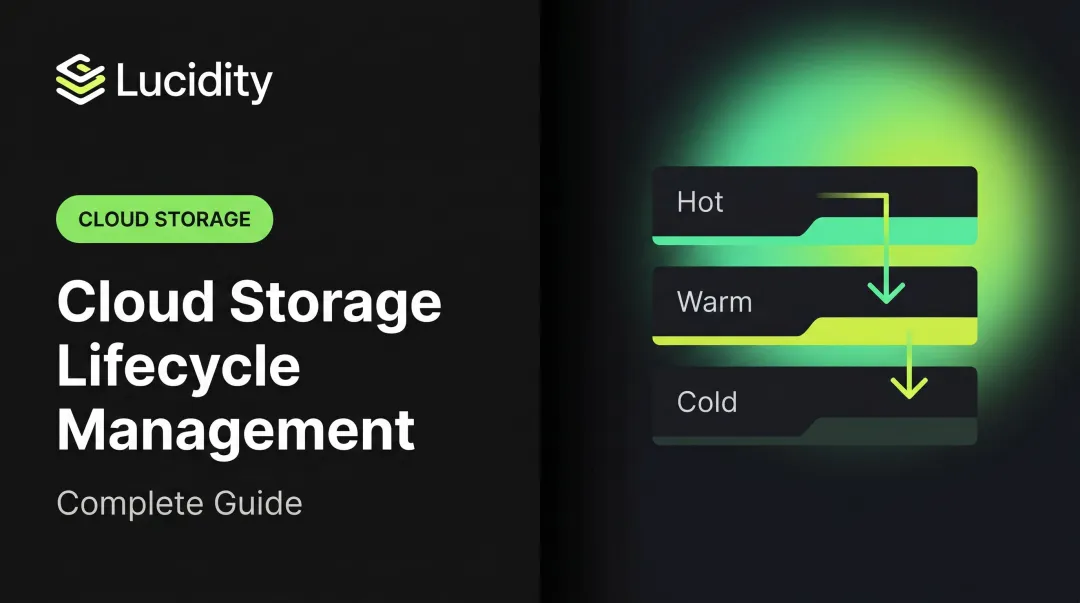
- Lifecycle Management Policies are the fastest path to cost savings — automatically tiering blobs from Hot to Cool, Cold, or Archive based on age or access frequency
- Azure Storage Actions handles complex, multi-account operations at scale with no custom code required
- Azure Functions and Logic Apps enable event-driven and workflow-based blob automation for custom processing needs
- Compliance automation (WORM, legal holds, retention policies) is natively supported for regulated industries
- Lucidity addresses block storage over-provisioning across Azure — a distinct cost problem that blob lifecycle policies alone can't solve
Why Automate Azure Blob Storage: Use Cases and Business Impact
Enterprise storage environments don't stay tidy on their own. Blobs accumulate across dozens of containers — application logs that haven't been read in months, backup snapshots never cleaned up, raw media files that should have moved to Archive a year ago. Without automation, engineers manually intervene, which means inconsistent enforcement and wasted time.
Tiering and Cost Optimization
Azure Blob Storage offers four access tiers with a wide cost spread (East US, LRS, retail pricing):
| Tier | Storage Cost (per GB/month) | Read Ops (per 10K) | Minimum Retention |
|---|---|---|---|
| Hot | $0.0208 | $0.004 | None |
| Cool | $0.0152 | $0.01 | 30 days |
| Cold | $0.0036 | $0.10 | 90 days |
| Archive | $0.00099 | $5.00 | 180 days |
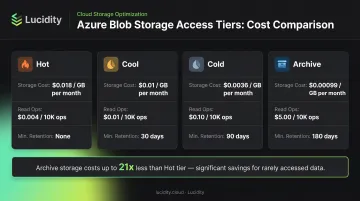
Source: Azure Blob Storage pricing, East US LRS retail, subject to change by region and redundancy.
The storage cost difference between Hot and Archive is roughly 21x. But manually tiering aging data is error-prone and rarely done consistently. Automation ensures blobs move to cheaper tiers the moment they qualify — eliminating the silent overspend that accumulates when Hot-tier data simply isn't reviewed.
Data Retention and Compliance
Regulated industries face hard retention requirements that manual tracking can't reliably meet:
- HIPAA (45 CFR 164.316): Requires documentation retention for 6 years from creation or last effective date
- FINRA Rule 4511: Books and records must be preserved for at least 6 years
- GDPR Article 5(1)(e): Personal data should not be kept longer than necessary
Azure Immutable Blob Storage supports WORM (Write Once, Read Many) policies, time-based retention intervals from 1 day to 146,000 days, and legal holds tied to user-defined tags like case IDs. Automated retention policies enforce these requirements consistently, with full audit trails.
Backup, Archive, and Metadata Management
Tiering and compliance cover the most visible costs, but two additional use cases drive meaningful operational value:
- Lifecycle policies can target previous blob versions and snapshots separately from current blobs, keeping versioned storage accounts from accumulating unchecked costs over time
- Automatically applying key-value index tags at ingest enables more precise downstream automation, faster searchability, and structured data pipelines with consistent metadata from the start
Native Azure Tools for Blob Storage Automation
Microsoft provides several first-party tools for blob automation. Each fits a different complexity level and team skill set.
Azure Blob Storage Lifecycle Management Policies
The most widely used native automation tool. Lifecycle policies apply rule-based transitions and deletions to blobs at scale with no extra compute required.
Key capabilities:
- Transitions blobs between Hot, Cool, Cold, and Archive tiers based on conditions
- Supports base blobs, previous versions, and snapshots
- Conditions include last-modified time, creation time, and last access time
- Filters can target blobs by prefix or blob index tag match
- Configured in the Azure Portal or via ARM/Bicep templates (
Microsoft.Storage/storageAccounts/managementPolicies)
Azure Storage Actions
Azure Storage Actions is Microsoft's fully managed platform for running condition-based operations across millions of blobs in multiple storage accounts. It's available across major global Azure regions.
Core components:
- Conditions: Define which blobs qualify using a visual designer, no code required
- Operations: Specify what happens (tier, tag, delete, etc.)
- Assignments: Target specific storage accounts and schedules
Tasks run asynchronously and generate CSV execution reports. Before touching production data, use the built-in condition preview (shows up to 5,000 blobs) and mock-run mode to validate logic. One important constraint: only one storage task assignment can execute at a time on a single storage account.
Supported account types are limited to general-purpose v2 (GPv2) — legacy Blob Storage and GPv1 accounts are not supported.
Azure Functions and Logic Apps
Azure Functions handle event-driven blob automation. A Blob trigger fires whenever a new or updated blob is detected, using either polling-based or Event Grid-based implementations (Flex Consumption plans support only Event Grid). Use Functions when you need custom processing logic, such as tagging, routing, or transformation, triggered immediately on upload.
Azure Logic Apps offer a no-code/low-code approach to multi-step workflows. The Azure Blob Storage built-in connector is available for Standard workflows, enabling integrations with other Azure services and third-party connectors without scripting.
Azure Automation and PowerShell
For teams that need programmatic control, Azure Automation runbooks paired with scheduled triggers are a practical option. Common use cases include:
- Running bulk operations across large blob sets
- Moving data between storage accounts using AzCopy
- Enforcing policies that fall outside the scope of visual tooling
- Automating migration and archiving workflows
AzCopy handles cross-account blob copies efficiently, making it a go-to for large-scale data movement.
How to Configure Azure Blob Storage Lifecycle Management Policies
Lifecycle policies are the right starting point for most teams: minimal setup with immediate cost impact.
Step 1: Analyze Access Patterns
Before writing any rules, use Azure Monitor or Storage Analytics to identify which containers hold infrequently accessed data. Understanding access frequency prevents overly aggressive tiering that disrupts active workloads.
Step 2: Create a Policy in the Azure Portal
Navigation path:
- Open the storage account in the Azure Portal
- Go to Data management → Lifecycle Management
- Select Add a rule
- Define the filter set: blob type and optional prefix
- Set your tier transition or deletion conditions
The portal offers List View for guided rule creation and Code View for direct JSON editing.
Step 3: Configure Conditions and Actions
Available conditions:
- Last-modified time
- Creation time
- Last access time (requires enabling access-time tracking)
Available actions:
tierToCool— minimum 30-day retentiontierToCold— minimum 90-day retentiontierToArchive— minimum 180-day retention; rehydration takes up to 15 hoursdelete
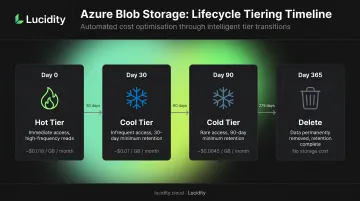
A practical starting configuration: move blobs to Cool after 30 days of no modification, Cold after 90 days, and delete after 365 days.
Step 4: Target Versions and Snapshots
Lifecycle policies apply to base blobs by default. Configure separate rules for previous versions and snapshots to prevent versioned storage accounts from accumulating hidden costs. Both versions and snapshots can have different tier transition timelines than the current blob version.
Step 5: Monitor and Refine
Use the LifecyclePolicyCompleted event along with Azure Monitor metrics and logs to verify policies are executing correctly. Refine thresholds over time based on observed behavior:
- Unexpected rehydration requests from Archive signal that your cool-to-archive window is too short for that workload's access patterns
- Underutilized Cool tier blobs may indicate your 30-day threshold is too conservative for low-activity containers
Best Practices for Azure Blob Storage Automation
Tag Blobs at Ingest
Blob index tags are key-value attributes indexed for search and management. Well-structured tags at the point of upload enable more precise lifecycle rules and reduce the risk of accidentally tiering or deleting active data.
Start with Cool/Cold Before Archive
Archive rehydration can take up to 15 hours, and high-priority rehydration costs more than standard. Before enabling Archive transitions, confirm that access patterns are rare and predictable.
Validate Before Going to Production
- Use Storage Actions' condition preview and mock-run mode before assigning tasks to production accounts
- Test lifecycle rules on non-production containers first
- Set up execution reports and alerts for failed task runs
Watch the Access Cost Tradeoff
Lower tiers have lower storage costs but higher read operation costs. A blob in Archive costs $5.00 per 10,000 read operations versus $0.004 for Hot. Tiering infrequently read-but-occasionally-needed data to Archive without understanding retrieval frequency can increase total costs.
Going Beyond Native Azure Tools for Storage Cost Optimization
Azure's native blob automation tools handle object storage well. But enterprises running at scale on Azure typically face a parallel and often more expensive problem: block storage over-provisioning.
The average enterprise runs at roughly 30% disk utilization — meaning organizations are paying for three times the storage capacity they actually use. Native blob lifecycle policies can't address this. They operate on object storage and don't touch Azure Managed Disks.
Lucidity operates at a different layer of the storage stack entirely. Its two core modules target the block storage problems blob policies were never built to solve:
- AutoScaler continuously monitors Azure block storage utilization and autonomously expands or shrinks volumes to match actual demand, with zero downtime and no code changes required
- Lumen identifies idle disks across four categories — unattached, unmounted, reserved, and zero-I/O — that don't surface in native Azure dashboards or Advisor recommendations
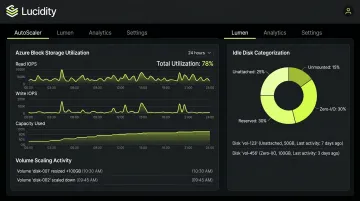
Together, these capabilities help enterprises cut block storage costs by up to 70%. The free Assessment tool analyzes your Azure environment in about five minutes, surfacing utilization, waste, and downtime risk specific to your block storage footprint — a useful starting point before committing to any optimization strategy.
Frequently Asked Questions
What are the automation tools in Azure?
Key native Azure automation tools include Azure Automation (runbooks), Azure Storage Actions, Azure Functions, Logic Apps, Lifecycle Management Policies, ARM templates, and Terraform. The right choice depends on the task: lifecycle policies for age-based blob tiering, Functions for event-driven processing, and Automation runbooks for scheduled or scripted operations.
How does Azure Data Factory relate to blob storage automation?
Azure Data Factory is a cloud-based ETL/ELT service for orchestrating data movement and transformation pipelines. It can work alongside blob storage automation, but unlike lifecycle policies or Storage Actions, ADF focuses on pipeline orchestration rather than storage object lifecycle management.
What is Azure Storage Actions?
Azure Storage Actions is Microsoft's fully managed, no-code platform for running condition-based operations — tiering, tagging, and deletion — across millions of blobs in multiple storage accounts. Tasks run asynchronously on a schedule and generate execution reports for monitoring.
How do I automate blob lifecycle management in Azure?
Use Azure Blob Lifecycle Management Policies, configured in the Azure Portal under Data management → Lifecycle Management, or via ARM/Bicep templates. Rules define conditions (last-modified time, creation time, last access time) and actions (tier transitions or deletion) that apply automatically at scale.
Can Azure Functions trigger blob storage operations automatically?
Yes. Azure Functions support Blob Storage triggers — a function executes automatically whenever a new or updated blob is detected. This enables event-driven processing like tagging, routing, or transformation without manual intervention, using either polling-based or Event Grid-based trigger implementations.