Introduction
Cloud storage lifecycle management is the practice of automating how data moves through storage tiers — hot, warm, cold, archive — or gets permanently deleted based on age, access patterns, or business rules. When policies are well-designed, costs stay predictable, compliance requirements are met, and engineering teams stop doing manual cleanup.
When they're not, the bill grows. According to McKinsey, organizations waste roughly 28% of their cloud spend — and storage is one of the biggest contributors.
Without lifecycle policies, data accumulates indefinitely across AWS, Azure, and Google Cloud. Storage bills grow faster than actual usage, and engineers end up doing cleanup that automated rules should handle instead.
This guide covers why lifecycle management matters, the four core policy types, warning signs that your current policies are broken, and a practical review schedule.
Key Takeaways
- Lifecycle policies automate data movement across storage tiers and deletions — keeping costs from compounding unchecked
- Four policy types — tiering, expiration, intelligent, and compliance — each solve a distinct problem
- Rising storage bills without matching workload growth, idle volumes, and failed audits are the clearest warning signs
- Review policies at least quarterly; trigger immediate reviews after architecture changes or budget spikes
- Static time-based rules miss real usage — intelligent platforms act on actual access patterns instead
Why Cloud Storage Lifecycle Management Matters
Without lifecycle policies, cloud storage defaults to indefinite retention. Data piles up unnoticed, and organizations end up paying premium rates for objects and volumes that haven't been touched in months.
Flexera's 2025 State of the Cloud Report found that 84% of organizations cite managing cloud spend as their top challenge, with budgets exceeding limits by an average of 17%. Unmanaged storage is a direct contributor.
The Cost Case for Tiering
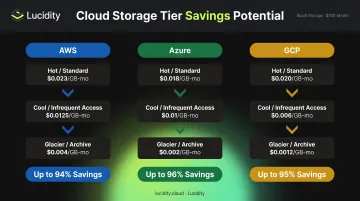
The price gap between storage tiers is substantial:
| Provider | Hot/Standard Tier | Archive Tier | Savings Potential |
|---|---|---|---|
| AWS (us-east-1) | $0.023/GB-month (S3 Standard) | $0.00099/GB-month (Glacier Deep Archive) | ~96% |
| Azure (eastus) | $0.0208/GB-month (Hot LRS) | $0.00099/GB-month (Archive LRS) | ~95% |
| GCP (us-central1) | $0.020/GB-month (Standard) | $0.00120/GB-month (Archive) | ~94% |
Those savings compound as data volumes grow. A 100 TB dataset moved from AWS S3 Standard to Glacier Deep Archive saves roughly $2,200 per month — without deleting a single byte.
Compliance and Security
The legal dimension is just as important as cost. Most regulated industries carry mandatory retention periods:
- FINRA requires broker-dealers to retain blotters, ledgers, and customer account records for six years
- HIPAA Security Rule documentation must be retained for six years from creation or last effective date
- IRS guidance requires most business records for three to seven years, depending on transaction type
Over-retention creates liability when data is held beyond its required deletion date. Under-retention violates mandates. Both are audit failures.
Every retained object that's no longer needed also expands the attack surface. Lifecycle-driven deletion shrinks the blast radius of a breach — data with no active purpose shouldn't be sitting in accessible storage.
Types of Cloud Storage Lifecycle Policies
Lifecycle management combines four distinct policy types applied based on data type, access frequency, and regulatory requirements. Most organizations need all four working in concert.
Tiering and Transition Policies
Tiering policies automatically move objects or volumes to lower-cost storage classes based on defined conditions, typically object age or days since last access.
A typical S3 tiering ladder might look like:
- Days 0–30: S3 Standard ($0.023/GB-month)
- Days 30–90: S3 Standard-IA — 30-day minimum storage duration applies
- Days 90–180: S3 Glacier Instant Retrieval — 90-day minimum applies
- Day 180+: S3 Glacier Deep Archive — 180-day minimum applies, retrieval in hours
Azure and GCP follow similar patterns. Azure Blob moves through Hot → Cool (30-day minimum) → Cold (90-day minimum) → Archive (180-day minimum, rehydration up to 15 hours). GCP's ladder runs Standard → Nearline (30-day minimum) → Coldline (90-day minimum) → Archive (365-day minimum).
One important caveat: minimum storage duration charges mean small objects transitioned too early can actually cost more than leaving them in Standard. Objects smaller than a few hundred KB are often better candidates for deletion than tiering.
Expiration and Deletion Policies
Expiration policies define when objects are permanently removed. This is the only way to stop paying for data with no remaining value.
Common deletion use cases:
- Temporary pipeline outputs deleted after 7 days
- Application log files purged after 90 days
- Failed job artifacts cleared after 30 days
The deletion mechanics vary by provider. AWS S3 queues objects for permanent removal in non-versioned buckets; in versioned buckets, expiration adds a delete marker and a separate noncurrent-version expiration rule handles actual removal.
Azure Blob respects soft delete settings — if enabled, lifecycle-deleted objects enter a soft-deleted state before permanent removal. GCP currently applies a default 7-day soft-delete period to live objects before permanent deletion.
The primary risk: over-aggressive deletion. A misconfigured rule that fires too early can permanently remove data still needed for compliance or recovery. Always test deletion rules against a small prefix or subset of non-production data before applying broadly.
Automated and Intelligent Lifecycle Management
Static, time-based rules share a fundamental limitation: they don't reflect actual usage. A log file set to delete after 90 days might still be actively queried; a dataset tiered to cold storage might be accessed weekly.
Intelligent lifecycle management replaces arbitrary time thresholds with continuous analysis of real access patterns — IOPS, throughput, latency, and cost trends — to make or recommend tier transitions and cleanup actions.
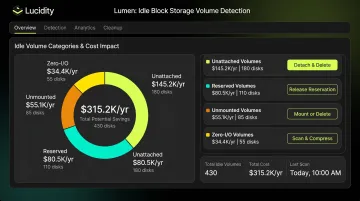
For block storage specifically, this matters even more. Native cloud dashboards don't reliably surface idle volumes created by terminated instances, autoscaling events, or workload migrations. Lucidity's Lumen product addresses this directly by identifying four distinct types of idle block storage volumes that standard cloud tools miss:
- Unattached volumes — no compute instance connected
- Reserved volumes — provisioned but unused capacity
- Unmounted volumes — attached to an instance but not mounted to the filesystem
- Zero-I/O volumes — attached and mounted, but recording no read or write activity
Together, these four categories can represent up to **70% of unused block storage spend**. Lumen continuously scores every disk's tier against actual usage data (IOPS, throughput, latency, and cost) and surfaces one-click cleanup actions that are auditable and reversible — with no scripts or infrastructure changes required.
Compliance and Retention Policies
Compliance policies enforce minimum or maximum retention periods for regulated data, often interacting with object locking features that prevent premature deletion.
All three major cloud providers support write-once-read-many (WORM) enforcement:
- AWS S3 Object Lock: prevents overwrite or deletion for a fixed retention period or indefinitely under legal hold
- Azure Immutable Blob Storage: time-based retention and legal hold policies; deletion rules do not function on blobs in immutable containers
- GCP Bucket Lock: once locked, retention period cannot be decreased or removed
The critical coordination issue: a deletion rule that fires before a retention lock expires will either fail silently or cause a compliance violation. Always validate rule precedence and document the interaction between expiration policies and retention locks before deployment.
Signs Your Cloud Storage Lifecycle Policies Need Attention
Lifecycle policies aren't permanent configurations. Usage patterns shift, workloads retire, and compliance requirements change. Several signals indicate that current policies are outdated, missing, or misconfigured.
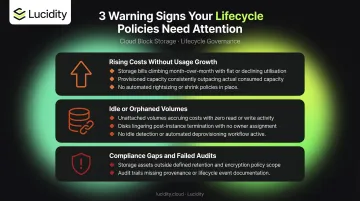
Storage Costs Rising Faster Than Usage
If storage bills grow month-over-month without a corresponding increase in active workloads, data is accumulating that lifecycle policies should be handling. Old backups, orphaned objects, and unattached block volumes are the usual culprits.
Watch for a high percentage of data sitting in premium storage tiers (Standard, high-performance) while access logs show that data hasn't been touched in weeks or months. Tiering rules are either absent or set too conservatively.
Monitoring recommendation: track storage cost growth rate as a baseline KPI. The FinOps Foundation includes storage costs attributed to data not accessed within a 90-day window as a recognized KPI for this reason.
Idle, Unattached, or Orphaned Storage Volumes
Storage resources provisioned for a workload that's since been retired or migrated often remain active and billing. For block storage, this includes:
- EBS volumes left behind after EC2 instance termination
- Azure Managed Disks not reassigned after VM decommission
- GCP Persistent Disks sitting idle after autoscaling events
The FinOps Foundation specifically flags unattached EBS volumes as a common and costly oversight — a buggy autoscaling group can generate thousands of dollars in daily spend on abandoned volumes before anyone notices.
Flag any storage resource meeting these criteria for immediate review:
- No attached compute instance
- No I/O activity in the past 30 days
- Creation date older than 30 days with zero read or write events
Compliance Gaps and Failed Audits
If retention audits flag missing records, or if compliance teams find data held beyond its required deletion date, lifecycle policies are enforcing the wrong retention windows — or none at all.
The absence of lifecycle policies on certain buckets or storage containers is itself an audit finding in mature cloud governance frameworks. Common failure modes include:
- Missing retention rules on regulated data classes
- Data held past its required deletion date
- No configured expiration on buckets containing obsolete or trivial records
DLA Piper's guidance on defensible deletion defines it as the "ongoing and routine elimination of unneeded data" — minimizing legal risk associated with evidence spoliation. Both over-retention and under-retention are failures from this perspective.
Cloud Storage Lifecycle Management Review Schedule
Review frequency should match the pace of organizational change. The right cadence depends on your environment's complexity and growth rate:
- Active FinOps programs: quarterly reviews
- Stable, well-classified environments: semi-annual reviews
- High-growth or AI/ML workload environments: monthly reviews
| Cadence | Focus Areas |
|---|---|
| Continuous / Real-time | Cost anomaly alerts, idle resource detection, budget threshold notifications |
| Monthly | Storage growth rate, percentage of data per tier, new buckets or volumes without policies attached |
| Quarterly | End-to-end policy audit, alignment with current compliance requirements, deletion of obsolete configurations |
| Annual | Full data classification refresh, policy redesign for new workload types, benchmark utilization against targets |
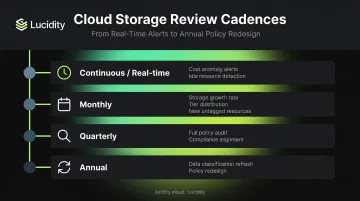
These cadences align with what major cloud providers recommend in practice. Microsoft Cost Management supports daily, weekly, and monthly scheduled cost alerts, and Azure Advisor refreshes cost recommendations daily. AWS Well-Architected guidance calls for ongoing cloud environment maintenance as a core cost optimization practice — which means your review schedule should be a living process, not a one-time exercise.
Triggers for Unscheduled Reviews
Some events should trigger an out-of-cycle review regardless of the regular schedule:
- A migration, new application launch, or autoscaling event creates new storage resources that often ship without lifecycle policies attached — review immediately to close that gap
- Storage costs exceeding forecast by 15–20% or more signals unmanaged growth that existing policies aren't catching — investigate before the next billing cycle
Conclusion
Cloud storage lifecycle management is operational hygiene, not optional optimization. Without it, data accumulates indefinitely, storage bills outpace workload growth, and engineering teams handle cleanup manually that automated policies should have addressed months earlier.
The right approach combines four policy types working in concert: tiering rules that move data to cost-appropriate storage classes, expiration rules that eliminate data with no remaining value, compliance retention policies that satisfy legal requirements, and intelligent monitoring that catches what static rules miss.
For block storage, idle volumes from terminated instances and autoscaling events are a persistent source of waste that time-based rules alone won't catch. Platforms like Lucidity's Lumen go further, continuously analyzing IOPS, throughput, and cost data to surface the four types of idle disks that native cloud dashboards don't show — unattached, reserved, unmounted, and zero-I/O — and delivering one-click cleanup backed by concrete usage data.
Regular review cycles, real-time anomaly monitoring, and automated enforcement together prevent the chronic over-provisioning that costs organizations an estimated 28% of their total cloud spend.
Frequently Asked Questions
What are the five stages of data lifecycle?
The five stages are: creation/ingestion, active storage and use, archiving, retention/compliance hold, and deletion. Lifecycle policies automate transitions between stages based on object age, access frequency, or business rules — no manual intervention required.
What is cloud storage lifecycle management?
It's the practice of defining automated policies that govern how data moves between storage tiers or gets deleted over time. The goal is ensuring organizations only pay for the storage tier that matches their actual access needs, rather than defaulting to indefinite retention in premium storage classes.
How do lifecycle policies reduce cloud storage costs?
They move infrequently accessed data from expensive high-performance tiers to lower-cost cold or archive tiers, and delete data with no remaining value entirely. The price gap between hot and archive storage can exceed 95% on AWS, Azure, and GCP — savings that compound as data volumes grow.
What is the difference between hot, warm, and cold cloud storage?
Each tier trades access speed for cost:
- Hot: Highest cost, optimized for frequent access (AWS S3 Standard, GCP Standard, Azure Hot)
- Warm: Lower cost, suits occasional access — but carries minimum storage duration charges (S3 Standard-IA, GCP Nearline, Azure Cool)
- Cold/archive: Lowest cost for rarely accessed data, with higher retrieval costs and longer minimum durations (S3 Glacier, GCP Coldline/Archive, Azure Archive)
How often should cloud storage lifecycle policies be reviewed?
At minimum quarterly, combined with continuous real-time monitoring for cost anomalies and idle resources. Trigger immediate reviews after architectural changes, new workload deployments, or unexpected storage cost increases above your defined threshold.
What happens if cloud storage lifecycle management is not implemented?
Data accumulates indefinitely in premium tiers, idle volumes go undetected, compliance risks grow as retention exceeds legal requirements, and engineering teams absorb mounting manual overhead. Storage bills scale faster than actual usage with no mechanism to reverse it.