Introduction
Azure teams face a real tension with blob data: keep it too long and storage costs balloon; delete it too early and you're out of compliance. Retention policies are how you resolve both sides of that problem, but only if you configure the right type.
"Retention policy" in Azure actually covers two distinct mechanisms. Immutability policies enforce WORM (Write Once, Read Many) protection for compliance. Lifecycle management policies automate tier transitions and deletion for cost control. Treating them as interchangeable is one of the most common reasons configurations fail or audits go sideways.
This guide covers both:
- Prerequisites and account-level setup
- Step-by-step CLI and portal configuration
- Key parameters that determine outcomes
- Mistakes that create permanent compliance problems or unexpected costs
Key Takeaways
- Azure Blob retention splits into two types: immutability policies (WORM-based, for compliance) and lifecycle management policies (tier-based, for cost control)
- Once a time-based immutability policy is locked, it cannot be deleted or shortened — not even by admins
- Version-level WORM requires blob versioning at account creation — incompatible with hierarchical namespace (ADLS Gen2)
- Lifecycle rules run every 24 hours — expect up to a day before changes take effect
- Always test with an unlocked policy first — locking is irreversible
What Are Azure Blob Storage Retention Policies?
Time-Based Immutability Policies
Time-based retention places blobs in a WORM state for a user-defined period. The Microsoft documentation confirms the range: minimum 1 day, maximum 146,000 days (roughly 400 years). During this period, blobs can be created and read — but not modified or deleted.
Azure offers two scoping options:
| Scope | How It Works | Key Requirement |
|---|---|---|
| Container-level WORM | Policy applies to all blobs in the container | No versioning required |
| Version-level WORM | Policy can be set per account, container, or individual blob version | Blob versioning required; incompatible with HNS |
Container-level is simpler to set up. Version-level gives you per-blob granularity but adds versioning overhead and is off the table for ADLS Gen2 accounts.
Legal Holds
Legal holds keep blobs in a WORM state indefinitely — no expiration date. The hold remains active until you explicitly clear every tag associated with it. They're designed for active litigation or regulatory investigations where you don't yet know how long the hold needs to last.
Legal holds and time-based retention can coexist on the same container. A blob cannot be deleted if either is active.
Lifecycle Management Policies
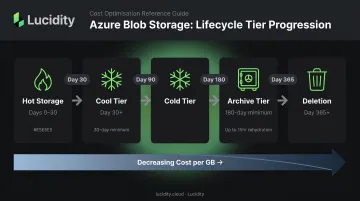
The third type works differently — it's not about compliance at all. Lifecycle management is a rules engine, not an immutability mechanism. It automatically moves blobs across access tiers — Hot, Cool, Cold, Archive — or deletes them after configurable time thresholds. The goal is cost optimization, not compliance enforcement.
The two policy types serve different purposes and can run simultaneously on the same storage account.
What You Need Before Configuring Azure Blob Storage Retention Policies
Account and Permission Requirements
- Account type: General Purpose V2 (GPv2) or premium block blob account for version-level WORM; container-level WORM supports a broader range including HNS accounts
- RBAC permission: Contributor role, or a custom role with
Microsoft.Storage/storageAccounts/blobServices/containers/immutabilityPolicies/write - For version-level WORM specifically:
- Blob versioning must be enabled
- Account-level WORM support (
--enable-alw true) must be set at account creation — this cannot be changed retroactively - Account must not have hierarchical namespace enabled
Know Your Compliance Requirements First
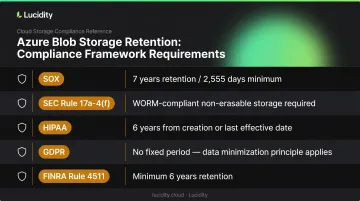
Getting the retention period wrong before locking creates a permanent problem — once locked, you can only extend it, never shorten. Common regulatory benchmarks:
- SOX: 7 years (2,555 days) for audit and review records
- SEC Rule 17a-4(f): Requires non-rewriteable, non-erasable storage; WORM is one compliant path (an audit-trail alternative now also exists under 2022 amendments)
- HIPAA: 45 CFR 164.316 requires 6 years from creation or last effective date for policy documentation; medical record retention varies by state
- GDPR: No fixed universal period — Article 5 requires personal data be kept no longer than necessary; pairs naturally with lifecycle deletion rules
- FINRA Rule 4511: Minimum 6 years where no specific period is defined; format must comply with SEC Rule 17a-4
Validate these against your legal team before committing to a period.
How to Configure Azure Blob Storage Retention Policies
Step 1: Create a GPv2 Storage Account with Versioning Enabled
If you need version-level WORM, set the --enable-alw flag at account creation. This cannot be changed later.
# Create resource group and storage account with account-level WORM support
az group create --name myResourceGroup --location eastus

az storage account create \
  --name mystorageaccount \
  --resource-group myResourceGroup \
  --sku Standard_LRS \
  --kind StorageV2 \
  --enable-alw true
Then enable blob versioning:
az storage account blob-service-properties update \
  --account-name mystorageaccount \
  --resource-group myResourceGroup \
  --enable-versioning true
Without versioning, container-level WORM is your only option.
Step 2: Create a Container and Apply an Immutability Policy
# Create container with version-level WORM enabled
az storage container create \
  --name mycontainer \
  --account-name mystorageaccount

# Apply immutability policy (365 days for GDPR-style retention)
az storage container immutability-policy create \
  --account-name mystorageaccount \
  --container-name mycontainer \
  --period 365
For SOX 7-year compliance, use --period 2555.
The retention period applies to all blobs in the container unless you override it at the version level. Verify it was applied:
az storage container immutability-policy show \
  --account-name mystorageaccount \
  --container-name mycontainer
Portal alternative: Storage Account → Containers → select container → Access Policy → Add policy under Immutable blob storage.
Step 3: Lock the Policy for Regulatory Compliance
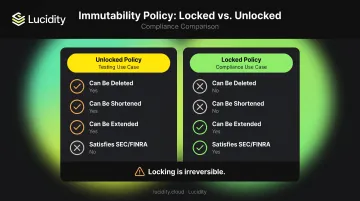
An unlocked policy can be modified or deleted, which is useful for testing. It does not satisfy SEC 17a-4(f), FINRA Rule 4511, or similar regulations. Locking makes the policy permanent and extension-only.
# Get the current policy and its ETag
az storage container immutability-policy show \
  --account-name mystorageaccount \
  --container-name mycontainer

# Lock the policy using the ETag from the previous command
az storage container immutability-policy lock \
  --account-name mystorageaccount \
  --container-name mycontainer \
  --if-match "<ETag-from-show-command>"
⚠️ This action is irreversible. Microsoft recommends locking within 24 hours of validating the policy in a non-production environment. Never run this command before confirming the retention period is correct.
Step 4: Apply a Legal Hold When Duration Is Unknown
az storage container legal-hold set \
  --account-name mystorageaccount \
  --container-name mycontainer \
  --tags case-2026-001
Multiple tags can be applied. The hold is only fully released when all tags are individually cleared. A blob cannot be deleted while any tag remains active, even if the time-based retention period has already expired.
Step 5: Configure a Lifecycle Management Policy
Immutability policies control whether data can be deleted. Lifecycle policies control when it gets tiered or deleted for cost management. Create a JSON policy file (policy.json):
{
  "rules": [
    {
      "name": "tiered-retention-rule",
      "enabled": true,
      "type": "Lifecycle",
      "definition": {
        "filters": {
          "blobTypes": ["blockBlob"],
          "prefixMatch": ["logs/"]
        },
        "actions": {
          "baseBlob": {
            "tierToCool": { "daysAfterModificationGreaterThan": 30 },
            "tierToArchive": { "daysAfterModificationGreaterThan": 90 },
            "delete": { "daysAfterModificationGreaterThan": 365 }
          }
        }
      }
    }
  ]
}
Apply it via CLI:
az storage account management-policy create \
  --account-name mystorageaccount \
  --resource-group myResourceGroup \
  --policy @policy.json
Portal alternative: Storage Account → Data Management → Lifecycle Management → Add a rule.
Lifecycle policies run once every 24 hours, so changes can take up to a day to take effect. Note that a lifecycle delete action will not execute against a blob protected by an active immutability policy. The immutability policy must expire before deletion can proceed.
Key Parameters That Affect Retention Policy Configuration
Retention Period Calculation
The effective retention period calculates from the blob's creation time, not the policy creation time. A blob created 1 year ago placed under a 5-year policy has only 4 years of effective retention remaining — not 5.
This matters most when applying policies retroactively to containers with existing data. Because newer blobs have a more recent creation timestamp, they'll retain more of the policy's full duration than older blobs in the same container.
Policy Scope: Container-Level vs. Version-Level
- Container-level WORM: Simpler setup, no versioning required, all blobs share one retention period. Required for ADLS Gen2 (HNS) accounts.
- Version-level WORM: Per-blob customization, more flexibility, but versioning adds storage overhead (retained versions accumulate costs) and requires account-level WORM support set at creation.
If your team uses hierarchical namespace for data lake workloads, container-level WORM is your only option.
Locked vs. Unlocked State
An unlocked policy is for testing. A locked policy is for compliance. The distinction is consequential:
| State | Can Be Deleted? | Can Be Shortened? | Can Be Extended? | Satisfies SEC/FINRA? |
|---|---|---|---|---|
| Unlocked | Yes | Yes | Yes | No |
| Locked | No | No | Yes | Yes |
Access Tier Thresholds and Cost Impact
Lifecycle rule thresholds directly affect monthly spend. A few practical traps:
- Moving data to Cool too early triggers retrieval penalties if access patterns change; Cool has a 30-day minimum storage duration
- Archive has a 180-day minimum and requires rehydration before data can be accessed (up to 15 hours at standard priority)
- Delaying the Archive transition unnecessarily inflates Hot or Cool storage costs
Use Azure Monitor access logs to validate actual read/write frequency before finalizing tier transition thresholds — guessing day counts typically results in either over-spend or retrieval penalties.
Common Mistakes When Configuring Azure Blob Storage Retention Policies
1. Locking a policy before validating the retention period
Once locked, the period can only be extended — never shortened. Organizations that lock prematurely and discover a wrong period are permanently bound to it. Always test with an unlocked policy in a non-production account first.
2. Applying version-level WORM to an HNS account
Version-level WORM is not supported when hierarchical namespace is enabled. Teams migrating data lake workloads into ADLS Gen2 commonly hit this wall. The only option is container-level WORM.
3. Assuming legal holds clear automatically at retention expiry
A blob under an active legal hold cannot be deleted even after the time-based retention period expires. Teams expecting automatic cleanup — but carrying an uncleared legal hold — accumulate costs indefinitely until all hold tags are manually removed.
4. Lifecycle rules without a prefix filter
If your lifecycle rule has no prefix match in the filter set, it applies to every blob in the storage account — including blobs under active immutability policies. The delete action won't execute against protected blobs, but the rule will still attempt to tier-transition them, producing unexpected storage behavior. Always scope lifecycle rules to specific prefixes.
Frequently Asked Questions
What is the retention policy for Azure Blob?
Azure Blob Storage offers two types: immutability policies (time-based retention and legal holds) that prevent modification or deletion for compliance, and lifecycle management policies that automate tier transitions and deletion for cost control. They serve different purposes and can be configured together on the same storage account.
What is the Azure Blob Storage lifecycle?
Azure Blob Storage lifecycle management is a rules engine that automatically moves blobs between access tiers (Hot, Cool, Cold, Archive) or deletes them based on age or last access time. It runs once every 24 hours, and you configure it via JSON rules through the portal, CLI, or PowerShell.
What is a 7-year retention policy?
A 7-year retention policy — 2,555 days — is required by financial regulations such as SOX for certain audit and review records. In Azure, this is implemented by setting a locked time-based immutability policy with a 2,555-day period on the relevant containers.
What is the difference between a locked and unlocked retention policy in Azure?
An unlocked policy can be modified, shortened, or deleted — it's intended for testing. A locked policy can only be extended, never shortened or deleted, and is the required state for regulatory compliance with SEC 17a-4(f) and similar rules.
Can Azure Blob Storage retention policies be deleted once set?
Unlocked policies can be deleted at any time. Once locked, a time-based policy cannot be deleted under any circumstances, including by Azure support. The lock holds until the retention period has expired on all blobs in the container and the container is empty.