The common assumption is that Azure is inherently expensive. It isn't. Azure costs become expensive because of how resources are provisioned, how rarely those decisions get revisited, and how little visibility teams have into what's actually running. This article examines where Azure costs accumulate, what drives them, and how to reduce spend across provisioning decisions, active management, and organizational governance.
Key Takeaways
- Azure spending compounds quietly — over-provisioned VMs, idle storage, and stale snapshots run 24/7 without delivering value
- The biggest cost drivers are provisioning choices that never get revisited: wrong VM sizes, over-allocated disks, pay-as-you-go for predictable workloads
- Rightsizing, commitment models, and architecture choices matter more than reactive cleanup — optimization starts before deployment
- Ongoing cost control requires tagging discipline, autoscaling, anomaly detection, and tooling to surface idle disks
- True Azure ROI is measured by cost per workload, cost per user, or cost per transaction — not the total bill
How Azure Costs Typically Build Up
Azure costs don't arrive as a single visible expense. They accumulate through dozens of small, ongoing charges: hourly VM usage, per-GB storage, data egress fees, unused reservations, and idle services that run continuously without delivering value.
The accumulation is gradual and often invisible. A few patterns show up repeatedly:
- Resources provisioned during migrations or peak-demand events rarely get resized once the pressure subsides
- Storage volumes are allocated with headroom buffers that never get reclaimed
- Dev and test environments keep running through weekends because no one set a shutdown schedule
Most of this waste only surfaces at billing review time — by which point weeks or months of avoidable spend have already occurred. Without consistent cost tagging, teams can't trace where the money went, let alone hold anyone accountable for it.
The Azure Cost Optimization workbook is specifically designed to surface these patterns: idle resources, improperly deallocated VMs, unattached managed disks, and idle gateways with empty backend pools. The fact that Microsoft built a dedicated workbook for this problem tells you something about how common it is.
Key Cost Drivers for Azure
Compute: The Visible Driver
Compute attracts the most optimization attention , which is useful, but that focus leaves other cost categories under-managed.
VM size mismatches are the core issue. Azure Advisor flags VMs where P95 max CPU stays below 3% and average CPU over three days is 2% or less as shutdown candidates. For user-facing workloads, resizing is recommended when P95 CPU and network utilization both sit at 40% or lower. These thresholds reveal how frequently VMs are provisioned for peak scenarios that rarely materialize.
Always-on instances for intermittent workloads, scaling configurations set for one-time traffic events, and general-purpose VM families used where burstable Bs-series instances would suffice — these decisions accumulate into meaningful monthly overages.
Storage: The Underestimated Driver
Storage is where Azure waste hides most effectively. The core problem: Azure Managed Disks are billed by provisioned capacity, not by what you use. And shrinking an existing disk is not supported — Microsoft explicitly states it may result in data loss. So whatever you provision tends to stay provisioned.
Over-allocated capacity persists indefinitely, and unattached managed disks keep generating charges after the associated VM is deleted. Stale snapshots pile up silently:
- Incremental snapshots for Premium SSDs stored on Standard storage: $0.05/GB/month
- Full Premium SSD snapshots: $0.18/GB/month
The tier gap compounds this further:
| Disk Size | Premium SSD | Standard SSD | Standard HDD |
|---|---|---|---|
| 32 GiB | $4.81/month | $2.40/month | $1.54/month |
| 128 GiB | $17.92/month | $9.60/month | $5.89/month |
| 1 TiB | $122.88/month | $76.80/month | $40.96/month |
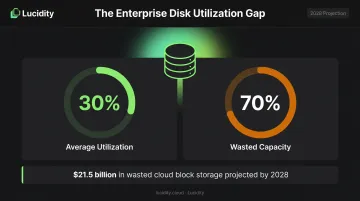
Lucidity's data from analyzing over 100 petabytes of enterprise storage shows average disk utilization sits around 30% — meaning roughly 70% of provisioned capacity generates cost without delivering value. The company estimates wasted cloud block storage spend will reach $21.5 billion by 2028.
Networking and Commitment Model Gaps
Beyond compute and storage, networking and purchasing model gaps are harder to catch without granular cost attribution — but they're just as damaging to your Azure bill.
Azure egress rates vary significantly by region and traffic type:
- Internet egress from North America: $0.087/GB (after the first 100 GB/month free tier)
- Inter-region transfers within North America: $0.02/GB
- South America inter-region transfers: $0.16/GB
For microservice architectures with chatty cross-region communication, these rates escalate quickly. Commitment model gaps add to the exposure — organizations paying on-demand rates for workloads that run year-round leave real money on the table. Reserved VM Instances can reduce compute costs by up to 72% versus pay-as-you-go pricing.
Azure Cost-Reduction Strategies
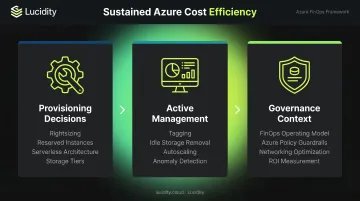
Effective Azure cost reduction operates across three distinct levers: decisions made before or during provisioning, how resources are actively managed once live, and the governance context surrounding Azure operations. The most impactful programs address all three.
Strategies That Change Provisioning Decisions
These are high-leverage because they prevent waste from accumulating in the first place.
Rightsize VMs before deployment — and revisit regularly. Use Azure Advisor with multi-week utilization windows (CPU, memory, I/O) to match VM families to actual workload requirements. Burstable Bs-series VMs suit workloads with low baseline usage and occasional spikes, avoiding the cost of always-on general-purpose instances. Azure Advisor supports lookback windows of 7 to 90 days for rightsizing analysis.
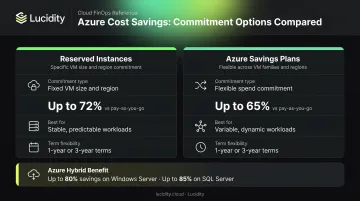
Replace pay-as-you-go with Reserved Instances or Savings Plans. For predictable workloads, committing to 1- or 3-year reservations delivers up to 72% savings versus on-demand pricing. Azure Savings Plans offer more flexibility across VM families and regions, saving up to 65%. Pair either option with Azure Hybrid Benefit — eligible Windows Server licenses save up to 80% more than standard pay-as-you-go; SQL Server customers can save up to 85%.
Design for serverless and containers where workloads allow. Azure Functions on the Consumption plan charges only when code runs, with a free grant of 1 million requests and 400,000 GB-seconds per month. AKS supports scaling user node pools to zero, eliminating idle capacity for batch and non-critical workloads. AKS Spot VMs offer discounts up to 90% versus pay-as-you-go for interruption-tolerant jobs.
Choose Blob storage tiers intentionally. Azure Blob Storage offers Hot, Cool, Cold, and Archive tiers with significantly different cost profiles. Set lifecycle policies to auto-transition data rather than leaving everything parked in Hot or Premium storage. The cost difference between tiers can be 10x or more per GB — automation here pays off fast.
Strategies That Change How Azure Is Managed
These address the gap between what was provisioned and what is actually needed.
Implement granular cost tagging. Without tags mapped to department, environment, cost center, and owner, Azure spend becomes untraceable. The FinOps Foundation describes cost allocation as using hierarchies, tags, and labels to assign technology costs to specific owners — which is foundational for any accountability model.
Use Azure Cost Management to generate showback or chargeback reports. This creates behavioral pressure on over-spending teams by making individual costs visible rather than buried in aggregate bills.
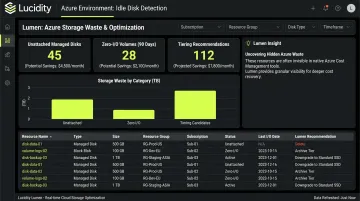
Eliminate idle and unattached storage with dedicated tooling. Unattached managed disks, reserved but unused volumes, unmounted disks, and zero-I/O storage generate charges indefinitely. They're nearly invisible in standard Azure dashboards, which means this waste compounds silently month after month.
Lucidity's Lumen identifies all four idle disk types across Azure environments, flagging waste that doesn't appear in Azure Advisor or native cost consoles. Together, these categories can represent up to 70% of unused block storage spend. Lumen also identifies tiering opportunities — for example, Premium SSD volumes eligible to move to Standard SSD — and executes those changes without downtime or maintenance windows. Customers like Dometic have achieved a 52% reduction in cloud storage spend using Lucidity's platform.
Configure autoscaling and automated scheduling. Virtual Machine Scale Sets, AKS autoscaling, and App Service scaling rules allow resources to contract during off-peak hours. Supplement autoscaling with scheduled shutdowns for dev, test, and staging environments using:
- Azure Automation's Start/Stop VMs v2
- DevTest Labs autoshutdown policies
These environments frequently run overnight and on weekends with no active users — making automated scheduling one of the fastest wins available.
Monitor costs with anomaly detection, not monthly reviews. Set up real-time budget alerts in Azure Cost Management so unexpected spikes surface immediately. Integrate cost monitoring into existing operations workflows so cost anomalies trigger the same response as performance incidents, rather than surfacing as a surprise at invoice time.
Strategies That Change the Governance Context
Even well-managed individual resources can generate runaway spend when the organizational structure allows unchecked provisioning. Governance closes that gap.
Adopt FinOps as a continuous operating model. FinOps isn't a tool — it's a cross-functional discipline that brings finance, engineering, and operations together around shared cloud cost accountability. Flexera reports that 63% of organizations now have FinOps teams, with centralized enablement as the most common structure. Key practices include:
- Regular cross-functional spending reviews
- Unit economics tracking (cost per transaction, cost per user)
- regular optimization reviews
Enforce cost guardrails through Azure Policy. Manual reviews at scale don't work. Use Azure Policy to:
- Restrict high-cost VM SKUs before deployment
- Require cost-center tagging as a deployment prerequisite
- Block resource creation outside approved regions
This shifts cost optimization from reactive cleanup to proactive constraint on waste generation.
Optimize networking at the architectural level. Map data flows, colocate interdependent services in the same Azure region, and apply compression where appropriate. Review whether Azure Front Door or CDN caching can reduce repeated outbound transfer costs — Front Door Standard starts at $35/month and can meaningfully reduce per-GB egress charges for high-volume workloads.
Measure ROI in business terms. Tracking total Azure spend obscures whether the organization is getting value. Define KPIs tied to workload outcomes — cost per feature, cost per API call, cost per active user — and use them to identify which Azure investments are delivering returns and which are candidates for rightsizing, rearchitecting, or retirement.
Conclusion
Reducing Azure costs requires identifying where cost actually originates — in provisioning decisions, in unmanaged active resources, or in the governance and architectural context — rather than applying blanket cuts that may harm performance or slow delivery.
Storage deserves particular attention. It's the cost category most frequently overlooked, hardest to shrink after the fact, and most responsive to automation. With average enterprise disk utilization sitting around 30%, the gap between what's provisioned and what's used represents a significant and largely recoverable expense — one that platforms like Lucidity are designed to close without manual intervention.
The organizations that consistently maximize Azure ROI treat cost management as an ongoing operational discipline, not a one-time remediation project. That shift in mindset, combined with the right tooling, is what separates incremental savings from sustained efficiency.
Frequently Asked Questions
How do you measure ROI for Azure, and is Azure cost-effective?
Azure ROI is best measured through unit economics — cost per transaction, cost per user, or cost per workload — rather than total spend alone. Azure can be highly cost-effective when provisioning decisions, commitment models, and governance align with actual usage patterns rather than theoretical peak demand.
What are the best Azure cost optimization strategies?
The highest-impact strategies include:
- Rightsize compute before deployment, not after
- Use Reserved Instances or Savings Plans for predictable workloads
- Eliminate idle storage — unattached disks, zero-I/O volumes, stale snapshots
- Enforce tagging and governance policies consistently
- Treat FinOps as an ongoing operating model, not a one-time project
What are the most commonly overlooked Azure cost drivers?
Block storage is the most under-managed category — unattached managed disks, over-provisioned volumes, and premium tiers applied to cold data drive silent, compounding waste. Cross-region data egress charges and dev/test environments left running outside business hours are the next most frequently missed drivers.
What is the difference between Azure Reserved Instances and Azure Savings Plans?
Reserved Instances commit to a specific VM size and region, delivering up to 72% savings — ideal for stable, predictable workloads. Savings Plans commit to an hourly spend amount and apply more flexibly across VM families, services, and regions, saving up to 65%. The right choice depends on how consistent and geographically fixed your workloads are.
How does storage optimization contribute to Azure cost reduction?
Over-provisioned block volumes, unattached managed disks, and premium tiers applied to cold data drive silent, compounding charges. Optimizing storage tiers, eliminating idle volumes, and right-sizing allocations can deliver significant returns — Lucidity customers have achieved up to 70% reduction in block storage spend.
What Azure-native tools help monitor and manage cloud spending?
Four native tools form the core monitoring stack:
- Azure Cost Management + Billing — budgets, alerts, and cost analysis
- Azure Advisor — rightsizing and reservation recommendations
- Azure Monitor — anomaly detection
- Azure Policy — governance guardrails
These cover most spending visibility needs, though tools like Lucidity's Lumen surface idle disk waste that native dashboards don't expose.