Introduction
Cloud waste is not a minor inefficiency. According to Flexera's 2026 State of the Cloud report, an estimated 29% of cloud spend delivers no business value — the first increase in five years. For DevOps teams running on Azure, that waste takes a specific shape: build environments left running between sprints, managed disks persisting after VM deletion, pipeline agents provisioned for peak load and never scaled back, and artifact storage growing silently without retention policies.
None of these problems start large. A few VMs here, a few disks there — and then a budget review surfaces months of invisible spend. Poor defaults, organic growth, and diffuse ownership let waste compound until the bill forces the conversation.
This guide breaks down Azure cost control for DevOps teams across three areas: pre-provisioning decisions, active practices that catch drift early, and structural changes that cut entire categories of waste at the source.
Key Takeaways
- Azure DevOps costs creep in through compute choices, idle pipeline agents, disk sprawl, and forgotten artifact retention policies
- Commitment discounts vary by model: Reserved Instances (72%), Savings Plans (65%), Spot VMs (90%) — each fits different workload types
- DevOps-specific waste like idle build agents and orphaned managed disks is invisible until it compounds into a serious budget problem
- Tagging, autoscaling agent pools, and scheduled non-production shutdowns cut ongoing spend without slowing delivery
- Managed disk sprawl is the most overlooked Azure DevOps cost driver — cleaning it up consistently yields some of the fastest savings
How Azure DevOps Costs Typically Build Up
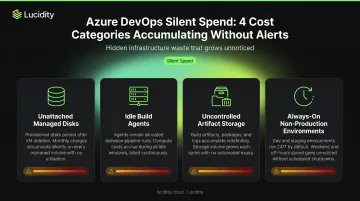
Azure cost accumulation in DevOps environments doesn't look like a spike on a graph. It looks like dozens of small charges that nobody owns, each reasonable in isolation, that compound over months across multiple teams and hundreds of resources.
The pattern repeats across organizations:
- A VM gets deleted, but its attached managed disk keeps billing at full storage rates
- Build agents are provisioned to handle peak sprint velocity and never scaled back
- Artifact feeds grow without retention enforcement until the free 2 GiB tier overflows into paid storage
- Dev, test, and staging environments run 24/7 because no one has ownership of the shutdown decision
These costs rarely appear in sprint retrospectives or team reviews. They surface during quarterly budget reviews, often months after the waste started accumulating. By the time someone pulls the Azure Cost Management report, six months of unnecessary spend may already be locked in.
The underlying driver is structural: Azure defaults don't automatically clean up resources when parent resources are removed, and no native alert fires when a disk becomes unattached or an environment runs at full compute scale overnight with zero active users.
Key Cost Drivers for Azure DevOps Teams
Azure DevOps spend typically concentrates in three areas. Understanding which driver dominates your environment determines where optimization effort pays off first.
Compute Provisioning
Self-hosted agent VMs are the most visible compute cost, and the most commonly oversized. Teams typically select VM SKUs based on worst-case build times rather than median resource consumption, leaving persistent idle capacity across every agent not actively running a job.
The right model depends on your build frequency and duration:
| Agent Type | Cost | Minutes Included |
|---|---|---|
| Microsoft-hosted | $40/month per additional parallel job | 1,800 free minutes (first job) |
| Self-hosted | $15/month per additional parallel job | Unlimited |
Storage and Disk Accumulation
Storage costs are the most underestimated driver. Three mechanisms build up quietly:
- Unattached managed disks: Azure does not automatically delete disks when a VM is deleted. Those disks continue billing at full storage rates
- Artifact feed growth: Azure Artifacts includes 2 GiB free; overages bill at $2/GiB up to 10 GiB, then declining rates — but feeds rarely hit limits until they've already been growing for months
- Snapshot accumulation: Backup policies generate snapshots that accumulate silently without cleanup rules
Gartner identifies overprovisioning and poor lifecycle management as the primary causes of rising public cloud storage costs. Storage gets provisioned, resources get deleted or change state, and the billing continues unnoticed.
Lucidity's data from 600+ enterprise assessments analyzing over 100 PB of storage shows 30% average disk utilization across cloud environments. That means roughly 70% of provisioned storage capacity sits idle or underutilized at any given time.
Licensing and Pipeline Configuration
Licensing waste compounds with headcount and is almost never audited after initial setup. Common patterns include:
- Paying $6/user/month for Basic seats assigned to product managers or approvers who only need read access (Stakeholder licenses are free)
- Paying $52/user/month for Basic + Test Plans for users who don't actively use testing features
- Running more parallel pipeline jobs than actual build concurrency requires
Azure Cost Optimization Strategies for DevOps Teams
Azure cost reduction for DevOps teams operates at three distinct layers: the decisions made before resources exist, how those resources are managed while running, and the environment they sit within. Each layer surfaces different savings — and addressing all three compounds the effect.
Cost Decisions: Pricing Models, Sizing, and Licensing
Decisions made during infrastructure planning — pricing model selection, VM sizing, licensing tiers — set the cost baseline for everything built on top of them. Getting these right early has the largest compounding effect.
Select the right pricing model for each workload:
| Pricing Model | Discount | Best For |
|---|---|---|
| Reserved Instances | Up to 72% | Always-on production build infrastructure |
| Savings Plans | Up to 65% | Flexible compute across multiple VM sizes |
| Spot VMs | Up to 90% | Batch builds, integration tests, interruptible jobs |
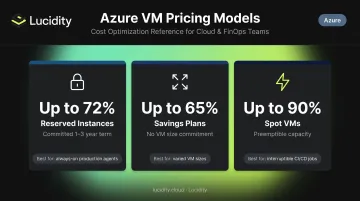
Spot VMs work well for CI/CD workloads that can tolerate a 30-second eviction notice. Reserved Instances make sense for agents running continuously. Savings Plans fit teams running varied compute configurations where a single reservation wouldn't apply broadly enough.
Right-size pipeline agent VMs at creation by reviewing actual CPU and memory consumption from prior builds rather than defaulting to large SKUs for safety margin. Azure Advisor analyzes the last seven days of utilization by default and surfaces VMs with CPU utilization at 5% or below as low-utilization candidates — most DevOps teams have several of these on their first audit.
Optimize licensing proactively:
- Assign free Stakeholder licenses to anyone who approves, reviews, or monitors but doesn't commit code
- Cross-check Visual Studio Subscription holders to avoid paying for duplicate Basic seats
- Audit whether Basic + Test Plans ($52/user/month) is actively used or whether simpler workflows could use lower-tier access
Set artifact retention policies at environment creation, not after the first large storage bill. Define maximum retention periods per feed and configure automated deletion beyond a set build age before the 2 GiB free tier overflows.
Active Management: Scaling, Monitoring, and Tagging
Many Azure DevOps cost problems persist not because the wrong decisions were made initially, but because no active management exists to catch drift. SKUs that made sense six months ago no longer match actual usage — and the gap rarely surfaces without active review.
Enable autoscaling for self-hosted agent pools based on queue depth rather than maintaining a fixed count of always-on agents. A fixed pool provisioned for peak sprint throughput runs at significant idle cost during off-peak periods. Queue-depth autoscaling means agents spin up when builds are waiting and scale back when they're not.
Use Azure Cost Management and Azure Advisor on a weekly cadence — not quarterly. Azure Advisor uses machine learning to identify resize and shutdown candidates, with shutdown recommendations triggered when:
- P95 of max CPU utilization across all cores is below 3%
- Outbound network utilization is below 2% over seven days
Weekly reviews surface these candidates before months of idle spend accumulate.
Implement resource tagging across all DevOps infrastructure:
- Environment type (dev / test / staging / prod)
- Team name
- Pipeline name
- Sprint or release
Tagging makes it possible to trace Azure spend back to specific workloads and creates accountability that drives behavior change. Without it, cost reports show totals with no actionable ownership.
Set up budget alerts and anomaly detection in Azure Cost Management so DevOps teams receive notifications when spending in a resource group or subscription deviates from baseline. Budget alerts typically fire within an hour of a threshold being crossed — early enough to investigate before a small overage becomes a large surprise.
Environmental Context: Schedules, Licensing, and Storage
Some Azure cost problems aren't about individual resources — they're about the environment those resources sit in. Non-production environments running at production scale overnight, storage tiers that don't match access patterns, and licensing gaps created by organizational structure all fall here.
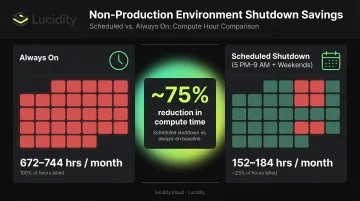
Schedule automatic shutdown for non-production environments using Azure Automation or DevOps pipeline schedules. A VM running 24/7 is billed for 672–744 hours per month. A 5 PM to 9 AM weekday shutdown schedule plus weekends reduces that to 152–184 billable hours — roughly a 75% reduction in compute time for the same environment. Dev, test, and staging environments running at full cost while every developer is offline is straightforward waste with a straightforward fix.
Apply Azure Hybrid Benefit to Windows Server and SQL Server VMs used in build and test infrastructure if the organization holds existing on-premises licenses. This delivers up to 85% savings on SQL Server workloads and up to 80% on Windows Server when combined with Reserved Instances — without changing your architecture.
Implement Azure Storage lifecycle management policies to automatically tier build artifacts, logs, and snapshots based on access age:
- Hot → Cool after 30 days
- Cool → Cold after 90 days
- Cold → Archive after one year
Most DevOps teams store build logs and old artifacts in Hot tier indefinitely because no one configured the transition rules at setup. Lifecycle policies run automatically and are free to create; you pay only for the underlying tier transitions.
Address managed disk sprawl. CI/CD pipelines that create and delete VMs for builds or test runs consistently leave behind managed disks that were never cleaned up. Azure does not delete these automatically — they continue billing at full storage rates regardless of whether any VM is attached or any workload is reading from them.
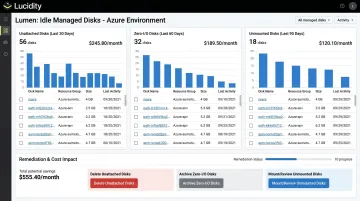
Zero-I/O disks are the hardest category to catch: technically attached to a resource but generating no activity, they won't appear in standard unattached disk queries but still represent real spend. Together with unattached, reserved, and unmounted disks, these four categories can account for up to 70% of unused block storage spend.
Lucidity's Lumen identifies and prioritizes all four idle disk types in Azure environments — surfacing disks that don't appear in native Azure dashboards or standard Advisor recommendations. Teams can remediate them directly from the dashboard without scripts, agents, or CI/CD pipeline changes.
Conclusion
Azure cost optimization for DevOps teams works best when teams can identify where a cost originated — whether from a decision made early, a management gap that allowed drift, or a structural condition in the environment. Cutting spend without that diagnosis tends to remove the wrong things and create reliability risk.
Cost optimization is not a one-time exercise. As DevOps velocity and team size grow, so does the volume of provisioned resources, disks, agents, and licenses. Teams that embed cost visibility into standard workflows see savings that compound — rather than scrambling to cut at quarter-end.
That means making governance a habit at the point of action:
- Run weekly Azure Advisor reviews to catch idle resources before they accumulate
- Set artifact retention policies at environment creation, not after the fact
- Include disk cleanup steps in every decommission checklist
Storage is one of the easiest places to start. Lucidity's free Storage Assessment identifies idle and over-provisioned disks across your Azure environment in minutes — no agents or infrastructure changes required.
Frequently Asked Questions
What is Azure cost optimization for DevOps?
Azure cost optimization for DevOps refers to reducing cloud spend on the infrastructure DevOps teams use — including CI/CD agents, build VMs, managed disks, artifact storage, and licensing — by identifying waste, right-sizing resources, and applying governance without slowing delivery velocity.
Is there a cost for Azure DevOps?
Azure DevOps includes a free tier covering 5 Basic users and 1 Microsoft-hosted pipeline job with 1,800 minutes per month. Beyond that, Basic seats cost $6/user/month, additional Microsoft-hosted parallel jobs cost $40/month, self-hosted jobs cost $15/month, and Basic + Test Plans costs $52/user/month.
What are the core pillars of Azure cost optimization?
The Azure Well-Architected Framework identifies Cost Optimization as one of five pillars. In practice, that means right-sizing resources, choosing appropriate pricing models, eliminating idle spend, and enforcing ongoing governance through visibility and accountability.
How can DevOps teams reduce Azure pipeline costs specifically?
Switch interruptible build jobs to Spot VMs, use self-hosted agents with autoscaling based on queue depth to avoid paying for idle parallel jobs, enforce artifact retention policies to stay within free storage tiers, and audit whether Microsoft-hosted or self-hosted agents are cost-optimal for your team's build frequency and volume.
How do unattached managed disks waste money in Azure DevOps environments?
Deleting a VM does not automatically remove its managed disks — they keep billing at full storage rates. In high-churn CI/CD environments, unattached, unmounted, and zero-I/O disks accumulate quietly and can account for a significant portion of total Azure storage spend.