Introduction
According to Flexera's 2024 State of the Cloud Report, organizations estimate 28% of their cloud spend is wasted — and rightsizing VMs ranks as the top optimization initiative, cited by 66% of respondents. That's not a rounding error. At enterprise scale, it compounds into millions in avoidable annual spend.
The waste rarely comes from one bad decision. It builds through dozens of small provisioning choices — a VM sized for a migration peak that never materialized, a dev environment left running overnight, a disk that outlived the VM it served. Each looks minor in isolation. Across a fleet of hundreds, the bill is significant.
Azure VMs aren't inherently expensive — the costs escalate through provisioning decisions left unchecked and never revisited as workloads evolve. This article covers where that waste originates, how to address it operationally, and why storage infrastructure is the dimension most VM rightsizing reviews overlook.
Key Takeaways
- Azure bills for allocated resources, not actual usage — an idle 16-vCPU VM costs exactly the same as a fully utilized one
- The biggest waste drivers are over-provisioning at deployment, mismatched VM families, no review cadence, and ignored disk costs
- Matching VM series to workload type before provisioning eliminates waste before it starts
- Azure Advisor and Azure Monitor surface rightsizing candidates, but savings require consistent action, not just discovery
- Managed disks keep billing after VMs are stopped or deleted so storage must be reviewed alongside compute
How Azure VM Costs Typically Build Up
Azure billing follows allocation, not utilization. A VM provisioned with 16 vCPUs is billed for all 16 — whether the application uses 3 or 15. That distinction matters more than most teams realize when making provisioning decisions.
The compounding effect is gradual. VMs are typically sized once — during a migration sprint or product launch — then left alone. As applications stabilize, traffic patterns flatten, and code gets optimized, actual resource consumption drops. The VM size doesn't. That original provisioning decision becomes a permanent billing commitment, renewing automatically every month.
That drift stays invisible until scale exposes it. One oversized VM is negligible. Spread across 50, 100, or 300 VMs in an enterprise environment, it turns into a cost problem that only surfaces during a FinOps review or an unexpected bill spike — by which point the waste has been accumulating for months.
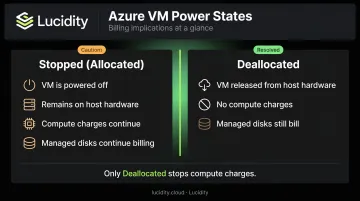
There's also a billing nuance teams frequently get wrong: a VM in "Stopped" state is still billed for instance usage if it remains allocated on the underlying host. Only deallocated VMs stop incurring compute charges. Microsoft's documentation distinguishes explicitly between Stopped (Allocated) — which bills — and Deallocated — which does not. Managed disks attached to either state continue to accrue charges regardless.
Key Cost Drivers for Azure VM Sizing
Over-Provisioning at Deployment
The most common driver is provisioning for the worst case. Teams estimate peak load, add a comfort buffer, and select a VM that may never see full utilization under normal conditions.
Lift-and-shift migrations amplify this problem. Azure Migrate supports two assessment approaches: as-on-premises sizing (which replicates allocated on-premises specs) and performance-based sizing (which uses actual utilization data to recommend right-sized targets). Teams that default to the first approach carry existing over-allocation directly into Azure — paying cloud-rate prices for on-premises-style buffer.
VM Family Mismatch
Azure offers distinct VM series built for different workload profiles. Defaulting to D-series general-purpose VMs for everything means paying for a balanced CPU-to-memory ratio when the workload only needs one dimension.
| Workload Type | Recommended Series | Why |
|---|---|---|
| General enterprise apps | D-series | Balanced CPU/memory |
| Memory-intensive (databases, ERP, caches) | E-series / M-series | Higher memory-to-CPU ratio |
| CPU-intensive (batch, analytics, scientific) | F-series | Higher CPU-to-memory ratio |
| Variable, low-average CPU (dev/test, CI agents) | B-series | Credit-based bursting |
| High disk throughput / IO workloads | L-series | Storage-optimized |
A memory-bound database on an F-series VM hits memory constraints early while paying for CPU capacity it never uses. You're overpaying and under-delivering at the same time.
Absence of an Ongoing Review Cadence
Even correctly sized VMs drift out of alignment over time. Code gets optimized, user behavior shifts, traffic peaks flatten — yet without a structured review process, the underlying VM specs stay frozen while the workload has quietly moved on.
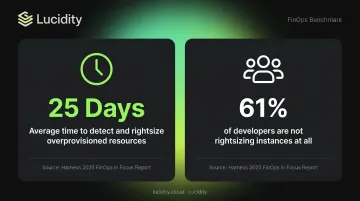
Harness's 2025 FinOps in Focus report found enterprises take an average of **25 days to detect and rightsize overprovisioned resources** — and 61% of developers are not rightsizing instances at all. The gap between provisioning and review is where most persistent waste lives.
Attached Storage Costs That Persist Beyond Compute
That review gap extends further than most teams realize. VM rightsizing reviews almost always focus on CPU and memory — managed disks rarely make the checklist.
Azure Managed Disks bill by provisioned tier — a 200 GiB Standard SSD maps to the E15 256 GiB tier, and that tier is charged hourly regardless of actual IOPS consumed. When VMs are stopped or deleted, their attached disks frequently remain. Microsoft's documentation confirms that those disks stay in the resource group and keep accruing charges.
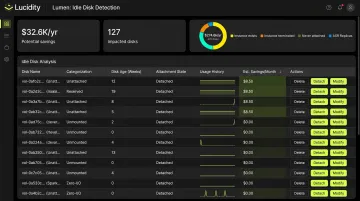
Lucidity's Lumen product specifically addresses this layer, identifying four categories of idle disks — unattached, reserved, unmounted, and zero-I/O — that native Azure dashboards and Advisor recommendations typically don't surface. Across 600+ assessments analyzing 100+ petabytes of storage, Lucidity has found that idle disks can represent up to 70% of unused block storage spend. That's the cost gap compute-only rightsizing leaves behind.
Cost-Reduction Strategies for Azure Virtual Machines
The right approach depends on where the cost is actually originating — upfront decisions, ongoing management gaps, or the infrastructure context surrounding the VM. These three strategy categories map to each source.
Strategies That Change the Decision
Match VM series to workload before provisioning. Use the table above as a starting reference, then validate against the application's actual bottleneck. If the workload is memory-bound, E-series will cost less than D-series at equivalent memory capacity.
Don't replicate on-premises specs. On-premises hardware is typically provisioned to handle peak load with no elasticity — headroom that cloud elasticity makes unnecessary. Use Azure Migrate's performance-based assessment to analyze historical on-premises utilization and right-size from actual data, not allocated specs.
Use B-series when average CPU stays low but spikes matter. B-series VMs accumulate CPU credits when running below base performance and spend those credits during bursts. For dev/test environments, CI agents, and lightweight web servers, B-series is notably cheaper than equivalent standard series VMs. The validation test: if CPU credits remain consistently high and rarely deplete, the workload fits.
Strategies That Change How VMs Are Managed
Use Azure Advisor and Azure Monitor together. Azure Advisor analyzes CPU, memory, and outbound network utilization using a configurable lookback window of 7 to 90 days, surfacing shutdown and resize recommendations. Pair Advisor output with Azure Monitor's historical metric views — at least 30 days of data to capture weekly cycles — before acting. One important limitation: Advisor recommendations don't account for existing Reserved Instance purchases, so displayed estimated savings may overstate achievable reductions.
Also note: memory metrics are not collected by default in Azure Monitor. Guest OS metrics, including available memory, require the Azure Monitor Agent to be installed. Teams running rightsizing reviews without the agent are working with incomplete data.
Establish a regular review cadence. One-time rightsizing delivers one-time savings. A practical cadence:
- Quarterly reviews for stable production workloads
- Monthly for actively developed applications
- Ad hoc reviews triggered by major code changes, traffic shifts, or architectural updates
Azure Workbooks and custom KQL queries in Log Analytics can build persistent utilization dashboards that make this repeatable rather than manual each time.
Automate shutdowns for non-production environments. Dev, test, and staging VMs frequently run 24/7 despite being actively used only during business hours. Azure Automation runbooks and built-in auto-shutdown settings can eliminate that off-hours spend without any production impact.
Strategies That Change the Context Around VMs
Apply Reservations or Savings Plans to stable workloads — but rightsize first. Two commitment-based discount programs are available:
- Azure Reserved VM Instances: 36%–72% off pay-as-you-go pricing on 1- or 3-year commitments
- Azure Savings Plans: up to 65% off eligible compute with a fixed hourly spend commitment
The sequencing matters: committing to the wrong VM size locks in waste at a discounted rate. Rightsize before you commit.
Right-size attached disks alongside compute. Disk tiers are provisioned independently of actual usage and persist after VMs are stopped or deleted. Any VM rightsizing initiative should include an audit of attached and unattached volumes.
Lucidity's Lumen surfaces idle disks across four categories — unattached, reserved, unmounted, and zero-I/O — showing disk age, attachment state, usage history, and potential savings for each. Teams can execute cleanup directly from the dashboard with one-click actions that are auditable and reversible, without scripts or manual overhead.
Scale Sets outperform oversized single VMs for variable demand. A single large VM sized for peak load is both more expensive and less resilient than an Azure Virtual Machine Scale Set that scales in and out automatically based on actual load. This shifts the architecture from permanent over-provisioning to on-demand capacity matching.
Conclusion
Azure bills for what is allocated — so every dollar saved closes the gap between provisioned resources and actual workload demand. That gap traces back to specific decisions: provisioning for peak load that never arrives, selecting the wrong VM family, skipping quarterly reviews, or overlooking the storage cost layer entirely.
The decisions that drive overspend are identifiable and fixable. Which makes rightsizing a visibility and execution challenge, not a technical one.
Rightsizing is also contextual and continuous. The right VM family for a workload today may be wrong after an application rewrite. The correct size during peak traffic may be oversized once patterns stabilize.
Compute savings are only part of the picture. Managed disks left running after their VMs are deleted continue generating charges that standard rightsizing tools miss entirely. Catching that hidden cost layer requires dedicated idle disk detection — the kind Lucidity's Lumen provides across Azure, AWS, and Google Cloud.
Sustained cost control comes down to three habits:
- Review VM sizing quarterly — workload profiles change; recommendations go stale
- Audit orphaned disks monthly — unattached and zero-I/O volumes accumulate silently
- Treat rightsizing as an operational discipline, not a one-time project with a completion date
Frequently Asked Questions
How often should Azure VMs be reviewed for rightsizing?
A quarterly cadence works well for stable production workloads; monthly reviews suit actively developed applications. Any significant change — a code optimization, traffic shift, or architectural update — should trigger an immediate ad hoc review regardless of the scheduled cycle.
Does resizing an Azure VM cause downtime?
Yes. Resizing requires a VM restart. If the target size is available on the same hardware cluster the process is faster, but if not, the VM must be deallocated first. Schedule resizes during maintenance windows and use availability sets or zones to minimize impact.
What metrics should I monitor to determine if an Azure VM is oversized?
The key signals are average and peak CPU percentage, available memory, outbound network utilization, and disk IOPS relative to provisioned tier. Note that memory metrics require the Azure Monitor Agent to be installed — not collected by default through standard platform metrics.
What is the difference between vertical and horizontal scaling in Azure VM rightsizing?
Vertical scaling changes the VM size itself, adding or reducing vCPUs and memory on a single instance. Horizontal scaling adjusts the number of VM instances using Scale Sets. Vertical scaling suits workloads with stable, predictable resource needs; horizontal scaling handles variable demand where capacity must flex dynamically.
Can Azure Advisor alone handle all my VM rightsizing needs?
Advisor is a useful starting point, but its lookback window caps at 90 days, it ignores existing Reserved Instance purchases, and its SKU recommendations lack specificity. Effective rightsizing requires pairing Advisor with Azure Monitor historical data, a defined review cadence, and clear team accountability.
How should I handle disk costs when rightsizing Azure VMs?
Managed disks bill by provisioned tier and continue accruing charges even after a VM is stopped or deleted if the disk itself isn't removed. Any rightsizing initiative should audit both attached and unattached volumes, flagging disks with zero recent I/O, over-tiered provisioning, or no surviving parent VM.