Introduction
Most enterprises running workloads on Azure today are operating on infrastructure that was provisioned years ago — migrated from on-premises environments and never truly optimized. The virtual machines are oversized. The storage is over-provisioned. Monitoring is reactive at best.
The consequences are predictable: Flexera's 2026 State of the Cloud Report found that estimated wasted cloud spend on IaaS and PaaS has climbed back to 29% after five years of decline — and managing cloud spend remains a top challenge for 85% of organizations.
Modernizing Azure workloads is a continuous discipline — one that spans compute selection, storage configuration, observability, and governance. When done well, it cuts costs, reduces downtime incidents, and returns engineering capacity to work that moves the business forward.
This guide covers: what Azure workloads are, how to use the Well-Architected Framework as your modernization lens, compute and storage optimization strategies, monitoring best practices, and a phased roadmap to get started.
Key Takeaways
- 29% of enterprise cloud spend is wasted — most of it from workloads provisioned years ago and never revisited
- The Azure Well-Architected Framework's five pillars — Reliability, Security, Cost Optimization, Operational Excellence, and Performance Efficiency — set the standard for modernization
- Compute modernization starts with moving stateless and event-driven workloads off oversized VMs
- Azure Managed Disks are among the most consistently over-provisioned resources in enterprise environments, and shrinking them manually is rarely done
- Start with quick wins like idle disk cleanup before tackling complex re-platforming — modernization works best as a phased, iterative process
What Are Azure Workloads and Why Do They Need Modernizing?
Microsoft's Well-Architected Framework defines a workload as a collection of application resources, data, and supporting infrastructure that work together to accomplish a business process. It's not just a single application — it's the full stack of compute, storage, networking, and code delivering a defined business outcome.
Common Workload Types on Azure
| Workload Type | Primary Modernization Priority |
|---|---|
| Web applications | Move from IaaS VMs to PaaS (App Service) |
| Batch processing jobs | Evaluate Azure Batch for cost-efficient scaling |
| Real-time analytics pipelines | Elastic compute and managed streaming services |
| Mission-critical transactional systems | Reliability, health modeling, and failover design |
| AI/ML inference workloads | Right-sized GPU compute, auto-scaling |
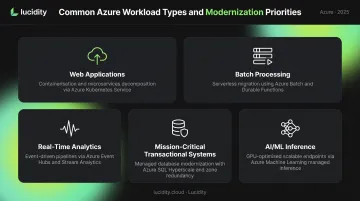
Each type has different failure modes and different optimization levers. A web application running on an oversized VM has a very different fix than a batch job consuming peak-allocated storage 24/7.
Why Modernization Can't Wait
Workloads provisioned two or three years ago were sized against different traffic patterns, different pricing tiers, and often different architectures altogether. Azure Advisor's cost recommendations exist precisely because idle and underutilized resources accumulate silently across subscriptions. Teams rarely revisit sizing decisions once a workload is live.
The FinOps Foundation's 2025 State of FinOps Report identifies workload optimization and waste reduction as the top priority for FinOps practitioners — which means the gap between "running" and "right-sized" is where most Azure cost problems actually live.
The Azure Well-Architected Framework as Your Modernization Foundation
Microsoft's Azure Well-Architected Framework (WAF) organizes cloud workload quality across five pillars. Every modernization effort should be measured against all five — skipping one creates technical debt in a different dimension.
Reliability
Mission-critical workloads must handle failures gracefully, including cascading failures in distributed systems. One underused practice: health modeling — defining what "healthy" looks like for a workload before an incident forces the question.
The WAF's health modeling guidance combines business context with raw monitoring data to quantify workload health. Teams that implement this catch degradation before users notice.
Security
Security hardening belongs inside every modernization effort, not after it. The essentials:
- Enforce least-privilege RBAC across all workload identities
- Enable Microsoft Defender for Cloud on production subscriptions
- Apply customer-managed keys for sensitive or regulated workloads
- Audit service principal permissions regularly — these accumulate quickly
Cost Optimization
The cost pillar covers more than SKU selection. A complete cost optimization posture includes:
- Rightsizing compute and storage to actual utilization
- Eliminating idle resources (unattached disks, unused IPs, stopped VMs still incurring storage charges)
- Using reserved instances strategically for predictable workloads
- Enforcing consistent tagging and budget alerts across subscriptions
Performance Efficiency
The WAF defines performance efficiency as designing for elastic scale, not peak-provisioned capacity. Workloads statically sized for worst-case load stay over-budget and fail to adapt when demand patterns shift. The target posture:
- Autoscale compute and storage to match real demand, not theoretical peaks
- Monitor utilization continuously to catch over-provisioned resources before they compound
- Set scaling policies based on measured baselines, not assumptions
Right-Sizing Compute: Moving Beyond the Lift-and-Shift
The most common modernization failure: an organization migrates on-premises VMs directly to Azure VMs, matches the original CPU and memory allocation, and moves on. Years later, those VMs are still running at 10-20% average CPU utilization — and no one has revisited the decision. Flexera's State of the Cloud Report puts overall IaaS/PaaS waste at 29%, with compute over-provisioning as a primary driver.
Compute Options Decision Framework
Microsoft's compute decision guide maps workload characteristics to the right Azure service:
| Compute Service | Best For | Move Here When... |
|---|---|---|
| Azure VMs | OS-level control, legacy apps requiring specific OS configs | No PaaS option fits the dependency stack |
| Azure App Service | Web apps, REST APIs, background jobs | Workload is stateless and doesn't need OS access |
| Azure Container Apps | Containerized microservices, event-driven apps | Containers needed but Kubernetes API access isn't |
| Azure Kubernetes Service (AKS) | Complex orchestration, Kubernetes-native tooling | Kubernetes API access or advanced scheduling is required |
| Azure Functions | Event-driven, short-burst, spiky workloads | Traffic is unpredictable and bursty |
| Azure Batch | HPC, large-scale parallel processing | Data-intensive batch jobs with predictable run patterns |
Key modernization triggers:
- Stateless APIs running on VMs → strong candidate for App Service or Container Apps
- Event-driven workloads with spiky patterns → Azure Functions can cut compute costs significantly
- Data-intensive batch jobs → Azure Batch scales to zero after job completion, eliminating idle compute costs
- Only move to AKS when Kubernetes API access or complex orchestration is genuinely required
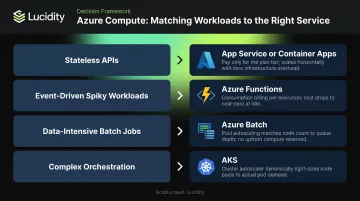
Cost is only part of the equation. A stateless API forced into AKS adds Kubernetes operational overhead that offsets any savings. Before picking a service, confirm whether the workload actually needs what that service requires you to manage.
Storage Modernization: The Hidden Cost Driver in Azure Workloads
Compute over-provisioning is visible — you can see CPU and memory metrics. Storage over-provisioning is different. Azure makes it straightforward easy to expand a Managed Disk. Shrinking one is another matter entirely.
Microsoft's own documentation states that shrinking an existing disk is not supported and may result in data loss. In practice, teams provision storage generously to meet SLA requirements, and they never shrink it. That unused capacity accumulates across every subscription, driving up costs with no corresponding value.
The Four Categories of Idle Disk Waste
Most enterprise Azure environments contain four types of idle disk waste, often invisible in native Azure dashboards:
- Unattached disks — not connected to any VM, often left behind after VM deprovisioning
- Reserved disks — allocated but sitting unused in a resource group
- Unmounted disks — attached to a VM but not mounted by the operating system
- Zero-I/O disks — attached, mounted, but showing no read/write activity
Together, these categories can represent a substantial share of block storage spend. The problem is that native Azure tooling — including Azure Advisor — surfaces only the most obvious cases, primarily unattached disks. The remaining three categories typically go undetected.
Autonomous Storage Optimization with Lucidity
That detection gap — three of the four idle disk categories invisible to Azure — is exactly what Lucidity's platform is built to close.
Lumen, Lucidity's observability product, provides deep visibility into every disk across Azure subscriptions. It identifies all four idle disk types with full context: disk age, attachment state, and usage history. Waste that doesn't appear in Azure's native console surfaces immediately, with one-click cleanup that's auditable and reversible.
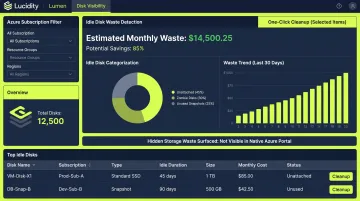
AutoScaler addresses the shrinking problem that Azure's native tooling can't solve. Rather than waiting for manual intervention, AutoScaler continuously monitors actual disk utilization and autonomously expands or shrinks volumes in real time — with zero downtime and no code changes required. Both products operate as a NoOps layer, integrating with existing Azure environments without infrastructure modifications.
Across hundreds of assessments and over 17 petabytes analyzed, Lucidity has found that the average enterprise runs at approximately 30% disk utilization. The platform improves that to 75% on average. Dometic, one of Lucidity's customers, achieved a 52% reduction in cloud storage spend after deploying the platform.
For teams beginning a modernization initiative, Lucidity's free Assessment tool gives a clear picture of Azure storage waste across subscriptions — no agents, no infrastructure changes, and completable in under five minutes.
Monitoring, Observability, and Governance at Scale
A modernized workload without a structured observability layer isn't truly modern. Azure Monitor provides the building blocks:
- Azure Monitor Logs — centralized log aggregation and querying for workload telemetry
- Azure Monitor Metrics — time-series performance data for compute, storage, and network resources
- Azure Monitor Alerts — automated notifications when metrics breach defined thresholds
On workspace architecture, Microsoft recommends starting with a single Log Analytics workspace to reduce complexity. Multiple workspaces are warranted when:
- Regulatory requirements mandate data residency in specific regions
- Security boundaries require separating operational and security data
- Resilience requirements call for regional isolation
Those workspace decisions feed directly into the next layer: defining what "healthy" actually means for your workload.
Health Modeling as a Modernization Practice
Health modeling is one of the most impactful and least-used modernization practices. The approach:
- Define health states (healthy, degraded, unavailable) in business terms
- Establish Service Level Indicators (SLIs) and Service Level Objectives (SLOs)
- Map resource health to workload health using Azure Monitor Health Models (currently in preview)
Teams that implement health models catch failures during degraded states — before they escalate into outages users report.
Governance Fundamentals
Governance at scale requires more than tagging guidelines:
- Use management group hierarchies to apply policies that cascade by inheritance across subscriptions
- Use Azure Policy to enforce tagging mandates, SKU allowlists, and configuration requirements automatically
- Set budget alerts per scope (production, staging, dev/test) to catch runaway spend during and after modernization
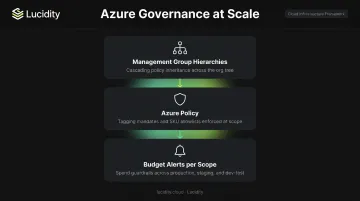
Without enforcement, policies remain documentation. Azure Policy turns compliance requirements into automated guardrails that hold even as teams and subscriptions scale.
A Phased Roadmap to Modernizing Azure Workloads
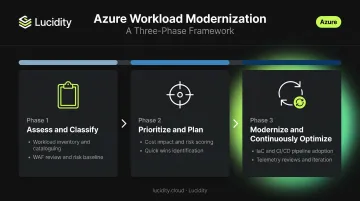
Phase 1 – Assess and Classify
Start with a workload inventory across all Azure subscriptions. For each workload, document:
- Compute type and current utilization metrics
- Storage configuration and actual I/O patterns
- Compliance and data residency requirements
- Business criticality and recovery objectives
Use the Azure Well-Architected Review — a structured self-assessment of approximately 60 questions across all five pillars — to score each workload and surface the highest-priority gaps.
Phase 2 – Prioritize and Plan
Not every workload modernizes on the same timeline. Prioritize based on:
- Cost impact — highest-spend workloads with identifiable waste
- Business risk — workloads with reliability gaps or compliance exposure
- Architectural debt — workloads that are the furthest from current best practices
Sequence quick wins first: deleting unattached and idle disks, moving stateless APIs off oversized VMs, enabling autoscaling. These deliver immediate cost savings and build organizational confidence before tackling complex efforts like containerization or PaaS migration.
For the idle disk quick win specifically, Lucidity's free Assessment quantifies wasted storage across Azure subscriptions with no platform commitment required — a useful baseline before any broader remediation work begins.
Phase 3 – Modernize and Continuously Optimize
Follow these principles through implementation:
- Infrastructure as Code (IaC) for all workload deployments — the WAF's operational excellence pillar requires IaC across all deployments
- CI/CD pipelines with performance testing gates to catch regressions before they reach production
- Regular telemetry reviews — adjust compute sizes, reclaim storage waste, and update health model thresholds as workload patterns evolve
The FinOps Foundation's framework describes this as iterative phases: Inform, Optimize, Operate. The operate phase is continuous. Modernization never reaches a final state.
Frequently Asked Questions
What are workloads in Azure?
An Azure workload is a collection of application resources — compute, storage, networking, and code — that function together to deliver a specific business outcome. Microsoft's Well-Architected Framework uses this definition to provide workload-level guidance rather than individual resource guidance.
What are examples of Azure workloads?
Common examples include web applications on App Service, batch data processing jobs on Azure Batch, real-time analytics pipelines using Event Hubs and Stream Analytics, containerized microservices on AKS, and AI/ML inference workloads on GPU-enabled VMs. Each type has different modernization priorities.
What are the 4 types of Azure storage services?
The four core Azure storage services are Blob Storage (unstructured data), Azure Files (managed file shares), Queue Storage (message queuing), and Disk Storage (block storage for VMs). Azure Managed Disks, part of the Disk Storage category, are the most consistently over-provisioned storage type in enterprise workloads.
What is the Azure Well-Architected Framework?
The Azure Well-Architected Framework is Microsoft's set of guiding principles for designing and operating cloud workloads across five pillars: Reliability, Security, Cost Optimization, Operational Excellence, and Performance Efficiency. A built-in review tool assesses workloads against roughly 60 questions and surfaces prioritized recommendations.
How do I know if my Azure workloads need modernizing?
Watch for these signals:
- VMs running at consistently low CPU and memory utilization
- Azure bills growing without corresponding business growth
- Unattached or idle managed disks accumulating across subscriptions
- No autoscaling or health monitoring configurations in place
How can I reduce storage costs in Azure workloads?
Start by identifying and removing unattached and idle disks, which typically deliver the fastest cost savings. Then right-size managed disk SKUs to actual I/O requirements. For ongoing optimization, autonomous tools like Lucidity can continuously identify over-provisioned capacity and reclaim it without manual engineering effort.