Introduction
Cloud waste isn't a new problem — but it's getting worse. Flexera's 2026 State of the Cloud Report found that estimated wasted IaaS and PaaS spend ticked back up to 29% after five years of decline. Meanwhile, 84% of organizations identify managing cloud spend as a top challenge, with cloud budgets exceeding limits by an average of 17%.
For enterprises running Azure Savings Plans, that waste compounds directly into long-term commitments. A 1- or 3-year plan locks in an hourly spend rate regardless of whether workloads shrink, shift clouds, or get migrated. When that commitment is sized against an inflated baseline — padded with idle storage, orphaned disks, and over-provisioned volumes — every dollar of waste gets baked into a multi-year obligation.
Azure Savings Plans can reduce eligible compute costs by up to 65% versus pay-as-you-go rates. But that discount only pays off when commitments are accurately sized, actively tracked, and built on a clean cost baseline. This guide breaks down exactly how to get each piece right — before you sign the next commitment.
Key Takeaways
- Azure Savings Plans offer up to 65% off compute pay-as-you-go rates for a fixed hourly commitment over 1 or 3 years — unused hours are forfeited, not rolled over
- Over-committing wastes money every hour; under-committing leaves discounts unrealized — both go undetected without active monitoring
- Inaccurate sizing, poor multi-cloud visibility, and inflated baseline spend (especially idle block storage) quietly erode savings plan ROI
- Max savings come from better pre-commitment sizing, continuous in-term tracking, and baseline cost cleanup before you lock in
How Azure Multi-Cloud Savings Plan Costs Build Up
Azure Savings Plan costs don't appear as a single line item at purchase. They accumulate as a continuous stream of hourly billing charges — whether workloads are running at full capacity, scaled down, or partially migrated to another provider.
Each hour, eligible Azure compute usage receives discounted pricing up to the committed threshold. Usage above the commitment bills at pay-as-you-go rates. Usage below the commitment is still charged in full. The benefit is strictly use-it-or-lose-it, and unused hourly commitment cannot be carried forward.
Why Multi-Cloud Environments Amplify the Problem
In a single-cloud environment, commitment drift is manageable. In multi-cloud deployments spanning Azure, AWS, and GCP, it compounds quickly:
- Workloads shift between providers, but savings plan commitments stay fixed
- Azure Savings Plans apply only to eligible Azure resources — any compute migrated to AWS or GCP mid-term directly erodes coverage efficiency
- Dynamic architectures mean Azure-specific utilization can drop without any obvious operational trigger
Each of these shifts quietly drains commitment value in the background. Most enterprises only surface the problem during quarterly FinOps reviews or billing anomaly alerts — by which point months of forfeited commitment hours have already accumulated. Azure Savings Plans cannot be canceled, refunded, or exchanged after purchase, so the losses are permanent.
Key Cost Drivers for Azure Savings Plans in Multi-Cloud Environments
Four drivers account for most Azure savings plan waste — and each one compounds the others.
Inaccurate Commitment Sizing
If the hourly commitment exceeds actual compute consumption — which happens when teams overestimate future growth — every hour below that threshold is paid for but not used. There's no mechanism to adjust it mid-term.
The FinOps Foundation frames this directly: financial exposure from under-utilization equals committed dollars per hour multiplied by the total hours in the term. A seemingly small over-commitment of $5/hour becomes $43,800 in wasted spend over a 1-year term.
Workload Unpredictability in Multi-Cloud Deployments
Dynamic workloads that shift instance types, regions, or cloud providers reduce Azure-specific utilization over time. Technical requirement changes, architectural shifts, and active migrations can all make specific commitments underutilized — and more flexible commitment structures don't fully eliminate this risk, they only reduce it.
Inflated Baseline Spend from Storage Waste
Teams sizing a savings plan often use total Azure spend as a proxy for compute demand. That figure is misleading when it includes storage waste:
- Unattached managed disks (Azure does not automatically delete disks when a VM is removed)
- Over-provisioned volumes sitting at a fraction of their allocated capacity
- Idle disks generating charges with zero active I/O
According to Lucidity's assessment data across hundreds of enterprise environments, average disk utilization sits at just 30% — meaning roughly 70% of provisioned storage capacity is unused. When FinOps teams size a savings plan against a spend total that includes this waste, they over-commit because the baseline is artificially high.
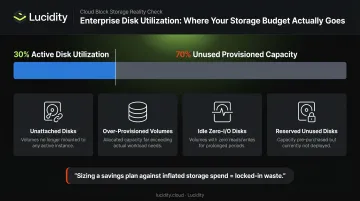
Lucidity's Lumen surfaces these idle disk categories — unattached, reserved, unmounted, and zero-I/O — including waste that native Azure dashboards and standard Advisor recommendations don't flag, giving FinOps teams a cleaner baseline before they commit.
Governance Fragmentation Across Subscriptions
When different teams purchase savings plans independently across Azure subscriptions without centralized oversight, coverage overlaps and gaps emerge simultaneously. One team may over-commit on a workload that another team's subscription could have covered.
At scale, this fragmentation is difficult to detect — each team's purchasing decision looks reasonable in isolation, but the aggregate picture reveals redundant commitments and unprotected spend side by side.
Cost-Reduction Strategies for Azure Multi-Cloud Savings Plans
Cost reduction strategies vary depending on where the problem originates — in how the plan was selected, how it's being managed, or what conditions in the surrounding environment are inflating the baseline.
Strategies That Change Pre-Purchase Decisions
Right-size the commitment using recent usage data. Azure provides personalized savings plan recommendations through Azure Advisor, the portal purchase experience, and the Savings Plan Benefit Recommendations API — using 7, 30, and 60 days of actual on-demand usage. The FinOps Foundation supports a conservative approach: start with commitments that cover workload troughs, not peaks. Covering 70–80% of your average compute baseline (not the observed maximum) and layering additional coverage after validating utilization trends reduces the risk of locking in waste.
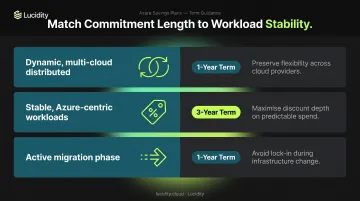
Match term length to workload stability.
| Workload Scenario | Recommended Term |
|---|---|
| Dynamic, multi-cloud distributed | 1-year (lower lock-in risk) |
| Stable, Azure-centric workloads | 3-year (deeper discount) |
| Active migration phase | 1-year (flexibility during transition) |
Blend Savings Plans with Reserved Instances. Savings Plans offer spend-based flexibility across services and regions — ideal for unpredictable workloads. Reserved Instances lock in a specific VM size and region for up to 72% off, but require stable, predictable configurations. Used together — each matched to the workloads it suits — they outperform either instrument alone.
Apply Azure Hybrid Benefit. Organizations with existing Windows Server or SQL Server licenses with Software Assurance can apply Azure Hybrid Benefit to reduce VM licensing costs. Microsoft confirms SQL Server customers can save up to 85% versus pay-as-you-go through Azure Hybrid Benefit, and Windows Server customers can save up to 80% when combining Hybrid Benefit with Reserved Instances. Reducing the per-hour licensing cost lowers the total hourly commitment needed to achieve target savings.
Strategies That Improve In-Term Management
Monitor utilization continuously. Azure provides savings plan utilization reports in the portal — initial utilization data appears within 48 hours, with later usage typically visible within 2–24 hours. Setting budget alerts at 80% and 100% of committed thresholds enables FinOps teams to respond before unused hours accumulate rather than discovering it in a monthly report.
Scope plans at the management group level. Azure allows savings plan scope across resource groups, single subscriptions, management groups, or shared scope. In multi-subscription enterprises, centralizing scope at the management group level ensures the highest-cost eligible resources are automatically covered first, maximizing utilization without manual allocation tracking.
Act on Azure Advisor rightsizing recommendations. Azure Advisor flags underutilized VMs and over-provisioned instances — it flags shutdown candidates when P95 max CPU stays below 3% and outbound network utilization stays below 2% over seven days. Acting on these recommendations keeps actual consumption closer to the committed threshold, reducing unutilized hours.
Track Effective Savings Rate (ESR) as the primary benchmark. The FinOps Foundation defines ESR as:
ESR = 1 − (Actual Spend with Discounts / Equivalent Spend at On-Demand Rate)
ESR gives a more complete picture of savings plan ROI than discount percentage alone — it accounts for utilization rate, coverage percentage, and realized discount simultaneously. A plan with a 65% headline discount but 60% utilization delivers a far lower ESR than a plan with a 45% discount and 95% utilization.
Reduce Baseline Spend Before Committing
Cleaning up the cost environment before sizing a savings plan prevents the most common source of locked-in waste: commitments sized against inflated baselines rather than actual compute demand.
Eliminate idle storage before committing. Key cleanup actions:
- Delete unattached managed disks (Azure won't do this automatically)
- Remove orphaned storage volumes and redundant backups no longer required
- Shut down idle VMs that show no meaningful utilization over extended periods
- Right-size over-provisioned volumes to appropriate tiers
Lucidity's Lumen surfaces all four categories of idle disks — including types invisible to native Azure dashboards — with one-click cleanup that's auditable and reversible. The free Lucidity Assessment completes a full scan of your Azure storage environment in 5 minutes, no agents or infrastructure changes required, giving FinOps teams a clear picture of actual versus provisioned spend before any commitment decision.
Implement multi-cloud governance to prevent commitment fragmentation. In environments spanning Azure, AWS, and GCP, savings plan commitments need to be reviewed in context of total cross-cloud compute spend — not Azure in isolation. A centralized FinOps governance model that maps workloads to their primary cloud prevents teams from inadvertently buying overlapping commitments across providers for the same logical workload.
Align resource scheduling with savings plan coverage. Non-production environments and batch workloads don't need continuous savings plan coverage. Azure VM auto-shutdown reduces on-demand spend for dev/test resources during off-hours without affecting the savings plan, which should be scoped to production workloads running continuously. This keeps the committed amount fully utilized during active production hours.
Conclusion
Reducing costs under an Azure Multi-Cloud Savings Plan isn't about blindly cutting the commitment amount. It requires diagnosing where the cost problem actually lives — in how the plan was sized, how it's being tracked and applied, or what the surrounding environment looked like before the commitment was made.
The organizations that get the most from their Azure savings plan ROI treat FinOps as an ongoing practice: reviewing utilization data regularly, acting on rightsizing recommendations, cleaning up storage waste before renewals, and aligning multi-cloud governance so commitments don't fragment across teams. Tools like Lucidity help surface idle disks, tiering inefficiencies, and over-provisioned storage before they inflate the baseline your next commitment is built on — giving FinOps teams a cleaner foundation to plan from.
Frequently Asked Questions
What is the Azure Savings Plan?
Azure Savings Plan for Compute is a flexible pricing model offering up to 65% off pay-as-you-go rates in exchange for a fixed hourly spend commitment over 1 or 3 years. It applies across eligible compute services including VMs, Azure App Service, Azure Functions, and Container Instances — with flexibility across regions and VM families.
What is the difference between Azure Savings Plans and Reserved Instances?
Savings Plans offer spend-based flexibility across regions, VM families, and eligible services — ideal for dynamic or shifting workloads. Reserved Instances lock in a specific VM size and region for up to 72% off, but suit stable, predictable workloads. Most organizations benefit from a blend of both, applied to distinct workload categories.
Can Azure Savings Plans be canceled or modified after purchase?
No. Azure Savings Plans cannot be canceled, refunded, or exchanged for Reserved Instances once committed. The hourly commitment amount, term length, and billing frequency are fixed at purchase. Only scope, auto-renewal settings, display name, and RBAC can be adjusted after the fact.
How do I determine the right hourly commitment for an Azure Savings Plan?
Azure provides personalized recommendations in the Cost Management portal and through Azure Advisor, using 7-, 30-, and 60-day usage history. Start conservatively by covering average compute baseline rather than peak, then increase coverage only after validating utilization trends across your environment.
What changed in Azure Cost Management in mid-2025?
Microsoft's July & August 2025 Cost Management update (published September 4, 2025) introduced savings plan chargeback capabilities, letting teams allocate savings plan costs to specific subscriptions, resource groups, or resources using amortized cost data. It also added Cost Details API guidance for FinOps teams managing large billing datasets programmatically.
How do Azure Savings Plans apply in a multi-cloud environment?
Azure Savings Plans cover only eligible Azure compute resources; they don't apply to AWS or GCP workloads. In multi-cloud environments, size commitments based on the compute that will reliably remain on Azure, and establish accurate per-provider utilization data before purchase to avoid over-commitment.