Cloud cost anomalies don't announce themselves — they accumulate. And without proactive detection, every team ends up in the same position: reacting after the fact, scrambling to identify root causes, and explaining overruns to finance.
Azure cost anomaly detection changes this dynamic. Instead of discovering problems at month-end, FinOps, DevOps, and ITOps teams get near-real-time visibility into unexpected spend — before a one-day spike becomes a two-week bleed. According to Flexera's State of the Cloud Report, organizations self-estimated that 32% of their cloud spend is wasted — anomaly detection is one of the primary mechanisms for clawing that back.
This guide covers how Azure's native anomaly detection works, the most common anomaly types to watch for, a five-step response workflow, and where native tooling falls short for storage-specific waste.
Key Takeaways
- Azure cost anomaly detection flags statistically significant deviations from your historical spending baseline before they appear on the monthly invoice.
- Native Azure Cost Management includes ML-based anomaly detection at the subscription level, free of charge.
- Common anomaly sources: compute spikes, unauthorized resource creation, unattached storage disks, and SKU tier changes.
- Detection alone isn't enough — you need a structured investigation and response workflow to act on alerts.
- For storage-specific anomalies, tools like Lucidity surface idle disk waste (unattached, unmounted, zero-I/O) that native Azure alerts miss entirely.
What Is Azure Cost Anomaly Detection?
Azure cost anomaly detection is an automated process that continuously analyzes spending patterns across your Azure subscriptions and flags statistically significant deviations from expected baselines.
Here's how it compares to other Azure cost tools:
| Tool | How It Works | When It Fires |
|---|---|---|
| Budget Alerts | You define a spending threshold | When you cross the number you set |
| Cost Forecasting | Projects expected future spend | At regular forecast intervals |
| Anomaly Detection | ML model monitors live data | When spend deviates from historical patterns — even within budget |
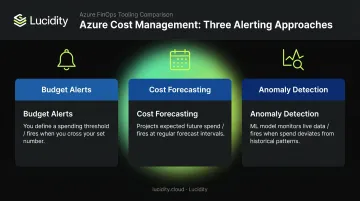
An anomaly can exist entirely within your budget ceiling while still representing a serious problem. A resource group that suddenly triples its daily spend is behaviorally abnormal even if the absolute dollar amount hasn't breached your budget threshold — and that's exactly what anomaly detection is built to surface.
Native vs. Third-Party Approaches
Azure offers two approaches to anomaly detection:
- Azure Cost Management (native): ML-based, subscription-scoped, no additional cost. Best for teams starting out or managing a single-cloud Azure environment.
- Third-party FinOps platforms: Multi-cloud coverage, tag-enriched, owner-mapped, more granular drilldown. Better for complex environments where Azure spans multiple subscriptions and teams.
Most mature organizations use both — native detection for baseline coverage, third-party tools for deeper context and cross-cloud visibility.
Why Azure Cost Anomaly Detection Matters
Cloud environments are dynamic by design — autoscaling, on-demand provisioning, and pay-per-use billing mean a single misconfiguration gets metered immediately. A developer can spin up a high-tier VM in minutes, and every second it runs shows up on your bill.
That combination makes cost spikes possible within hours — and the Flexera 2025 State of the Cloud report found that **84% of organizations struggle to manage cloud spend**, even with dedicated tooling.
The Cost of Detection Delay
Every day an anomaly goes undetected, it compounds. A runaway VM doesn't pause billing while you investigate. A misconfigured autoscaler keeps provisioning instances through the weekend.
The key operational metric here is MTTD — Mean Time to Detect. Shorter MTTD translates to lower overrun costs. A spike caught in four hours costs a fraction of one discovered four days later.
Core Benefits of Anomaly Detection
- Deviations surface within 24-48 hours, not at month-end, eliminating bill shock
- Alerts include service, resource group, and region context so triage starts with a direction, not a blank page
- Teams tied to their own workload alerts develop real accountability for spend
- Unauthorized resource creation from compromised credentials almost always appears as unexpected charges first — making anomaly detection an early security signal
- The FinOps Foundation defines Anomaly Management as a core capability: detecting, identifying, alerting on, and managing unexpected cost events in a timely manner
Common Types of Azure Cost Anomalies to Watch For
Not all anomalies look the same. Some are sudden spikes; others are slow bleeds that never trigger a threshold alert. Understanding the categories helps prioritize both detection scope and response urgency.
Usage Spikes from Compute and Autoscaling
Misconfigured autoscale rules are among the most common — and most expensive — anomaly sources. Microsoft's own autoscaling guidance notes that aggressive autoscaling can lead to significantly higher costs when a maximum instance count isn't properly defined. A batch job with no concurrency limit or an accidental deployment of a Premium-tier VM can generate a visible cost jump within hours.
Unexpected Resource Creation
New VMs, databases, or storage accounts provisioned without tagging or approval workflows add silently to billing. These are common in environments where multiple teams have provisioning access but no centralized governance. Azure Policy can enforce tag requirements and even deny resource creation without required tags — but that governance has to be in place before the resource is created.
Storage and Disk Waste
Unattached disks, idle volumes, and over-provisioned storage accounts are a persistent and often invisible cost source. Microsoft's own documentation notes that disks are not automatically deleted when a VM is removed — they continue accruing charges until explicitly cleaned up.
Standard Azure Cost Management alerts typically miss this category because they flag cost thresholds, not inactivity patterns. A disk sitting idle at a steady, predictable cost never triggers an anomaly — it simply becomes part of your baseline.
That's a gap Lucidity's Lumen addresses directly. It identifies all four idle disk types — unattached, reserved, unmounted, and zero-I/O — that standard Azure dashboards and Advisor recommendations don't surface.
SKU Tier Changes and Data Egress
Two more categories that standard alerts routinely miss:
- When a managed disk or VM is resized to a premium tier during scaling or a misconfigured deployment, billing shifts immediately. Azure bills hourly at the provisioned tier — so a P10 disk upgraded to P50 performance tier accrues P50 charges from that moment forward.
- Azure provides the first 100 GB/month of outbound transfer free, but inter-region transfers or misconfigured services generating unexpected outbound traffic can add up quickly and often bypass typical monitoring.
How Azure Cost Anomaly Detection Works — And How to Respond
Here's a practical end-to-end view: how anomaly detection operates natively in Azure, and what your team should do at each stage.
Step 1 — Build a Spending Baseline
Azure Cost Management uses a WaveNet deep learning algorithm — a univariate time-series model — trained on 60 days of historical usage data per subscription. The model accounts for daily variation, weekly trends, and recurring billing cycles.
Detection runs approximately 36 hours after the end of each day (UTC) to ensure a complete dataset. New subscriptions may need several weeks before detection becomes reliable — the baseline needs enough history to establish meaningful patterns.
Step 2 — Flag and Alert on Deviations
When actual spend falls outside the model's predicted confidence interval, an anomaly is flagged. To configure alerts:
- Navigate to Azure Home → Cost Management → Cost Alerts → + Add
- Select Alert type: Anomaly
- Configure recipients and notification preferences
Required permissions: Cost Management Contributor role, or a custom role with Microsoft.CostManagement/scheduledActions/write.
One key limitation: native anomaly alerts are available at the subscription level only. They're not available for individual resource groups or management groups, and aren't supported in Azure Government or sovereign cloud environments.
Step 3 — Investigate the Root Cause
When an alert fires, follow this drill-down sequence in Cost Analysis:
- Open Cost Analysis → Smart Views and locate the anomalous day
- Group costs by Service Name to identify the affected service
- Filter by that service, then group by Resource Group → Resource → Meter to narrow the source
- Check the Activity Log for the identified resource — look for deployments, resizing events, or configuration changes that coincide with the spike
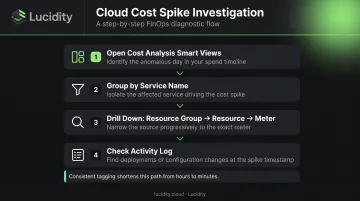
If resources are tagged with Owner, Environment, and CostCenter, the path from alert to responsible team takes minutes instead of hours. Without consistent tagging, this drill-down can stall at step two.
Step 4 — Determine Whether the Anomaly Is Legitimate
Not every anomaly is a problem. Common expected anomalies worth documenting and closing:
- End-of-month billing adjustments
- Planned project launches or load tests
- Seasonal traffic increases
- One-time migrations
- Reserved Instance purchases
Documenting these cases helps refine detection accuracy over time. Each closed false positive teaches the system what "normal" looks like for your environment — and keeps the alert channel credible enough that teams don't start ignoring it.
Step 5 — Act and Prevent Recurrence
For genuine unexpected anomalies, corrective actions include:
- Delete or deallocate unintended resources
- Revert misconfigured SKUs or performance tiers
- Adjust autoscale rules with appropriate maximum instance counts
- Escalate to security teams if unauthorized provisioning is suspected
Once the immediate issue is resolved, close the loop on the conditions that allowed it to surface undetected:
- Refine alert rules based on documented false positives
- Enforce tagging policies (Owner, Environment, CostCenter) via Azure Policy
- Review anomaly history monthly to identify recurring patterns
- Set Azure Policy guardrails to require approval for high-cost resource types
How Lucidity Helps Address Azure Storage Cost Anomalies
Azure's native anomaly detection does its job well at the subscription level. The gap is specificity — particularly for storage.
Unattached disks, unmounted volumes, zero-I/O disks, and over-provisioned storage accounts rarely trigger anomaly alerts because they don't spike. They exist at a steady cost that becomes part of your baseline, invisible to both threshold-based and deviation-based detection. They're not anomalies by the time you're looking for them — they're the new normal.
Lucidity's Lumen product addresses this directly. It continuously monitors storage utilization across Azure environments and identifies all four idle disk categories that standard Azure dashboards and Advisor recommendations miss:
- Unattached disks — provisioned but not connected to any VM
- Reserved disks — allocated but sitting idle in standby
- Unmounted disks — attached to a VM but not in active use
- Zero-I/O disks — mounted and visible, but recording no activity
Each identified disk comes with full context — age, attachment state, type, and usage history — so teams can make confident cleanup decisions without operational risk.
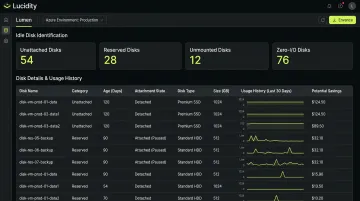
From the same dashboard, idle disks can be removed with one click. No scripts, no tickets, no manual verification steps.
Lucidity customers see storage utilization improve from an industry average of 30% to 75% and reduce cloud block storage costs by up to 70%. Dometic, for example, reduced their cloud storage spend by 52% after deploying the platform.
Azure Cost Management tells you when something unexpected happened at the billing level. Lucidity prevents storage waste from becoming a persistent, hidden cost before it ever registers as an anomaly. They solve different parts of the same problem.
If you want to see the idle disk waste in your Azure environment before committing to anything, Lucidity's free Assessment scans your environment agentlessly and returns findings in about five minutes — no infrastructure changes, no commitment.
Frequently Asked Questions
What is cost anomaly detection?
Cost anomaly detection is an automated process that compares actual cloud spending against a historical baseline and flags statistically significant deviations. It catches unexpected charges from misconfigurations, runaway resources, or unauthorized usage before they appear on the monthly invoice.
Is Azure cost anomaly detection free?
Azure's built-in cost anomaly detection is included at no additional charge — you only need the Cost Management Contributor role to configure alert rules. Third-party FinOps platforms with more advanced detection (multi-cloud, owner-mapped, tag-enriched) come with their own pricing models.
How does Azure cost anomaly detection work?
Azure uses a WaveNet deep learning model trained on 60 days of historical spending data to predict expected costs per subscription. Anomalies are flagged when actual spend falls outside the model's confidence interval. Detection runs daily, approximately 36 hours after each day ends in UTC.
What is the difference between anomaly alerts and budget alerts in Azure?
Budget alerts fire when spending crosses a threshold you define in advance. Anomaly alerts use machine learning to detect unexpected deviations from historical patterns, making them better suited for catching surprises that fall within budget but are behaviorally abnormal.
What are common causes of Azure cost anomalies?
The most frequent root causes: misconfigured autoscaling rules, accidental deployment of high-tier resources, unattached or idle storage disks, unexpected data egress charges, SKU changes during reconfigurations, and unauthorized resource provisioning from compromised credentials.
How long does it take Azure to detect a cost anomaly?
Expect a 1-2 day detection delay after spending occurs. New subscriptions may also need several weeks to build a sufficient baseline before anomaly detection becomes reliable.