Introduction
Cloud waste is not a minor inefficiency — it's a structural problem. According to Flexera's 2026 State of the Cloud report, organizations waste an estimated 29% of their cloud IaaS and PaaS spend, based on a survey of 753 technical professionals. For enterprises running significant Azure workloads, that figure translates directly into budget overruns, delayed infrastructure investments, and engineering teams spending time firefighting cost spikes instead of building.
The underlying issue is rarely that Azure is too expensive. It becomes expensive through neglect and misalignment — specifically:
- Overprovisioned VMs that never get right-sized
- Storage volumes paid for but barely used
- Predictable workloads billed at pay-as-you-go rates when reservations would cost a fraction of the price
- Non-production environments left running through weekends
This guide breaks down how those costs accumulate, what drives them, and what specific actions actually reduce them.
Key Takeaways
- Idle resources, overprovisioned compute, and forgotten environments accumulate Azure costs gradually — no single decision is ever fully to blame
- Core waste drivers: VM overprovisioning, underutilized storage, pay-as-you-go pricing on stable workloads, and weak governance
- Upfront decisions (right-sizing, reservations, Hybrid Benefit) deliver the highest-impact savings
- Ongoing management through tagging, alerts, and automation locks those savings in
- Azure's native tools expose waste, but acting on findings consistently is what actually moves the bill
- Optimization is continuous: workloads shift, teams add resources, and savings erode without governance
How Azure Costs Typically Build Up
Azure bills don't usually spike overnight. They accumulate across hundreds of small decisions — a VM sized slightly too large, a disk provisioned for peak capacity that never arrived, a dev environment that ran all weekend because no one scheduled a shutdown. Each line item looks manageable. Together, they compound.
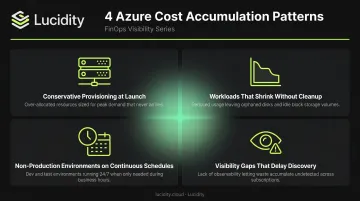
Most of that drift traces back to the same recurring patterns:
- Conservative provisioning at launch — teams size VMs for worst-case scenarios to avoid performance complaints, then never revisit once the workload stabilizes
- Workloads that shrink without cleanup — a project winds down, traffic drops, or a feature gets deprecated, but the underlying resources keep running at full allocation
- Non-production environments on continuous schedules — dev, test, and staging environments provisioned like production but running through nights and weekends when no one is using them
- Visibility gaps that delay discovery — without tagging, multi-subscription aggregation, or real-time alerts, organizations often find out about overspend only when finance flags a budget breach
No single resource looks like the culprit. That's what makes gradual accumulation hard to catch: the waste is distributed, not concentrated. Getting control starts with knowing where to look.
Key Cost Drivers in Azure
Understanding where spend originates is what separates targeted cost reduction from ineffective blanket cuts. Three categories account for the majority of preventable Azure overspend.
Compute Overprovisioning
VMs get sized for peak demand at provisioning time and rarely get adjusted afterward. The logic is reasonable — performance issues are immediate and visible, while overspend is slow and abstract. But the result is organizations paying for substantial headroom they almost never use.
Azure Advisor's cost recommendations specifically address underutilized VMs and VM Scale Sets, flagging instances where CPU and memory utilization suggests a smaller SKU would handle the workload. In most cases, dropping one SKU tier recaptures 20-30% of that VM's monthly cost without touching performance.
Storage Waste
Azure Managed Disks are provisioned in advance for anticipated maximum capacity. Unlike compute, where you can see CPU pegging at 10%, storage waste is largely invisible — the provisioned size shows in your bill, but actual utilization rarely does unless you're actively monitoring it.
Lucidity's analysis across hundreds of enterprise assessments covering over 17 petabytes of data found that the average enterprise runs at roughly 30% disk utilization, meaning approximately 70% of provisioned storage capacity goes unused. That unused allocation doesn't disappear from your invoice.
Idle disks — including unattached volumes, unmounted disks, and zero-I/O allocations — persist in environments long after the workloads that needed them are gone.
Pricing Model Mismatch
Many Azure cost problems aren't really about resource usage — they're about the terms under which that usage is purchased. The gap between pay-as-you-go and committed pricing is significant:
- Azure Reservations can save up to 72% compared to pay-as-you-go for Windows and Linux VMs
- Azure Savings Plans offer up to 65% off eligible compute services with more flexibility
A database server running 24/7 on pay-as-you-go isn't an overprovisioning problem. It's a pricing model problem — and the fix doesn't require any architectural changes.
Cost-Reduction Strategies for Azure
The most effective lever depends on where cost is actually originating. The strategies below are grouped by what they change: the decisions made at provisioning, the ongoing management practices, or the broader architecture and deployment context.
Strategies That Reduce Costs by Changing Decisions
These are choices made before or at the point of provisioning — and getting them right is typically the highest-leverage place to start.
Right-Size Before You Provision
Defaulting to a "safe" VM size is one of the most expensive habits in cloud operations. Evaluate actual workload requirements using historical data or load testing before provisioning, not after. Azure Advisor identifies right-sizing candidates using CPU and memory utilization data — use it proactively, not just when costs are already elevated.
The asymmetry matters here: right-sizing before provisioning takes minutes. Reclaiming overspend after months of overprovisioning is far harder, because the cost has already landed.
Commit to Reserved Instances or Savings Plans
For stable, predictable workloads — databases, backend application servers, infrastructure that runs continuously — pay-as-you-go pricing is a premium you don't need to pay.
| Option | Max Discount vs. Pay-As-You-Go | Flexibility |
|---|---|---|
| Reserved Instances (1-year) | Up to 72% | Specific VM type, size, and region |
| Reserved Instances (3-year) | Up to 72% | Specific VM type, size, and region |
| Savings Plans (1 or 3-year) | Up to 65% | Flexible across VM families and regions |
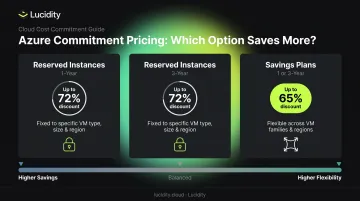
Most organizations use both: Reservations for the most stable, well-defined workloads; Savings Plans where usage patterns are predictable but VM family flexibility matters.
Leverage Azure Hybrid Benefit
Organizations with existing Windows Server or SQL Server licenses can apply them in Azure instead of paying for new ones. Azure Hybrid Benefit can save Windows Server customers up to 80% versus standard pay-as-you-go rates — with no architectural changes required.
When stacked with Reserved Instances, the savings compound further. SQL Database Business Critical workloads can reach up to 80% savings when combining a 3-year reservation with Azure Hybrid Benefit.
Choose Storage Tiers Based on Access Patterns
Azure blob storage offers Hot, Cool, Cold, and Archive tiers — each optimized for different access frequencies. Azure Managed Disks range from Standard HDD (backup and infrequent access) to Premium SSD v2 (production and performance-sensitive workloads). Provisioning the wrong tier for a workload compounds over time.
Storage waste deserves particular attention because it's quiet. Managed Disks are allocated at provisioning time for maximum anticipated capacity, and organizations rarely shrink or reclaim that allocation as workloads evolve.
Lucidity's Lumen product continuously scores every disk's tier against actual usage — IOPS, throughput, latency, and cost — and identifies idle disks across four categories: unattached, reserved, unmounted, and zero-I/O. It surfaces specific, data-backed recommendations that teams can act on with one-click cleanup, requiring no scripts or scheduled downtime. Dometic, an Azure customer, reduced their cloud storage spend by 52% after deploying Lucidity.
Strategies That Reduce Costs by Changing How Azure Is Managed
Well-designed deployments accumulate waste over time as workloads evolve. These practices keep costs aligned with actual usage rather than historical provisioning.
Implement Tagging and Cost Attribution
Without consistent tags, cost data can't be allocated to teams, projects, or environments — making it impossible to identify which workloads are actually driving spend. Tag inheritance and enforcement via Azure Policy are essential for maintaining consistency across subscriptions at scale.
Set Budgets, Alerts, and Policy Guardrails
Azure Cost Management supports budget creation with configurable alerts when spending approaches thresholds. Azure Policy can restrict oversized VM SKUs, enforce required tags, or limit which resource types can be deployed. Guardrails prevent cost-inefficient decisions from being made in the first place, rather than appearing in next month's bill.
Automate Shutdown of Non-Production Resources
Dev, test, and staging environments running overnight and on weekends represent avoidable spend that's rarely justified. Azure Automation and Azure DevTest Labs support scheduled VM deallocation during off-hours. For environments with low weekend utilization, this single practice can meaningfully reduce monthly compute costs.
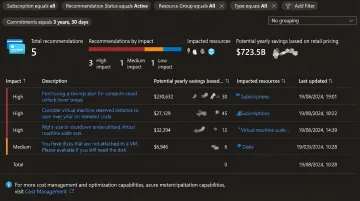
Act Consistently on Azure Advisor Recommendations
Azure Advisor provides rightsizing, idle resource, and commitment recommendations based on actual usage patterns. Acting on those recommendations on a regular cadence is what actually moves the needle. Organizations with systematic review processes recover materially more savings than those who check Advisor occasionally and move on.
Strategies That Reduce Costs by Changing the Context Around Azure
Sometimes the architecture itself is the cost driver, and resource-level tuning won't move the needle significantly.
Use Spot VMs for Interruptible Workloads
Azure Spot VMs offer discounts of up to 90% versus pay-as-you-go by using idle Azure compute capacity. They're well-suited for batch processing, CI/CD pipelines, large-scale simulations, and data transformation. They are not appropriate for stateful services requiring continuous availability — Spot VMs have no SLA and can be evicted with as little as 30 seconds' notice.
Eviction policies and checkpointing logic are necessary to handle interruptions gracefully before deploying workloads on Spot.
Eliminate Unnecessary Data Transfer Costs
Data transfer between Azure regions, and especially out of Azure entirely, can become a significant line item for high-traffic applications. Keeping dependent services co-located in the same region eliminates inter-region transfer fees. Azure CDN and Azure Front Door can reduce egress costs for globally distributed content by serving requests from edge nodes rather than origin infrastructure.
Enable Autoscaling
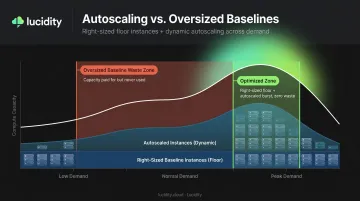
Static provisioning forces a trade-off between under-serving peak demand and overpaying during off-peak periods. Azure VM Scale Sets, App Service autoscaling, and AKS Horizontal Pod Autoscaler allow compute to contract when demand drops and expand when it rises.
Autoscaling delivers the most savings for workloads with clear within-day or within-week demand variation. One important nuance: autoscaling from an already-oversized baseline still wastes money. Combine autoscaling with right-sized floor instances for the best outcome.
Adopt Serverless and PaaS Where Appropriate
Azure Functions and Logic Apps eliminate always-on infrastructure for event-driven or low-throughput workloads. The cost model shifts from reserved capacity to per-execution billing — Azure Functions' Consumption plan even includes a monthly free grant of 1 million executions and 400,000 GB-seconds.
Serverless is not universally cheaper. High-throughput, latency-sensitive workloads often cost more per execution than equivalent right-sized VMs running continuously. The decision should come down to the workload's actual usage pattern — not a preference for newer architecture styles.
Conclusion
Azure cost optimization works when you identify where spend is actually coming from — provisioning decisions, management gaps, architectural trade-offs — and apply targeted fixes rather than broad cuts. Indiscriminate reduction creates new problems; precise action creates lasting savings.
Optimization also doesn't hold on its own. Workloads change, teams provision new resources, and savings erode without ongoing governance, monitoring, and periodic re-evaluation of sizing and pricing commitments. The teams that sustain Azure cost control build it into regular operations — scheduled reviews, automated alerts, and clear ownership — rather than treating it as a project with a finish line.
Frequently Asked Questions
What is the fastest way to reduce Azure costs immediately?
Three quick wins require no architectural changes: use Azure Advisor to identify idle and underutilized resources, enable automated shutdown of non-production VMs during off-hours, and apply Azure Hybrid Benefit to eligible Windows Server and SQL Server workloads. All three can be implemented within days.
What is the difference between Azure Reserved Instances and Azure Savings Plans?
Reserved Instances offer deeper discounts (up to 72%) tied to a specific VM type, size, and region. Savings Plans offer slightly lower discounts (up to 65%) but with flexibility across VM families and all Azure regions. Most organizations use both, depending on how stable and well-defined each workload is.
How does Azure Hybrid Benefit reduce cloud costs?
Organizations apply existing on-premises Windows Server or SQL Server licenses to Azure workloads rather than purchasing new ones, saving up to 80% versus standard pay-as-you-go rates. Hybrid Benefit can be stacked with Reserved Instances for compounded savings on eligible workloads.
What are the most common causes of Azure cost overruns?
The top three: VM overprovisioning (sized for peak demand but running at low average utilization), idle or orphaned resources that are never cleaned up after workloads change, and running predictable workloads on pay-as-you-go pricing when Reserved Instances would cost significantly less.
How can I avoid overprovisioning Azure storage?
Storage waste accumulates when disks go unmonitored — Azure Managed Disks are rarely resized downward after provisioning. Audit disk utilization regularly using Azure Advisor's Cost Optimization workbook, and use blob lifecycle management policies to shift infrequently accessed data to lower-cost tiers like Cool or Archive.
What Azure-native tools are available for cost management and optimization?
The core toolkit: Azure Cost Management + Billing (spend tracking, budgets, and alerts), Azure Advisor (rightsizing and idle resource recommendations), Azure Policy (governance guardrails and tag enforcement), and Azure Monitor (anomaly detection and autoscale rules).