Introduction
Most Azure storage teams are working with incomplete information. Hundreds or thousands of storage accounts spread across subscriptions, regions, and business units—and the only way to answer "where is our storage growing?" is to run PowerShell scripts against siloed dashboards and hope nothing falls through the cracks.
Azure Storage Discovery is Microsoft's direct response to that problem. It's a fully managed, portal-native service that centralizes blob storage analytics into a unified workspace—no custom tooling or query languages required. Natural-language queries through Copilot in Azure make insights accessible to teams without deep technical backgrounds.
This article covers:
- What Azure Storage Discovery does and how it works
- The insight dimensions it surfaces across your storage environment
- How to set it up in the Azure portal
- Copilot integration and natural-language query capabilities
- Pricing tiers and what's included at each level
- Where the tool leaves enterprises with blind spots, particularly around Azure Managed Disks
Key Takeaways
- Azure Storage Discovery unifies visibility into Azure Blob and Data Lake Storage across your entire estate in one workspace
- Insights span five dimensions: capacity, activity, security, configurations, and errors
- Setup takes two steps: create a workspace, then define scopes using ARM tags
- Copilot in Azure lets non-technical stakeholders query storage estates in plain English—no Kusto required
- Scope is blob/object storage only—Azure Managed Disks need a separate optimization layer
What Is Azure Storage Discovery?
Azure Storage Discovery is a fully managed Microsoft service that aggregates storage telemetry from Azure Blob Storage and Azure Data Lake Storage accounts—across all subscriptions, resource groups, and regions—into a single unified workspace.
The problem it solves is real. Enterprises running data at scale often have hundreds or thousands of storage accounts with no consolidated view of capacity growth, access patterns, security posture, or cost optimization opportunities.
Gartner attributes rising public cloud storage costs directly to overprovisioning, poor data lifecycle management, and outdated manual controls — all issues that stem from limited visibility.
What It Is (and Isn't)
Azure Storage Discovery is not a monitoring platform, SIEM tool, or replacement for Azure Monitor. It's specifically an object-storage analytics and governance layer.
Key scale facts:
- One workspace can analyze up to 1 million storage accounts across subscriptions and regions
- Both plans include a 15-day historical backfill from the moment of deployment
- Standard plan retains insights for up to 18 months, enabling annual trend analysis
- Initial insights typically appear within 24 hours of deployment
These numbers matter when you're sizing the service for an enterprise-scale deployment.
Who Benefits Most
The service is most valuable for:
- Cloud architects needing cross-subscription capacity visibility
- Storage administrators managing accounts across multiple regions
- FinOps teams identifying waste and tier optimization opportunities
- Data governance leads auditing security posture across the estate
Five Types of Insights Azure Storage Discovery Delivers
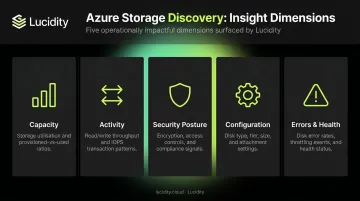
According to Microsoft's documentation, Storage Discovery surfaces six report categories: Capacity, Activity, Errors, Configurations, Security, and Consumption. Here's what the five most operationally impactful ones deliver in practice.
Capacity Insights
Capacity reports show object sizes, object counts, and growth trends broken down by subscription, resource group, storage account, and region. Teams can identify which accounts and regions are growing fastest, with data segmented by access tier—Hot, Cool, Cold, and Archive.
For FinOps teams, this is the starting point for any right-sizing conversation — without granular growth data by tier and region, cost reduction efforts are largely guesswork.
Activity Insights
Activity reports cover transaction volume, ingress, and egress metrics across the estate. The practical value is identifying accounts with low transaction rates but high storage costs — these are prime candidates for tier downgrades or cleanup. Accounts that look active by size alone often show near-zero transactions when examined here, making cleanup decisions much easier to justify.
Security Posture Insights
Security reports flag configuration outliers that represent compliance or governance risk, including:
- Storage accounts with shared access keys still enabled
- Anonymous blob access configured
- Public network access without restrictions
- Encryption settings that deviate from baseline
Microsoft recommends replacing shared key authentication with Microsoft Entra ID and managed identities where possible. Storage Discovery makes it straightforward to identify which accounts haven't made that transition yet.
Configuration Analysis
This report surfaces inconsistencies in redundancy settings (LRS, ZRS, GRS), lifecycle management policies, inventory configurations, and encryption modes across accounts. A production workload running on LRS when organizational policy requires GRS is a real-world example of the gap this report catches — before it becomes a recovery incident.
Error and Health Reporting
Failed operations and error codes are aggregated across accounts to surface recurring issues across the fleet: throttling patterns, misconfigured clients, and workloads experiencing repeated failures. Reviewing these at scale — rather than investigating each account individually — lets operations teams get ahead of problems instead of reacting to them.
How to Set Up Azure Storage Discovery
Setup takes two steps and requires no additional infrastructure.
Step 1: Create the Discovery Workspace
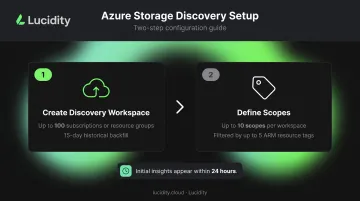
Deploy an Azure Storage Discovery workspace resource in an Azure resource group. During creation, define workspace roots by selecting the subscriptions and/or resource groups containing the storage accounts to analyze. Microsoft allows up to 100 subscriptions and/or resource groups as workspace roots.
Historical data is backfilled automatically (15 days for both plans), and initial insights typically appear within 24 hours.
Step 2: Define Scopes
Scopes are logical groupings of storage accounts within the workspace—think cost centers, business units, or workload types. You can create up to 10 scopes per workspace, each filterable by up to 5 ARM resource tags.
This is where tagging strategy pays off. If storage accounts are already tagged by cost center, environment (prod/dev), and owner, scopes can be configured immediately and reports become filterable by those dimensions. Without consistent tagging, the workspace still works—but scoped FinOps reporting loses most of its value.
Governance prerequisite: Tag accounts by cost center, environment, and owner before configuring the workspace. Retroactive tagging works, but it delays meaningful scoped analysis.
Reports and Dashboard Access
With setup complete, reports are available directly in the Azure portal, no extra infrastructure or query language required. Each report is filterable by:
- Region and redundancy type
- Performance tier and encryption settings
Every chart drills down into a list of contributing resources, and those lists export as CSV files for bulk operations or scripting.
Copilot in Azure: Natural Language Meets Storage Analytics
Copilot in Azure is built directly into the Storage Discovery workspace. Stakeholders can ask plain-language questions and receive answers as charts, tables, or trend lines—no Kusto queries, no scripting.
Example queries that work out of the box:
- "Which storage accounts are above 1 TiB with the fewest transactions?"
- "Show storage accounts with shared access keys enabled"
- "Chart storage accounts by region"
Access points include the workspace overview page, individual insights pages, and "Ask Copilot" buttons beside charts.
What Copilot Can and Cannot Do
This distinction matters operationally:
| Capability | Copilot Status |
|---|---|
| Query and visualize aggregated Storage Discovery data | ✅ Supported |
| Generate charts, tables, and trend visualizations | ✅ Supported |
| Create storage resources | ❌ Not supported |
| Modify storage-resource configurations | ❌ Not supported |
Copilot is a query and visualization layer. It doesn't execute operational changes, and any remediation actions require separate portal workflows or automation scripts.
That limitation extends to accuracy as well: AI-generated outputs can misinterpret ambiguous prompts. Any high-impact decisions surfaced by Copilot—identifying blobs for deletion, flagging accounts for tier changes—should be verified against raw metrics before acting.
Azure Storage Discovery Pricing: Free vs. Standard
Microsoft offers two tiers. Here's a direct comparison:
| Feature | Free Plan | Standard Plan |
|---|---|---|
| Capacity insights | ✅ | ✅ |
| Configuration insights | ✅ | ✅ |
| Activity insights | ❌ | ✅ |
| Error insights | ❌ | ✅ |
| Security insights | ❌ | ✅ |
| Data retention | 15 days | 18 months |
The Standard plan billing is based on the number of storage account resources and data objects analyzed. Published pricing starts at $1 per storage account up to 1,000 accounts, scaling down to $0.60 for accounts 1,001–10,000 and $0.20 above 10,000. Use the Azure pricing calculator for region-specific estimates.
The Free plan covers the basics for evaluation or low-complexity environments. Upgrade to Standard once you need historical trend data beyond 15 days, security posture visibility, or activity and error tracking — the features most FinOps and ITOps teams rely on for ongoing governance.
Azure Storage Discovery is available through the Azure Marketplace and through Storage Center in the Azure portal under "Data management."
Beyond Blob Storage: The Block Storage Visibility Gap
Azure Storage Discovery covers Azure Blob Storage and Azure Data Lake Storage. It does not provide visibility into Azure Managed Disks—the block storage volumes attached to virtual machines.
This matters for one reason: Microsoft's own documentation acknowledges that when a VM is deleted, attached disks are not deleted by default, creating unnecessary costs unless those unattached disks are found and removed. There's no native discovery layer that surfaces this waste at scale the way Storage Discovery does for blobs.
The Managed Disk Problem in Practice
Managed Disks are frequently:
- Over-provisioned at initial allocation, then never right-sized as workloads evolve
- Left unattached when VMs are deleted or workloads shut down
- Running on the wrong tier (Premium SSD where Standard SSD would perform just as well)
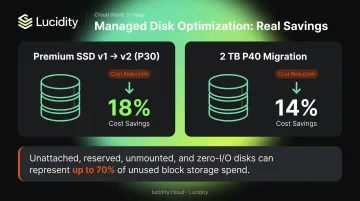
The FinOps Foundation's Azure Managed Disks paper gives concrete examples: moving from Premium SSD v1 to Premium SSD v2 with equivalent IOPS shows 18% savings on a P30 disk, and a 2 TB P40 migration shows approximately 14% savings. These are per-disk figures. Multiply that across hundreds of volumes in an enterprise environment and the savings become significant.
Filling the Gap with Lucidity
For teams using Azure Storage Discovery to optimize blob storage, block storage requires a separate solution. Lucidity's platform provides the discovery, real-time visibility, and autonomous right-sizing for Azure Managed Disks that Storage Discovery offers for blobs.
Lucidity Lumen identifies four specific categories of idle disks that don't appear in native Azure dashboards: unattached, reserved, unmounted, and zero-I/O. Together, these can represent up to 70% of unused block storage spend. For each idle disk, Lumen surfaces disk age, attachment state, type, and usage history, giving teams enough context to act safely without scripts or guesswork.
On the optimization side, Lucidity's AutoScaler autonomously expands and shrinks Azure Managed Disk volumes in real time, with no downtime. Enterprises typically move from 30% average disk utilization to 75%, a 2.5x improvement that directly reduces costs. Customers like Dometic have documented a 52% reduction in cloud storage spend after deployment.
For teams ready to see what their Azure block storage estate actually looks like, Lucidity's free Assessment surfaces utilization, waste, and downtime risk in approximately five minutes. No agents or infrastructure changes needed.
Frequently Asked Questions
What is Azure Storage Discovery?
Azure Storage Discovery is Microsoft's analytics workspace that provides enterprise-wide visibility into Azure Blob Storage and Data Lake Storage estates. It offers interactive portal reports and Copilot-powered natural language queries, with a single workspace able to analyze up to one million storage accounts.
What storage types does Azure Storage Discovery support?
Azure Storage Discovery supports Azure Blob Storage and Azure Data Lake Storage (object/blob storage) only. It does not cover Azure Managed Disks, Azure Files, or other storage types.
How does Azure Storage Discovery use Copilot in Azure?
Copilot is embedded directly in the Storage Discovery workspace, letting users ask plain-language questions and receive answers as charts, tables, and trend visualizations. It reduces reliance on Kusto queries or custom scripting, though it cannot create or modify storage resources.
What is the difference between the Free and Standard pricing plans?
The Free plan covers capacity and configuration insights with 15 days of data retention. The Standard plan adds activity, error, and security insights with up to 18 months of retention—necessary for annual trend analysis and seasonal capacity planning.
How do I set up an Azure Storage Discovery workspace?
Create a workspace in a resource group, then select subscriptions or resource groups to analyze (up to 100 workspace roots). Optionally, define scopes using ARM tags to represent business groups or workloads. Initial insights typically appear within 24 hours.
What tool covers Azure Managed Disks that Storage Discovery doesn't?
Azure Storage Discovery is limited to blob and object storage, leaving Managed Disks uncovered. Lucidity fills that gap—it identifies idle disks across four categories (unattached, reserved, unmounted, and zero-I/O) and autonomously right-sizes volumes without downtime.