Introduction
Cloud overspending is a persistent problem across enterprises. According to Flexera's 2025 State of the Cloud report, 84% of organizations struggle to manage cloud spend, with budgets exceeding established limits by 17% on average. For teams running Azure SQL Managed Instance, that gap can be significant — SQL MI sits at the premium end of the Azure SQL portfolio, and its pricing structure compounds quickly when left unmanaged.
SQL MI delivers near-complete SQL Server compatibility, VNet integration, built-in HA, and enterprise-grade SLAs. That richness comes with a billing model that charges across compute, licensing, storage, and backup — simultaneously. Teams that over-provisioned at launch and never revisited the configuration often find costs running 30–50% above initial projections by the six-month mark.
What follows covers how SQL MI costs accumulate, where the biggest waste typically hides, and concrete strategies — organized by the type of change required — to cut the bill without sacrificing performance or availability.
Key Takeaways
- SQL MI bills across five dimensions at once — vCores, service tier, licensing, storage, and backup retention — so waste compounds fast
- Azure Hybrid Benefit can eliminate the SQL license component — roughly 40% savings on General Purpose, up to 55% on Business Critical
- Reserved Instances and Start/Stop scheduling address compute waste for stable and intermittent workloads respectively
- Default PITR retention is 7 days (configurable to 35) — leaving it high for low-criticality workloads drives unnecessary backup storage spend
- Lasting savings require stacking discount programs with operational discipline — neither alone is enough
How Azure SQL Managed Instance Costs Build Up
SQL MI billing isn't a single line item. Microsoft meters it across three concurrent dimensions: compute (vCore count × hours running), storage (primary data above the included 32 GB/month), and SQL Server licensing (unless Azure Hybrid Benefit is applied). Each dimension runs independently, and they compound.
The challenge is that cost growth is often gradual and hard to catch without active monitoring:
- An over-provisioned instance running 24/7 builds up compute charges continuously, whether queries are running or not
- Primary storage grows as data accumulates, crossing billing thresholds silently
- Backup storage charges increase with database size and data churn rate — and can spike for high-change databases on long retention windows
- Licensing costs persist on idle or test instances that were never configured with appropriate discount programs
Many of these costs only surface during billing reviews. Backup storage overruns, data egress from cross-region geo-DR setups, and storage allocated but never used are among the most common surprises. Teams that audit their configuration quarterly typically identify at least one billing category running above its optimal baseline — making periodic review a direct cost control lever, not just good hygiene.
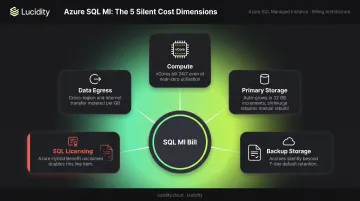
Key Cost Drivers for Azure SQL Managed Instance
Understanding where money actually goes is the prerequisite for reducing it. Three dimensions account for the vast majority of SQL MI spend.
Service Tier and vCore Count
The service tier and vCore count are the single largest cost factors. According to Microsoft's SQL MI pricing page, a Standard-series General Purpose instance at 4 vCores runs approximately $736/month on pay-as-you-go. The equivalent Business Critical configuration runs approximately $1,984/month — roughly 2.7× higher for the same vCore count.
Business Critical's premium reflects its architecture: local SSD storage and multiple Always On replicas. For workloads that require it, the price is defensible. For those that don't, it's recurring spend with no return.
The Next-gen General Purpose tier deserves attention before defaulting to Business Critical. Microsoft positions it as an architectural upgrade — higher performance, larger storage scale via Elastic SAN — at the same baseline cost. For many workloads, it closes the performance gap without the price premium.
Storage Costs
Storage billing has two separate components:
| Component | General Purpose | Business Critical |
|---|---|---|
| Primary storage (above 32 GB included) | $0.115/GB/month | $0.25/GB/month |
| PITR backup storage (LRS/ZRS) | $0.10/GB/month | $0.10/GB/month |
| LTR backup storage (LRS/ZRS) | $0.025/GB/month | $0.025/GB/month |
Both primary and backup storage grow automatically as data accumulates. For large or frequently-updated databases, backup storage in particular can become a meaningful cost line — especially if PITR retention is set to the maximum 35 days.
Storage costs are variable by nature — but licensing is a fixed decision that many teams set once and forget.
Licensing Model
The choice between License-Included and Azure Hybrid Benefit (AHB) is made at provisioning and rarely revisited — even as it compounds monthly. For organizations that migrated SQL Server licenses with active Software Assurance, License-Included pricing translates directly to avoidable spend.
The financial difference is significant:
- License-Included: Compute + SQL Server license bundled into the hourly rate
- Azure Hybrid Benefit: Apply existing SQL Server licenses; pay compute costs only
- Typical savings: 40–55% reduction on the compute portion of the bill, per Microsoft's AHB documentation
If your team hasn't audited this setting since migration, that's the first place to look.
Cost Reduction Strategies for Azure SQL Managed Instance
SQL MI cost reduction isn't a one-time configuration fix. The strategies below are organized by the type of change required: decisions made at provisioning, operational practices applied while instances run, and structural changes to how environments are organized.
Strategies That Change Provisioning Decisions
These have the highest per-dollar impact but require deliberate choice.
1. Select the right service tier before provisioning
Default to Business Critical only if the workload specifically requires its always-on replicas or low-latency local SSD. Most workloads don't. Evaluate the Next-gen General Purpose tier before committing — it matches General Purpose pricing while eliminating the justification for many Business Critical deployments.
2. Apply Azure Hybrid Benefit if existing SQL licenses are in play
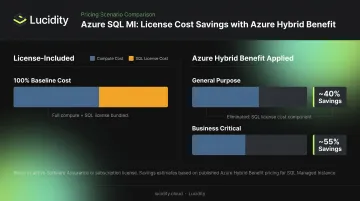
Organizations with Software Assurance-enabled SQL Server licenses can eliminate the SQL licensing component entirely. The savings are material:
- General Purpose: approximately 40% savings vs. license-included pay-as-you-go
- Business Critical: approximately 55% savings vs. license-included pay-as-you-go
Teams that migrated from on-premises SQL Server and never updated their licensing configuration are leaving this discount on the table.
3. Commit to Reserved Instance pricing for stable production workloads
For instances expected to run continuously for 12 months or more, Azure Reservations deliver real compute discounts versus pay-as-you-go. Both 1-year and 3-year commitments are supported across General Purpose, Business Critical, and both locally-redundant and zone-redundant configurations. Check the Azure pricing calculator for the exact savings row for your target tier and region — percentages vary by configuration.
4. Use Dev/Test pricing or the Free Tier for non-production instances
SQL MI offers a free tier — 720 vCore hours/month and 64 GB of storage for 12 months, limited to one instance per subscription. Azure Dev/Test pricing under qualifying Visual Studio or Enterprise Agreement subscriptions removes SQL license charges for non-production workloads. Many teams run test instances on standard pay-as-you-go and never claim either discount.
Strategies That Change How Instances Are Managed
These reduce cost through operational practices applied while instances are active.
1. Use Start/Stop to eliminate compute charges during idle periods
General Purpose and Next-gen General Purpose instances can be stopped on-demand or on a schedule. When stopped, vCore and SQL licensing charges cease — only storage is billed. Business Critical does not support Stop/Start.
This is particularly effective for:
- Development and staging environments that don't run overnight
- Batch-processing instances used only during business hours
- Demo or testing instances provisioned temporarily
Both manual and scheduled stop/start commands are supported.
2. Right-size vCores based on actual utilization
Many SQL MI deployments are provisioned with headroom for anticipated peak demand and then left unchanged. Azure Monitor surfaces the data needed to make a right-sizing decision : average CPU percentage, IO bytes read/written, IO requests, and storage space metrics for Microsoft.Sql/managedInstances.
If average CPU utilization is consistently below 30–40%, there's a strong case for reducing vCore count. The Next-gen General Purpose tier also adds flexible memory tuning as an additional right-sizing lever beyond vCores alone.
3. Tune backup retention settings deliberately
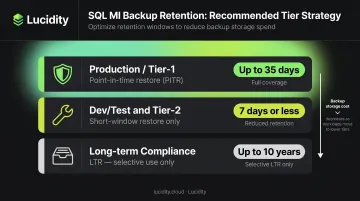
The default PITR retention period is 7 days, configurable up to 35 days. Leaving retention at the maximum for all instances (including dev/test or lower-criticality workloads) generates backup storage charges that accumulate silently.
A practical tiering approach:
- Production / tier-1 workloads: Up to 35 days PITR where RPO requirements justify it
- Dev/test and tier-2 instances: 7 days or less
- Long-term compliance needs: Use LTR (up to 10 years) selectively, not as a default
4. Monitor costs continuously and set anomaly alerts
Without active budget monitoring, storage growth and unexpected backup charges can go unnoticed for weeks. Set per-instance budgets in Azure Cost Management, configure threshold breach alerts, and establish tagging practices that attribute costs to specific teams, environments, or business units.
Tagging is what makes accountability stick. Without it, teams consume capacity without visibility into what they're spending, and optimization gains quietly reverse.
Strategies That Change the Context Around Instances
These address root causes that instance-level changes alone can't fix.
1. Consolidate smaller instances with Instance Pools
When multiple smaller SQL MI instances are needed (common in multi-tenant SaaS architectures or departmental database setups), Instance Pools allow several instances to share a pre-allocated set of vCores. The minimum pool configuration is 8 vCores. Billing is based on resources allocated to the pool rather than each instance behaving as a fully isolated deployment, which reduces per-instance overhead for smaller workloads.
2. Use the free standby license for geo-DR secondaries
Since November 2022, Microsoft no longer charges SQL Server licensing for passive secondary instances in a Failover Group geo-DR setup. A secondary managed instance can be designated as standby, eliminating double licensing for primary + secondary configurations.
Teams that established geo-DR setups before this change and haven't re-evaluated their billing configuration may still be paying for a license they no longer need to.
3. Evaluate whether SQL MI is the right deployment model
SQL MI is designed for workloads requiring full SQL Server compatibility, VNet integration, or specific agent/CLR features. Workloads that don't use those capabilities may be better served by Azure SQL Database (Single or Elastic Pool configurations) which are often cheaper for simpler use cases.
This is a context-level decision that gets skipped during migration projects. Running a workload on SQL MI that only needs Azure SQL Database features is one of the more common sources of persistent overspend.
4. Implement FinOps governance across SQL MI environments
Cost reduction at scale requires organizational practices, not just technical configuration:
- Establish environment-level tagging standards before provisioning new instances
- Assign cost ownership to application teams so they see what they're spending
- Schedule quarterly right-sizing reviews to catch utilization drift
- Integrate SQL MI costs into broader cloud cost reporting frameworks
- Use storage observability tools (such as Lucidity's Lumen) to track actual vs. allocated disk utilization across Azure deployments, especially where SQL MI storage sits alongside other block storage volumes
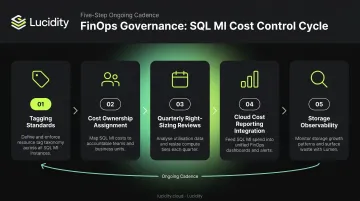
The teams that sustain cost reductions are the ones that make visibility and accountability part of standard operations — not a quarterly fire drill.
Conclusion
Azure SQL MI costs rarely stem from a single misconfiguration. They accumulate gradually — from provisioning decisions left at defaults, licensing choices never revisited, and operational patterns no one monitors. Identifying where cost actually originates is the first step toward fixing it.
The core levers each respond differently:
- Service tier selection — GP vs. BC determines both price floor and performance ceiling
- Licensing model — Azure Hybrid Benefit alone can cut compute costs by up to 40%
- Reserved Instances — 1- or 3-year commitments deliver the largest sustained discounts
- Right-sizing — idle vCores are billed whether used or not
- Backup retention — default settings often exceed what workloads actually require
The most effective approach combines discount programs applied at the right decision points with operational discipline and structural governance. Revisiting these periodically matters as much as the initial optimization. Cloud costs drift — and the teams that control them build in regular review cycles rather than treating optimization as a one-time task.
Frequently Asked Questions
How much does Azure SQL Managed Instance cost per month?
Cost is driven by vCores, service tier, hardware series, storage above the 32 GB inclusion, and backup retention. On pay-as-you-go pricing, a small General Purpose instance starts around $736/month, while larger Business Critical configurations can exceed $10,000/month before add-ons. Use the Azure Pricing Calculator for estimates based on your configuration.
What is the difference between General Purpose and Business Critical tiers for cost?
Business Critical runs approximately 2.7× higher than General Purpose for the same vCore count, reflecting its use of local SSD storage and multiple Always On replicas. The Next-gen General Purpose tier now narrows the performance gap significantly at the same baseline cost as General Purpose, making it a strong alternative to Business Critical for most workloads.
Does Azure Hybrid Benefit apply to Azure SQL Managed Instance?
Yes — AHB applies across both General Purpose and Business Critical tiers. Organizations with Software Assurance-enabled SQL Server licenses can eliminate the SQL licensing component of the hourly charge, delivering approximately 40% savings on General Purpose and up to 55% on Business Critical versus license-included pay-as-you-go pricing.
What is the Start/Stop feature and how does it reduce costs?
Start/Stop allows General Purpose and Next-gen General Purpose instances to be paused on demand or on a schedule. During the stopped state, vCore and SQL license charges cease — only storage is billed. It's most effective for development, staging, or batch-processing instances that don't need to run continuously.
Can Reserved Instances be used with Azure SQL Managed Instance?
Yes — RI pricing is supported for SQL MI across General Purpose and Business Critical tiers and both locally-redundant and zone-redundant configurations. Savings vary by tier, region, and hardware series; verify current discounts in the Azure pricing calculator for your region and tier.
What are the hidden costs of Azure SQL Managed Instance?
Often-overlooked cost components include backup storage (billed separately based on retention period and data churn rate), storage beyond the 32 GB inclusion, and data egress for cross-region geo-DR replication. These can add up quickly if retention windows and storage growth go unmonitored — especially for large or frequently-updated databases.