SaaS companies carry cloud costs directly in their cost of goods sold. Every dollar of Azure waste compresses gross margin, distorts unit economics, and makes it harder to understand whether individual customers are actually profitable. The inefficiency isn't abstract — it shows up in the numbers when you scale.
The good news: Azure costs for SaaS companies aren't inherently expensive. They become expensive because of decisions made around provisioning, architecture, and governance — most of which are revisable. This article covers where those costs actually come from, the key SaaS-specific drivers, and three categories of strategies to address them.
Key Takeaways
- Azure SaaS costs accumulate through overprovisioning, environment sprawl, and resources left unresized after deployment
- Key cost drivers: multi-tenancy trade-offs, storage that grows but never shrinks, commitment misalignment, and no per-customer visibility
- Three levers exist: provisioning decisions, active workload governance, and architectural fixes
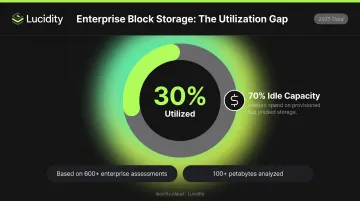
- Block storage waste is pervasive — Lucidity's 600+ enterprise assessments show average disk utilization of just 30%, leaving 70% of provisioned capacity idle
- Track cost per customer, not just total monthly spend — that's where SaaS optimization becomes actionable
How Azure Costs Build Up for SaaS Companies
Azure costs for SaaS companies don't spike suddenly. They accumulate — each new customer, environment, or feature deployment adds resources that are provisioned conservatively and rarely revisited.
That compounding effect is the real danger. Overprovisioned infrastructure multiplied across a growing customer base means the same percentage of waste generates exponentially greater dollar impact at 500 customers than it did at 50.
A SaaS company with ten customers can absorb the inefficiency. At enterprise scale, those same structural problems become a measurable drag on gross margin.
Most teams don't notice until a FinOps audit or investor scrutiny forces the conversation. By then, the patterns are deeply embedded in how infrastructure gets deployed.
Key Azure Cost Drivers for SaaS Companies
Multi-Tenancy Architecture Decisions
The decision between shared infrastructure and dedicated per-tenant resources shapes Azure costs more than almost any other architectural choice.
- Shared infrastructure reduces per-customer COGS but introduces noisy-neighbor risk
- Dedicated per-tenant deployment provides clean isolation but costs multiply linearly with customer count
- Most teams default to over-provisioned dedicated infrastructure — and never revisit the decision as the customer base grows
Storage Over-Provisioning Without Shrinkage
SaaS companies must provision block storage for every customer's workload. The problem: Azure managed disks cannot be reduced in size once provisioned — Microsoft explicitly states that downsizing a disk directly isn't supported due to data loss risk, and the documented workaround requires creating a new smaller disk and migrating data.
The result: teams over-provision to cover peak demand and never resize down. Across 600+ assessments analyzing over 100 petabytes of storage, Lucidity has found the average enterprise uses just 30% of provisioned disk capacity. For SaaS companies storing data for hundreds or thousands of customers, that 70% gap represents persistent, avoidable spend.
Environment Sprawl
SaaS teams routinely run full dev, staging, QA, and production environments — sometimes duplicated per tenant — consuming compute and storage around the clock regardless of actual usage.
Non-production environments generate real Azure bills even when no one is actively using them, and they rarely get the same cost scrutiny as production.
Commitment Misalignment
Environment costs are only part of the picture. SaaS usage follows growth curves that are broadly predictable but volatile at the customer level — and reservation strategy often swings between two failure modes:
- Over-committing: locking into 3-year Reserved Instances for workloads tied to customer retention, then carrying stranded capacity when customers churn
- Under-committing: avoiding reservations entirely and paying full pay-as-you-go rates for stable baseline workloads
Neither extreme is optimized for SaaS growth patterns.
Absence of Per-Customer Cost Visibility
Azure Cost Management allocates costs by subscription, resource group, and tag — but SaaS companies need per-tenant cost intelligence. Without it:
- Which customer segments are margin-positive stays invisible
- You can't see where COGS is growing faster than revenue
- You can't prioritize which workloads are worth optimizing first
Without per-tenant visibility, cost optimization targets aggregate averages — not the actual workloads driving waste.
Cost-Reduction Strategies for Azure SaaS Workloads
Strategies vary depending on whether waste originates from how resources are provisioned upfront, how they're governed while active, or how the architecture creates cost conditions that governance alone can't fix.
Strategies That Change Provisioning Decisions
Right-size compute before deployment. SaaS teams default to over-specified VM series because rightsizing post-deployment feels risky. Use Azure Advisor cost recommendations and the Azure VM selector tool to establish the correct instance family and size before deployment. Set a quarterly review cadence as a governance checkpoint — don't wait for the annual budget conversation.
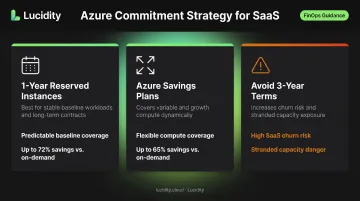
Calibrate reservation strategy to SaaS usage patterns. Azure Reserved VM Instances save up to 72% versus pay-as-you-go, and Azure Savings Plans can reduce compute costs up to 65%. The right approach for SaaS:
- Use 1-year Reserved Instances for stable baseline workloads tied to long-term customer contracts
- Layer Savings Plans over variable compute to cover growth
- Avoid 3-year terms for workloads that depend on customer retention — customer churn can strand that commitment
Apply Azure Hybrid Benefit where applicable. SaaS companies migrating from on-premises or holding existing Windows Server or SQL Server licenses can apply those licenses to Azure workloads at reduced rates. Azure Hybrid Benefit for Linux allows switching eligible VMs between BYOS and PAYG without redeployment or downtime. Microsoft estimates combined savings up to 76% when paired with 3-year Reserved Instances for eligible RHEL or SLES workloads.
Align billing tiers to resource architecture. SaaS pricing tiers (Starter, Growth, Enterprise) should correspond to actual infrastructure configurations. When billing tiers are decoupled from resource profiles, low-tier customers can consume disproportionate cloud resources while generating low revenue. This is a structural COGS problem that no cost governance tool can resolve.
Strategies That Improve Active Workload Governance
Implement per-tenant resource tagging as a prerequisite for COGS visibility. Without a consistent tagging strategy linking Azure resources to specific customers, environments, and product lines, cost anomalies are invisible. Use Azure Policy to enforce tagging at resource creation. Ungoverned resources accumulate fast in SaaS environments where new customer deployments happen frequently.
Eliminate idle and orphaned resources continuously. Stopped VMs, unattached managed disks, empty load balancers, and unused storage volumes accumulate silently. Azure Advisor surfaces recommendations, but native tooling has limits.
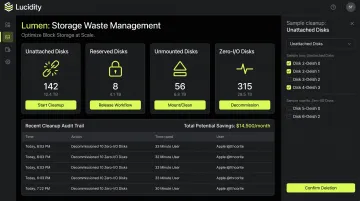
For block storage specifically, Lucidity's Lumen identifies four idle disk categories that often don't appear in native dashboards or standard Advisor recommendations:
- Unattached — provisioned volumes with no VM attachment
- Reserved — allocated but consistently underutilized
- Unmounted — attached to a VM but not mounted to the OS
- Zero-I/O — mounted but generating no read/write activity
Together, these categories can represent up to 70% of unused block storage spend. Lumen enables one-click cleanup directly from the dashboard with a full audit trail and no scripts required — practical for SaaS companies managing storage across large customer bases.
Automate non-production environment shutdown during off-hours. Dev, staging, and QA environments running continuously represent avoidable spend. Microsoft's Start/Stop VMs v2 supports scheduled VM management through Azure Automation components. Scheduled shutdown during off-hours recovers this spend without impacting development velocity.
Set budget alerts at multiple scopes. Configure Azure Cost Management budgets at the subscription, resource group, and per-customer-segment level, with alerts at 80% and 100% thresholds. Anomaly detection at the resource level is especially important for SaaS companies where a single misconfigured customer deployment can spike the shared bill before anyone notices.
Strategies That Address Structural Architecture Conditions
Reassess tenancy model decisions as the customer base scales. The cost profile of shared versus dedicated infrastructure changes significantly between 50 and 500 customers. Microsoft's Deployment Stamps pattern provides a framework for deploying standardized, repeatable shared deployments that maintain isolation where required. If dedicated-per-tenant was an early default rather than a deliberate architectural choice, this pattern is worth a formal evaluation.
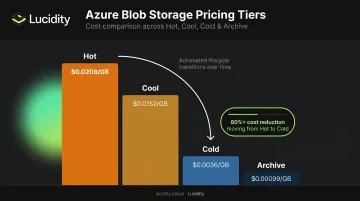
Implement Blob Storage lifecycle management to reduce data tier costs. SaaS companies accumulate historical data per customer that often stays in hot-tier storage long after it stops being actively accessed. Azure Retail Prices for East US LRS show the cost differential clearly:
| Tier | Price per GB/month |
|---|---|
| Hot | $0.0208 |
| Cool | $0.0152 |
| Cold | $0.0036 |
| Archive | $0.00099 |
Lifecycle policies can automatically move aging data to cooler tiers based on access patterns. Moving a terabyte of rarely-accessed data from Hot to Cold reduces that storage cost by over 80%, and lifecycle management handles it without manual intervention.
Co-locate dependent services within the same Azure region. Cross-region data transfer fees are an underestimated cost driver. Inter-continental transfer in North America runs $0.02 per GB — small per transaction, but significant at SaaS volume.
Services communicating across regions accumulate per-GB costs that compound quickly at scale. Region selection is made at architecture time and is expensive to reverse, so getting co-location right upfront avoids a costly structural problem later.
Conclusion
Sustainable Azure cost reduction starts with identifying where cost originates in the stack — provisioning decisions, governance gaps, or structural architecture choices — and addressing each category on its own terms.
For SaaS specifically, this is a continuous practice, not a one-time project. As the customer base grows, each inefficiency compounds. The same 70% block storage underutilization that's manageable at launch becomes a material COGS problem at scale. What makes optimization sustainable at scale is per-customer cost visibility, governance that operates without constant engineering attention, and automation that handles provisioning decisions before they hit the invoice. Tools like Lucidity address this directly for block storage — autonomously expanding, shrinking, and right-sizing volumes across Azure without requiring infrastructure changes. If storage waste is part of your cost picture, that's a practical starting point.
Frequently Asked Questions
What are the biggest Azure cost drivers for SaaS companies?
The top SaaS-specific drivers are storage over-provisioning, environment sprawl, commitment misalignment, and the absence of per-tenant cost visibility. Each compounds as the customer base scales — the same percentage of waste generates greater dollar impact at 500 customers than at 50.
How do Azure Reserved Instances and Savings Plans work for variable SaaS workloads?
Reserved Instances offer deeper discounts (up to 72%) for fixed, predictable workloads; Savings Plans offer flexibility across compute types at up to 65% off. Avoid over-committing to 3-year terms for workloads tied to specific customers — churn can strand that spend.
What is the difference between Azure cost management and Azure cost optimization?
Cost management covers visibility, allocation, budgeting, and reporting — knowing where money is going. Cost optimization covers rightsizing, waste elimination, and commitment purchasing — reducing how much you spend. SaaS companies need both disciplines running in parallel, not sequentially.
How does storage over-provisioning affect SaaS cloud costs on Azure?
Azure managed disks cannot be reduced without manual data migration, so most teams never resize down after initial provisioning. Lucidity's data across 600+ enterprise assessments shows average disk utilization of just 30% — the majority of provisioned capacity sits idle while still billing.
What Azure-native tools are available for SaaS cost optimization?
Azure Advisor, Azure Cost Management, and the Azure Pricing Calculator cover rightsizing recommendations, budget alerts, and pre-deployment estimates. These native tools hit their limits in multi-tenant SaaS environments — per-tenant cost attribution and idle disk detection across all four disk categories require purpose-built tooling.
How should SaaS companies measure cost-per-customer on Azure?
Tag resources with tenant identifiers at creation time (enforced via Azure Policy), filter spend by tag in Azure Cost Management, and allocate shared resource costs using a defined method — transaction volume or customer size both work. This metric is foundational for understanding COGS and gross margin at scale — aggregate spend reports won't surface it.