Azure egress costs are fees charged when data leaves Azure's data centers — to the public internet, another Azure region, or a different cloud provider. Data flowing into Azure (ingress) is always free. What you pay for is everything going out.
This guide covers exactly how Azure egress is priced, which factors drive costs higher, what most teams overlook, and practical strategies to reduce your bill.
Key Takeaways
- Azure charges for outbound data transfer based on volume, destination, and routing method; the first 100 GB/month is free
- Internet egress rates range from $0.05 to $0.181/GB depending on source region and volume tier
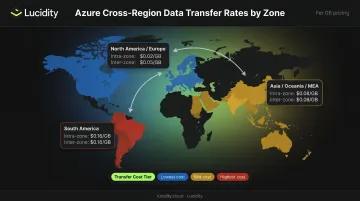
- Cross-region transfers within North America or Europe cost $0.02/GB; South America runs $0.16/GB and Asia/MEA hits $0.08/GB
- VNET peering, NAT Gateways, and Log Analytics export charges are frequently overlooked egress drivers
- Reducing egress is primarily an architectural problem: co-locate resources, use Azure CDN, compress data, and monitor proactively
Azure Egress Pricing: What You'll Actually Pay
Azure egress is not a single flat rate. Costs vary based on four variables: where the data is going, which geographic billing zone the source region falls into, total monthly data volume, and which network routing option is selected. Teams that ignore this variability regularly underestimate their bills.
What's Free
Here's what Azure doesn't charge for:
- Data ingress from any source into Azure
- Transfers within the same Availability Zone
- Data transfers between Azure services in the same region
- Traffic within a single virtual network
- Data moving from Azure origin services to Azure CDN from Microsoft or Azure Front Door
Once you know what's exempt, the paid tiers become clearer — and the opportunities to reduce costs more obvious.
What You Pay for Internet Egress
Internet egress uses a tiered pricing model — rates decrease at higher monthly volumes, but the first 100 GB is free. Pricing also differs significantly by source region.
Microsoft Premium Global Network (per GB):
| Volume Tier | North America / Europe | Asia, Australia, MEA | South America |
|---|---|---|---|
| First 100 GB/month | Free | Free | Free |
| Next 10 TB | $0.087 | $0.120 | $0.181 |
| Next 40 TB | $0.083 | $0.085 | $0.175 |
| Next 100 TB | $0.070 | $0.082 | $0.170 |
| Next 350 TB | $0.050 | $0.080 | $0.160 |
Routing Preference: ISP Network (per GB):
| Volume Tier | North America / Europe | Asia, Australia, MEA | South America |
|---|---|---|---|
| First 100 GB/month | Free | Free | Free |
| Next 10 TB | $0.080 | $0.110 | $0.120 |
| Next 40 TB | $0.065 | $0.075 | $0.085 |
| Next 100 TB | $0.060 | $0.070 | $0.080 |
| Next 350 TB | $0.040 | $0.060 | $0.075 |
For bulk, non-latency-sensitive workloads — batch exports, log archives, backups — the ISP Network option is worth evaluating. It routes traffic through public internet paths closer to the destination rather than Microsoft's private backbone, and the rate difference is real. Most teams leave this at the default (Premium Network) without checking whether the cheaper option meets their requirements.
Cross-Region Transfer Costs
| Transfer Scenario | Rate |
|---|---|
| Within North America or Europe (intra-continental) | $0.02/GB |
| Within Asia, Oceania, or Middle East & Africa | $0.08/GB |
| Within South America | $0.16/GB |
| North America or Europe → another continent | $0.05/GB |
| Asia, Oceania, or Africa → another continent | $0.08/GB |
| South America → another continent | $0.16/GB |
Worked example: A business transfers 15 TB from a North America region and 8 TB from South America via Microsoft Premium Global Network.
North America (15 TB = 15,360 GB):
- First 100 GB: Free
- Next 10,000 GB at $0.087 = $870.00
- Remaining 5,260 GB at $0.083 = $436.58
- NA subtotal: $1,306.58
South America (8 TB = 8,192 GB):
- First 100 GB: Free
- Remaining 8,092 GB at $0.181 = $1,464.65
Combined monthly total: ~$2,771 — with South America generating more than half the cost from roughly half the data volume.
Key Factors That Drive Azure Egress Costs Higher
Azure egress costs are shaped by technical, geographic, and architectural variables — many of which teams don't consciously evaluate until the bill arrives.
Data Volume and Transfer Destination
The two most powerful cost levers are how much data moves and where it goes:
- Internet-bound traffic — the most expensive scenario
- Cross-region transfers — moderate cost, scales with geography
- Same-region transfers — free between services in the same region
Per-GB rates decrease at higher volume tiers, but absolute monthly costs still scale steeply for data-intensive workloads: media delivery, analytics pipelines, or backup replication can push into the hundreds of TB range within a single billing cycle.
Geographic Source Region
The same 10 TB of data costs very different amounts depending on where it originates. The first 10 TB of internet egress from South America ($0.181/GB) costs more than double the equivalent from North America ($0.087/GB). Teams with workloads in higher-cost regions carry a persistent cost disadvantage. Region selection deserves evaluation at architecture time, not during quarterly cost reviews.
Azure Service-Specific Egress Sources
Egress charges don't originate only from direct downloads. Several Azure services generate per-GB charges that teams frequently fail to attribute:
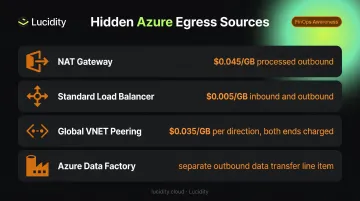
- NAT Gateway — charges $0.045/GB for data processed through outbound rules, separate from standard bandwidth charges
- Standard Load Balancer — charges $0.005/GB for data processed inbound and outbound
- Global VNET Peering — charges both inbound and outbound traffic at both ends (more on this below)
- Azure Data Factory — pipeline outputs that move data out of Azure data centers generate a separate outbound data transfer line item
A practical example: microservices deployed across two different VNETs that communicate frequently via global peering will generate charges on both the sending and receiving end, every time they exchange data. At high call frequency, those per-GB charges on both sides can exceed the cost of the compute running the services themselves.
Storage Tier and Replication Patterns
Archive tier blobs must be rehydrated to an online tier before access. That rehydration triggers read transaction fees and retrieval charges before any egress fees apply — so cross-region access of cold data carries three separate cost layers: retrieval, transactions, and egress.
Over-provisioned managed disk volumes that are unnecessarily snapshotted and replicated across regions add to egress costs without surfacing clearly in billing dashboards — the snapshot activity rarely appears as a distinct line item until costs are already elevated.
What Most Teams Miss About Azure Egress Costs
The VNET Peering Blind Spot
Many teams assume that resources in peered VNETs transfer data for free. They don't. Azure's Virtual Network pricing confirms that both inbound and outbound traffic is charged at both ends of peered networks.
| Peering Type | Inbound | Outbound |
|---|---|---|
| Regional VNET peering | $0.01/GB | $0.01/GB |
| Global VNET peering, Zone 1 | $0.035/GB | $0.035/GB |
| Global VNET peering, Zone 2 | $0.09/GB | $0.09/GB |
| Global VNET peering, Zone 3 | $0.16/GB | $0.16/GB |
In microservices architectures where dozens of services communicate across peered VNETs at high frequency, this assumption becomes expensive very quickly. Global peering at $0.035/GB per direction, charged on both sides, is three to four times costlier than teams expect.
The Monitoring and Diagnostic Data Problem
When Azure Monitor or Diagnostic Settings are configured to export logs and telemetry, the costs depend on what's being exported and where. Two charges catch teams off guard:
- Log Analytics Data Export: $0.10/GB exported from the workspace
- Diagnostic Settings: $0.25/GB for processing and sending platform logs to Storage, Event Hubs, or similar destinations
Both charges accumulate quietly and are rarely audited.
One detail to get right: Microsoft documentation confirms that sending diagnostic data to a different region via Diagnostic Settings does not itself incur data transfer charges. The processing and export fees still apply, though, and Log Analytics Data Export destinations must be in the same region as the workspace. Audit these configurations periodically — misrouted exports are a common source of bill surprises.
Budget Alerts Won't Stop a Runaway Egress Event
Azure's own documentation is clear: budget alerts notify when thresholds are exceeded, but they do not stop resource consumption or cap spending. A misconfigured export job or unexpected traffic spike will continue generating charges after an alert fires.
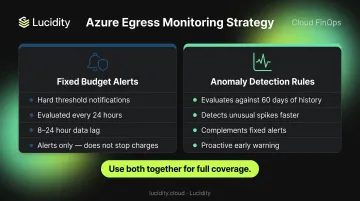
Cost and usage data is typically available within 8–24 hours, and budgets are evaluated every 24 hours. By the time an alert email arrives, several hours of charges may already have accumulated. A more effective approach combines both:
- Fixed budget alerts for hard threshold notifications
- Anomaly detection rules in Azure Cost Management, which evaluates daily usage against 60 days of historical patterns and flags unusual spikes faster than standard alerts
How to Reduce Azure Egress Costs
Architect for Egress Efficiency from the Start
Most egress reduction happens at the design stage, not after deployment. The structural changes that matter most:
- Co-locate interdependent resources in the same region and Availability Zone — this eliminates cross-AZ and cross-region transfer charges for services that communicate frequently
- Use Azure CDN or Azure Front Door for static and cacheable content — data transfer from Azure origin services to both is free, and edge caching reduces origin egress substantially
- Compress data before transmission — reducing byte volume directly reduces the per-GB charges that accumulate
- Batch data transfers — moving data in bulk rather than frequent small requests reduces billable transfer events
Architectural changes made before deployment cost nothing. The same changes after deployment require refactoring, testing, and migration — each carrying its own risk.
Use Azure's Native Cost Management Tools Proactively
Azure Cost Management + Billing lets you break down egress charges by resource, resource group, or service — moving beyond total bill views to identify exactly which workloads are generating the most transfer costs.
- Set up anomaly detection alerts alongside fixed budget thresholds — anomaly detection catches unusual spending spikes that a fixed limit alone might miss
- Use the Azure Pricing Calculator before deploying new architectures or entering new geographic markets to model egress costs in advance
- Filter Cost Analysis by the bandwidth meter to isolate egress charges from compute and storage costs
Audit Storage Workflows for Hidden Egress Drivers
Cross-region storage replication, frequently snapshotted managed disk volumes sent to remote regions, and over-provisioned disks caught in backup or DR policies are common but easily missed egress contributors. Regular audits of storage replication policies should be part of any cloud cost review cycle.
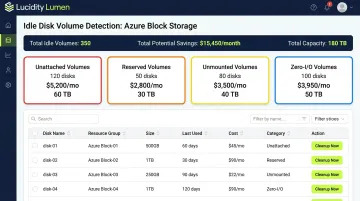
For FinOps and DevOps teams focused on Azure block storage, Lucidity's Lumen surfaces idle and over-provisioned disk volumes that native Azure dashboards won't flag. It identifies four categories of idle disks — unattached, reserved, unmounted, and zero-I/O — that can collectively represent up to 70% of unused block storage spend:
- Unattached and unmounted volumes still incurring storage charges with no active workload
- Reserved disks allocated but not in use
- Zero-I/O volumes sitting in active replication or backup policies
When idle volumes are being replicated across regions, eliminating them removes the underlying driver of avoidable cross-region data movement. Lumen provides one-click cleanup with full audit trails, making it straightforward to act on findings during periodic cost reviews.
Frequently Asked Questions
Does Azure charge for egress?
Yes. Azure charges for outbound data transfer beyond the first 100 GB per month (free tier). Rates vary by destination and source region — South America and Asia/MEA are significantly more expensive than North America or Europe.
What is the difference between ingress and egress in Azure?
Ingress is data entering Azure's network and is always free. Egress is data leaving Azure's data centers — to the public internet, another Azure region, or another cloud provider — and incurs per-GB charges beyond the free monthly tier.
How much does Azure charge for data transfer between regions?
Intra-continental transfers cost $0.02/GB within North America or Europe, $0.08/GB within Asia/Oceania/MEA, and $0.16/GB within South America. Inter-continental transfers from North America or Europe start at $0.05/GB. Always verify current rates on the Azure Bandwidth pricing page.
Is data transfer free within the same Azure Availability Zone?
Yes — transfers within the same Availability Zone and between services in the same region are free. Cross-AZ transfers are not charged either, per current Microsoft documentation. That said, cross-region and cross-VNET transfers can accumulate quickly for distributed applications.
What Azure services generate the most egress charges?
The most common high-egress sources include:
- Internet-facing workloads (streaming, external APIs)
- NAT Gateways ($0.045/GB) and globally peered VNETs ($0.035/GB+)
- Log Analytics Data Export ($0.10/GB) and Diagnostic Settings exports ($0.25/GB)
- Azure Data Factory pipelines and cross-region managed disk replication
How can I monitor and reduce my Azure egress costs?
Use Azure Cost Management + Billing to break down egress by resource, and configure anomaly detection alerts alongside fixed budget thresholds. Architecturally, co-locate resources in the same region, use Azure CDN for cacheable content, and audit replication policies to cut unnecessary cross-region transfers.