According to the FinOps Foundation's 2024 State of FinOps survey, 49% of practitioners identified reducing cloud waste as their top priority — and Synapse environments are a frequent source of that waste, precisely because costs are spread across multiple services that don't consolidate into one visible line item.
This post breaks down every storage layer in Azure Synapse, how each one is priced, where hidden costs accumulate, and what you can do to bring the bill under control.
Key Takeaways
- Synapse storage costs pull from three separate buckets: ADLS Gen2, Dedicated SQL Pool internal storage, and Serverless SQL Pool data processing
- Pausing a Dedicated SQL Pool stops compute charges — storage charges continue
- Deleting a Synapse workspace does not delete the linked ADLS Gen2 storage account
- Unpartitioned Serverless SQL queries scan full datasets and multiply per-TB costs fast
- Block storage disks under Spark Pool nodes typically go untracked — and unoptimized
What Is Azure Synapse Storage? Types, Layers, and Architecture
Azure Synapse doesn't use a single unified storage system. It relies on multiple storage layers serving different components — and which layer holds your data determines how you're billed.
Azure Data Lake Storage Gen2 (ADLS Gen2)
ADLS Gen2 is the primary storage backbone of every Synapse workspace. It stores raw, semi-structured, and unstructured data in formats like Parquet, JSON, ORC, and CSV. Both Serverless SQL Pools and Apache Spark Pools query data directly from ADLS Gen2, meaning this storage persists independently from any compute resources.
ADLS Gen2 is provisioned as a separate Azure resource. It continues to accrue cost even if the Synapse workspace or compute pools are deleted. Teams that don't explicitly decommission the linked Data Lake after a project winds down keep paying — often without realizing it.
Dedicated SQL Pool Storage
Dedicated SQL Pools maintain their own internal columnar storage, separate from ADLS Gen2. The pool stores data in a distributed, compressed columnar format across its nodes, billed per TB per month.
This storage charge does not disappear when you pause the pool. Pausing stops DWU compute billing — the storage line item remains active regardless.
Serverless SQL Pool: No Dedicated Storage
Serverless SQL Pools have no storage layer of their own. They're a query engine only — reading data from ADLS Gen2 or Azure Blob Storage on demand. This is why Serverless SQL billing is based on data processed per query, not data stored.
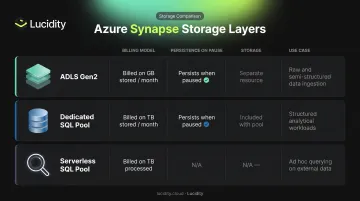
Each storage layer carries its own billing behavior. Understanding those differences is the foundation for managing Synapse costs effectively.
| Storage Layer | Billed On | Persists When Paused? | Use Case |
|---|---|---|---|
| ADLS Gen2 | GB stored per month | Yes (separate resource) | Raw/semi-structured data for Serverless SQL and Spark |
| Dedicated SQL Pool | TB stored per month | Yes | Structured, high-performance analytical workloads |
| Serverless SQL Pool | TB of data processed | N/A (no storage) | Ad hoc querying over existing data lake files |
How Azure Synapse Analytics Pricing Works
Synapse uses consumption-based billing with multiple independent meters. Each component carries a separate meter, so costs aren't consolidated under one line item — and that makes the total bill hard to forecast.
Dedicated SQL Pool Pricing
Dedicated SQL Pools carry a two-part bill:
- Compute — billed in Data Warehouse Units (DWUs) per hour, regardless of actual query load
- Storage — billed separately at $23.00/TB-month (East US)
Current pay-as-you-go compute rates (East US, as of June 2026):
| DWU Tier | Hourly Rate | 730-Hour Monthly Estimate |
|---|---|---|
| DW100c | $1.51 | $1,102.30 |
| DW500c | $7.55 | $5,511.50 |
| DW1000c | $15.10 | $11,023.00 |
| DW2000c | $30.20 | $22,046.00 |
| DW5000c | $75.50 | $55,115.00 |
| DW10000c | $151.00 | $110,230.00 |
| DW30000c | $453.00 | $330,690.00 |
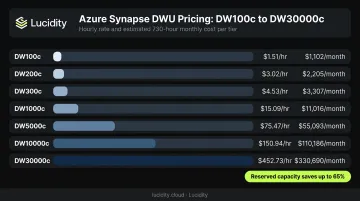
Reserved capacity on the Azure Synapse pricing page reduces compute costs by ~37% for 1-year and up to 65% for 3-year commitments. Storage is not included in reservations.
Serverless SQL Pool Pricing
Serverless SQL charges $5.00 per TB of data processed (East US). Key billing rules:
- Minimum charge of 10 MB per query applies
- DDL statements (CREATE, DROP) and metadata-only operations are free
- The meter runs on data scanned, not data stored
Apache Spark Pool Pricing
Spark Pools are billed per vCore-hour, prorated by the minute. Billing starts when the pool launches, not when a job begins executing.
| Node Size | vCores | Per-vCore-Hour | Node-Hour Cost |
|---|---|---|---|
| Small | 4 | $0.138 | $0.552 |
| Medium | 8 | $0.138 | $1.104 |
| Large | 16 | $0.138 | $2.208 |
Node count multiplies these costs directly. A cluster with 10 large nodes runs at $22.08/hour.
Synapse Commit Units (SCUs)
Beyond per-service metering, Azure offers pre-purchase plans via Synapse Commit Units. Organizations buy a block of SCUs upfront and use them across eligible Synapse services over 12 months. Discount tiers range from ~6% (5,000 SCUs at $4,700) to ~28% (360,000 SCUs at $259,200).
One important limitation to note before committing:
- SCUs do not cover storage costs
- ADLS Gen2 storage is excluded from SCU coverage
- Dedicated SQL Pool storage is also excluded
Azure Synapse Storage Pricing: A Complete Breakdown
Storage costs in Synapse come from three separate billing sources — and each follows different pricing logic. Missing any one of them is a common reason cloud budgets run over.
ADLS Gen2 Storage Costs
ADLS Gen2 is billed per GB per month, with pricing varying by access tier (East US, LRS, HNS):
| Tier | Storage Rate |
|---|---|
| Hot | $0.0208/GB-month |
| Cool | $0.0152/GB-month |
| Cold | $0.0036/GB-month |
| Archive | $0.00099/GB-month |
Colder tiers look attractive on storage cost alone — but read access costs climb sharply. Archive Read Operations run $6.50 per 10,000 operations versus $0.065 per 10,000 for Hot writes. This tradeoff matters when deciding where to move data.
Beyond storage capacity, ADLS Gen2 also charges for:
- Transaction costs — per 10,000 operations
- Data transfer / egress — for cross-region traffic or replication changes
These transaction and egress charges are frequently missed by teams reviewing only the storage capacity line item.
Dedicated SQL Pool Storage Costs
Data inside a Dedicated SQL Pool is billed at $23.00/TB-month (East US), on top of the DWU compute bill. Azure bills this continuously — even when the pool is paused. It runs on a separate meter from ADLS Gen2 pricing.
Serverless SQL vs. ADLS Gen2: The Cost Distinction
These two services bill for entirely different things:
- ADLS Gen2 = you pay to store data
- Serverless SQL Pool = you pay to process data (query execution only)
The cost multiplier effect is easy to underestimate. A team storing 50 TB in ADLS Gen2 and running 100 Serverless queries that each scan the full dataset pays:
- ADLS Gen2 storage: billed on the full 50 TB
- Serverless processing: $5.00/TB × 50 TB × 100 queries = $25,000 in query costs alone
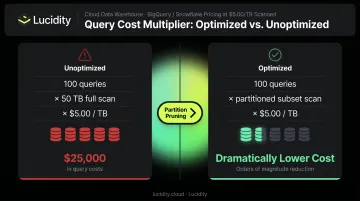
Queries that scan entire datasets instead of partitioned subsets drive costs up fast.
Data Integration Storage Costs
Synapse Pipelines and Data Flows generate indirect storage costs through staging files, temporary data during flow execution, and outputs written back to ADLS Gen2. These write back to ADLS Gen2 and bill as standard storage capacity. Direct pipeline metering runs separately:
- Azure Hosted IR Orchestration: $1.00 per 1,000 activity runs
- Data Flow (Standard): $0.343/vCore-hour
- Data Flow (Basic): $0.273/vCore-hour
Hidden Costs and Common Pricing Pitfalls
The Orphaned Data Lake
When a Synapse workspace is deleted, the linked ADLS Gen2 storage account is not automatically removed. Teams regularly discover they're paying for terabytes of data in a Data Lake attached to a workspace that no longer exists. Explicit post-project cleanup — auditing and deleting linked ADLS Gen2 resources — is not optional.
The Idle Dedicated SQL Pool Trap
Pausing a Dedicated SQL Pool stops DWU compute charges, but storage continues. The cost difference is significant:
- DW1000c running 24/7 (730 hours/month): $11,023/month compute
- DW1000c paused 12 hours/day (365 hours/month): $5,511.50/month compute
- Monthly compute savings from pausing: $5,511.50
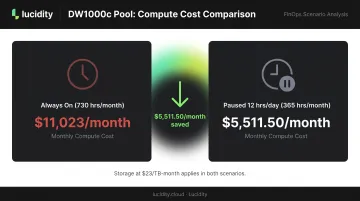
Storage at $23/TB-month applies in both scenarios. Organizations that never pause — leaving pools running overnight and on weekends with no active queries — pay for hours of DWU billing that generate zero output.
The Serverless Query Multiplier
Two separate cost drivers catch serverless users off guard:
- Query over-scanning: Broad
SELECT *queries or missing partition pruning can scan 10x more data than needed. At $5.00/TB processed, scanning 10 TB instead of 1 TB costs $50 instead of $5 — per query run. - Cross-region egress: When data stored in one Azure region is queried by resources in another, egress charges apply. These don't appear in the Synapse pricing calculator and surface only on your bill.
How to Optimize Azure Synapse Storage Costs
Apply ADLS Gen2 Tiering with Lifecycle Policies
Move infrequently accessed data from Hot to Cool or Archive tiers using Azure Blob Storage lifecycle management, which supports automated tier transitions based on last-access or last-modified date.
The critical tradeoff: Cool and Archive tiers save on storage but cost significantly more per read operation. This strategy only reduces your bill if data is genuinely rarely accessed.
Optimize Serverless SQL Queries
Three changes directly reduce the TB billed per query:
- Convert CSV to Parquet — columnar format means serverless SQL reads less data when querying specific columns
- Implement partition pruning — queries that use filepath or filename filters eliminate entire file partitions from the scan
- Select specific columns — avoid
SELECT *; query only the columns your logic requires
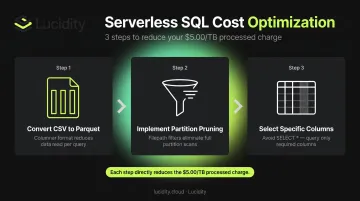
Each change reduces data processed, which reduces the $5.00/TB charge directly.
Automate Dedicated SQL Pool Pause/Resume
Schedule automatic pausing during non-business hours using Azure Automation or Synapse pipeline triggers. The DW1000c example above shows pausing 12 hours/day saves over $5,500/month in compute alone. For predictable workloads, combine this with 1-year reserved capacity for an additional ~37% reduction on the hours the pool is running.
Address the Block Storage Layer Beneath Synapse Compute
There's a storage cost dimension that sits entirely outside the Synapse pricing dashboard: the Azure managed disks underlying Spark Pool nodes and Synapse-connected virtual machines.
When Spark clusters shut down, their associated managed disks often remain — unattached, idle, and still billed. These disks don't appear in Synapse cost reports, so they accumulate silently.
Lucidity's Lumen product identifies four categories of idle Azure managed disks — unattached, reserved, unmounted, and zero-I/O — that together can represent up to 70% of unused block storage spend. This includes disks left behind after Spark cluster shutdown that don't surface in native cloud dashboards or standard Azure Advisor recommendations.
Cleanup happens with one click directly from the Lumen dashboard, with no scripts or manual processes required.
For teams wanting a baseline first, Lucidity's free Assessment tool scans your Azure environment in about 5 minutes — no agents, no code changes, no infrastructure modifications. It surfaces utilization, waste, and downtime risk metrics for block storage volumes that standard Azure reporting won't show.
Frequently Asked Questions
How much does Azure Synapse Analytics storage cost?
Three meters drive storage costs: ADLS Gen2 (Hot: $0.0208/GB, Cool: $0.0152/GB, Archive: $0.00099/GB in East US), Dedicated SQL Pool internal storage at $23.00/TB-month, and Serverless SQL Pool at $5.00/TB processed. Rates vary by region — check the Azure Synapse pricing page for current figures.
Can you store data in Azure Synapse?
Yes — via two primary paths. ADLS Gen2 stores raw and semi-structured data (Parquet, JSON, CSV, ORC) for access by Serverless SQL and Spark Pools. Dedicated SQL Pools store structured, warehoused data in an internal columnar format. Serverless SQL Pool is a query engine only and stores no data independently.
What is the difference between serverless and dedicated SQL pool storage in Azure Synapse?
Dedicated SQL Pools maintain internal columnar storage billed at $23.00/TB-month — this persists even when the pool is paused. Serverless SQL Pools have no storage layer; they query data from ADLS Gen2 and are billed only for data scanned per query at $5.00/TB processed.
Does Azure Synapse Analytics have hidden storage costs?
Two are particularly common: ADLS Gen2 storage continues billing after workspace deletion if the storage account isn't explicitly removed, and Dedicated SQL Pool storage charges persist even when compute is paused. Cross-region data egress between storage and compute resources is also frequently overlooked.
How can I reduce Azure Synapse storage costs?
Four tactics deliver the most impact:
- Move cold data to ADLS Gen2 Cool or Archive tiers
- Use Parquet format and partition pruning to reduce Serverless SQL data scanned
- Schedule automatic pausing of Dedicated SQL Pools during off-hours
- Evaluate 1-year reserved capacity for persistent compute savings
What happens to Synapse storage costs after I delete a workspace?
Deleting an Azure Synapse workspace does not delete the linked ADLS Gen2 storage account. Storage billing continues for all data in that Data Lake until the storage account itself is explicitly deleted. Post-project cleanup of linked storage resources is a critical step that teams frequently miss.