Introduction
Choosing an Azure deployment model sounds straightforward until you're sitting in a room with your ITOps, DevOps, and FinOps leads, each pulling in a different direction. Public cloud for speed and scale. Private cloud for compliance. Hybrid because "we can't move everything yet." Every option looks reasonable on a slide deck—and that's exactly where the problem starts.
Pick the wrong model for a workload and the consequences aren't abstract. You're looking at compliance gaps that surface during audits, performance bottlenecks that spike incident tickets, or cloud bills that balloon unnoticed because storage was provisioned for peak capacity that never materialized.
This guide breaks down all three Azure deployment models—public, private, and hybrid—covering how each works, where each fits, what each costs, and the specific operational traps that catch enterprises off guard. By the end, your team will have enough clarity to make workload-level decisions—not just pick a model that looks good in a presentation.
Key Takeaways
- Azure is a public cloud platform by default, but supports private and hybrid deployments through Azure Stack, Azure Local, and Azure Arc.
- Public cloud suits variable, scalable workloads—but over-provisioning block storage silently inflates costs, since Azure doesn't support shrinking existing managed disks.
- Private cloud delivers maximum control and compliance isolation, but carries real CapEx in hardware, facilities, and dedicated staff.
- 88% of cloud buyers were deploying or operating hybrid cloud in Q3 2024, per IDC, making it the dominant enterprise architecture.
- The right model is decided workload by workload—not by a single blanket IT policy.
What Is Azure and Why Do Deployment Models Matter?
Microsoft Azure is a public cloud computing platform—infrastructure owned and operated by Microsoft, delivered over the internet to customers worldwide. When someone says "we're on Azure," they almost always mean public Azure.
The broader Azure ecosystem goes further, though:
- Azure Stack Hub — on-premises datacenter deployments
- Azure Local (formerly Azure Stack HCI) — distributed infrastructure at the edge
- Azure Arc — unified management of resources running outside Azure
That distinction matters because deployment model and service model are not the same thing.
- Service models (IaaS, PaaS, SaaS) describe the abstraction layer—how much of the stack Microsoft manages vs. the customer.
- Deployment models describe who owns the infrastructure, who can access it, and where data physically lives.
Per NIST SP 800-145, the four deployment models are private, community, public, and hybrid. Azure touches three of them.
Why the Choice Has Real Consequences
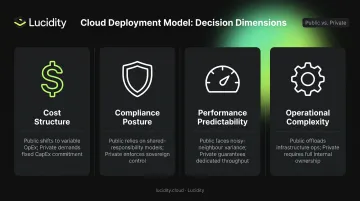
Deployment model selection drives downstream outcomes across four dimensions:
- Cost structure — Public is OpEx (pay-as-you-go); private is CapEx (hardware, facilities, staff)
- Compliance posture — Data residency, sovereignty, and audit scope vary significantly by model
- Performance predictability — Dedicated hardware eliminates shared-tenant interference
- Operational complexity — Hybrid environments compound monitoring, security, and governance overhead
Flexera's 2025 report found **84% of organizations struggle to manage cloud spend**—and deployment model mismatches are a leading cause. Choosing the wrong model doesn't just affect costs—it shapes your compliance posture, performance ceiling, and operational burden from day one.
Azure Public Cloud: Scalable, Fully Managed, Pay-As-You-Go
Azure Public Cloud is Microsoft's standard platform: infrastructure owned, operated, and maintained by Microsoft, shared across multiple customers in a logically isolated multi-tenant model. Each customer's data is isolated at the virtual network level, but the underlying physical infrastructure is shared.
Advantages Worth Knowing
The public model's appeal is real and well-documented:
- No upfront hardware investment — Pure OpEx, billed for what you consume
- Global scale — Azure spans over 70 regions and 400+ datacenters worldwide
- Built-in resilience — Availability zones, geo-redundancy, and managed failover built into the platform
- Fully managed infrastructure — Microsoft handles hardware, firmware, physical security, and datacenter operations
- Elastic scaling — Spin up capacity in minutes; release it when demand drops
Common enterprise use cases: web applications with unpredictable traffic, dev/test environments, AI and ML workloads, big data analytics, and disaster recovery. Any workload with variable demand profiles maps well to public cloud economics.
The Hidden Cost of Azure Storage Over-Provisioning
Microsoft does not support shrinking existing Azure managed disks. Expanding a disk is straightforward. Shrinking one requires deprovisioning, data migration, re-provisioning, and reattachment—a risky, manual process with real downtime exposure.
Teams respond the only way that makes sense: provision generously upfront, then leave it alone. The disk sits at 30% utilization while the bill quietly climbs month over month.
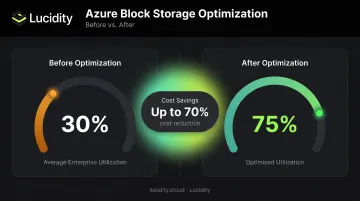
Lucidity's analysis across 600+ enterprise assessments covering 100+ PB of storage confirms this pattern: the average enterprise runs at roughly 30% disk utilization before optimization. Organizations are routinely paying for approximately 3x the block storage they actually use.
Lucidity's AutoScaler addresses this directly—autonomously expanding and shrinking Azure block storage in real time, with zero downtime, based on actual workload behavior rather than static provisioning decisions. Dometic reduced cloud storage spend by 52% after deployment.
Across the platform, customers achieve storage cost reductions of up to 70% and see utilization climb from 30% to 75%.
Shared Responsibility Still Applies
That elastic, managed model doesn't eliminate your security obligations. Under Azure's shared responsibility model, Microsoft secures the physical layer and platform infrastructure—customers retain responsibility for:
- Data classification and protection
- Identity and access management
- Application-level security configurations
- Network security rules and endpoint protection
Public cloud shifts who handles what—it doesn't reduce the total security surface your team owns.
Azure Private Cloud: Control, Compliance, and Dedicated Infrastructure
A private cloud is a computing environment used exclusively by a single organization. It can sit in the company's own datacenter, in a colocation facility, or be managed by a third party—but the defining characteristic is dedicated infrastructure. No shared compute, no shared storage, no other tenants.
In the Azure context, private cloud typically means deploying Azure Stack Hub (runs Azure services locally in 4–16 server scale units), Azure Local (extends Azure capabilities to customer-owned distributed infrastructure), or Azure Stack Edge (for edge and disconnected environments).
When Private Cloud Makes Sense
Private deployment isn't a legacy choice—it's the right choice for specific scenarios:
- Data sovereignty or physical isolation is a hard requirement—banking, defense, and certain government workloads fall here
- Legacy applications carry hardcoded infrastructure dependencies that make shared environments impractical without significant refactoring
- Operations run disconnected or air-gapped, with no reliable connectivity to Azure public cloud
- Workloads run at consistently high utilization, where dedicated hardware economics can compete with pay-as-you-go pricing
Dedicated infrastructure eliminates the "noisy neighbor" effect—where adjacent workloads on shared resources introduce unpredictable latency. For latency-sensitive, high-priority workloads, that consistency has measurable value.
The Real Cost Calculation
The most common private cloud misconception: "we own the hardware, so it's cheaper." The full picture includes costs that rarely appear in the initial business case:
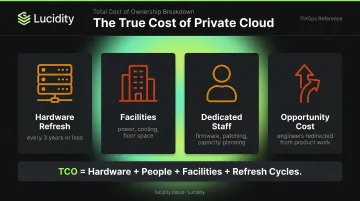
- Refreshes server hardware every three years or less (IDC found 44% of organizations hit this cadence; 14% refresh in under two years)
- Pays for power, cooling, physical security, and datacenter floor space continuously
- Employs dedicated engineers for firmware, patching, hardware support, and capacity planning
- Redirects those same engineers away from product work and cloud optimization
The honest TCO comparison isn't hardware cost vs. Azure invoices. It's total infrastructure cost—including people, facilities, and refresh cycles—vs. a right-sized public cloud deployment.
The utilization rate is the deciding variable. Low, variable utilization generally makes private cloud more expensive per unit of useful work. High, steady utilization combined with a strong compliance case can shift the math the other way.
Model it by workload. Don't assume either direction.
Azure Hybrid Cloud: Connecting On-Premises and Azure Public Cloud
Azure Hybrid Cloud is an architecture that integrates on-premises or private infrastructure with Azure public cloud services—allowing workloads, data, and management to operate across both environments in a coordinated way. It's not a single product. It's a pattern, enabled by a set of Azure-native tools.
How Azure Enables Hybrid Architectures
Three tools form the core of Azure's hybrid architecture:
| Tool | What It Does |
|---|---|
| Azure Arc | Extends Azure management and governance to servers, Kubernetes clusters, and data services running outside Azure—on-premises, at the edge, or in other clouds |
| Azure Stack Hub | Runs Azure services locally in a customer datacenter, supporting connected or fully disconnected operations |
| Azure ExpressRoute | Provides private network connectivity between on-premises infrastructure and Azure—traffic doesn't traverse the public internet, and Microsoft documents lower, more consistent latency compared to internet routing |
ExpressRoute offers circuit bandwidths from 50 Mbps up to 10 Gbps on standard circuits, with ExpressRoute Direct supporting dual 10 Gbps, 100 Gbps, or 400 Gbps for high-throughput requirements.
Why Hybrid Is the Default Enterprise Reality
Hybrid isn't a transitional phase most enterprises pass through on the way to "full cloud." For the majority, it's a permanent operating model. IDC reported that 88% of cloud buyers were deploying or operating hybrid cloud in Q3 2024. Enterprises don't migrate everything at once—workloads have different compliance profiles, latency requirements, and refactoring costs.
Common hybrid use cases:
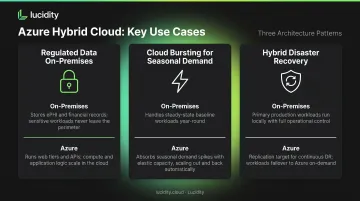
- Regulated data on-premises, customer-facing apps in Azure — Keep ePHI or financial records on-premises; run web tiers and APIs in Azure public cloud
- Cloud bursting for seasonal demand — Retail or logistics organizations with predictable seasonal spikes use Azure public cloud capacity when on-premises resources hit limits
- Hybrid disaster recovery — Replicate on-premises workloads to Azure as a cost-effective DR target without maintaining a full secondary datacenter
Hybrid Complexity Is Real
The architecture that gives you placement flexibility also multiplies operational surface area:
- Querying on-premises databases from Azure workloads over ExpressRoute introduces latency that co-located architectures don't have. Measure it for your specific workload before assuming it's acceptable.
- Consistent enforcement of identity, network, and data policies across on-premises and Azure requires deliberate governance tooling beyond Azure Security Center alone.
- When alerts split between on-premises SIEM tools and Azure Monitor, incident response slows. Unified observability requires explicit architecture decisions upfront.
For enterprises managing block storage across hybrid environments, surfacing utilization and waste across both Azure and private infrastructure is a persistent challenge. Native cloud consoles don't provide that visibility across environment boundaries, which creates blind spots for ITOps and FinOps teams tracking where spend is actually going.
Choosing the Right Azure Deployment Model
No single deployment model fits every workload in an enterprise portfolio. The right framework is workload-level classification, not an organization-wide policy.
A Practical Decision Framework
Classify each workload across four dimensions before assigning a deployment model:
- Data sensitivity and regulatory requirements — Does this workload handle data subject to HIPAA, PCI DSS, FedRAMP, or GDPR? Map the actual compliance obligation; don't assume private cloud is required without checking the regulation's actual mandate
- Demand variability — Steady-state, predictable workloads favor private or reserved capacity; variable, bursty workloads favor public cloud elasticity
- Performance requirements — Does the workload require consistent, dedicated performance (private) or is shared infrastructure acceptable (public)?
- Integration dependencies — What on-premises systems does this workload communicate with? High-frequency cross-environment calls favor co-location
Deployment Model Comparison
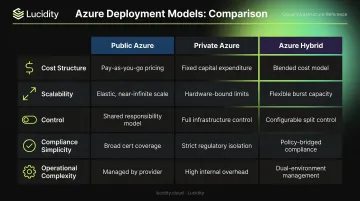
| Dimension | Public Azure | Private Azure | Azure Hybrid |
|---|---|---|---|
| Cost structure | OpEx, pay-as-you-go | CapEx + ongoing OpEx | Mixed CapEx/OpEx |
| Scalability | High, near-instant | Limited by owned hardware | Flexible, with complexity |
| Control | Shared responsibility | Full control | Partial control across environments |
| Compliance simplicity | Requires governance discipline | Easier physical isolation | Most complex to audit consistently |
| Operational complexity | Low (managed by Microsoft) | High (self-managed) | Highest (spans both environments) |
Deployment Model Decisions Aren't Permanent
As workloads evolve, regulations change, and Azure pricing shifts, the right placement for a workload may change. A dev environment that started in private cloud may move to public Azure as the team matures. A workload blocked by legacy dependencies may become cloud-ready after refactoring.
Microsoft's Cloud Adoption Framework recommends treating workload placement as a live decision—supported by ongoing inventory, utilization data, and cost modeling. That ongoing reassessment has a direct storage implication: every deployment model shift can leave behind over-provisioned or idle block storage volumes that quietly inflate costs.
For FinOps and ITOps teams managing Azure block storage across hybrid environments, Lucidity provides unified visibility across public and private infrastructure—autonomously rightsizing volumes, detecting idle disks, and ensuring deployment model changes don't leave stranded storage behind.
Frequently Asked Questions
Is Azure public or private?
Azure is fundamentally a public cloud platform—owned and operated by Microsoft, shared across multiple customers with logical data isolation. Microsoft also supports private deployments through Azure Stack Hub and Azure Local, and hybrid environments through Azure Arc, so the broader Azure ecosystem technically spans all three models.
What is a public cloud in simple terms?
A public cloud is a computing environment owned and managed by a third-party provider where infrastructure is shared across many organizations. Resources are accessed over the internet on a pay-as-you-go basis, and the provider handles all hardware maintenance, facilities, and physical security.
What is the difference between public and private cloud?
Public cloud is shared, third-party-managed infrastructure accessed over the internet with no upfront hardware costs, though tenancy is shared across organizations. Private cloud is dedicated infrastructure for a single organization, offering greater control and physical isolation at significantly higher setup, staffing, and maintenance costs.
What is an Azure hybrid cloud?
An Azure hybrid cloud connects on-premises or private infrastructure with Azure public cloud services. Tools like Azure Arc and Azure ExpressRoute enable workloads and data to move between environments based on compliance, performance, and cost requirements, with centralized governance across both.
When should a company choose private cloud over Azure public cloud?
Private cloud makes sense when organizations face strict data sovereignty regulations, need physical infrastructure isolation for compliance (banking, healthcare, defense), or operate steady-state, high-utilization workloads where owned infrastructure economics compete favorably with pay-as-you-go pricing. For variable or bursty workloads, public cloud almost always wins on cost.