According to Flexera's 2025 State of the Cloud report, 84% of organizations struggle to manage cloud spend — and that's not because they lack visibility tools. It's because they lack a structured process for evaluating what they have and what they actually need.
An Azure cloud assessment fills that gap. It's not a security checklist or a compliance exercise. It's a systematic review of your entire environment — covering cost efficiency, reliability, security, operational excellence, and performance — that turns assumption into data.
This article explains what an Azure cloud assessment covers, how to run one effectively, and where the most impactful optimization opportunities typically hide.
Key Takeaways
- An Azure cloud assessment is a structured evaluation of your Azure environment across five dimensions: Reliability, Security, Cost Optimization, Operational Excellence, and Performance Efficiency.
- It follows the Azure Well-Architected Framework — Microsoft's gold standard for cloud architecture evaluation.
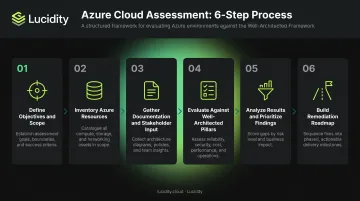
- Six stages drive the process: scope definition, resource inventory, documentation, pillar evaluation, findings prioritization, and remediation roadmap.
- The most consistently overlooked finding is cloud block storage over-provisioning, where enterprises pay for 3x the storage they actually use.
- Storage remediation alone can cut Azure costs by up to 70% — with no infrastructure changes required.
What Is an Azure Cloud Assessment?
An Azure cloud assessment is a systematic evaluation of an organization's Azure environment. It examines infrastructure, security controls, cost structures, and operational practices to surface gaps, risks, and optimization opportunities across your cloud footprint.
Unlike a security audit — which focuses on one dimension — a full cloud assessment spans all five pillars of the Azure Well-Architected Framework: reliability, security, cost optimization, operational excellence, and performance efficiency. That breadth is what makes it a strategic review rather than a point-in-time compliance check.
Three Formats Organizations Use
| Format | Who It's For | What to Expect |
|---|---|---|
| Azure Well-Architected Review | Self-directed teams | Free ~60-minute self-assessment across all five pillars, available at Microsoft Learn |
| Microsoft Customer Success Teams | Enterprise Agreement customers | Guided assessment with Microsoft account teams |
| Azure Expert Assessment | Organizations without Unified Support | Free expert-led path; Microsoft describes it as claimable via the Azure Expert Assessment homepage |
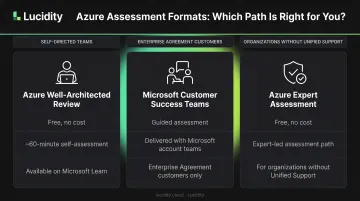
The Azure Well-Architected Review is worth running first — it generates a prioritized recommendation list tied to your specific workload, giving you a concrete starting point before engaging Microsoft or a partner.
Why Azure Cloud Assessment Is Critical for Your Cloud Strategy
Cloud environments don't stay optimized on their own. Without regular review, resources accumulate, configurations age out of best practices, and costs compound invisibly. The Cloud Security Alliance reported in 2024 that 44% of surveyed organizations experienced a cloud data breach, with 31% attributing it to misconfiguration or human error — a problem that regular assessment directly addresses.
The business case extends beyond security:
- Surfaces hidden cost waste — unattached disks, over-provisioned VMs, idle resources billing every hour
- Identifies security gaps before they become breach vectors
- Validates architecture decisions against reliability and performance benchmarks
- Creates a measurable baseline so cloud strategy progress can be tracked over time
- Enables data-backed decisions for spend, scaling, and modernization priorities
Those business benefits also feed a governance requirement most enterprise teams can't ignore. Boards, auditors, and enterprise customers expect documented proof of cloud governance maturity — not verbal assurances. A regular assessment cadence provides exactly that: a paper trail showing your team reviews, measures, and acts on cloud health systematically.
The 5 Pillars: What a Comprehensive Azure Cloud Assessment Covers
The Azure Well-Architected Framework organizes cloud health into five distinct dimensions. Each pillar targets a specific failure mode that organizations commonly experience at scale.
Pillar 1 – Reliability
Assess whether workloads are designed for high availability. Review multi-region configurations, failover mechanisms, SLA coverage, and disaster recovery setups.
Key metrics to evaluate:
- RTO and RPO targets vs. actual architecture design
- SLA coverage by workload — Azure VMs achieve 99.99% availability only when deployed across two or more Availability Zones; a single-instance VM with Premium SSD achieves 99.9%
- Frequency of P1 incidents and time-to-recovery trends
Pillar 2 – Security
Review IAM configurations (role assignments, MFA enablement, privileged identity management), network security groups, encryption at rest and in transit, and compliance posture.
Common misconfigurations to flag:
- Overly permissive NSG rules that expose resources unnecessarily
- Unencrypted VM disks
- Insufficient logging and monitoring coverage
- Gaps in compliance alignment (HIPAA, PCI-DSS, GDPR, SOC 2)
Microsoft Defender for Cloud is the primary tool here — it monitors security posture, secures code pipelines, and surfaces misconfiguration findings across your environment.
Pillar 3 – Cost Optimization
Evaluate resource utilization across VMs, databases, and storage to identify underutilized, idle, or over-provisioned assets.
Storage deserves particular attention. Azure managed disk storage is one of the highest-waste areas in enterprise Azure environments. Microsoft documents that directly downsizing a managed disk is not natively supported — meaning right-sizing requires a manual workaround that most teams never complete.
The result: organizations pay for provisioned capacity they'll never use, indefinitely.
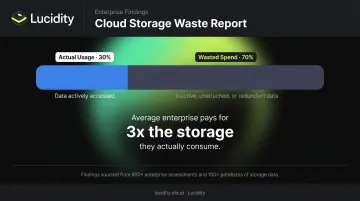
Lucidity's internal research across 600+ enterprise assessments and 100+ petabytes of storage data finds that the average enterprise operates at approximately 30% disk utilization — paying for roughly 3x the storage they actually consume.
Pillar 4 – Operational Excellence
Assess DevOps practices, deployment pipelines, monitoring configurations, and incident management to surface manual toil and process gaps.
Operational assessment starts with three questions:
- Are infrastructure-as-code practices in place, or is provisioning still manual?
- How many hours per month does the team spend on storage ticket triage and provisioning requests?
- Are alerting thresholds configured, or is the team operating reactively?
Lucidity's research across 100+ enterprises finds that managing 200 TB of storage requires approximately 8 hours per month in manual effort — hours that compound as environments scale.
Pillar 5 – Performance Efficiency
Review whether resources are right-sized for workload demands and whether autoscaling policies match actual usage patterns.
For storage specifically, Azure Premium SSD performance tiers are tied to provisioned size — meaning an undersized disk can create I/O bottlenecks for AI training jobs, high-throughput analytics, or busy transactional databases.
Microsoft notes that performance tier resize operations can also fail due to insufficient performance bandwidth capacity, so this pillar requires careful evaluation before any changes are made.
How to Conduct an Azure Cloud Assessment: Step by Step
Most organizations underinvest in Steps 1 and 5 — where the most strategic value is either created or lost. The process works best when each stage is completed deliberately.
Step 1 – Define Objectives and Scope
Before touching any Azure tooling, answer: what does this assessment need to accomplish?
Common objectives include cost reduction, migration readiness, compliance validation, or architecture review. Each objective shapes which findings matter most and how they should be prioritized.
Document the specific Azure subscriptions, resource groups, regions, and workload types in scope. Explicitly list what's out of scope — this prevents the assessment from expanding into an indefinite project.
Step 2 – Inventory Your Azure Resources
Use Azure Resource Graph for efficient, at-scale resource querying across subscriptions. Supplement with Azure Migrate for migration-specific inventory and Azure portal tooling for individual resource inspection.
During this step, flag:
- Resource age and last-modified dates
- Tagging hygiene — untagged resources are a reliable indicator of cost waste
- Ownership gaps — unowned resources typically have no one accountable for right-sizing them
Step 3 – Gather Documentation and Stakeholder Input
Collect the following before the evaluation begins:
- Security policies and past audit findings
- Architecture diagrams and IAM documentation
- Cost reports and budget history
Then brief cross-functional stakeholders — IT, FinOps, DevOps, security, and business owners — on assessment goals and gather input on known pain points. Automated tools catch configuration issues; humans catch context that tools miss.
Step 4 – Evaluate Against Each Well-Architected Pillar
Run the Azure Well-Architected Review against each workload, and supplement with specialized tools:
- Microsoft Defender for Cloud — security posture and misconfiguration findings
- Azure Cost Management — spend analysis, budget alerts, and Advisor cost recommendations
- Azure Resource Graph — governance queries at scale
- Storage utilization tools — disk efficiency and idle disk identification
Document findings per pillar with severity, business impact, and affected resources. Keep pillar findings separate — mixing them into a single list makes prioritization nearly impossible.
Step 5 – Analyze Results and Prioritize Findings
Score findings using a consistent framework:
- Security vulnerabilities — use CVSS for severity scoring
- Financial findings — use cost-impact estimates to reflect actual business risk
Separate findings into two categories:
- Quick wins — issues resolvable rapidly with high impact (unattached disks, unused resource groups, over-permissive NSG rules)
- Structural improvements — longer-term architecture changes that address root causes
Aim for at least two quick wins per structural improvement — this keeps teams motivated while the harder work moves forward.
Step 6 – Build a Remediation Roadmap and Assign Ownership
Translate prioritized findings into a plan with assigned owners, timelines, and measurable KPIs — for example, target storage utilization rate, target unplanned downtime reduction, target monthly cost savings.
For reassessment cadence, Microsoft recommends running the Azure Well-Architected Review every four months for brownfield workloads (existing production environments) on a continuous improvement path. Trigger reassessment after major architecture changes, compliance audits, or significant cost spikes.
How Lucidity Helps You Act on Azure Cloud Assessment Findings
Assessment findings are only useful if something is done with them. The challenge is that the most consistently impactful finding — cloud block storage over-provisioning — is also one of the hardest to remediate manually.
The reason is structural. Microsoft confirms that directly downsizing an Azure managed disk is not supported. Right-sizing requires a manual workaround: snapshotting the disk, creating a smaller disk from the snapshot, and migrating data across — a process that carries performance risk, requires a maintenance window, and consumes significant engineering time. Most teams deprioritize it indefinitely.
The result: organizations keep paying for storage capacity they provisioned two years ago for a workload that never grew into it.
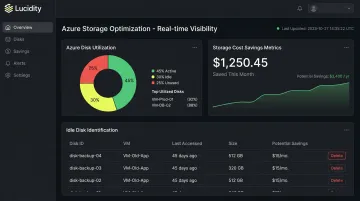
Lucidity addresses this directly. The platform provides real-time visibility into every Azure disk volume and autonomously right-sizes storage with zero downtime and no code changes required. It identifies four types of idle and underutilized disks:
- Unattached — provisioned disks with no VM attached
- Reserved — allocated but inactive capacity
- Unmounted — disks attached to a VM but not in use
- Zero-I/O — disks showing no read/write activity
Lumen, Lucidity's observability product, also surfaces disk tiering recommendations across Azure Premium v2, Premium v1, Standard SSD, and Standard HDD — showing exactly which disks belong on a different tier, why, and executing the move without disruption.
Lucidity's platform increases average disk utilization from ~30% to 75%, cuts cloud block storage costs by up to 70%, and reclaims 100+ engineering hours that would otherwise go to manual provisioning and storage ticket management.
Customers back this up. Iron Mountain eliminated hours of provisioning work and reduced annual block storage spend. Dometic achieved a 52% reduction in cloud storage spend after implementing Lucidity's optimization.
Lucidity is recognized as a 2025 Gartner Cool Vendor in Data Protection and Storage and is featured in Forrester's Cloud Cost Optimization and Management Landscape, Q3 2025 — third-party validation that the approach works.
For teams that want to start with assessment before committing to anything, Lucidity offers a free self-serve Assessment that runs in under 5 minutes, requires no agents or infrastructure changes, and benchmarks your Azure disk utilization against data from 600+ enterprise assessments across 100+ petabytes analyzed.
If your assessment has surfaced storage waste, the free Assessment gives you a concrete baseline — and a clear path to acting on it.
Frequently Asked Questions
How do I prepare for an Azure cloud assessment?
Document your Azure environment first: subscriptions, resource groups, key service configurations, and existing cost reports. Then define clear objectives, assemble a cross-functional team spanning IT, security, and FinOps, and gather any compliance documentation your industry requires.
What are the 5 pillars of Azure?
The 5 pillars refer to the Azure Well-Architected Framework: Reliability, Security, Cost Optimization, Operational Excellence, and Performance Efficiency. These five dimensions structure every comprehensive Azure cloud assessment.
How often should an Azure cloud assessment be conducted?
Microsoft recommends running the Azure Well-Architected Review every four months for workloads on a continuous improvement path; stable environments should reassess at least semi-annually. Any major architecture change, compliance audit, or significant cost spike should trigger an immediate review.
What tools are commonly used for Azure cloud assessments?
Core tools include the Azure Well-Architected Review, Microsoft Defender for Cloud, Azure Cost Management, and Azure Resource Graph. Specialized platforms like Lucidity surface storage utilization and idle disk patterns that native Azure tools don't expose.
What is the difference between an Azure security assessment and a full cloud assessment?
An Azure security assessment focuses exclusively on security posture — IAM, network configuration, encryption, and compliance. A full cloud assessment evaluates all five Well-Architected pillars, including cost efficiency, performance, and operational practices, making it a broader strategic exercise rather than a narrowly scoped security review.
What are the most common findings from an Azure cloud assessment?
The most frequently cited issues are:
- Over-provisioned and idle cloud storage
- Misconfigured network security groups
- Underutilized compute resources
- Gaps in backup and disaster recovery configuration
- Excessive manual processes that create engineering overhead without proportional value