Introduction
According to IBM's 2024 Cost of a Data Breach report, the global average breach cost reached $4.88 million in 2024, with breaches spanning multiple environments averaging over $5 million and taking 283 days to identify and contain. When that storage environment is Azure Blob Storage — holding documents, backups, logs, and AI training datasets — the exposure potential is significant. Regulatory fines, customer trust loss, and compliance failures follow quickly.
Azure Blob Storage is not an insecure platform. Microsoft's infrastructure is sound. The risk comes from how organizations configure and operate it. The most common culprits:
- Anonymous access left enabled after initial setup
- Storage account keys hardcoded in code repositories
- Firewall rules never tightened after a temporary change
These gaps are avoidable. This guide covers the practical controls that matter: encryption settings, identity and access management, network-level restrictions, monitoring, and the specific misconfigurations behind most real-world exposures.
Key Takeaways
- Use Microsoft Entra ID with RBAC as your primary access control — avoid relying on account keys
- Enforce HTTPS and set TLS 1.2 as the minimum at the storage account level
- Disable anonymous public access unless a specific use case explicitly requires it
- Enable Microsoft Defender for Storage and configure diagnostic logging with Azure Monitor alerts for threat detection
- Apply least privilege across every access method: SAS tokens, RBAC roles, and stored access policies
Security Guidelines for Azure Blob Storage
Azure Blob Storage security spans four risk domains: identity and access, encryption, network controls, and ongoing monitoring. None of these operates in isolation — a strong encryption policy doesn't help if an anonymous request can read the container, and tight network rules don't compensate for a shared key hardcoded in a pipeline.
The risks here are operational, not architectural. Microsoft's platform controls are solid. What creates exposure is misconfiguration — overly permissive policies, forgotten firewall exceptions, and keys that never get rotated.
That misconfiguration problem compounds over time. Treat these controls as a recurring operational discipline, not a deployment task:
- Access policies drift as teams and roles change
- Keys go unrotated for months — sometimes years
- Firewall rules opened for "temporary" access stay open permanently
Baseline Security: Encryption and Data Protection
Encryption at Rest
Azure Storage automatically encrypts all data at rest using 256-bit AES. This applies to every storage account, every performance tier, every access tier — and it cannot be disabled. For most organizations, this default is sufficient.
When it isn't sufficient is when regulatory requirements or internal policy demand control over the encryption keys themselves. Two options exist:
- Customer-managed keys (CMK) — Keys stored in Azure Key Vault or Azure Key Vault Managed HSM. Azure manages encryption operations, but your organization controls key rotation, revocation, and access. This applies account-wide to Blob Storage and is the right choice for compliance-driven environments (HIPAA, FedRAMP, PCI DSS).
- Customer-provided keys (CPK) — An AES-256 key supplied per request. Azure uses it for that specific operation and never stores it. Every subsequent read or write on that blob must supply the same key. This is granular but operationally complex, and has limitations: no Azure portal support for data operations and no object replication support for source blobs encrypted this way.
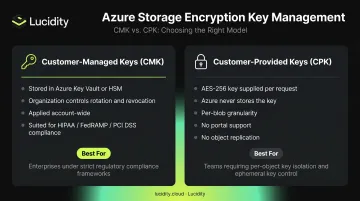
Choose CMK when you need organizational key control with manageable overhead. CPK is appropriate for specific high-sensitivity blobs where per-request control justifies the complexity.
Enforcing Secure Transport
Enable Secure transfer required at the storage account level. When active, the REST API only accepts HTTPS connections — HTTP requests are rejected outright. This setting is on by default for new storage accounts, but verify this setting on any legacy accounts.
Set TLS 1.2 as the minimum version. Microsoft is deprecating TLS 1.0 and 1.1 for Azure Blob Storage on February 3, 2026 — this transition is mandatory, not optional.
TLS 1.0 and 1.1 are vulnerable to known attacks like POODLE and BEAST. Configure the minimum TLS version directly in the storage account settings.
Authentication and Identity Access Management
Microsoft Entra ID and RBAC
Microsoft Entra ID (formerly Azure AD) with RBAC is the most secure access method for Azure Blob Storage. The advantages over shared keys are concrete:
- No credential to leak or rotate
- Supports MFA, Conditional Access, and Privileged Identity Management
- Full audit logging tied to actual identities
- Permissions revocable immediately without rotating account-wide keys
The four key built-in roles for Blob Storage:
| Role | Permissions |
|---|---|
| Storage Blob Data Owner | Full access including POSIX ACL assignment |
| Storage Blob Data Contributor | Read, write, and delete |
| Storage Blob Data Reader | Read and list only |
| Storage Blob Delegator | Gets user delegation key to create user delegation SAS |
Assign the most restrictive role that meets the use case. A service that only reads blobs should never hold Contributor permissions.
Account Access Keys: Handle With Care
Each storage account comes with two 512-bit access keys. These are effectively master passwords — they grant full account access with no per-request scoping, no identity binding, and no way to revoke without rotating the key itself (which breaks everything using that key).
If account keys must be used:
- Store them in Azure Key Vault, never in code or config files
- Access via managed identity — never pass keys as environment variables or hardcode in source
- Rotate on a defined schedule with a documented rollback plan
For greenfield workloads, skip account keys entirely and use Entra ID.
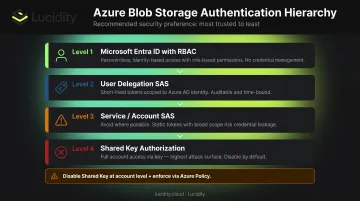
Shared Access Signatures (SAS)
SAS tokens provide scoped, time-limited access without requiring full account credentials. Three types exist:
- User delegation SAS — Signed with Entra ID credentials. No stored account key involved. This is the recommended type.
- Service SAS — Signed with an account key. Limited to specific service operations.
- Account SAS — Signed with an account key. Grants access across multiple services.
User delegation SAS is preferred because it carries no account key dependency and is capped at a 7-day maximum expiry. For any SAS token you do issue, these governance practices reduce exposure:
- Set expiry to one hour or less for service SAS tokens not backed by a stored access policy
- Always enforce HTTPS-only in the SAS URI
- Grant only the permissions the consumer actually needs — read-only when only reading
- Use stored access policies for server-side revocation capability if a token is compromised
Disabling Shared Key Authorization Entirely
The strongest access control posture is disabling Shared Key authorization at the storage account level. When disabled:
- All account key-based requests fail
- Service SAS and account SAS tokens also fail (they're derived from account keys)
- Only user delegation SAS and Entra ID-authenticated requests succeed
Entra ID becomes the only valid authentication path. Pair this setting with an Azure Policy assignment to prevent re-enabling shared key access at the subscription level — otherwise a misconfigured deployment can silently revert the control.
Network-Level Security Controls
Storage Account Firewall
By default, storage accounts accept connections from all networks. That's a large attack surface for accounts holding sensitive data.
Configuring the firewall to "Selected networks" restricts access to:
- Specific public IP address ranges
- Subnets within Azure Virtual Networks (VNets)
- Specific Azure resource instances
The rule is simple: if the storage account doesn't need to be publicly reachable, it shouldn't be. Lock it to the networks that legitimately need access and nothing else.
Private Endpoints
For enterprise workloads running inside Azure, private endpoints are the strongest network isolation option available. A private endpoint assigns a private IP address from your VNet to the storage account. All traffic routes over Azure Private Link — bypassing the public internet entirely for workloads that don't require external access.
Anonymous Access Controls
Disable anonymous public access at the storage account level. When the Allow Blob public access setting is off, Azure rejects all unauthenticated requests regardless of what individual container-level ACL settings say. The account-level setting overrides container settings completely.
A few practical notes:
- New storage accounts created after September 2023 (portal) and November 2023 (API/CLI/SDK/Terraform) have anonymous access disabled by default. Accounts created before those dates were not automatically updated.
- If a use case genuinely requires public content delivery, isolate those containers in a dedicated storage account. Don't mix public and private data in the same account.
Cross-Tenant Replication Controls
Object replication policies can replicate block blobs to storage accounts in different Microsoft Entra tenants, which means data can leave your organization's tenant boundary without obvious visibility. To close this gap:
- Disable cross-tenant replication using the
AllowCrossTenantReplicationcontrol - Accounts created after December 15, 2023 have this disabled by default
- Verify this explicitly on older accounts, as they were not automatically updated
Monitoring, Logging, and Threat Detection
Diagnostic Logging
Enable diagnostic logging and send logs to the StorageBlobLogs table in Azure Monitor. Every request to Blob Storage includes an AuthenticationType field that records how the request was authorized: anonymous, OAuth token (Entra ID), Shared Key, or SAS.
This is your audit trail. Without it, you have no way to know whether your access controls are working or being bypassed.
Microsoft Defender for Storage
Logging tells you what happened. Microsoft Defender for Storage tells you when something is wrong. Enable it on all storage accounts for anomaly detection and real-time security alerts with remediation guidance, covering threats including:
- Access from suspicious IP addresses or Tor exit nodes
- Unusual data exfiltration patterns
- Malicious content uploads
- A sensitive blob container changed to allow public unauthenticated access
- Blob-hunting enumeration activity
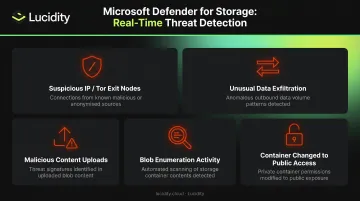
Defender for Storage integrates with Microsoft Defender for Cloud, so alerts surface in the same place as other security signals across your Azure environment.
Azure Monitor Alerts
Diagnostic logs become actionable when you build alerts around them. Set up log alerts that trigger when:
- Requests are authorized anonymously (AuthenticationType = Anonymous)
- Requests use Shared Key authorization (useful if you've disabled it and want to confirm nothing is bypassing the policy)
- An unusual volume of failed requests appears in a short window
Together, these three layers — diagnostic logs, Defender alerts, and Monitor rules — give you full-spectrum visibility into who is accessing your Blob Storage, how, and whether any of it looks suspicious.
Common Azure Blob Storage Security Mistakes to Avoid
Leaving Anonymous Access Open
The most common mistake is anonymous access remaining enabled. It was the default on older storage accounts and is rarely reviewed after initial setup. The consequence is direct: any internet user can read or list blobs without credentials. Microsoft's 2025 threat intelligence report documented threat actors using DNS and HTTP header probing specifically to discover publicly exposed Azure Blob endpoints, followed by enumeration tools to gather credentials for follow-on attacks.
Fix: Audit the allowBlobPublicAccess setting on every storage account. Disable it unless there's a documented, deliberate reason for public content.
Hardcoding Account Keys
Account keys stored in application code, configuration files, or environment variables are a leading cause of credential exposure. Source repositories, including commit history, are a particularly dangerous location. Microsoft explicitly warns that storing account keys or connection strings in clear text is a security risk.
The alternative:
- Store keys in Azure Key Vault rather than in code or config files
- Access them via managed identity to eliminate the credential entirely
- Move to Entra ID authentication as the strongest long-term option — account keys become unnecessary
SAS Tokens With Long Expiry or Broad Permissions
A SAS token with write and delete permissions valid for 30 days is not a narrowly scoped credential. It's a near-equivalent to an account key for the blobs it covers. The Microsoft MSRC incident in 2023 involved an overly permissive SAS token shared in a public GitHub repository, exposing internal Microsoft Teams messages and workstation backups. The recommendation from that incident: one hour or less for service SAS tokens, and least privilege on permissions.
A long-lived SAS token that gets compromised is difficult to invalidate quickly unless a stored access policy backs it.
Treating Security as a One-Time Setup
Configuration drift is how well-secured accounts become vulnerable. A storage account gets set up correctly at deployment, but six months later the posture has quietly eroded. The fix is operational, not technical.
Schedule recurring reviews that cover:
- Firewall rules broadened for temporary vendor access and never closed
- Keys unrotated because the reminder was dismissed
- Monitoring alerts that fired repeatedly and got muted instead of investigated
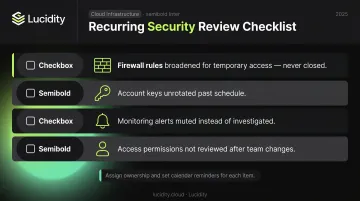
Assign ownership for each of these. Set calendar reminders. Security debt in cloud storage builds in the background — the only way to catch it is to look deliberately.
Conclusion
Azure Blob Storage security depends on layering controls. Encryption at rest protects against physical media exposure but doesn't stop an authenticated user with excessive permissions. Network restrictions reduce attack surface but don't protect against insider threats without audit logging. No single setting is sufficient — each layer compensates for the gaps in the others.
Treat this as a recurring operational obligation, not a one-time setup. Keep these on your regular review cycle:
- Review access policies quarterly and remove any permissions that are no longer needed
- Rotate credentials on a defined schedule, not just after incidents
- Audit firewall rules after any temporary changes to confirm exceptions were reversed
- Verify that monitoring alerts are still active and being reviewed by the right people
The controls in this guide are straightforward to implement. Keeping them enforced as teams grow, environments shift, and temporary exceptions accumulate — that's where most organizations fall short.
Frequently Asked Questions
How do you secure access to Azure Blob Storage?
The recommended approach is Microsoft Entra ID with RBAC, avoiding account keys and anonymous access entirely. When scoped access is needed for specific use cases, user delegation SAS tokens are acceptable — provided they carry short expiry windows (one hour or less) and minimum required permissions.
Is data stored in Azure Blob Storage encrypted?
Yes. Azure Storage encrypts all data at rest by default using 256-bit AES, and this cannot be disabled. Organizations that need control over encryption keys can configure customer-managed keys via Azure Key Vault for key rotation and ownership control.
How secure is Azure Blob Storage?
Azure Blob Storage ships with strong security defaults, but the actual security posture depends almost entirely on configuration. Misconfigurations — anonymous access enabled, hardcoded account keys, open network rules — are the primary source of risk, not the platform itself.
What is the difference between SAS tokens and Azure AD for Blob Storage access?
Azure AD (Entra ID) ties access to an authenticated identity with full auditability, MFA support, and instant revocation. SAS tokens are signed URIs that grant access independently of any identity — no identity verification, no MFA, and no way to invalidate them before expiry. Entra ID is preferred because it removes per-credential management and plugs directly into Conditional Access policies and RBAC.
Should I disable anonymous access to Azure Blob Storage?
Yes — anonymous access should be disabled at the storage account level unless there is a specific, deliberate requirement to serve public content. When disabled, Azure rejects all unauthenticated requests regardless of container-level ACL settings.
What is the minimum TLS version recommended for Azure Blob Storage?
TLS 1.2 is the Microsoft-recommended minimum. TLS 1.0 and 1.1 use outdated cryptographic algorithms and will be rejected by Azure Blob Storage starting February 3, 2026. This setting can be enforced directly in the storage account configuration.